It was all leading up to this. The internet shutdown schedule in Moscow was announced in advance: carriers warned about possible mobile internet restrictions from May 5 to 9. And now it’s here. The usual scenario of “opened the app, ordered a taxi, off you go” only works when you have internet. And that’s exactly what’s missing or works intermittently. Yandex has prepared a solution for how to order a taxi without internet, and it will most likely surprise you with its old-school approach. Here’s what to do.

Learning how to call a taxi from your phone all over again
Why Yandex Taxi Isn’t Working in Moscow and St. Petersburg
The official reason is security measures during holiday events from May 5 to 9. The “Big Four” carriers warned about mobile internet and SMS restrictions in Moscow and the Moscow region. The same restrictions apply in several other cities.
Whitelists are supposed to work, but in practice some users can't access anything at all.
Now for a nuance that’s important to understand. Theoretically, Yandex services are included in so-called internet whitelists — approved resources that should work even during restrictions. But in practice, many users in Moscow find that even these whitelists don’t work. Some people report a complete absence of not only mobile but also home wired internet depending on the provider and district.

In major cities, you shouldn’t count on mobile internet
A separate question is whether the MAX messenger works without internet — the one being promoted as the main domestic communication tool. The very one that, according to its developers, works even in a parking garage. Spoiler: no messenger works without network access. Internet has been shut down in Moscow, and this affects all apps without exception, including the state-backed MAX.
How to Call a Taxi Without Internet on Android
Brace yourselves. Yandex officially recommends ordering a taxi by phone. Yes, with a regular voice call. We’re going back to 2005 — welcome back.
Remember how voice calls work on Android.
Yandex Taxi phone numbers by city:
- Moscow — +7 (495) 999-99-99;
- St. Petersburg — +7 (812) 366-66-66;
- Yekaterinburg — +7 (343) 266-66-66;
- Kazan — +7 (843) 510-00-00;
- Sochi — +7 (862) 444-44-42.
If your city isn’t on the list, you can find the number on the taxi.yandex.ru website or in the Yandex Go app on Android if you have Wi-Fi. It’s best to save the number you need to your contacts in advance while you still have internet. Now, instructions for those who’ve already forgotten how this works:
- Open the standard “Phone” app on Android (the one with the green handset icon).
- Dial the number manually or find it in your contacts if you saved it beforehand.
- Press call and wait for an operator to answer (a real person, not a bot).
- Tell them the pickup address and destination by voice (yes, with words, not on a map).
- Ask the operator about the estimated wait time and remember or write down the car number.
- Have cash ready: when ordering by phone, Yandex Taxi without internet accepts cash payment only.
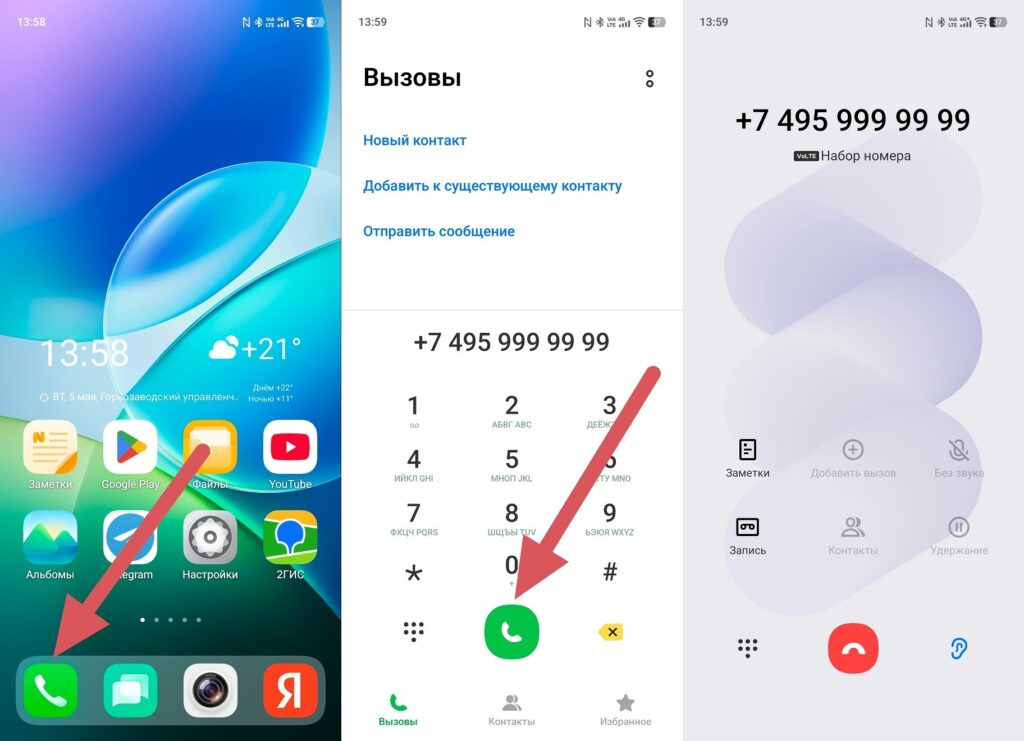
Calling a taxi the old-fashioned way
After internet is restored, Yandex recommends checking in the app that your trip was completed correctly and the fare was calculated accurately. Just in case.
Car Sharing Without Internet — How to Use It
The situation with car sharing is more complicated. If the internet went down before you started a rental, you’ll simply have to wait for the network to come back. Yandex Go without internet won’t let you unlock a car: the app is required for that.
Bluetooth doors work without internet.
But if the internet went down during an active rental, there’s a way out:
- Turn on airplane mode on your smartphone.
- Turn on Bluetooth (it works independently of internet).
- Open the Yandex Go app.
- Switch the car to standby mode through the app (Bluetooth doors allow you to control the lock without internet).
- Lock the doors and leave the car in a safe place.
- Complete the rental later when the internet is restored.
If the final rental cost raises questions, contact Yandex support after the network is restored. Yandex promises to sort it out.
When Will Mobile Internet Be Turned Back On
Officially, the blocks were announced for the period from May 5 to 9. According to carrier statements, these are “temporary restrictions” during holiday events. So theoretically, after May 9, internet in Moscow should return to normal operation. Theoretically.

Internet might be restored soon. Might
In practice, “temporary” restrictions sometimes have a tendency to linger. Carriers haven’t published exact time frames for each day (only the general period from May 5 to 9). Mobile internet may work during certain intervals rather than being completely absent for all five days straight. But you shouldn’t count on it.
The main practical advice: while the internet block in Moscow hasn’t been lifted, use Wi-Fi where it’s available, save taxi phone numbers to your contacts, and keep cash on hand. No internet in Moscow is unpleasant but solvable. Everything should return to normal on May 10. Should.


