Hosting provider Cloudflare assigned the domain web.max.ru a “spyware” status in its public Cloudflare Radar service. Max’s press service has already responded, saying it’s an analyzer error, not a real threat, but the situation is unpleasant — both for users and for the messenger itself. A similar situation previously occurred with the “Telega” client, and it ended with removal from the App Store.
MAX is now spyware. Happy?
Let’s break it down point by point: what exactly happened, what risks it poses for iPhone and Android owners, and what to do if you’ve already installed the app.
Cloudflare Labeled MAX as Spyware
The “spyware” label appeared for the domain web.max.ru in the Cloudflare Radar service — a public website scanning tool. When exactly the classification was triggered is unknown: in the scan results from April 30, 2026, the service is also marked as “malicious.”
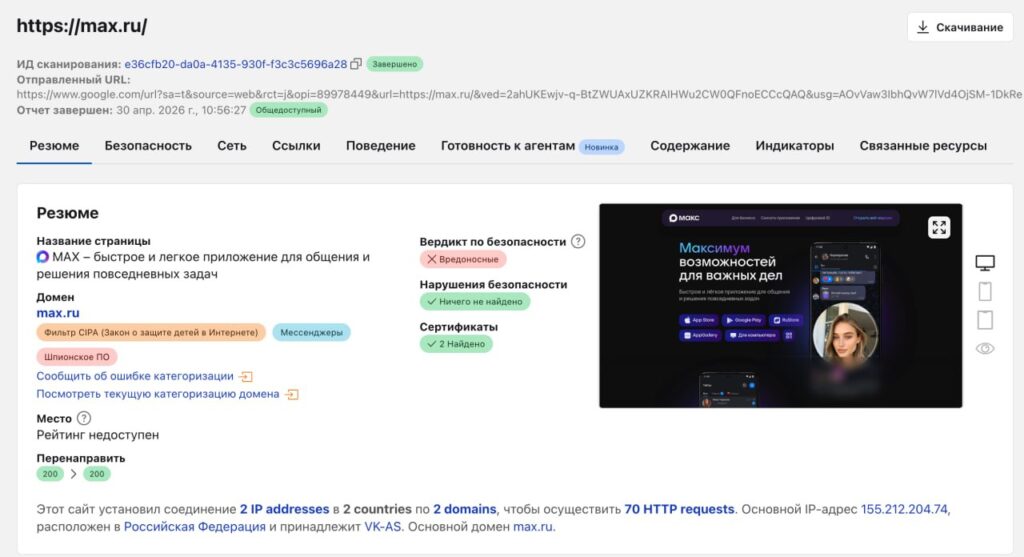
The label can be found here
At the same time, the messenger has a valid TLS certificate — a digital signature for the website needed for secure HTTPS connections. This means the formal technical security of the connection is maintained. The Max app remains available for download in both the App Store and Google Play.
Max’s press service stated that Cloudflare’s classification was “caused by a misinterpretation of request headers sent to ordinary web analytics services on the max.ru site.” In short, the issue involves technical data that the app sends to statistics servers, and Cloudflare’s scanner flagged them as suspicious.
Is the MAX Messenger Safe After the Cloudflare Label
The short honest answer: the Cloudflare label alone does not prove that Max steals data. It’s an automatic classification by one provider based on request signatures, not the result of an expert code review.
What we know for certain:
- the messenger’s domain is labeled in Cloudflare Radar as “spyware” and “malicious”
- the site’s TLS certificate is valid
- the app remains in the App Store and Google Play
- the developers explain the situation as a web analytics analyzer error
What we DON’T know:
- which specific request headers triggered the detection
- whether anyone has conducted an independent audit of the app
- how quickly Cloudflare will reconsider the classification
For the average iPhone user, this means something simple: until the situation is clarified, keeping truly sensitive conversations in Max is not the best idea. But there are also no grounds to claim confirmed surveillance.
Telega and Cloudflare — How a Similar Story Ended With Removal From the App Store
This is not the first high-profile case involving Cloudflare. In early April 2026, the provider labeled the unofficial Telegram client “Telega” as “spyware.” At the same time, the app was removed from the App Store, though it remained in Google Play.

Telega was removed from the App Store because of this
On April 11, the developers of “Telega” reported that Cloudflare had removed the erroneously assigned classification. However, as of April 30, the “spyware” label in Cloudflare Radar still remains — meaning that even after the official removal of the status, the public service continues to display the warning.
The developers of “Telega” filed a complaint with the FAS (Federal Antimonopoly Service) over the app’s removal from the App Store: they are asking the regulator to evaluate Apple’s actions, which does not provide specific reasons or technical conclusions. The FAS responded, calling this “not the first signal regarding Apple” and promised to take action in case of violations. The takeaway for users: a Cloudflare label is not a death sentence in itself, but it can easily become a reason for Apple to remove an app from the store — as already happened with “Telega.”
Will MAX Be Removed From the App Store
As of publication, Max is available in both the App Store and Google Play. Apple has not commented on the situation, and no decisions regarding the messenger have been publicly made.
But the precedent with “Telega” shows how Apple typically acts in such cases:
- an external maliciousness label appears from a third-party service
- Apple removes the app from the App Store without public explanation
- the developer tries to challenge the decision through regulators
There’s no guarantee that the same will happen with Max — the messenger’s status, connections, and audience are quite different from a small unofficial client. But if you already have Max installed on your iPhone, it’s worth keeping in mind: theoretically, the app could disappear from the App Store without warning, and there would be no way to reinstall it afterward.
How to Check an App for Viruses on iPhone and Android
An important thing right away: classic antivirus programs for iPhone don’t exist in the traditional sense. iOS isolates each app in a “sandbox” — a program physically cannot scan other apps. Everything that “antivirus” apps offer in the App Store is mainly network checks, password audits, and phishing link detection.
What you can actually do on iPhone if you’re worried about a specific app:
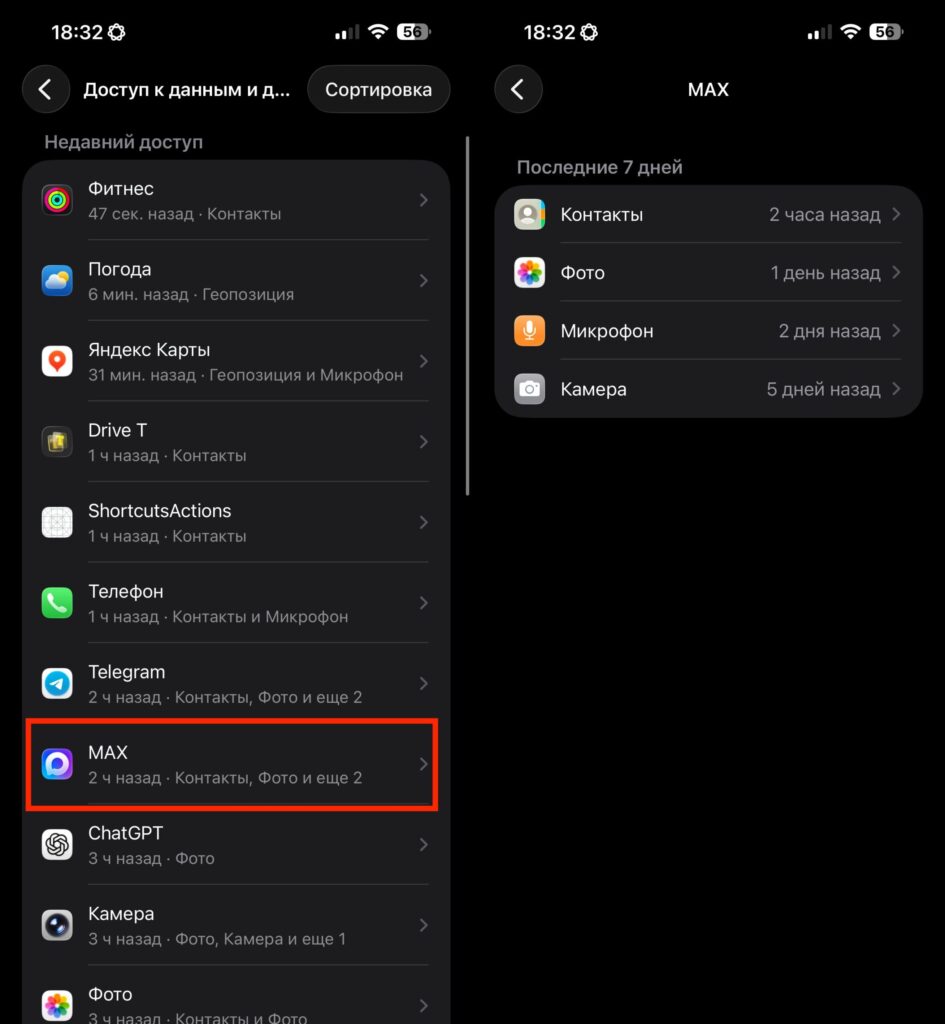
MAX doesn’t ask for anything unnecessary
- go to Settings — Privacy & Security and check what data the app has access to
- disable unnecessary permissions: microphone, camera, location, contacts
- in the “App Privacy Report” section, see which sensors and network domains the app has accessed over the last 7 days
- if in doubt — delete the app and don’t restore data from that app’s backup
On Android, there are more options: Google Play Protect (built-in app verification) works there, and you can install a full-fledged antivirus from a well-known vendor. It’s also useful to:
- check the app’s permissions in Settings — Apps
- revoke access to contacts, SMS, and call logs if you don’t use them
- check how much traffic the app uses in the background
Neither on iOS nor on Android can a regular user independently confirm or deny the “spyware” status — that requires reverse engineering of the code. You can only limit what the app has access to.
MAX or Telegram — Which Is Safer
What’s actually safer: MAX or Telegram


