I thought my iPhone was lagging because of MAX. I sat down, measured battery consumption and performance, and found out that MAX had nothing to do with it. But my friend didn’t bother checking anything and just deleted the icon. A week later, he wrote in a panic: deleted MAX from iPhone, what do I do, bank verification codes aren’t coming through, the school chat is inaccessible. On Android, he would have reinstalled the app in a minute. On iPhone, that no longer works, and the decision to delete MAX suddenly turned out to be permanent.
Figuring out what happens if you delete MAX from your iPhone in 2026
What Happens If You Delete the MAX App from Your iPhone
Let’s immediately distinguish two different actions. Deleting the icon and deleting the account are not the same thing. When you decide to delete MAX from your iPhone, the account stays alive: the number is still linked to you, your profile is visible to contacts, people keep messaging you. You just can’t see any of it.
You must not delete MAX under any circumstances
Deleting your MAX account is a separate procedure within the app. That one is truly irreversible, and it’s exactly what many people confuse with simply removing the client. But keep in mind: your MAX conversations won’t disappear if you delete the app. Chats, contacts, and call history are stored on servers, not in your phone’s memory. Log into the same account from any device and you’ll see everything.
Only the cache is erased locally. Some photos and videos will need to be reloaded, especially if the chat is heavy. By the way, the situation is exactly the same on Android — the differences between platforms lie in a completely different area. You’re not losing data. You’re losing access to it.
Why You Can’t Reinstall MAX on iPhone
The national messenger was removed from the App Store, and this is not a temporary measure. The already installed app continues to work and isn’t going anywhere, but it won’t receive updates. There’s no button for re-downloading in the “Purchased” section either: the app was completely unpublished.
Android still has Google Play, RuStore, and the developer’s website. That’s exactly why some people get a separate cheap smartphone for VK and MAX. But we have no alternative app stores, and none will appear in the foreseeable future.
Don’t install MAX IPA files from third-party websites. Conversations, contacts, and bank verification codes go through the messenger. A tampered build means all of that will leak. And most importantly: avoid clones that pretend to be the national messenger.
How to Get MAX If You Deleted the App
The first working option and the safest one is the MAX web version. The answer to the question how to download MAX if you deleted it sounds paradoxical: you can’t, but you can still use it.
- Open web.max.ru in Safari.
- Log in with your phone number.
- Tap the “Share” button in the bottom bar.
- Select “Add to Home Screen” and confirm.
- You’ll get a shortcut just like an app. Open it to enable MAX notifications on your iPhone.
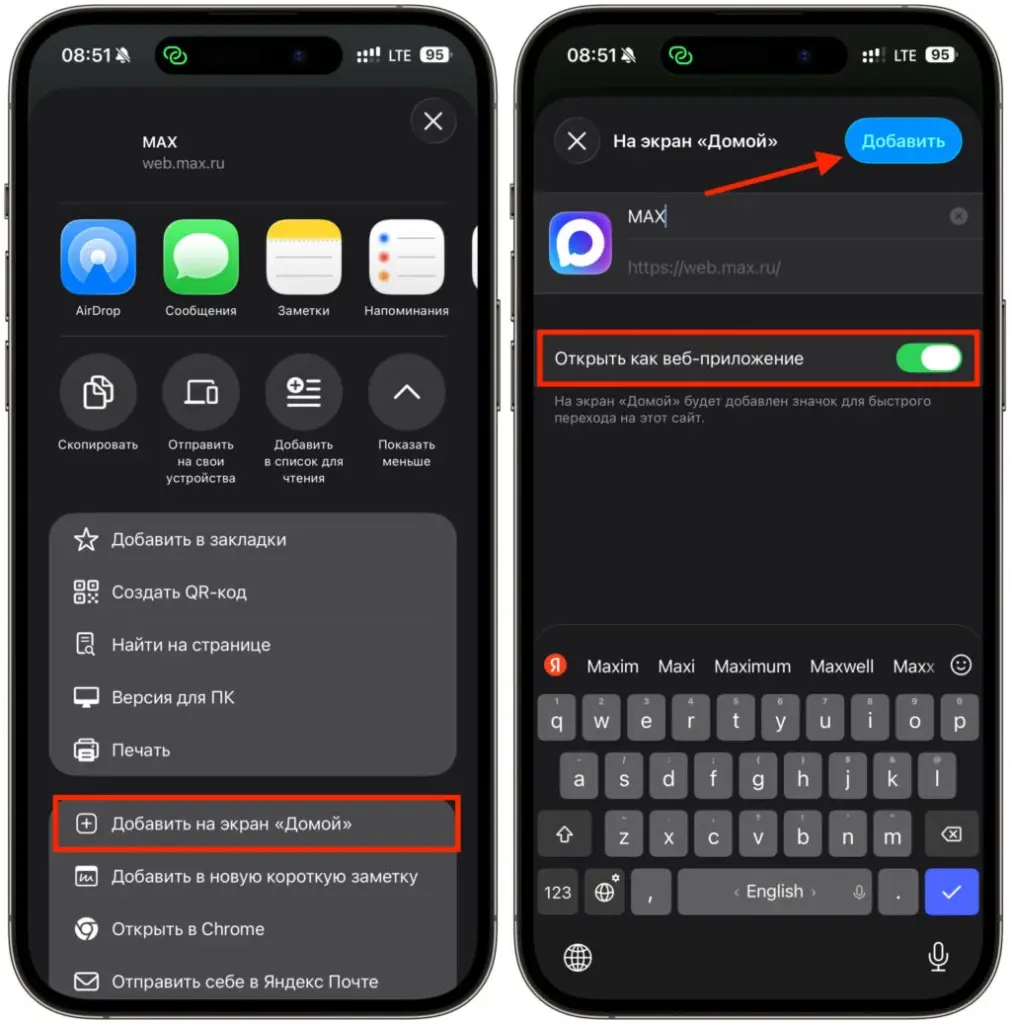
Just install the MAX web version and forget about apps
The web version is not a full replacement, and there are notable differences from the app.
How to Restore MAX on iPhone via iMazing
The second method doesn’t work for everyone, but it’s worth trying. If MAX was ever downloaded on your Apple ID, the app may still remain in the library.
- Install iMazing on your computer from this link, connect your iPhone via cable.
- Grant permission on the smartphone.
- Open the app management section.
- Go to the library tab and search for MAX.
- If the app is found, you’ll be able to restore MAX on your iPhone by clicking “Install on device.”
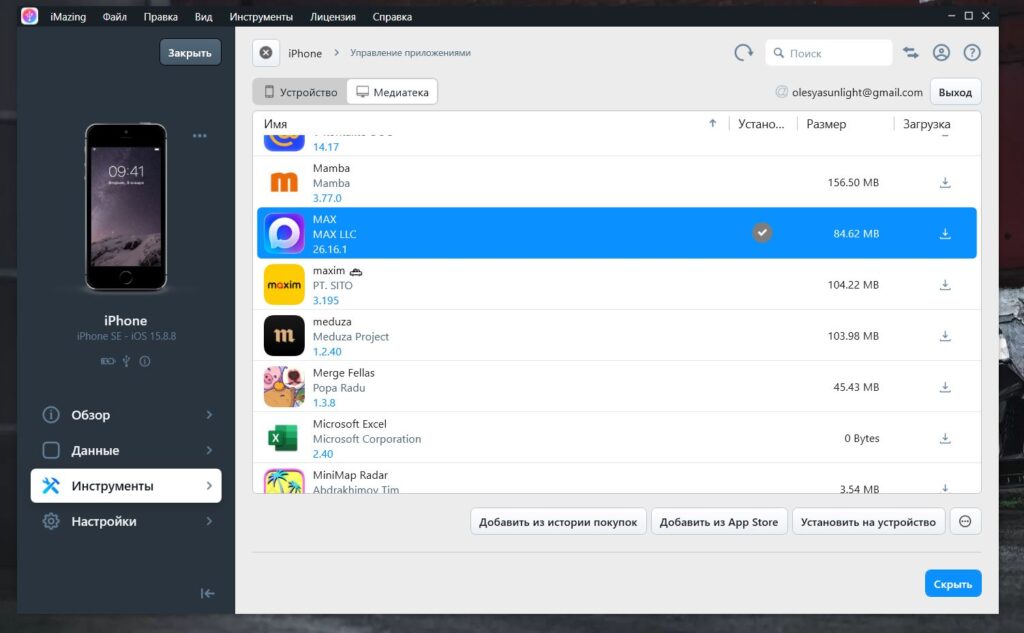
MAX can still be restored via iMazing if you downloaded it before
If iMazing doesn’t see the messenger, it means restoring MAX for your account is not possible. The restriction is on the App Store side, and repeating attempts is pointless. And an honest caveat: this method only works as long as Apple hasn’t completely purged the app from its database.
Why You Shouldn’t Delete MAX from Your iPhone
If the messenger is already installed, the best thing you can do is leave it alone. It works, it receives messages, and it doesn’t need updates. And in the future, there are plans to route all internet access through MAX, so deleting it today could backfire as soon as tomorrow.

Disable “Offload Unused” so iOS doesn’t delete MAX
A separate gotcha from iOS. The system can automatically remove rarely used apps while keeping their data. Normally this is convenient, but with MAX specifically, it means your iPhone will delete the messenger for you, and there will be no way to install MAX on your iPhone again. In App Store settings, disable the “Offload Unused Apps” toggle. Right now, don’t put it off.


