The MAX messenger continues to catch up with Telegram in terms of functionality, and sometimes it does so quite convincingly. One programmer I know explained why he still hasn’t switched to MAX — and among his arguments was the lack of convenient little features like voice message transcription. Well, that argument no longer holds. Not only has MAX long since added voice message transcription, but now the messenger has also learned to convert video circles into text. Those very “circles” that people send instead of a normal message, and then you struggle trying to watch them at an inconvenient moment.
Any circle can now be turned into text with one tap
Why You Need Video Message Transcription in MAX
Video circle transcription in MAX appeared in the latest version of MAX and works for free, without a subscription and without any limits. It’s a handy feature when you’re sitting in a meeting and someone sends you a video circle. You can’t watch it, but you can easily read what they’re saying. Converting video messages to text solves this problem entirely. The text transcription appears right below the circle in the chat — you simply read it with your eyes without opening the video. No need to look for headphones, no need to wait for the right moment, no need to rewatch the circle a second time to remember what was said.
The conditions are worth noting separately. In Telegram, transcription of voice and video messages is available for free only twice a week. Want more — buy Telegram Premium. In MAX — no limits, no subscription: circle transcription is free, even a hundred per day. For those who receive a lot of voice and video messages, this is a real advantage, not a marketing gimmick.
How to Update MAX on iPhone
Before looking for the transcription button, make sure you have the latest version of the app installed on your iPhone. The circle-to-text conversion feature appeared in version 26.15.1, and if you have an earlier build, the button simply won’t be there.
The problem is that some users don’t have MAX in the App Store. If MAX messenger is missing from your App Store, that’s a separate story and you need to act differently. But if MAX is already installed and just needs updating, do the following:
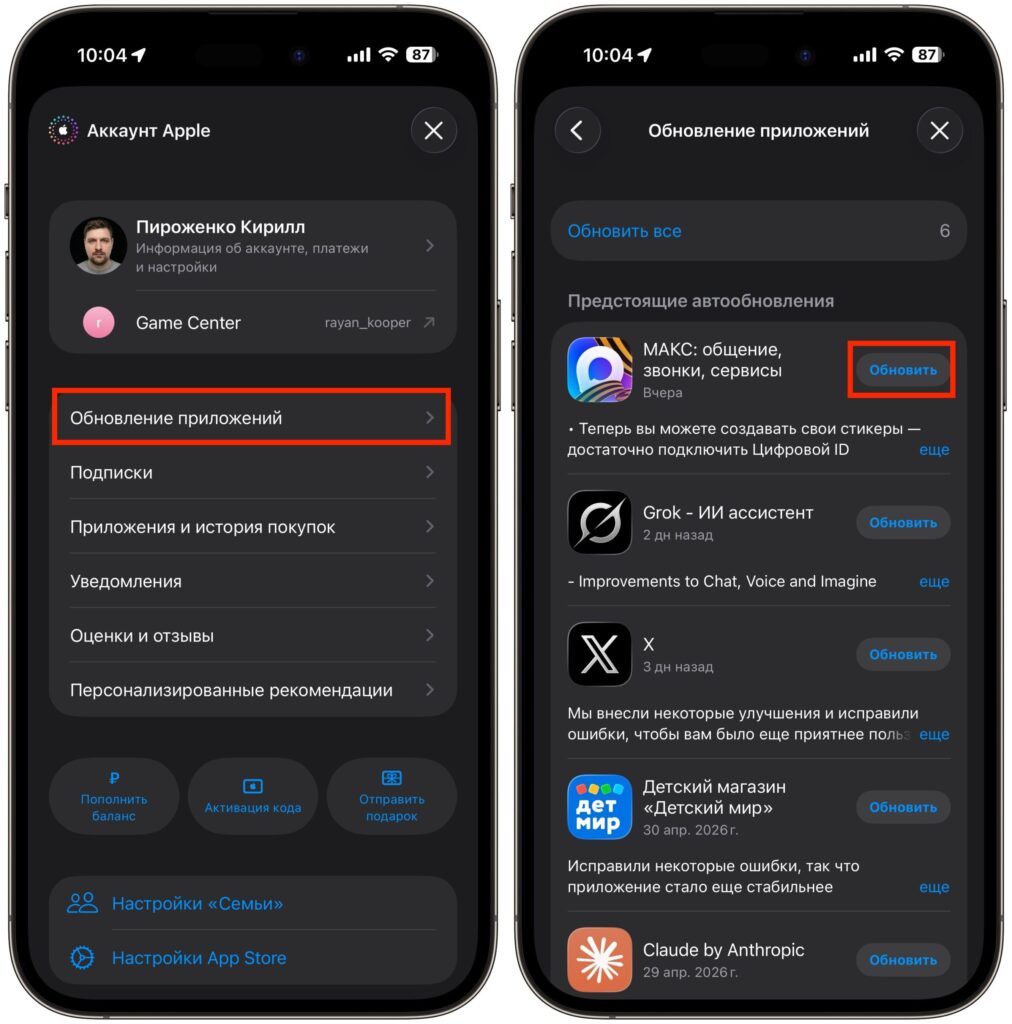
Update MAX to the latest version
- Open the App Store on your iPhone.
- Tap the profile icon in the upper right corner of the screen.
- Select the “App Updates” section.
- Find MAX in the list and tap “Update.”
- Wait for the installation to complete and open the app.
If the update doesn’t appear in the list, pull the screen down to refresh it manually. Sometimes the App Store doesn’t immediately pull up the latest versions, and a simple page refresh helps. By the way, we have a detailed step-by-step guide on updating MAX on iPhone — if something goes wrong, check it out.
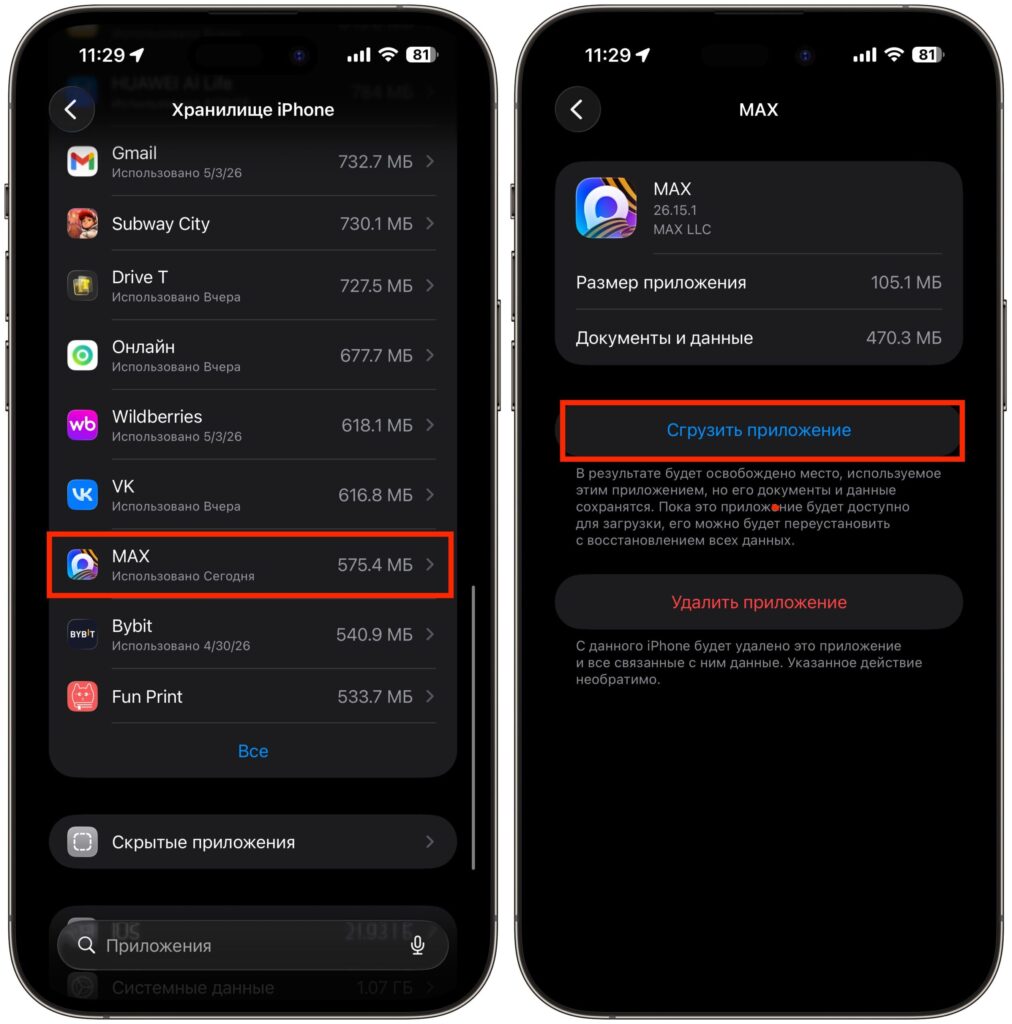
If the button hasn’t appeared, try offloading the app — it helps
If after updating the transcription button doesn’t appear, try clearing the app cache. To do this, go to “Settings” — “General” — “iPhone Storage,” find MAX in the list and select “Offload App.” After that, reinstall it from the App Store and launch it. This usually fixes the issue with “stuck” updates.
How to Convert a Video Circle to Text in MAX on iPhone
After updating, no additional settings are required — the feature works right out of the box. Here’s how to transcribe a circle in MAX:
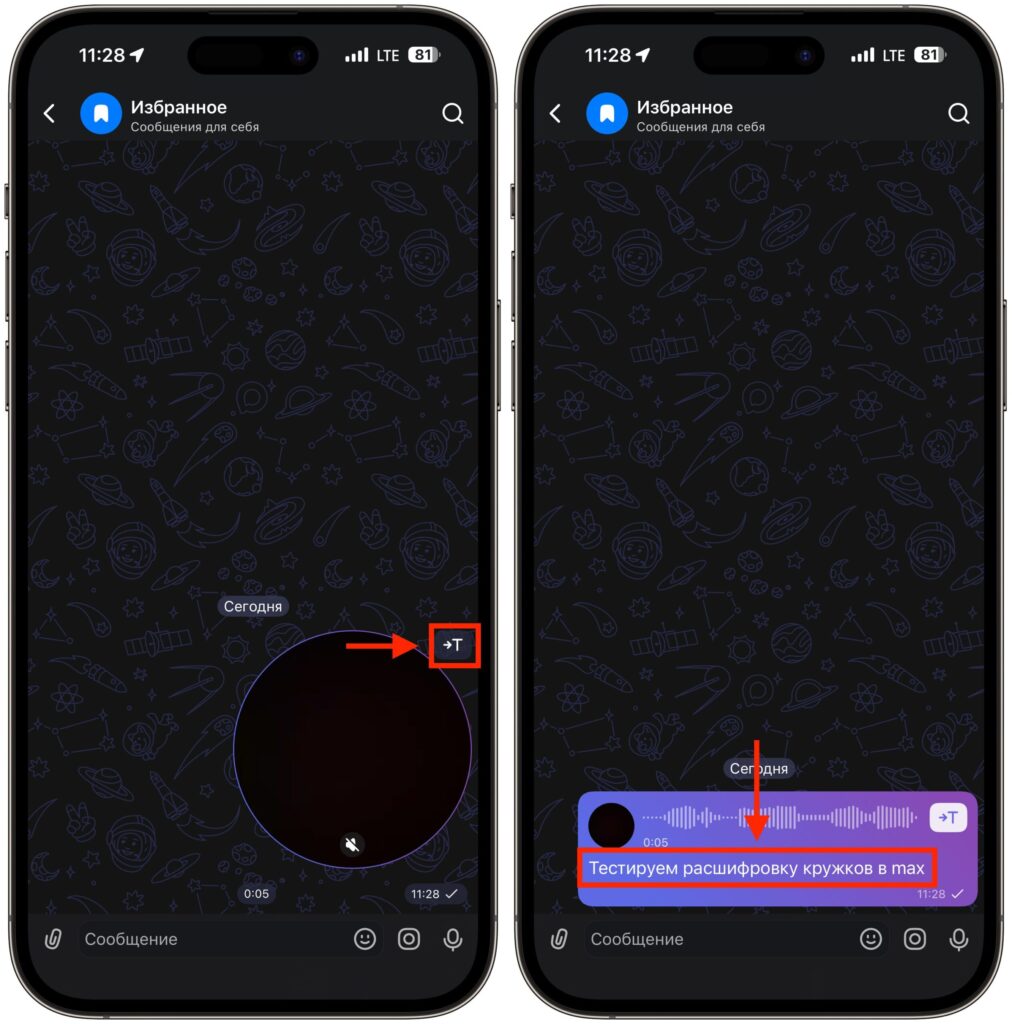
One button, and the video is converted to text
- Open any chat that contains a video circle message.
- Next to the circle, you’ll see a special icon — the letter “T” in a circle.
- Tap it, and within a couple of seconds, a text transcription will appear below the video message.
That’s it, nothing else needs to be done. The text is saved below the message — you can reread it at any time or copy it. Transcription works in all types of chats: personal, group, and even archived conversations. There are no limitations on video duration either — you can transcribe both a short five-second circle and a long one-minute video message.
The transcription quality, frankly, is pleasantly surprising. Of course, if the other person is mumbling incoherently or speaking against the background of a noisy street, the result won’t be great — but that’s a limitation of any speech recognition system. Under normal conditions, MAX handles it well, and the text comes out quite readable. Compared to Telegram, the recognition quality is roughly the same — the only difference is that MAX doesn’t charge money for it.
How Circle Transcription in MAX Differs from Telegram
Free video circle transcription without limits is a strong argument in favor of MAX. But let’s be honest: one convenient tool is not a reason to switch your primary messenger.
In terms of overall feature set, stability, and MAX’s interface convenience, it still falls behind Telegram. It has a smaller user base, fewer bots, fewer channels, and the interface is rough around the edges in places. Yes, MAX is actively developing and receives notable updates every month — adding voice transcription here, teaching circles to convert to text there — but it’s still a long way from Telegram’s level.
The most sensible scenario for 2026 is to use both messengers in parallel. MAX — for those contacts and chats that have already moved there. Telegram — for everything else. Circle transcription is a nice bonus that makes using MAX a bit more comfortable. But basing a decision to fully switch on one feature is definitely not worth it.


