Voice messages are convenient right up until you find yourself in a meeting, on the subway without headphones, or simply don’t want to listen to a two-minute monologue instead of a single sentence. The MAX messenger on iPhone has finally added voice message transcription — a feature users have been waiting for since launch. Here’s how to convert a voice message to text in MAX and how this feature differs from the one in Telegram.
Voice messages in MAX can easily be converted to text
Why You Need Voice Message Transcription in MAX
It’s a familiar situation: someone sends you a voice message that’s a minute and a half long, and you’re sitting in a quiet office where listening to it out loud would be awkward. Or you’re riding the subway, where the noise drowns out any sound. This is exactly what voice-to-text conversion is for — you simply read the contents of the audio message with your eyes.
In MAX, this feature works for free, with no limits on the number of transcriptions and no subscription required. The text appears right below the audio track in the chat — no need to navigate anywhere or copy anything. Voice messages up to 60 minutes long are supported, so even the most lengthy voice messages are no longer a problem.
Updating MAX on iPhone
Before looking for the transcription button, make sure you have the latest version of the messenger installed. Voice transcription in MAX is available starting from version 26.13.0 for iOS. Here’s how to update the app:
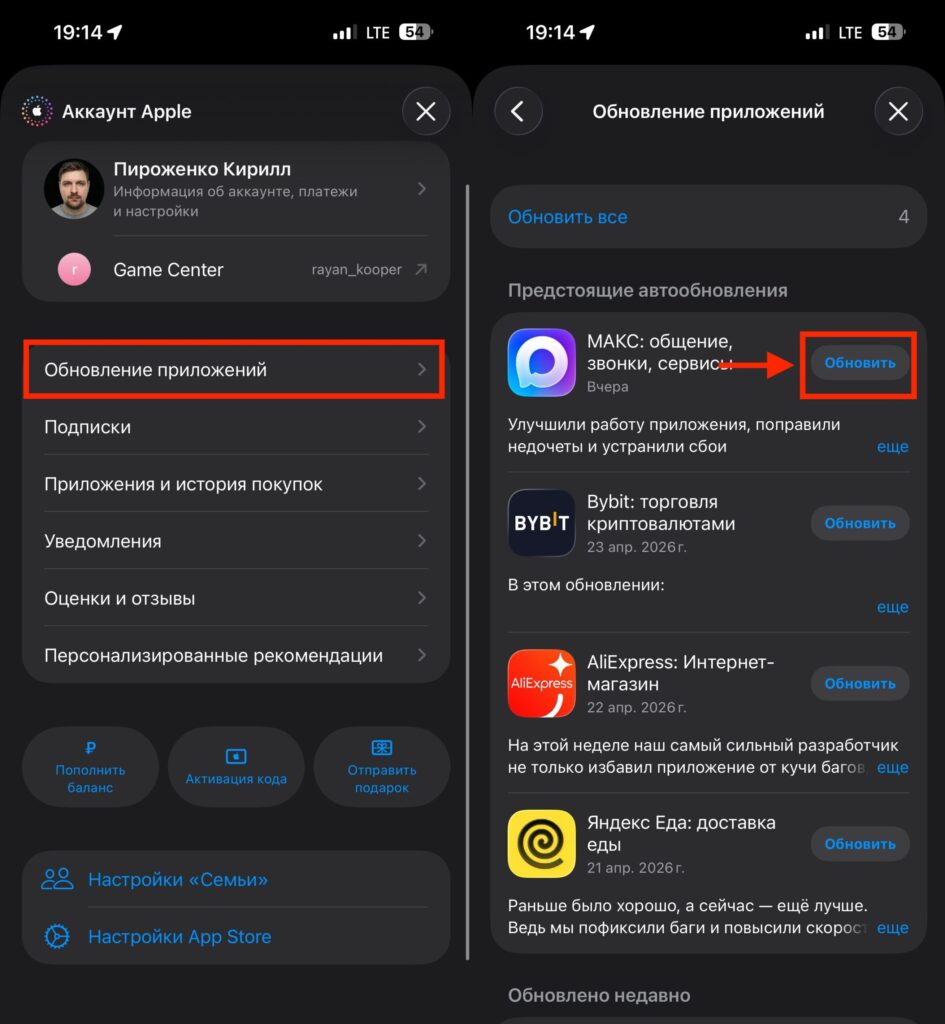
Update to the latest version
- Open the App Store on your iPhone.
- Tap your profile icon in the upper right corner.
- Scroll down to the section with available updates.
- Find MAX (the app is currently called “Maks”) and tap “Update.”
- After installation, restart the messenger.
If the update doesn’t appear, check whether automatic updates are enabled. Go to Settings — App Store and make sure the “App Updates” toggle is active. Unlike Android, on iPhone there’s no way to clear the cache of an individual app through system settings. But if the feature hasn’t appeared after updating, try deleting and reinstalling MAX from the App Store.
How to Convert a Voice Message to Text in MAX on iPhone
After updating, there’s nothing additional to configure. The feature works right away — no permissions or activations needed. Here’s what you need to do:
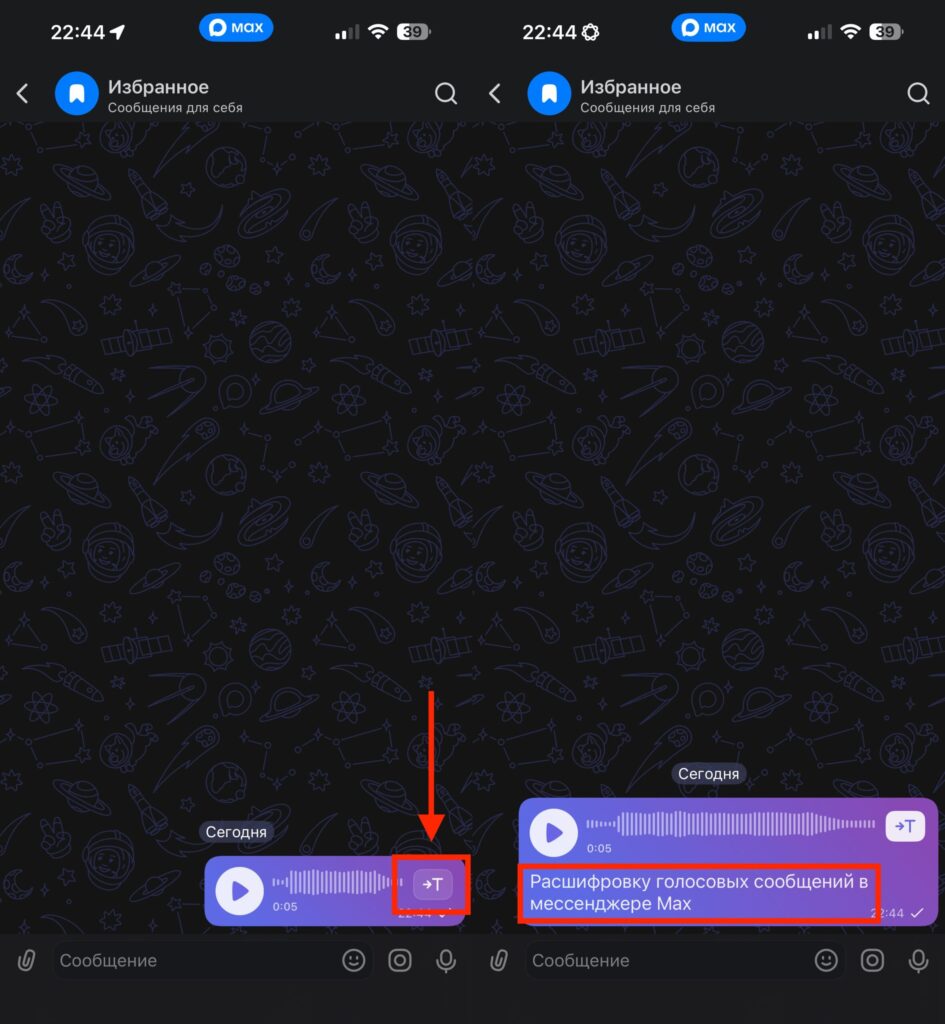
Transcription is done instantly
- Open any chat that contains a voice message.
- Find the icon with the letter “T” next to the audio track.
- Tap it — the text transcription will appear right below the voice message.
The resulting text is saved below the audio message, and you can re-read it at any time or copy it. Voice-to-text conversion in MAX works in all types of chats: personal, group, and even archived conversations. Both incoming and outgoing voice messages can be transcribed.
Comparing Voice Transcription in MAX and Telegram
Telegram added voice transcription significantly earlier, and for a long time it was one of the strongest arguments against MAX. However, there’s a fundamental difference between the implementations that works in favor of the national messenger.
In Telegram, free voice transcription is available only twice a week. If you receive voice messages every day, without a Telegram Premium subscription the feature becomes useless. In MAX, there are no limits at all: transcribe as many messages as you want, for free, without subscriptions or caps.
| Feature | MAX | Telegram |
|---|---|---|
| Voice transcription | Free, no limits | 2 messages per week for free (some users have no free attempts), the rest requires Premium |
| Unlimited transcription | Free | Only with Telegram Premium |
| Maximum duration | Up to 60 minutes | Up to 30 minutes |
| Availability in chats | All chats | All chats |
This is perhaps the first case where the MAX messenger surpasses Telegram in a specific user-facing feature, rather than simply by virtue of not being blocked. Free unlimited transcription versus two attempts per week — the difference is more than noticeable.
Is It Worth Using Transcription in MAX
A very useful feature that I will personally use
If you already use MAX on iPhone — definitely yes. Update the messenger and give it a try: the feature works quickly, and the text appears almost instantly. Speech recognition quality is quite acceptable for everyday communication, although unclear speech or heavy background noise may result in inaccuracies — just like in any other messenger.
For those who use Telegram without a Premium subscription, this could be an additional reason to check out MAX. Unlimited free transcription is a serious advantage, especially if you regularly receive voice messages.


