The question of at what age to give a child a phone is something every parent decides differently. But once the device is already there, the next question arises: how do you make sure your child knows how to handle money and doesn’t spend it all in one day on a mobile game? Sberbank created a separate SberKids app for this — a full-fledged mobile bank designed specifically for children.
Installing SberKids on a child’s smartphone
What Is SberKids
SberKids for children is a mobile bank, simplified and adapted for a child-friendly interface. The app is designed for children aged 6 to 13 and works in tandem with the parent’s Sberbank Online app. The child can see their balance, savings goals, and spending history. The parent controls expenses, sets limits, and transfers money.
It’s not just a wallet. SberKids for children includes:
- linking to a real children’s Sber debit card;
- a financial goals system (the child saves up for a specific item);
- an educational section about money and financial literacy;
- parental controls with spending category restrictions;
- transfers from parents, scheduled pocket money.
The app is entirely in Russian, with a bright and intuitive interface that even younger schoolchildren can understand. So it’s worth at least giving it a try.
How to Download SberKids on Android for Free in Russian
In 2026, you can download SberKids in two ways. The first and easiest is through RuStore. The Russian app store works on most Android smartphones and contains the latest version. Searching for “SberKids” will find the app instantly.
The second way is the SberKids APK from the official website. Go to sber.ru, find the “SberKids” section, and download the installation file directly. This is the official version from Sberbank, with no risk involved.
The SberKids app is free — it requires no payment either for downloading or during use.
How to Install SberKids on Android
If you’re installing through RuStore, simply tap “Install” and wait for it to finish. If you’re downloading the APK file, follow these steps:
- Download the APK file from the official Sberbank website.
- Open the file via the notification or file manager in the “Downloads” folder.
- If the system asks for permission to install from unknown sources, allow it for the browser or file manager.
- Tap “Install” and wait for it to finish.
- After installation, open the app and sign in with the child’s phone number.
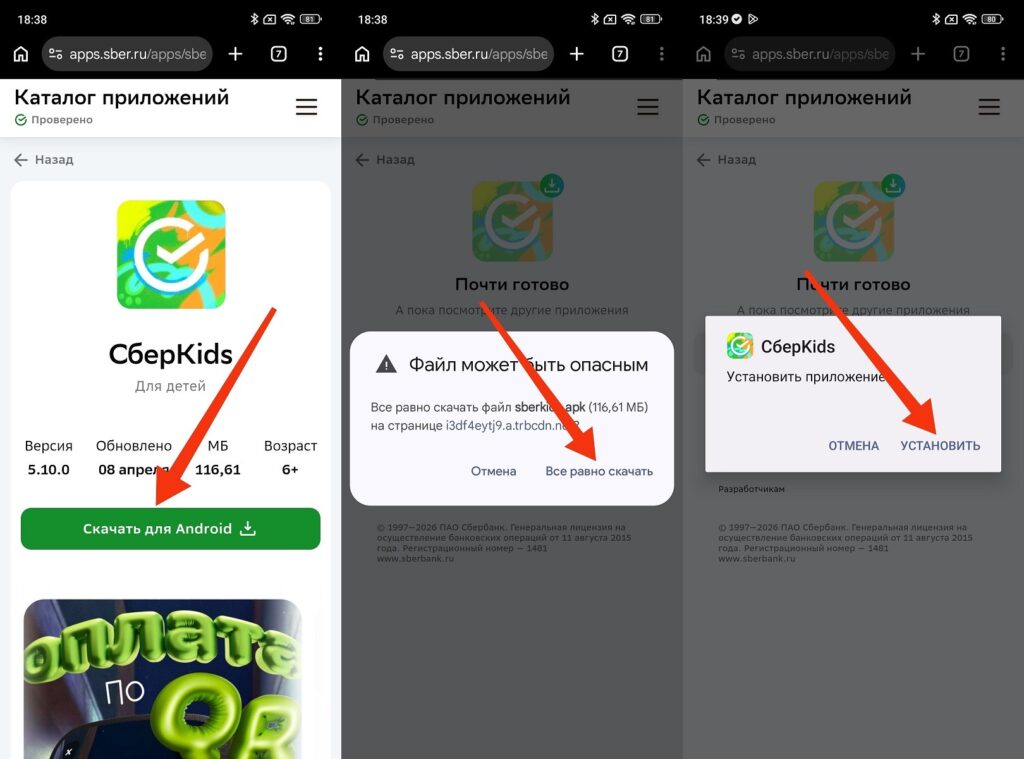
Installing SberKids on a child’s smartphone
Important note: for the SberKids app to work, you need a phone number linked to the child’s Sber account. If there’s no card yet, you’ll need to get one first.
How to Get a Children’s SberKids Card Through Sberbank Online
You can get a Sber card for your child directly in the Sberbank Online app without visiting a branch:
- Open Sberbank Online on the parent’s smartphone.
- Go to the “Catalog” section or use the search for “SberKids”.
- Select “Get a SberKids Card”.
- Enter the child’s details: name, date of birth, phone number.
- Choose the delivery method (delivery or pickup from a branch).
- Confirm the application with an SMS code.
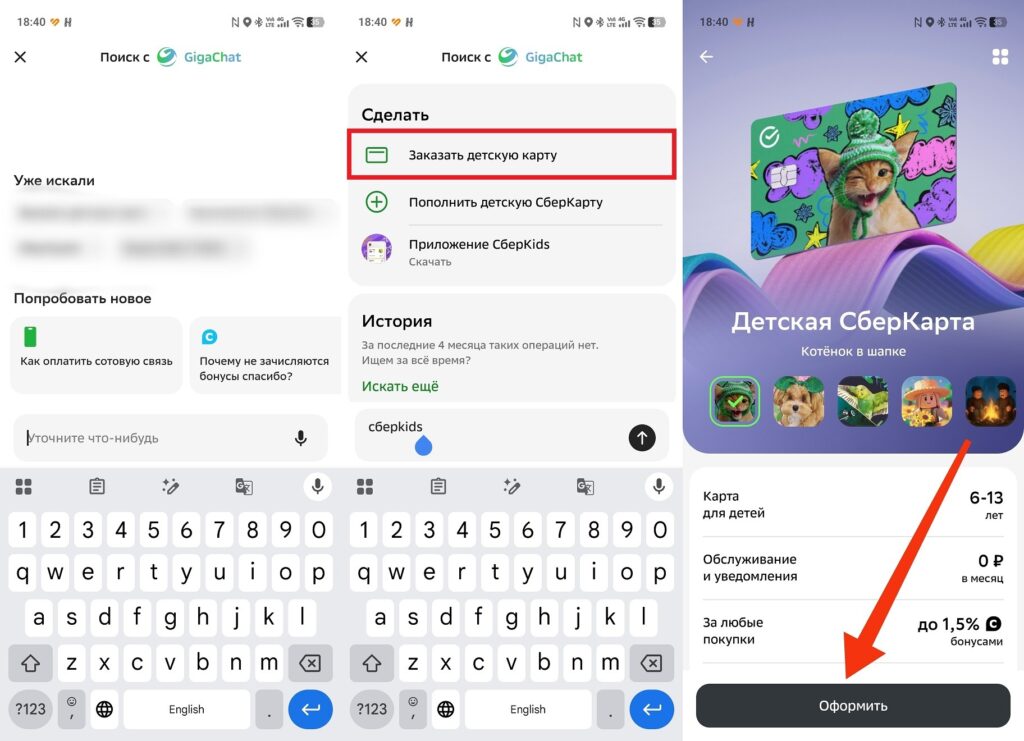
The card can be issued through the Sber app
The Sber card for children is issued for free and is linked to the parent’s account. The child gets their own plastic card with their name, but can only spend within the set limits. You can get a Sber card for a child starting from age 6 (the minimum age for enrollment).
SberKids App Features
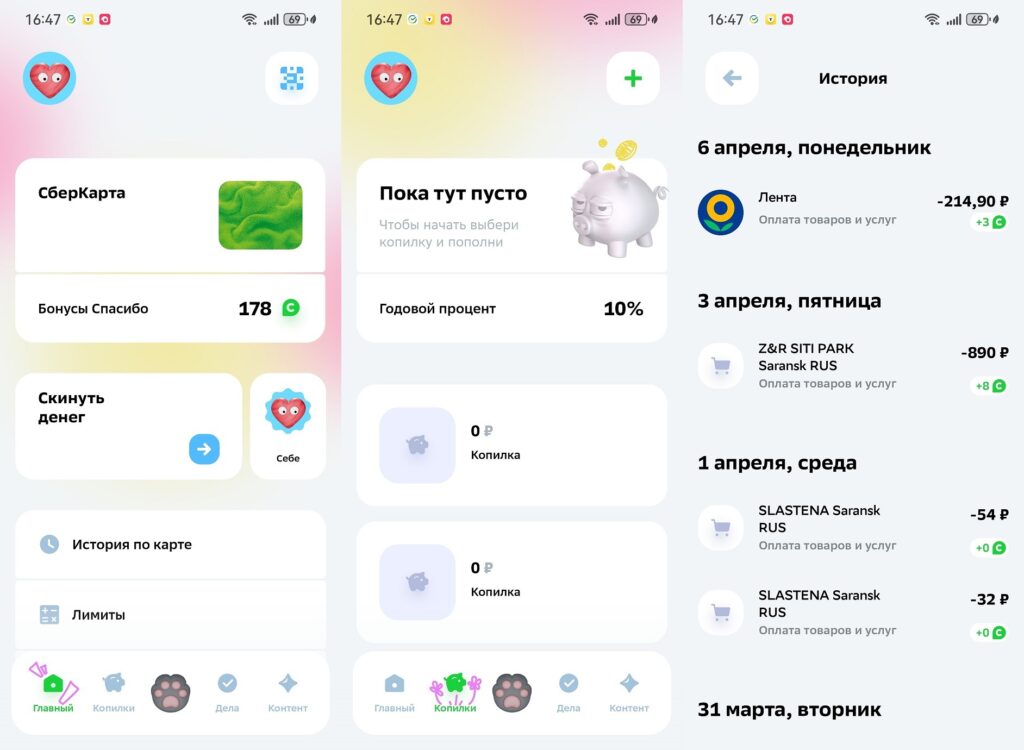
The app has many useful features
Once the card is issued and the app is installed, the child gets access to a full-fledged children’s bank:
- Balance and spending history. The child can see how much money is on the card and where it went. Clear visualization: charts and categories.
- Savings jar in SberKids. You can create a goal (for example, saving up for a bicycle) and set money aside for it. The parent can see the progress and support with a transfer.
- Scheduled pocket money. The parent sets up an automatic transfer (once a week or once a month) and the money arrives on its own.
- SberKids wallet. Storing money, paying for purchases with the card or via SBP (Fast Payment System).
- Educational section. Tasks and materials about what money is, how to save, and why budgeting matters.
Money in SberKids is real rubles in a real account. The child can pay with the card in stores and also transfer money via SBP.
How to Set Up Limits and Parental Controls in SberKids
Parental controls in SberKids are configured through the Sberbank Online app on the parent’s smartphone:
- Open Sberbank Online.
- Select the child’s card.
- Tap “Limits”.
- Set a daily or monthly spending limit.
- If needed, restrict categories: for example, block online purchases or cash withdrawals.
- Save the changes.
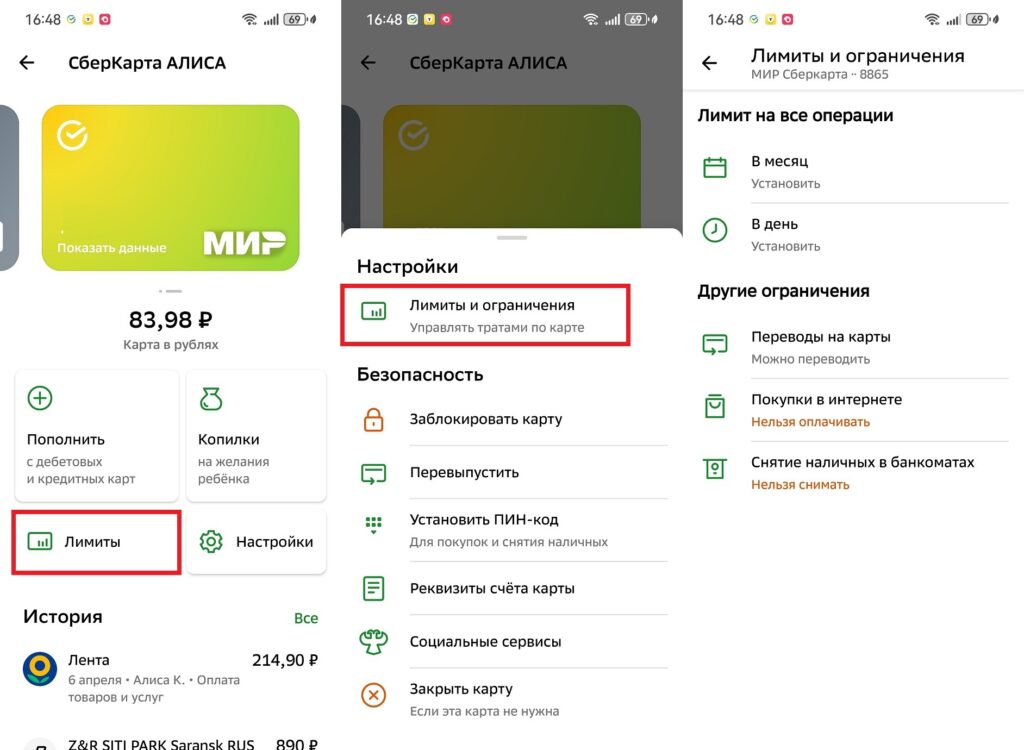
Limits are set through the parent’s app
The parent receives a notification about every child’s transaction in real time. If something goes wrong, you can instantly block the card right from the app.