If VK and MAX disappeared from your smartphone, there’s no need to panic
In the summer of 2026, apps from the VK ecosystem, including the popular social network and the MAX messenger, disappeared from Google Play and App Store. Initially, iPhone users complained that MAX wasn’t working or loading, and now the problem has affected Android users as well. However, there’s no need to panic, because already installed apps continue to work properly, and for new installations there are official and completely safe workarounds.
VK and MAX Apps Are No Longer in App Store and Google Play
According to Interfax, as of July 2026, downloading VKontakte and MAX through the usual foreign platforms is no longer possible. In June, the apps became unavailable on iOS. In July, it became known that VK and MAX apps disappeared from Google Play.
This situation is already familiar to Russian users who previously had to search for where to download Sberbank Online and other important banking services. The main news announced by the company’s press service is that current versions work without restrictions: messages are sent, calls go through, and push notifications arrive on time.
How to Install VK and MAX on Android Without Google Play
The architecture of the Android operating system makes it easy to bypass Google’s restrictions. To safely install MAX and VKontakte, the best option is to use the domestic app store RuStore. This is an official distribution channel that guarantees you’ll get a clean, virus-free program.
How to install RuStore on Android:
- Open the official website rustore.ru in your mobile browser and tap “Download”;
- Launch the downloaded APK file from the “Downloads” folder;
- Allow your browser to install unknown apps (the system will prompt you to go to the appropriate settings section);
- Open RuStore, search for “VKontakte” or MAX, and tap “Install”.
Technical requirements should be taken into account. For stable operation of the MAX service, Android version 8 or newer is required, and the current VKontakte client needs at least the ninth version of the operating system.
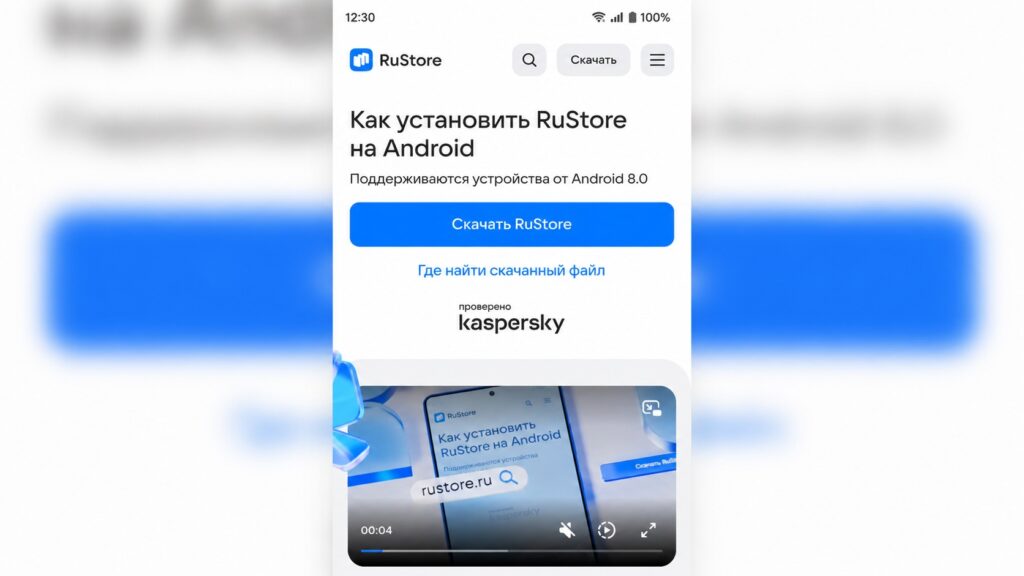
Installing RuStore on Android
Can You Download VK and MAX as APK Files?
When an app disappears from usual access, dozens of websites instantly appear online offering to download the APK installation file directly. They often attract attention with names like “VK_Premium_mod” or “MAX_unlocked.”
Technically, an APK is simply a code archive, similar to familiar .exe files for computers. The problem is that attackers often embed hidden code into modified versions. Such fake programs from unknown sources steal passwords and personal information, including access to your banking apps and secret chats.
That’s why installation files should only be downloaded from official developer websites. The MAX messenger can be downloaded via max.ru. VKontakte and other Russian apps are available in the RuStore catalog.
How to Install VK and MAX on iOS Without the App Store
Apple device owners are less fortunate because the iOS system is closed and doesn’t allow you to simply install a file from the internet. Developer certificates and third-party programs like AltStore work unstably and can be revoked at any moment. Installing RuStore on iOS is also impossible.
The official solution from the developers is to turn the website into a web app. Modern Safari browser standards make it possible for the mobile version of a website to look and function almost like a full-fledged app.
How to get VK and MAX back on iPhone:
- Open the built-in Safari browser and go to the official website vk.ru or web.max.ru;
- Log in to your account using your phone number;
- Tap the “Share” button (square with an arrow) on the bottom browser bar;
- Select “Add to Home Screen.”
After that, a familiar icon will appear on your home screen. The social network will open without the browser interface, in full-screen mode. For push notifications to work, the web version will request a separate permission on the first launch — make sure to confirm it.
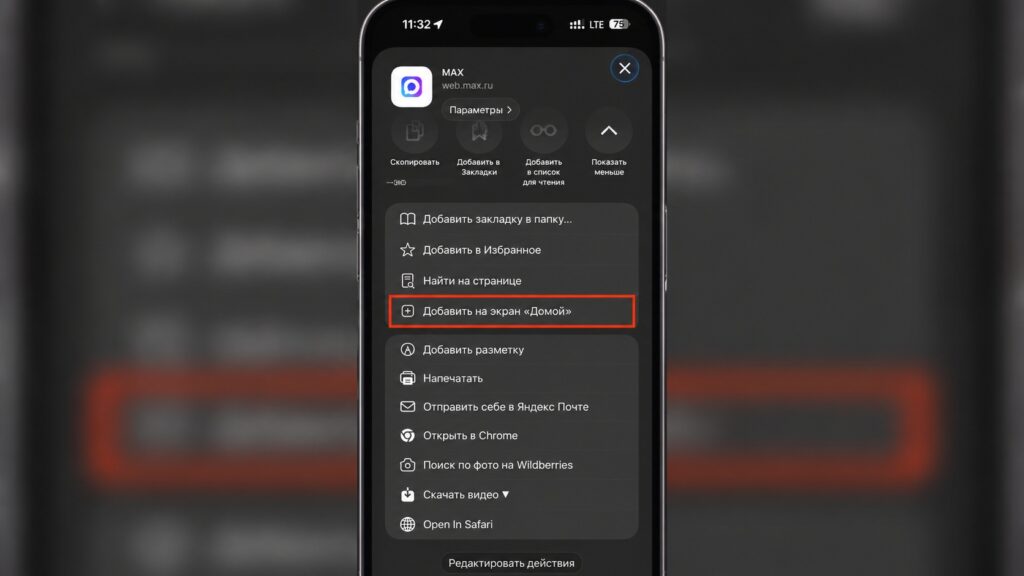
How to add the MAX web version to the home screen
How to Keep VK and MAX on Your Smartphone
If your iPhone or iPad already has the necessary clients installed, the most important rule right now is to never delete them under any circumstances. Updates will no longer arrive, but basic functions will remain fully operational.
To prevent the system from automatically removing apps without your knowledge to save storage, you need to disable offloading of unused apps. To do this, go to iPhone Settings, find the App Store section, and toggle “Offload Unused Apps” to the off position. This ensures that the important service stays on your device even if you rarely open it.
Unfortunately, transitioning to alternative app stores and web apps is the new reality of mobile platforms. The main internet safety rule in these conditions remains unchanged: always verify the website address before entering your data and only trust downloads from verified official sources.