
MAX Not Working or Not Loading — What to Do
If MAX is stuck on loading, won’t send you a verification code, or crashes when you open a video — you’re not alone. The Russian messenger MAX is becoming a mandatory channel for building chats, schools, banks, and government agencies, so in 2026 more and more everyday tasks will depend on it working properly. Let’s look at common causes of failures, ways to fix them, and also explain why it will soon be hard to get by without MAX.
Why MAX Won’t Open on Your Phone
Most often the app fails to launch not because of a phone malfunction, but because of small things you can easily check yourself. MAX is a relatively young service, and the load on its servers is growing as official chats and channels are being moved there. So some problems are related not to your device, but to the service itself.
Here’s what to check first if MAX won’t open:
- whether you have a stable internet connection — try switching between Wi-Fi and mobile data
- whether your phone has run out of storage space
- whether the latest version of the app is installed from the official store
- whether an antivirus or parental controls are blocking the launch
- whether maintenance work is currently being done on the service side
If the app icon opens and immediately closes, the problem is usually with the installed file itself — there’s a separate section below about reinstallation.
MAX Not Loading Messages and Videos — Common Causes
The most common complaint goes like this: the app opened, but messages, photos, and videos won’t load or are stuck with an endless loading indicator. Here, one of three factors is almost always to blame.
The first and main one is a weak or unstable internet connection. Text weighs very little and gets through almost always, but photos, videos, and video messages require decent speed. If specifically media won’t load but text comes through, it’s almost certainly a connection speed issue.
The second factor is an overloaded app cache. Over time, MAX accumulates temporary files, and when there are too many of them, loading new data slows down. The third is a server-side failure of the messenger itself, especially during peak hours when building and school chats are flooded with messages.
What you can do if MAX won’t load photos, videos, or video messages:
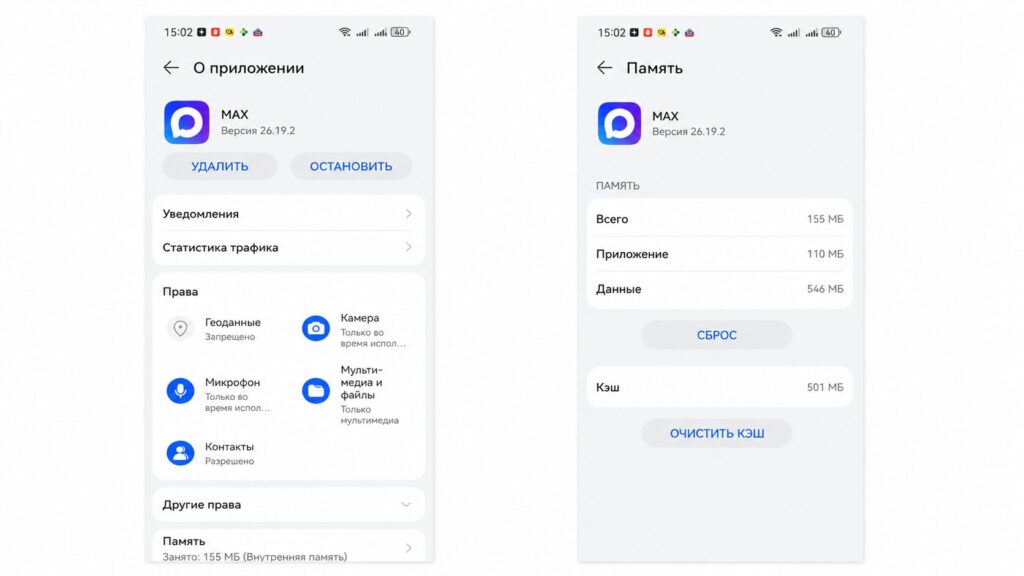
You can clear the cache by following this path: Settings — Apps — Storage
- Check your internet speed and switch networks
- Fully restart the app, don’t just minimize it
- Clear the MAX cache in your phone settings — chats won’t be deleted
- Restart the phone itself to reset stuck processes
- Wait 15–20 minutes if the problem is widespread and on the service side
Clearing the cache helps most often because it doesn’t touch your conversations but removes accumulated junk that interferes with loading.
What to Do If the Verification Code Doesn’t Arrive in MAX
A separate pain point during registration or login — the verification code doesn’t arrive to your number. This completely blocks access, so let’s address it separately.
Without a verification code, you won’t be able to log into the messenger
The reasons are usually simple. The SMS with the code may be delayed due to carrier network load — sometimes the message arrives after a few minutes. It’s possible you entered the number incorrectly or forgot the country code. Another common situation is that you have message blocking from unknown senders enabled.
If the MAX login code doesn’t arrive, try the following in order:
- check whether the phone number was entered correctly
- wait a couple of minutes without immediately requesting the code again
- make sure the phone has network signal and can receive regular SMS
- disable message blocking from unknown numbers
- request the code again or choose login via call, if that option is available
If nothing helps, sometimes temporarily turning off mobile internet works — then the SMS arrives through the regular communication channel without competing with internet traffic.
How to Reinstall MAX Without Losing Chats
When the app constantly crashes or freezes on startup, the most reliable method is reinstallation. And the main fear here is understandable: will the conversations disappear? Chats in MAX are stored on the server and linked to your phone number, so when you log in again, they load back up.
To reinstall MAX and keep access to your chats:
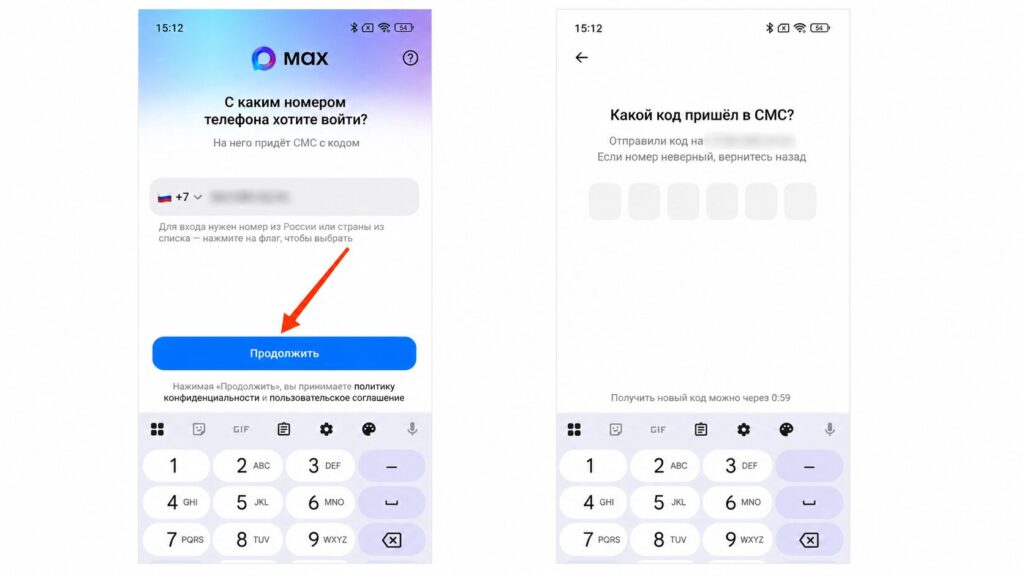
You can log into MAX simply using your phone number
- Make sure you remember the phone number the account is registered to
- Delete the app from your phone the usual way
- Download the latest version from the official app store
- Log in with the same number and confirm login with a code
- Wait for chats and media to sync again
Reinstalling MAX often solves problems that can’t be fixed by clearing the cache: corrupted app files, conflicts after a failed update, and accumulated errors. Essentially, it’s a fresh start without losing the conversations themselves.
MAX Is Lagging and Crashing — How to Fix
If MAX works but noticeably lags, slowly opens chats, or crashes when watching video, the cause is usually the phone’s resources. A messenger with video, video messages, and calls requires both RAM and storage space.
Most often a basic set of actions helps: close unnecessary apps running in the background, free up phone storage, update MAX to the latest version, and restart the device. On older smartphones with limited RAM, lag can simply be due to weak hardware — in that case, at least keep the latest, optimized version installed.
What to Do If MAX Doesn’t Work After an Update
Now the main point: why it’s worth troubleshooting MAX even if you don’t like the app. At the end of 2025, a law was signed expanding the messenger’s functions, and MAX is becoming the single official channel for a whole range of services.
Here’s who this will affect first:
- residents of apartment buildings — management companies and homeowners’ associations are required to maintain building chats in MAX, and information about water shutoffs, repairs, and meetings is considered delivered to the resident even if they haven’t read it
- parents and students — official class and study group chats, schedule notifications and changes go through MAX
- government agency employees and subordinate organizations who are recommended to switch to Russian messengers
- bank and telecom clients — since June 2025 their employees have been prohibited from using foreign messengers to communicate with clients
Formally, no one is fined for not having the app. But in practice, without MAX you may lose access to essential services and official notifications. The argument “I’m not in that chat” will no longer work.
Personal communication is not restricted: use whatever you prefer for private conversations. This only applies to official information and services.