We regularly publish collections of great finds on AliExpress, and readers constantly ask about the most convenient way to pay. Now Russian shoppers have a new option: AliExpress quietly, without any official announcements, added the ability to link a Wildberries account and pay via the WB Wallet. No press releases, no banners in the app — just a new setting that appeared in the profile. Here’s what it offers in practice and whether it’s worth using.
AliExpress and Wildberries are now friends
Linking AliExpress and Wildberries Accounts
AliExpress and Wildberries are the two largest marketplaces used by the majority of Russian shoppers. Now a first bridge has appeared between them: in the AliExpress profile settings, there’s a new option to sign in via WB ID. After linking, the accounts become connected, but data remains separate — purchase history, favorites, delivery addresses, and linked cards stay independent on each marketplace.
Russia's two largest marketplaces have quietly linked accounts.
The main requirement for linking Wildberries and AliExpress: both accounts must be registered to the same phone number. If your AliExpress account is linked to a different number or has none at all, you can fix this in the profile settings before linking.
We’ve previously written about how to safely shop on AliExpress — covering seller verification, purchase protection, and common fraud schemes. With the addition of WB Wallet as a payment method, the security question becomes even more relevant.
How to Link WB ID to AliExpress on Android
The procedure itself takes a couple of minutes. Before starting, make sure both accounts are registered to the same phone number (this is a mandatory requirement):
- Open the AliExpress app on Android and go to your profile (the person icon in the bottom panel).
- Select the “Sign in with WB ID” option.
- Confirm the login.
- Enter your phone number, then the one-time SMS code.
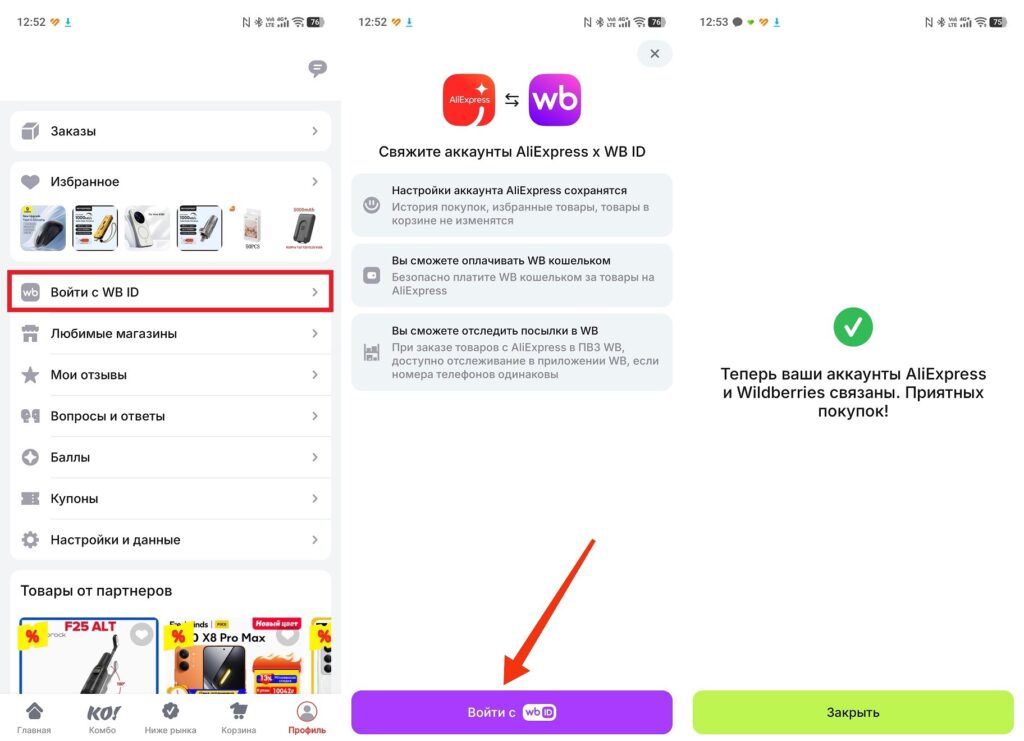
The link must be confirmed via WB ID
If the option doesn’t appear in your settings, update the AliExpress app to the latest version via Google Play. The feature was added recently and may not be available in older versions.
How to Pay for Items on AliExpress Using WB Wallet
After linking, WB Wallet becomes available as a payment method on AliExpress. You’ll need to have funds in the wallet (you can top it up in the Wildberries app using standard methods):
- Add the desired item to your cart in the AliExpress app and proceed to checkout.
- On the payment screen, select “WB Wallet” from the list of available options.
- Confirm the payment through the Wildberries app.
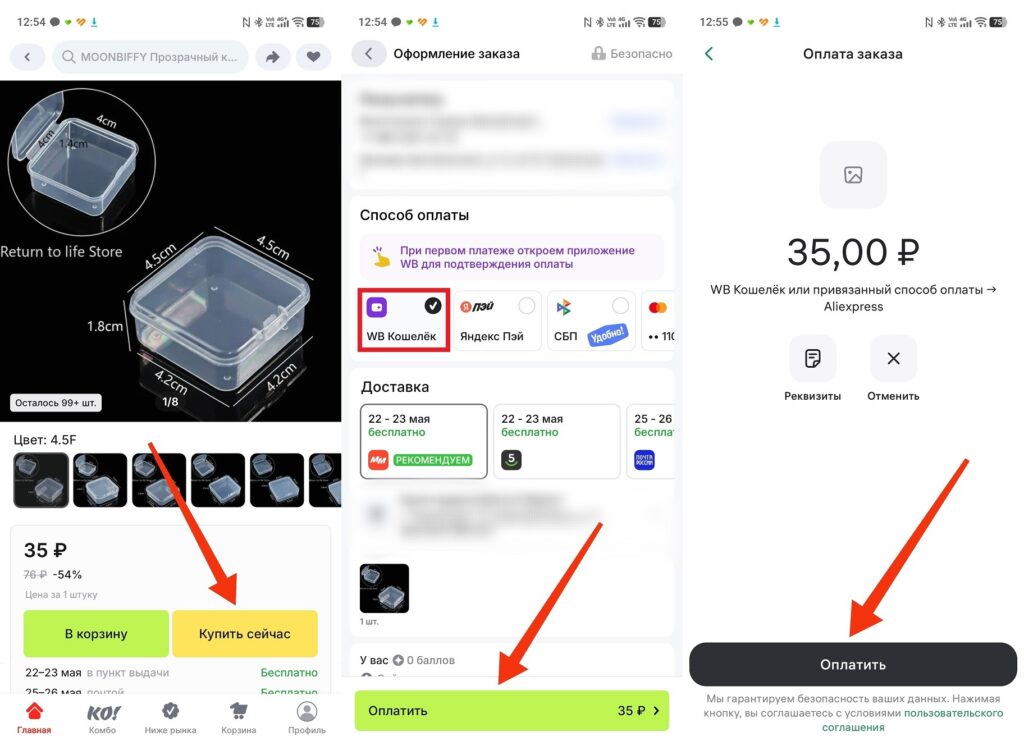
The first payment requires confirmation through the Wildberries app
It’s also worth noting AliExpress delivery to Wildberries pickup points. There’s no confirmed data yet on whether this option became available after linking accounts. But the integration logic suggests that shared pickup points are a likely next step. For now, AliExpress delivery works through standard channels: Russian Post, SDEK, and Magnit Market.
Is It Worth Paying on AliExpress with WB Wallet?
It depends on how you typically top up your WB Wallet and how convenient it is for your situation. Paying on AliExpress in Russia has historically been a pain point: some bank cards don’t work, foreign payment systems are unavailable, and virtual card workarounds require extra steps.
WB Wallet is one of the most stable ways to pay on AliExpress in Russia right now.
In this context, WB Wallet looks like a convenient alternative:
- It can be topped up through Russian banks without restrictions;
- It works reliably, since Wildberries hasn’t been disconnected from Russia’s payment infrastructure;
- No need to enter card details every time you make a purchase on AliExpress;
- Funds can be used on both AliExpress and Wildberries (one balance for two platforms).
On the downside: if the wallet runs out of money at the time of purchase, you’ll need to pause and top it up. Also, refunds from canceled orders will go back to the WB Wallet rather than to your card (keep this in mind). Ordering on AliExpress via WB Wallet is arguably one of the simplest and most stable payment methods for Russian shoppers in 2026 — especially if you already use Wildberries regularly and keep a balance there.


