Yandex Music on Android now lets listeners reduce the amount of AI-generated music in their personal recommendations and see labels showing whether a track was made with AI. The two features arrived together in a recent app update. According to figures Yandex itself disclosed, AI-generated tracks make up 4.4% of the entire catalogue, and among new releases their share reaches 27%, roughly one in four new tracks. The new toggle, called “Less AI,” does not remove such music entirely; it reduces how often it appears in personalized playlists and stations. Here is what changed and how to use it.

The toggle for turning down AI-generated tracks in Yandex Music on Android
What you need to know
- Yandex says AI-generated tracks account for 4.4% of its catalogue and 27% of new releases.
- A new “Less AI” switch in Settings > Sound and Controls reduces, but does not eliminate, AI music in personal playlists and stations.
- Tracks can now carry one of three AI labels in the “About the track” section: fully, partially, or possibly created with AI.
- Labels rely on rights holders, Yandex’s algorithms, and user reports, so an unlabeled track is not guaranteed to be human-made.
What changed in Yandex Music
Yandex added two features at once. The first is a toggle for AI tracks in recommendations. In the app’s settings you can now reduce the amount of AI-generated music that ends up in your personal selections, stations, and playlists. It cannot be switched off completely; the setting reduces the volume rather than blocking it, which the source author suggests will be enough for most users.
The second is labeling of AI content. Each track’s “About the track” section can now display one of three marks:
- “Track fully created using AI”;
- “Track partially created using AI”;
- “Track possibly created using AI”.
The data behind these labels comes from rights holders themselves, Yandex’s own algorithms, and reports submitted by users.

First, update the app and restart your phone
The features appear only after updating Yandex Music to the current version. The source author notes that if you have updated but the toggle is still missing, a restart of the phone may be needed: without it the setting may not show up even on the latest app version.
How to update Yandex Music on Android:
- Open Google Play.
- Search for “Yandex Music”.
- Tap “Update” if a new version is available.
- After updating, restart your phone.

Updating Yandex Music through Google Play
How to reduce AI tracks in recommendations
Once the app is updated and the phone restarted:
- Open the Yandex Music app.
- Tap the profile icon in the bottom-right corner.
- Go to “Settings”.
- Find the “Sound and Controls” section.
- Locate the “Less AI” switch and set it to the desired position.

Reducing AI-generated tracks in the Yandex Music app
After this, Yandex should surface AI-generated music less often in personal playlists and stations. The change is not instant: recommendations are rebuilt gradually over several listening sessions.

How to check whether a track was made with AI
The app now lets you check any track for AI involvement:
- Open the track in Yandex Music.
- Tap the three-dot menu next to the track, or tap the artist name.
- Select “About the track”.
- If the track was made with AI, the corresponding label will be shown there.
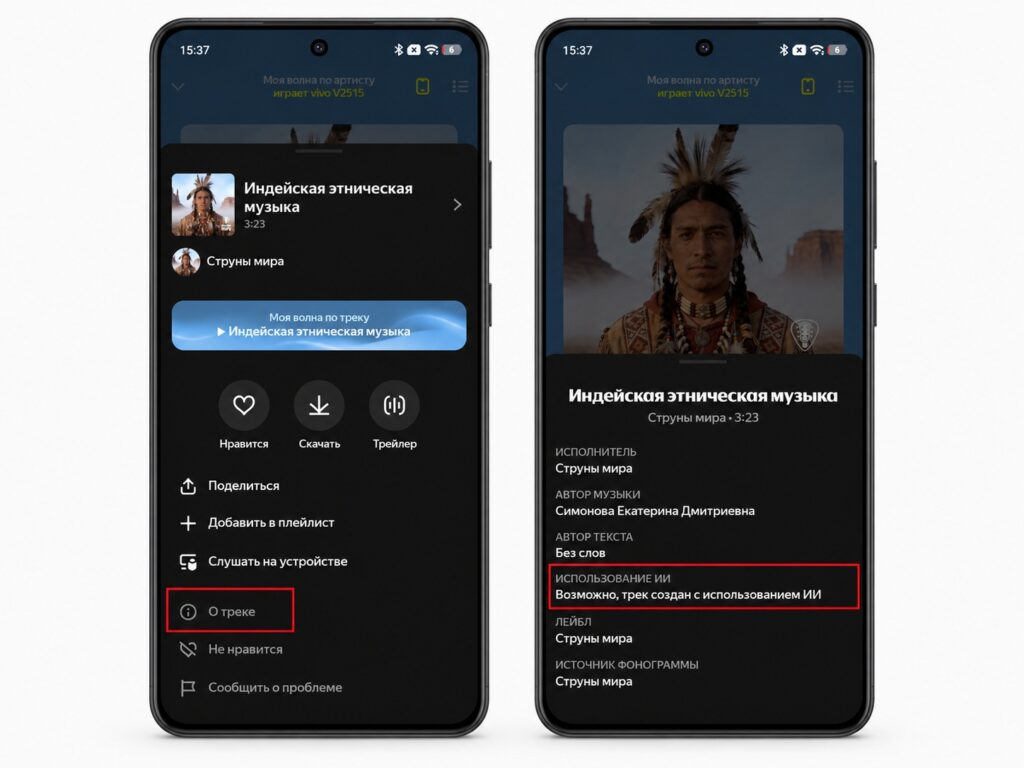
Checking a track for AI involvement in Yandex Music
An important caveat: the absence of a label does not automatically mean a track is human-made. Labeling depends on whether the rights holder disclosed AI use. Yandex says it will continue working on marking the catalogue more completely over time.
Why this matters, and why now
With AI-generated music making up 27% of new releases, it is no longer a curiosity but a steady stream. By Yandex’s own account, most of these tracks do not attract a significant number of plays. Yet, as the source author argues, the recommendation algorithm kept pushing them anyway simply because they were new releases that had to be placed somewhere.
The core issue was not that AI music exists, but that it entered recommendations without labels and without any user control. The new features do not remove AI music from the service, and the labeling remains incomplete. But listeners now have at least basic control over how much of it reaches them, along with a way to see what they are hearing.


