Recently, finding gasoline in Russia has turned from a trip to the nearest gas station into a real quest with an unpredictable outcome. In 2026, you may face fuel shortages, long lines, and prices that have jumped by tens of percent. We’ve already covered how to search for gasoline in Russia under new conditions, but the Yandex Fuel app deserves a separate discussion. It works roughly like this: you pull up to the pump, select fuel on the screen or by voice through Alice, and money is automatically deducted from your linked card. Let’s figure out how to set this up on Android, where to find savings, and whether there are any pitfalls.
Searching for gas through Yandex Fuel
Yandex Fuel — What It Is and How It Works
Yandex Fuel is a service that lets you find and pay for fuel right from your car, without going to the cashier or talking to an attendant. Everything is managed through the app: you can see prices at connected gas stations and available discounts in advance, and once you arrive, you select the pump, specify the volume, and pay with a card linked to the service. While the popular 2026 service GdeBenz only lets you find gas stations with fuel, Yandex Fuel also helps you pay for the purchase.
More than 10,000 gas stations across Russia are connected to the service — these are major chains like Rosneft, Bashneft, NNK, and Tatneft, as well as smaller companies, about 170 brands in total. For comparison: if you drive routes served by a single chain, there’s a good chance it’s already on the list.

The service was originally designed for contactless refueling
Something useful: fuel purchased through the app is insured — if it causes a vehicle malfunction, partner insurance companies will compensate for the damage. This is great given the transition to Euro-3 standard gasoline. Besides refueling, the service also lets you pay for car washes, goods from the gas station shop, insurance, toll road fees, or call a tow truck.
How to Find Gas Through Yandex Fuel on Android
A standalone Yandex Fuel app is available on Google Play, but you can also use the service without it — through other Yandex apps where you’re already signed in with your Yandex ID. If Google Play works for you, it’s easier to install the standalone app.
The first-time setup on Android goes like this:
- Install the Yandex Fuel app from Google Play and open it.
- Sign in with your Yandex ID.
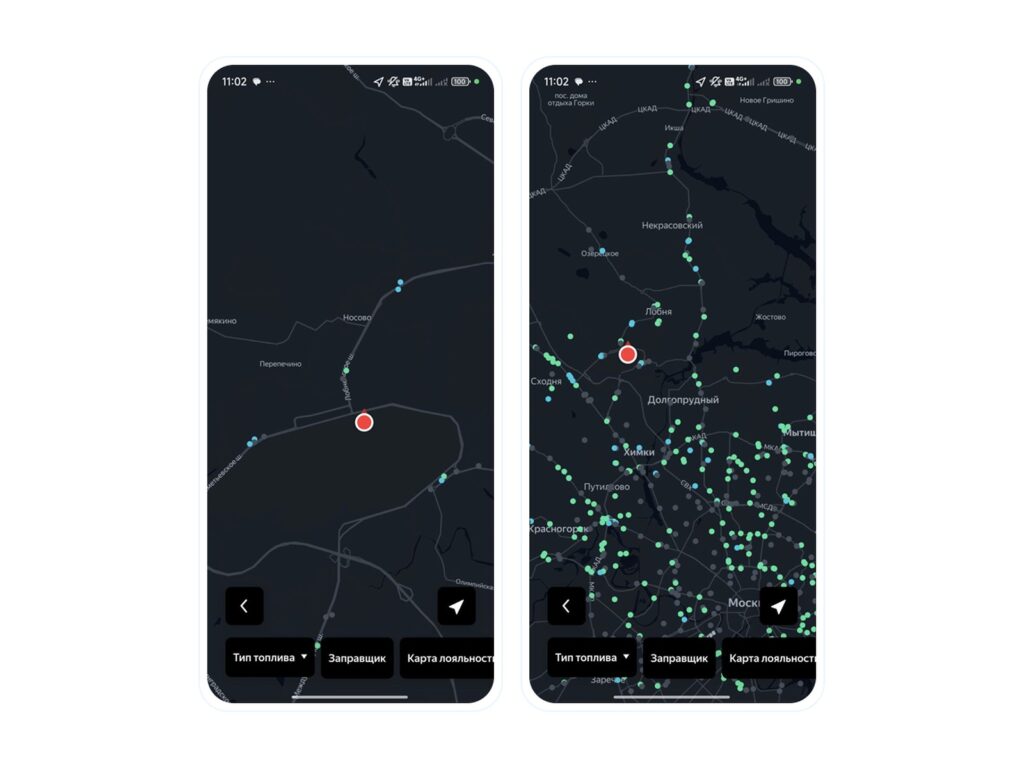
- Enable location on your smartphone and tap the “Refuel” button — nearby gas stations will appear on the map.
- Tap on the desired gas station to see prices and get a promo code.
- After selecting a station, tap “Let’s Go” — the app will build a route like a navigator.
Yandex Fuel is great for finding gas stations
To pay for fuel, you need to link a bank card once. If you don’t have access to Google Play, we’ve covered ways to install apps without the store in our guide on installing apps without Google Play.
How to Refuel and Pay for Fuel Through Yandex Fuel
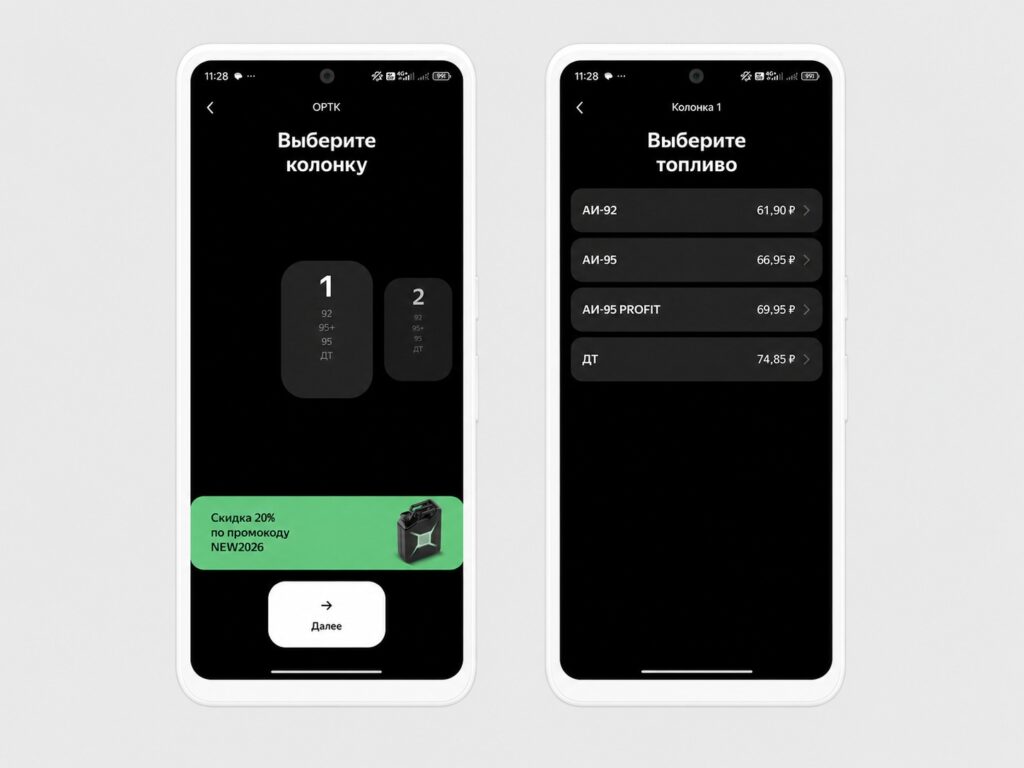
The refueling itself takes a couple of minutes. You need to pull up to a gas station connected to the service — with the navigator turned on, the system will automatically detect your location and find the right station. Then you select the pump and fuel type by voice through Alice or by tapping on the screen.
You can refuel right through the app
After that, the money is automatically deducted from your card, and a gas station attendant will come and refuel your car. There are no paper receipts — everything is stored in the app electronically.
If you need a full tank, after selecting the pump and fuel type, tap the “Full Tank” button and specify the volume — from 5 to 600 liters (the default is 60 liters). An important payment limitation: only cards from Russian banks are accepted.
Yandex Points and Loyalty Cards in Yandex Fuel
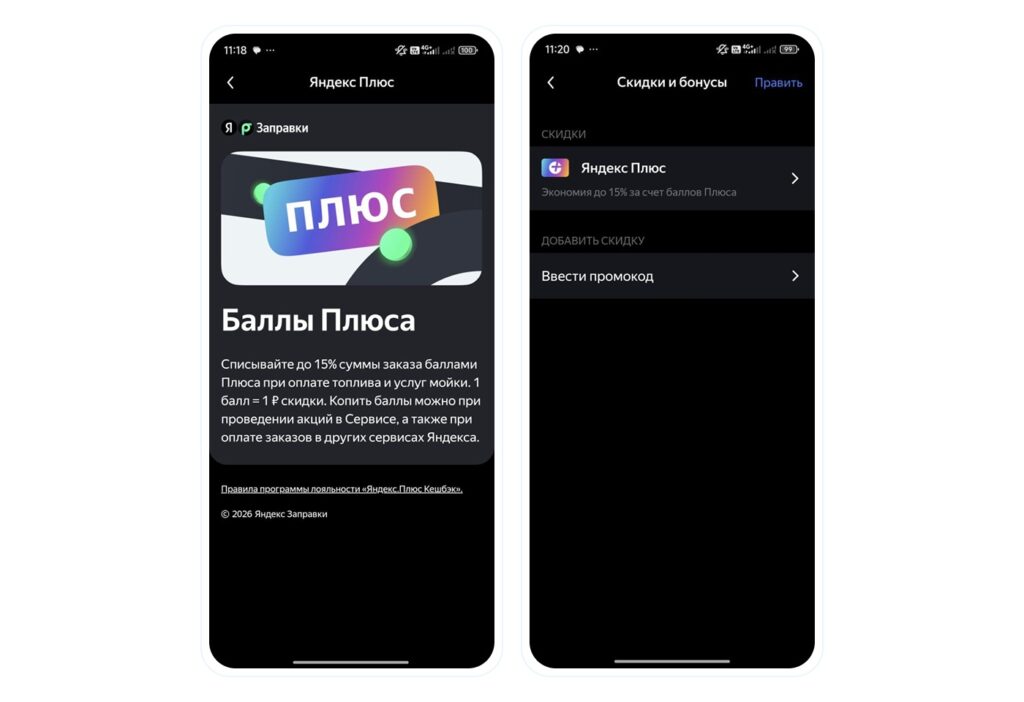
The main idea here is simple: without promo codes and discounts, the service doesn’t offer automatic savings. Promo codes appear when you tap on a specific gas station, different stations have their own deals, and some discounts apply to all orders — for example, a discount on your first order. All current offers are collected in the “Discounts and Bonuses” section.
The app has a loyalty program
There are several ways to save, and they can be combined:
- Promo codes and deals from specific gas stations — check them before each refueling.
- Yandex Plus subscription — part of the cost can be paid with Plus points.
- Loyalty cards from fuel brands — points accumulate just like with a regular purchase and add to the service’s discounts.
- Multiple bank cards — you can choose the one with increased cashback for the “Gas Stations” category.
To add a bonus card, open the “Loyalty Cards” section on the main screen and allow the app access to your location. After that, a list of gas stations whose cards can be linked will appear. Points accumulated on the card can be spent on fuel within the same chain — this is an additional discount on top of the main offers.
Is It Worth Using Yandex Fuel in 2026
The service genuinely saves time and nerves in clear scenarios even beyond the fuel shortage in Russia: bad weather, wanting to stay in the car and avoid contact with attendants, driving along familiar gas station chains. Transparency is also a plus — all payments and saved amounts are visible in the app, and paper receipts don’t get lost.
That said, don’t expect discounts “just because”: savings are tied to promo codes, Plus, and loyalty cards, and without them you pay the regular price. If you always refuel at the same gas station with already configured payment and your own loyalty program, a separate app might not be necessary.


