Recently, the gasoline situation in the country has really left much to be desired. Although queues in many regions have been reduced by introducing limits on fuel sales per person, many gas stations are closing unexpectedly. That’s why car owners would like to know — before heading out to a gas station — whether the specific type of fuel they need is available at the station they’re heading to. After all, it’s unpleasant to drive a dozen kilometers only to find out that the 100-octane fuel you need simply isn’t available. The GdeBenz map can help you with this, allowing you to find all the necessary information right on your iPhone.
Looking for a gas station that has fuel? With GdeBenz it will be easier
What Is GdeBENZ and How the Gas Station Map Works
GdeBENZ is a simple web map on the website gdebenz.ru that works on a crowdsourcing model. That means any driver can report the situation at a specific gas station: whether there’s gasoline, which fuel grades are available, how long the queue is — or whether it’s pointless to go there at all.
One person arrives at a gas station and reports that gasoline is available. Another confirms the information. A third specifies the grade and queue size. After that, dozens of other drivers know where it’s worth going and where it isn’t. The more people use the map, the more accurate it becomes for everyone.
The creators of the service report that the GdeBENZ audience has surpassed one million people. Drivers have left more than 100,000 markers and added over 2,000 gas stations that were not originally on the map.
How to Add GdeBENZ to Your iPhone Home Screen
If you use an iPhone, it’s convenient to add the web map to your home screen so you don’t have to search for the site every time. This is done through Safari:
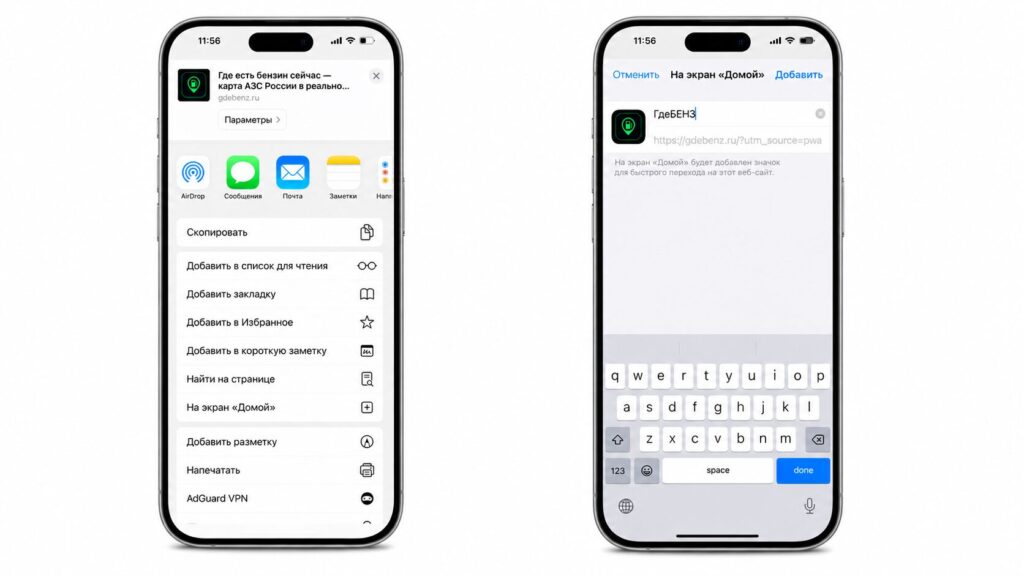
If you add the site to your home screen, it will work as a web app without the Safari interface
- Open gdebenz.ru in the Safari browser
- Tap the “Share” button — the square with an upward arrow at the bottom of the screen
- Scroll through the menu and select “Add to Home Screen”
- Optionally change the name and tap “Add”
The map can be saved to your iPhone home screen and opened like a regular app
After that, the icon will appear on your home screen, and the map will open in full-screen mode, without the address bar — almost like a real app. It’s free and doesn’t take up storage space like a full-fledged application.
It’s also worth keeping in mind the general principle: check how recent a marker is before heading out. Data that’s several hours old may no longer reflect reality, especially during periods of high demand at gas stations.
How to Tell Which Gas Stations Have Fuel Right Now
The main value of the service is the freshness of data. The map shows when the last marker was left and how many drivers confirmed it. There’s a filter for gas stations where fuel is available, and a filter by specific fuel grades — this is convenient if you need, for example, specifically 95-octane or 98-octane.
I personally live in Saransk, so initially I didn’t really believe the service had reached us too.
But no — it turned out that by now drivers are actively using it and sharing information about gas stations. Perhaps updates don’t come as frequently as one would like: new data for some stations arrives after 10-12 hours. But for most gas stations, information is updated quite quickly. So you can trust the map.
To find the nearest working gas station, the logic is as follows:
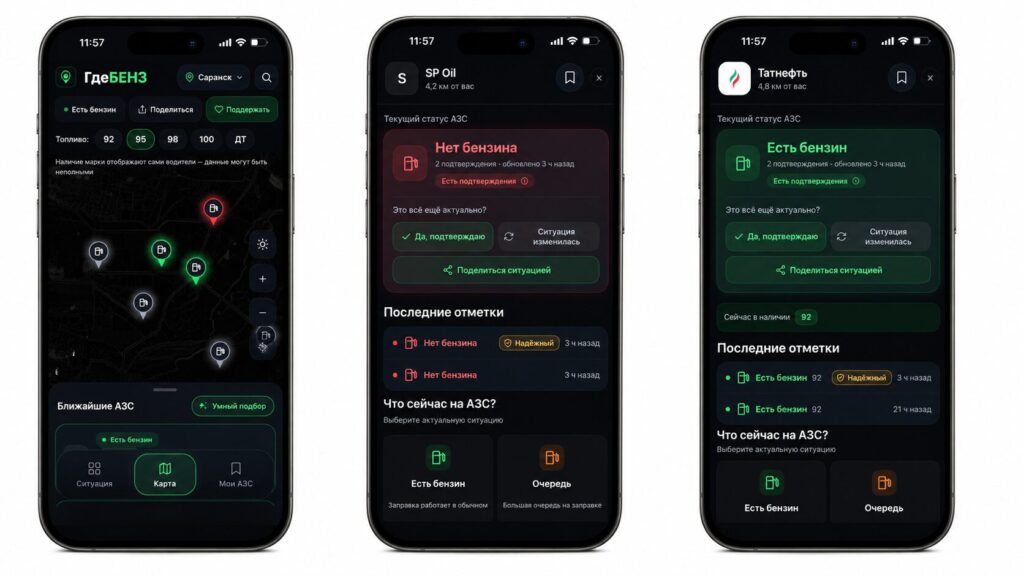
Here you can see where 95-octane is available and where it isn’t
- Open the map and allow access to your location
- Enable the filter for gas stations that have fuel
- If needed, select the desired fuel grade
- Check how recent the marker is and the number of confirmations
- Build a route from your current location
It’s important to understand the limitation: the situation at a gas station changes very quickly, and no single marker should be considered eternal truth. But when the same information is confirmed by dozens or hundreds of drivers, the picture becomes clearer than guessing blindly.
What Features Have Already Been Added to the Service
The service is being improved literally every hour. At the time of publication, GdeBENZ already has:
- Filter by fuel grades
- Ability to suggest a missing gas station
- Confirmation of information relevance
- Route building from current location
- A trust system for markers
- Rewards for helping develop the map
- A full-featured version for computers
It’s worth noting separately that users have added GdeBENZ to their phone’s home screen more than 80,000 times to open it like an app. This is where the logic for iPhone owners comes in handy: the site can be saved as an icon on the screen and used almost like a regular app, without installing from the App Store.
Who Will Find the GdeBENZ Gas Station Map Useful
The service is genuinely useful if you drive regularly and have encountered situations where a gas station doesn’t have the fuel grade you need or has a huge queue. The main savings here are time and fuel itself: you don’t waste your remaining fuel on a pointless trip across the city.
For iPhone owners and other smartphone users, this is a convenient free tool that doesn’t need to be installed from an app store — just open the website or add its icon to your home screen. With the caveat that the project is young and sometimes lags, it’s definitely worth trying — especially during periods when the fuel situation is unstable.


