I’ve already explained how to install the SberBank app on Android — the process is straightforward. But any installed app can be deleted, and the question “what happens to the money” comes up surprisingly often. The answer isn’t as obvious as it might seem at first glance. I’ll break down step by step what happens if you delete SberBank, saving the most important point for last.
Should you worry about your savings in Sber?
What Is Stored in the SberBank App
Before you tap “Delete,” it’s helpful to understand what exactly is inside the SberBank app. Many people think they’re just removing an icon. In reality, the following disappears along with the app:
- saved PIN code and biometric login settings;
- data about linked cards in the device wallet;
- cached transaction history (the one displayed without internet);
- transfer templates and saved recipients;
- notification settings and interface personalization.
It’s also worth mentioning SberPrime. Many people activate a promotional period when installing the app and then forget about it. After deleting the app, the subscription is not automatically canceled (charges continue to be deducted). Before deleting, it’s worth checking whether there are any active subscriptions and learning how to cancel SberPrime so you don’t keep paying for it after deletion.
When It’s Dangerous to Delete SberBank on Android
Deleting the app can be risky
There are several situations when deleting SberBank on your phone can create real problems. Not a catastrophe, but definitely inconveniences. Risky scenarios:
- an unfinished transfer or pending request (if the transaction is still being processed, tracking its status without the app will be difficult);
- an active loan or mortgage (the app is convenient for monitoring the payment schedule and receiving deduction notifications);
- a forgotten Sber ID password (without the app, restoring access to your account is significantly harder and takes longer);
- a card linked to other services via SberPay (after deleting the app, these links may break);
- an active SberPrime promotional period (deletion doesn’t cancel the subscription, and money will be charged on the scheduled date).
It’s also worth knowing about paid notifications. How to disable SberBank notifications that cost 99 rubles has been covered separately. It explains that SMS notifications at Sber are paid, and after deleting the app, they are not automatically disabled. Charges will continue.
What Happens If You Delete SberBank on Android
Deleting the app can actually lead to consequences
I’ll break it down step by step — from the obvious to the most important, so you have no remaining questions:
- Auto-payments and subscriptions. This is the most unpleasant part. All auto-payments — for utilities, internet, phone, streaming services — are linked to the bank account, not the app. After deleting the SberBank Online app, they will continue to work normally. Money will be deducted on the scheduled dates. Tracking and canceling them without the app is only possible through the website online.sberbank.ru or at a bank branch (which is significantly less convenient).
- Transaction history and documents. The entire history of money transfers in SberBank and other transactions is stored on the bank’s servers — not in the app. After deleting and reinstalling, the history won’t disappear. However, receipts and statements that you saved locally on your device will be lost along with the app. Documents you haven’t downloaded yet — make sure to do so before deleting.
- Account access. Money in the SberBank app — this is a common misconception. Money is stored not in the app but in bank accounts at Sber. Accounts exist regardless of whether the app is installed or not. Deleting the app means removing the tool for accessing the account, not the account itself. SberBank doesn’t lose money under any app deletion scenario.
What happens to the money? Nothing. Absolutely nothing. Money in SberBank will remain in the accounts in full. SberBank withdraws money only by your command — deleting the app is not such a command. Access to your money is preserved through the website, through another smartphone after reinstalling, or through an ATM.
Should You Delete the SberBank App
You won’t lose your money, but it’s still not worth deleting the app prematurely
It makes sense to delete if:
- you’ve switched to another bank and no longer use Sber;
- the app takes up a lot of space and you rarely use it;
- you’re concerned about security (for example, you lost your phone and want to delete the app remotely).
You shouldn’t delete if:
- you have an active loan or mortgage with Sber;
- you have auto-payments that are important to monitor;
- you regularly receive notifications about incoming payments to your card.
If the reason for deleting is annoying notifications or an inconvenient interface, this can be resolved through settings. How to conveniently set up the SberBank app has been covered separately. Sometimes five minutes of adjusting settings is enough to make the app stop being annoying.
How to Properly Delete SberBank on Android
If the decision to delete SberBank Online has been made, follow this checklist. It will take 10-15 minutes and will protect you from unpleasant surprises. Before deleting:
- Open the app and check the “Subscriptions” section — disable all active subscriptions, including SberPrime.
- Go to “Payments — Auto-payments” and write down or cancel all active automatic charges.
- Download the receipts and statements you need — after deletion, local files will be lost.
- Remember or write down your Sber ID login — without it, restoring access will be harder.
- Make sure there are no unfinished transactions or active requests.
The deletion itself:
- Press and hold the SberBank icon on the home screen.
- Select “Delete” or drag it to the trash.
- Confirm the deletion.
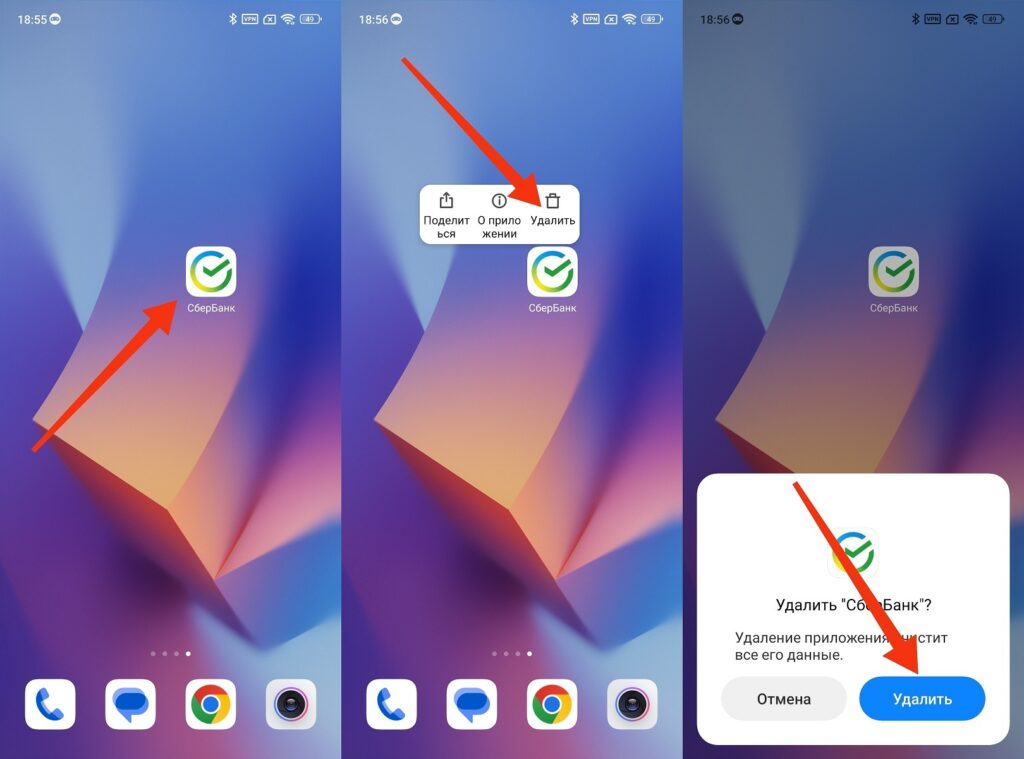
SberBank is deleted just like any other app
Or through settings: “Settings — Apps — SberBank — Delete.” The second method is more reliable (it guarantees deletion of both the app itself and its cache). You can delete SberBank on Android at any time and also reinstall it at any time from Google Play or RuStore.


