After Cloudflare labeled MAX as spyware (even though the label only lasted a day), many people wondered: should they just delete it to be safe? A reasonable question. But it immediately raises another one: what happens to your MAX chats if you delete the app? Will all messages disappear, or are they saved somewhere? I’ll break it down step by step, saving the main answer for last.
Where do messages go after deleting the app?
Where MAX Chats Are Stored
To understand what happens to your MAX chats after deleting the app, you first need to understand where they actually live. Many people think messages are stored on the phone (inside the app). But that’s not the case.
Your chats live on VK's servers, not on your phone.
The national messenger MAX uses cloud architecture: all messages, chat history, and media files are stored on VK’s servers. There’s one important nuance here that concerns many people. I covered whether MAX reads your chats in a separate article. In short: regular chats don’t use end-to-end encryption, which means theoretically there is access to your conversations. But that’s a separate topic. Let’s get back to the main question.
What Disappears from Your Phone After Deleting MAX
When you delete the MAX app from Android, the following disappears from your phone:
- the app interface and code itself;
- cache (temporary files the app created for faster performance);
- media files that were downloaded locally (photos, videos, voice messages, documents from chats);
- app settings: PIN code, biometrics, theme;
- notifications (new messages will stop arriving).
That’s everything that disappears. Notice: actual messages and chat history are not on this list. But there’s one important nuance I’ll cover in the next section.
What Remains After Deleting MAX on Android
Regular MAX chats (personal chats, group chats, channels) won’t go anywhere. All messages from the “deleted app” actually remain on VK’s servers in full.
No matter what, MAX leaves traces
After reinstalling MAX on your phone and logging into the same account, all your history will come back.
When MAX Chats Are Actually Deleted
Here are the scenarios when data can actually be lost — and you should pay attention:
- Deleting your MAX account. This is a fundamentally different action that shouldn’t be confused with deleting the app. We covered how to delete a MAX account separately. After deleting your profile, all chat history, contacts, and media files are permanently removed from VK’s servers. Recovery will be impossible.
- Media file retention period expiration. Messages themselves are stored indefinitely, but media files (photos, videos, documents) may be deleted from servers after some time if they weren’t saved locally. VK doesn’t publish the exact timeframe.
- Logging out without syncing. If some messages hadn’t synced with the server at the moment of logging out, they may be lost. This is a rare scenario but possible with unstable internet.
So, MAX chats are lost only in three cases: you deleted your account, the media file retention period expired, or you manually deleted messages within a chat. In all other situations, including removing the app itself, deleted MAX chats don’t disappear — they’re waiting for you on VK’s servers.
How to Restore MAX Chats After Deleting the App
If you deleted the MAX app and want to regain access to your chats, there’s good news. It takes just a few minutes:
- Open Google Play or RuStore and install MAX again.
- Launch the app and tap “Log in.”
- Enter the phone number linked to your account.
- Confirm login via SMS code or a code from another device.
- Wait for synchronization (your MAX message history will load automatically).
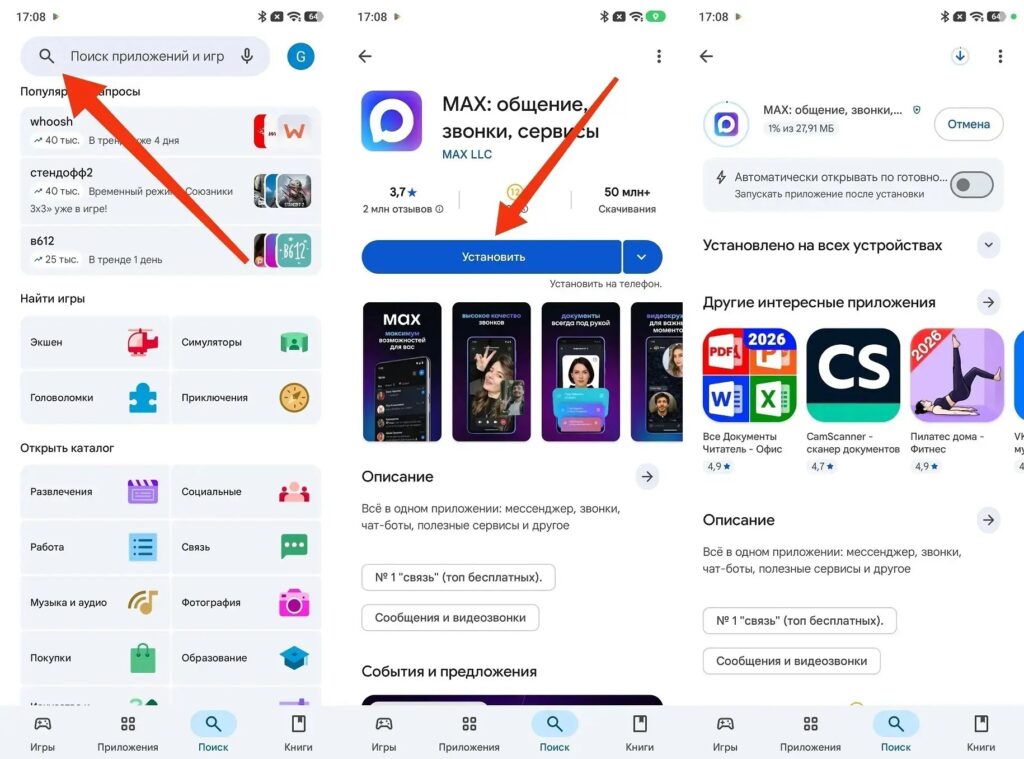
After reinstalling, everything comes back
Restoring MAX chats after deleting the app is only possible if the account wasn’t deleted. If the profile is gone, the data cannot be recovered. A separate note about media files: even if you can fully restore MAX messages, previously downloaded photos and videos that were stored locally won’t come back after deleting the app — they were in the downloads folder on your phone, not in the cloud. The previews in chats will still be visible, but you’ll need to download them again to view them.
Reinstalled MAX and logged into the same account — all chats are back.
Read about whether you should delete MAX from your Android phone in a separate article on our site.


