MAX messenger is actively developing, and a major update in 2026 promises new features. But many things are already working right now — including the activity status system. You wrote to someone, there’s no reply, and their profile shows a mysterious “Was recently online” or “Was online a long time ago” instead of an exact time. What this means, whether you can find out more precisely, and how to hide your own visit time — I’ll break it all down step by step.

Understanding visit time in MAX
Visit Time in MAX — What Is It
Visit time in MAX is information about when a user last opened the messenger. Unlike some other apps, the MAX app doesn’t show the exact time to everyone — this is an intentional privacy protection.
The logic behind statuses works as follows:
- if you’re in the person’s contacts — you’ll most likely see the exact last visit time in MAX;
- if you’re not in their contacts — you’ll only see a vague status: “Was recently online” or “Was online a long time ago”;
“Was recently online” means the person opened the messenger anywhere from a few minutes to a few hours ago. “Was online a long time ago” — from a few days to a few weeks. MAX intentionally doesn’t give more precise information. An interesting nuance regarding privacy: MAX on Android can be concerning in terms of data collection. But visit time by itself is harmless, though combined with other data it paints a picture of user activity.
How to Check Visit Time in MAX
Visit time of contacts in MAX is easy to check — you just need to open the person’s profile:
- Open the MAX app on Android.
- Go to the chat with the person you need.
- Tap on the contact’s name or avatar at the top of the screen — their profile will open.
- Below the name, the status is displayed: exact time, “Was recently online,” “Was online a long time ago,” or nothing — depending on the person’s privacy settings.

Some users choose to make their exact time visible
The exact login time in MAX is visible only when two conditions are met simultaneously: you are added to this person’s contacts, and they haven’t hidden their time from everyone. If even one condition isn’t met — you’ll only see a vague status or nothing at all. Finding out when a person was in MAX more precisely than the interface allows is technically impossible — MAX doesn’t provide such an option.
What to Do If Visit Time Isn’t Visible in MAX
If visit time isn’t visible in MAX for a specific person — the reason is one of three:
- you’re not added to their contacts — they see you as a stranger and only show a vague status;
- the person has hidden their visit time from everyone — their privacy settings are set to “Nobody”;
- the person has deleted their account or hasn’t logged in for a long time — in this case, the status may not be displayed at all.
The only working way to get access to the exact time is to ask the person to add you to their contacts. If they do and haven’t closed their time to everyone — you’ll start seeing the exact status. There is no technical workaround for this restriction.
How to Hide Visit Time in MAX
Hiding visit time in MAX can be done in the privacy settings. It will take less than a minute:
- Open the MAX app on Android.
- Go to the “Profile” section (icon in the bottom right corner).
- Tap on the settings gear icon in the top right corner.
- Find the “Privacy” or “Security” section.
- Select “See online status” or “Last visit time.”
- Choose the desired option from the available ones.
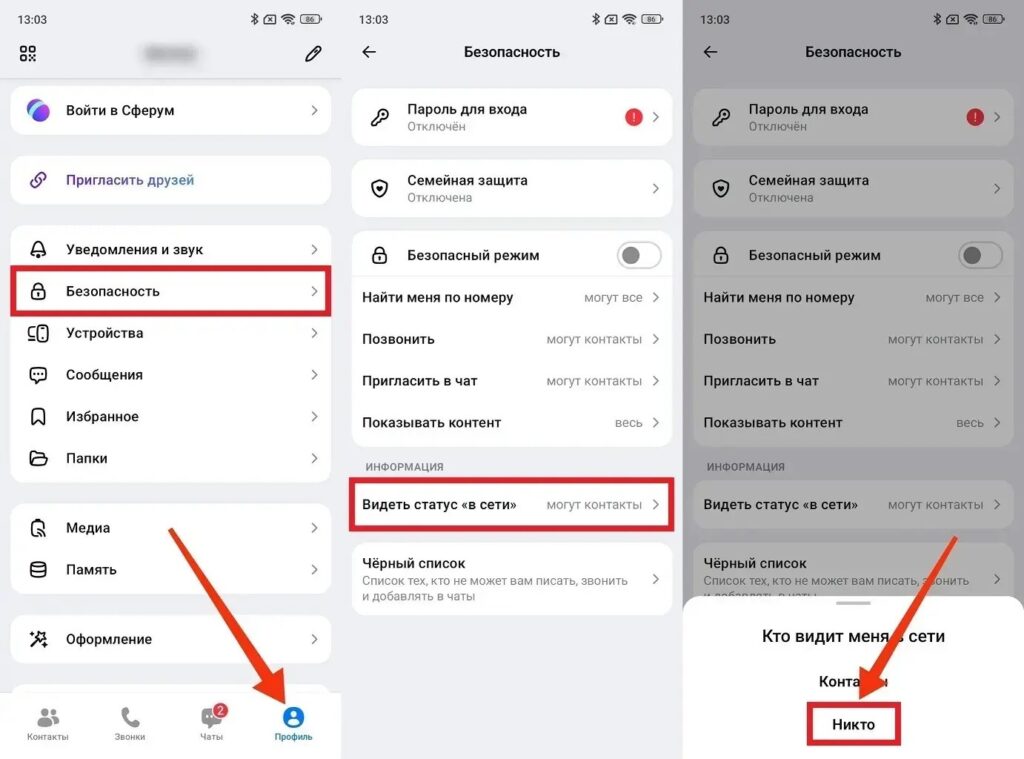
Visit time in MAX can be hidden from everyone
Available options:
- “Everyone” — exact time is visible to all MAX users;
- “Contacts” — exact time is visible only to those who are in your phone book. Everyone else sees “Was recently online” or “Was online a long time ago”;
After changing the settings, they take effect immediately (no need to restart the app). Removing visit time in MAX this way is a completely official and safe feature.


