Apple borrowed several features from Android in iOS 27 that have long been familiar to Android users. All of this has been working in the Google ecosystem for years, and now it’s coming to iPhone. We break down exactly what Apple copied and how useful these features actually are. Let’s be clear right away: this isn’t a story about Apple “caving in.” Borrowing successful ideas is a normal process that works both ways: Google also frequently takes good things from iOS. But specifically in iOS 27, the list of borrowings from Android turned out to be impressive, and for most items, the source honestly calls things what they are.
Keep in mind: many features that are only now appearing in iOS have been available on Android for years
Separate Volume Controls in iOS 27 — Something Android Has Had for a Long Time
In iOS 27, Apple will allow users to separately adjust the volume for calls, system sounds, and alarms without tying them to each other. On Android, this flexibility has been available for several years, and Apple has only caught up now. It’s actually strange, but AppleInsider.ru iOS expert Kirill Pirozhenko called this the best iPhone innovation in recent years.
Yes, if you compare directly, the difference in convenience is still in Google’s favor. On Android, volume controls are displayed in a dropdown panel right when you press the volume button, while on iPhone you’ll have to go into the settings menu for these adjustments. Nevertheless, if you want a quiet alarm but loud notifications — you can now configure this on iPhone too, just less quickly.
Clipboard Suggestions on the iPhone Keyboard

On Android, you can paste not only text this way, but also screenshots
On Android, when you copy text or take a screenshot, it automatically appears as a suggestion on the keyboard panel in any input field. It’s a small thing, but it genuinely speeds up your workflow: no need to long-press and look for the “Paste” button.
Apple is adding something similar to the iOS 27 keyboard: recently copied text or a screenshot will pop up as a quick suggestion. This will be especially useful for those who frequently transfer chunks of text and images between apps. On Android, this feature has been around so long that Apple could have drawn inspiration from it years ago.
Custom Cards and Passes in Apple Wallet
Google Wallet has long turned into a full-fledged digital wallet: bank cards, loyalty cards, flight tickets, digital documents. A separate advantage is the ability to create custom passes for any purpose: from a gym membership to a student ID.
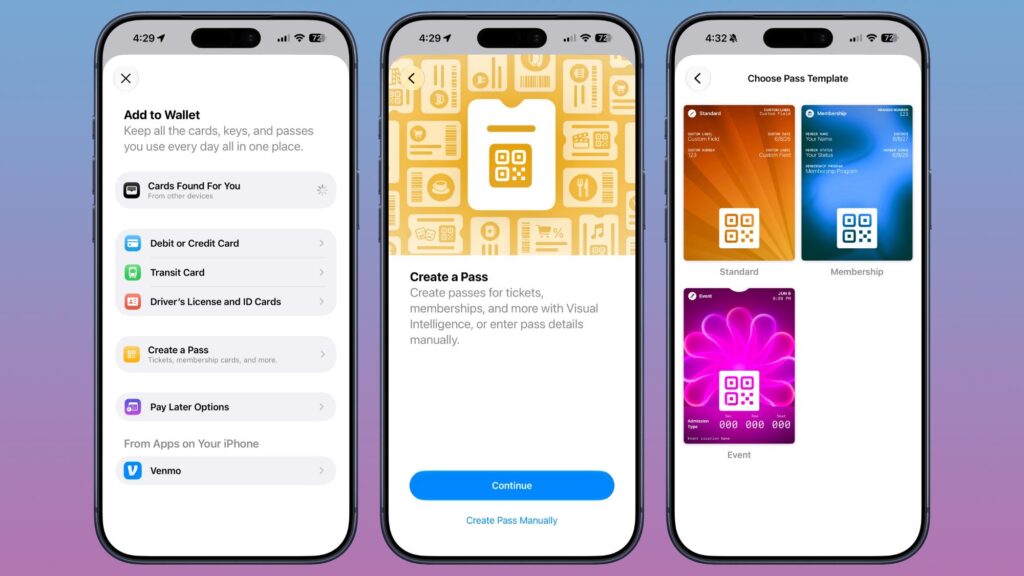
On Android, this feature has been around for 7, if not 10 years
In iOS 27, the Wallet app on iPhone becomes just as universal. You can create your own pass from a physical card or ticket — by photographing it or entering the data manually. If you live heavily in Wallet on iPhone, this addition will prove genuinely practical.
Shared Albums and Live Captions
Google Photos has long made shared access to photos simple: multiple people can add photos to a shared album, everything is stored in full quality and works across all platforms — iOS, Android, Mac, and in the browser. But iCloud still had limitations with this.
However, iOS 27 eliminates these shared album limitations in iCloud, largely replicating the logic of Google Photos. For a company that prides itself on user experience, years of photo-sharing problems looked odd — and it’s good they’re finally fixing them.
The second important borrowing is live captions for any video. Android can generate captions in real time even for videos without built-in subtitles. iOS 27 gets a similar feature: iPhone will be able to create captions for any video. This is convenient in noisy places or without headphones and makes content more accessible for people with hearing impairments.
AI Features in Photos: Reframe and Improved Cleanup
Google in recent years has been actively packing Google Photos with AI-based features. Magic Editor can remove unwanted objects, reframe a shot, and extend the background even after the photo was taken.
Apple brings something similar to the Photos app in iOS 27. The Reframe feature will allow you to move the main subject within the frame or extend the background with generative fill. Separately interesting is that Apple is using the Gemini AI model to improve the Cleanup tool — it should more accurately remove unwanted objects from photos.

Reframe and Cleanup in iOS 27: composition editing and removing unwanted elements
Who Needs the New iOS 27 Features and Is It Worth Updating
If you only use Android, no action is needed — most of these features have been available to you for a long time, and in some cases are implemented more conveniently, like separate volume controls right from the button.
But for those who have both an iPhone and an Android, updating to iOS 27 will noticeably smooth the transition between devices: shared albums will work properly, the clipboard will become more convenient, and live captions will appear. The main takeaway is simple — good ideas don’t belong to one platform, and many headline-grabbing iOS 27 innovations have been living on Android for several years already.