Free hairstyle try-on apps for Android fall into two very different camps: some use a neural network that erases your real hair and redraws a new cut on your selfie, while others simply paste a flat two-dimensional picture over your head. The source author installed three popular apps, ran selfies through each, and reports that this difference determines both how realistic the result looks and how much time you spend preparing a photo. YouCam Makeup delivered the most convincing renders but caps free use at five try-ons a day; FaceApp also generates well but unlocks only two haircut filters without payment; and “AI Stylist” offers more than 600 styles for free, but as rough overlays rather than realistic renders.

Three hairstyle try-on apps on a smartphone and tablet
What you need to know
- YouCam Makeup uses a neural network to remove your real hair and regenerate the chosen cut with shading, volume and strand texture, but the free tier allows only five try-ons per day and keeps all styles with bangs behind a paywall.
- FaceApp’s free version unlocks just two haircut filters (“Long” and “Bob”), two colors (“Blonde” and “Brunette”) and a few eyeliner options; bangs, afro curls, balayage and neon shades require Pro.
- “AI Stylist” claims more than 600 hairstyles and is fully free, but it overlays a flat 2D template rather than rendering hair, and it shows frequent, lengthy ads.
- For the overlay approach, the source author advises slicking long hair back or hiding it under a cap before shooting, or your own strands will stick out from under short-cut templates.
YouCam Makeup: the most realistic renders, five try-ons a day
According to the source author, the most honest result came from YouCam Makeup. The app runs a neural network that assesses face shape, forehead height and cheekbone line, then removes the real hair from the selfie and generates the selected cut from scratch, complete with light and shadow, volume and strand texture. The author describes the output as a believable image rather than a cut-and-paste appliqué.
The free selection of cuts is small but varied, extending to a pink pixie. The limitation is strict: five try-ons per day, and every style with bangs sits only in the paid catalog. Anyone wanting to cycle through a dozen cuts in one evening will either have to pay or spread the experiment across several days.
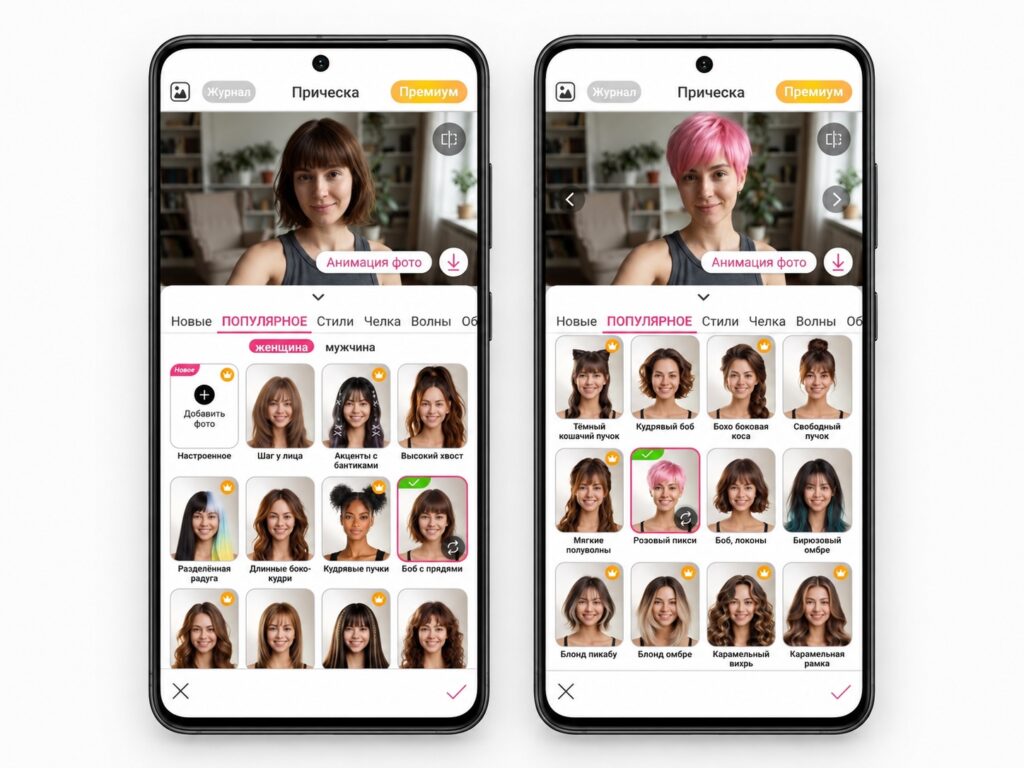
Hairstyles in the YouCam Makeup app

Beyond hair, the app includes makeup tools: users can enlarge lips, pick a lipstick, change eyebrow shape and draw eyeliner.
FaceApp: good AI generation, but only two free haircut filters
FaceApp is also built on a neural network, and the source author rates its generation quality as good. The problem is the free version: of a large catalog, only two basic haircut filters are open without purchase, “Long” and “Bob”; colors are limited to “Blonde” and “Brunette”; and makeup offers just a few eyeliner styles. Bangs, afro curls, balayage and neon shades are available exclusively in Pro mode.
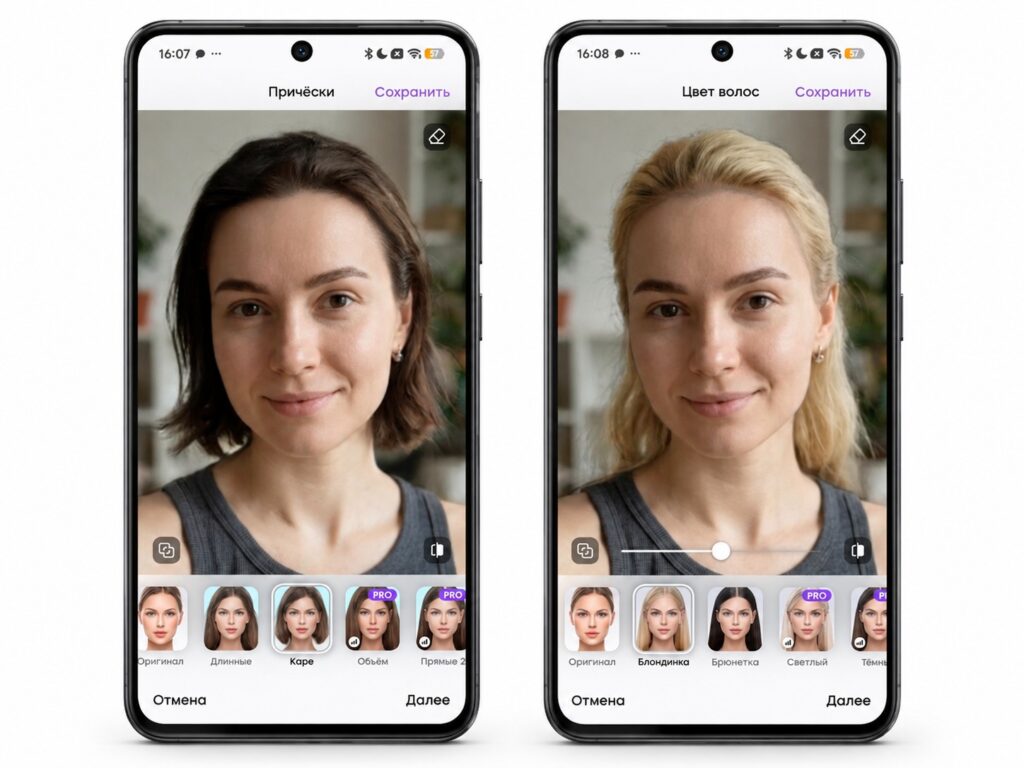
The FaceApp interface
That sounds meager, but the author notes it covers the two most common questions: whether a short bob would suit you and whether going blonde is worth it, both answerable without spending anything. Anything more exotic, such as asymmetric cuts or vivid colors, has to be tested elsewhere.

“AI Stylist”: 600+ styles that work like a flat sticker
“AI Stylist” competes on quantity: its catalog claims more than 600 hairstyles, from a classic bob to asymmetric creative cuts. But there is no neural network here that removes your hair. The app simply lays the chosen hairstyle over your head as a two-dimensional image, and the template can be dragged around the photo to sit more evenly.
Preparation tip from the source author: this is the main catch. If you have long hair and want to try an ultra-short bob, your own strands will poke out from under the template. Before shooting, hair needs to be slicked smoothly back or hidden entirely under a cap, otherwise the picture looks absurd. Even with perfect preparation, the author cautions not to expect miracles: this is a rough approximation, not a realistic render.
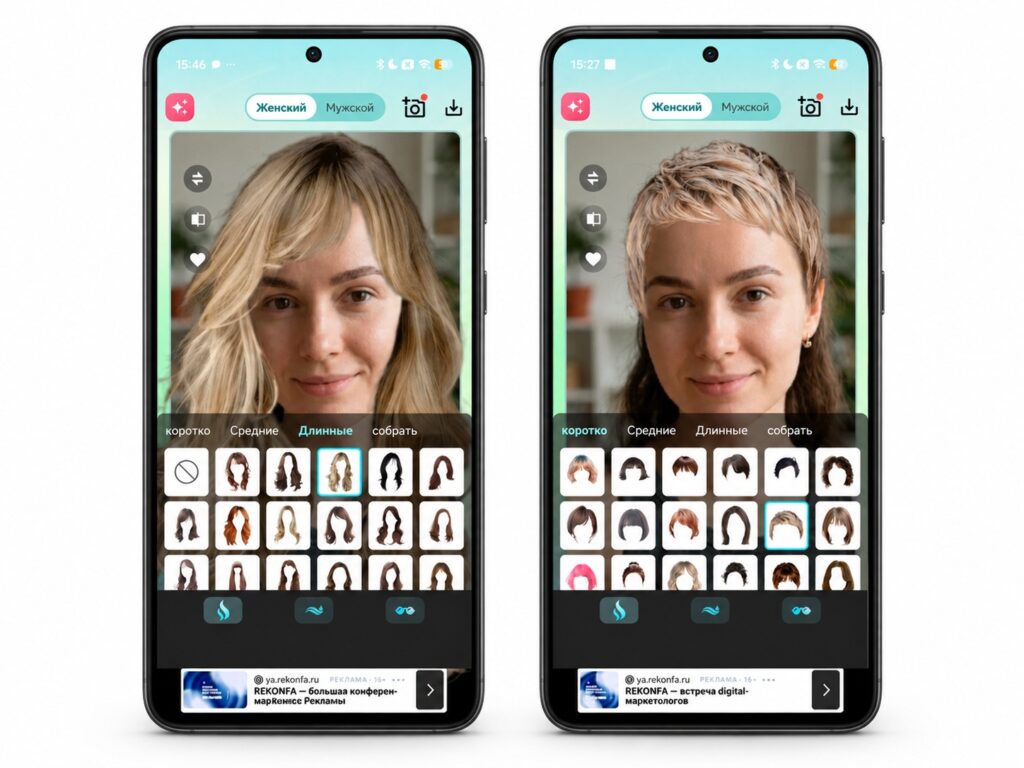
Features of the “AI Stylist” app
Pros and cons: the app is completely free and includes an entertainment tab with filters such as “Age Change,” which shows what you might look like at 60. On the downside, ads appear often and run long, which the source author found more irritating than YouCam Makeup’s five-try-on daily limit.
Which one to pick
Based on the source author’s testing, the choice comes down to what you want from the result. YouCam Makeup is the option for realistic previews if you can live with five try-ons a day and no free bangs. FaceApp is enough to answer the two basic questions of short bob versus long hair and blonde versus brunette. “AI Stylist” is the pick for browsing a huge range of shapes quickly, provided you treat the overlays as rough sketches and prepare your hair before the photo. These impressions come from one author’s hands-on trial, so app catalogs, free tiers and daily limits may differ by region or change over time.