WhatsApp backups, which previously could only be restored through the messenger app itself, are now managed directly from your phone’s settings. This is the main useful change in the June Google updates for Android. In addition, password transfer between managers, AI search in Google Play, and a notable redesign of app cards have been introduced. You don’t need to install these updates manually — they arrive automatically, without any user intervention.
What’s new in the June Google System updates for Android 2026: WhatsApp backups
Every month Google releases Google System Updates — a set of service updates that arrive separately from full firmware updates. They affect not only smartphones but also tablets, Wear OS watches, Android TV and Google TV televisions, and Android Auto. Some changes are visible immediately, while others roll out over months. But today we got something significant.
WhatsApp Backups Are Now in Android Settings
The most noticeable change for everyday users concerns the messenger. WhatsApp backups can now be managed through device settings, not just within the app itself. Previously, everything related to chat backups lived exclusively in WhatsApp’s settings section.
In practice, this means the location where your chat copies and media are stored becomes part of the overall device management system. This is convenient for those who want to see and control backups in one place alongside other Google data. There’s no talk of a complete backup migration or format change. It’s specifically about management through system settings.
Naturally, this feature is only available for smartphones. It’s not on watches, TVs, or Android Auto, nor is it needed there. But if you store important conversations, this is a good reason to double-check that a backup is actually being created and where it’s being saved.
Password Transfer Between Google Password Manager and Other Services
Another practical change arrived in early June. Passwords and passkeys can now be imported and exported between Google’s password manager and third-party managers. This works through a unified industry standard for credential exchange.
To translate from technical language: previously, migrating from one password vault to another often turned into a nightmare involving exports to insecure text files. Now the transfer becomes more direct and secure. This is especially important for those who use a separate password manager while keeping some data in the Google ecosystem.
Passkeys, in case you’re not aware, are already gradually replacing regular passwords and allow you to sign into services without typing characters, using fingerprint or face recognition instead. And the ability to transfer them between services removes one of the main fears — that you’ll end up locked into a single system.
AI Search Ask Play and New Card Design in Google Play
The app store also received its share of changes. A new “Ask Play” button has appeared in the Google Play search bar — it opens a full-screen conversational AI search when you enter a query. The idea is to search for apps not by exact name but by describing what you need.
Along with this, Google promises faster real-time results and flexible response formats. How much more convenient this actually is compared to traditional search remains to be seen in practice — for now, it’s yet another attempt to embed AI where a regular list used to work perfectly fine. It’s worth taking bold promises about AI search with a grain of salt.

What’s new in the June Google System updates for Android 2026: WhatsApp backups
Beyond AI, there are more down-to-earth improvements. Discounts and promotion terms are now displayed more clearly throughout the store — you can see the discount amount, the offer itself, and its duration. The purchase and installation windows have been redesigned, and pre-registration with auto-install have been combined into a single process. These are small things, but it’s exactly such small things that shape the daily experience.
Find Hub, Quick Share, and Other Security Changes
Several updates concern device protection and location. Find Hub setup is now offered during the initial phone setup, so you can locate your device remotely before you ever face losing it. This is a sensible move: many people only enable device tracking after the fact, when it’s already too late.
Verification of apps from unverified sources has also been strengthened. Google Play Protect adds additional security checks for apps installed outside the store. For Russia, this is particularly relevant: many people install banking and other apps from third-party sources, and an extra layer of verification certainly doesn’t hurt.
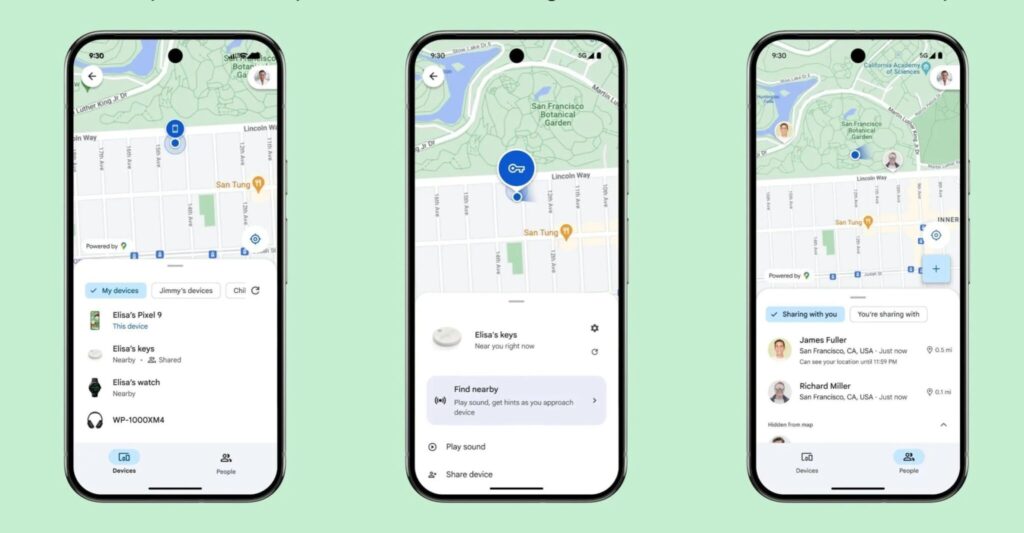
Find Hub is now set up in advance, not after the fact
Among smaller conveniences: when receiving a contact card via Quick Share, you can now immediately see the information from it, and the interface for managing contacts and their synchronization with Google has been improved.
How to Install the June Google System Update for Android 2026
The main thing to remember: updates arrive automatically and in the background, separately from firmware. The appearance of a feature in the changelog doesn’t mean it’s already on your device — the rollout takes from several days to several months.
If you want to check manually, here’s the path:
- Open the “Settings” app
- On Pixel, tap your name at the top to open “Google Services”
- Go to the “All Services” tab
- Open the “Privacy and Security” section
- Select “System Services”
It’s also worth separately checking the version of Google Play Services and Google Play Store through the “About app” section in settings — that’s where the described features arrive.