Two Nintendo Switch 2 games can now run on some high-end Android smartphones without the console or a cloud service. The most notable project, Banana Native, does not fully emulate the console. Instead, it runs a game’s ARM64 code directly on the phone’s processor and translates Nintendo’s graphics commands for Vulkan. On a flagship Snapdragon phone, its developer reports that Donkey Kong Bananza runs at about 30 FPS, with some sections reaching 55–59 FPS, without frame generation. The catch is that only a small number of Android phones qualify, only two games are confirmed to work, and setup differs from conventional emulators.
What you need to know
- The developer has tested Banana Native only on a phone with a Snapdragon 8 Elite Gen 5 and 16 GB of RAM. The stated minimum is Android 13, a Snapdragon chip with Adreno graphics and 12 GB of RAM.
- The developer has confirmed only Donkey Kong Bananza and Mario Kart World, and only specific game builds listed in the project documentation. Both games show graphical errors.
- The app is free on GitHub but contains no games, Nintendo keys or console firmware. It works with the user’s own game copies prepared as folders, not with NSP or XCI images.
- Preparing Donkey Kong Bananza on the phone takes about an hour, according to the developer. Mario Kart World currently runs out of memory during on-phone preparation.
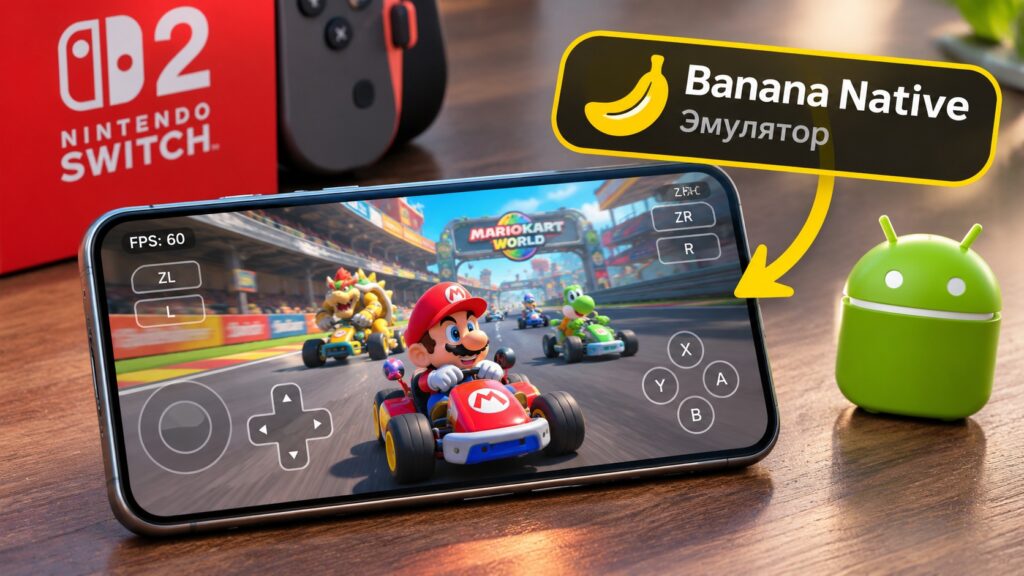
A Nintendo Switch 2 emulator running on Android
Two different approaches to Switch 2 games on Android
Several projects now allow Switch 2 games to run on Android. One is Eden SX2A, an experimental emulator built on other community projects. The more notable one is Banana Native.
Banana Native does not emulate the whole console. It executes the game’s ARM64 code natively on the smartphone’s processor and converts Nintendo’s graphics commands into Vulkan. This approach is what made the Donkey Kong Bananza results possible. Technically, Banana Native is therefore not a full emulator.
Hardware requirements rule out most phones
Check your phone’s specifications before downloading the app. The developer has tested Banana Native only on a device with a Snapdragon 8 Elite Gen 5 and 16 GB of RAM. The stated minimum requirements are:
- Android 13 or later;
- a Snapdragon processor with Adreno graphics;
- at least 12 GB of RAM;
- a Qualcomm graphics driver or a compatible Turnip driver;
- enough free storage for the game files.
The 12 GB figure is only the minimum; 16 GB of RAM is preferable for demanding games. Compatibility with other processors has not been confirmed. You can usually find your phone’s specifications under Settings → About phone. If the processor model is not listed there, an app such as CPU-Z or AIDA64 can show it.
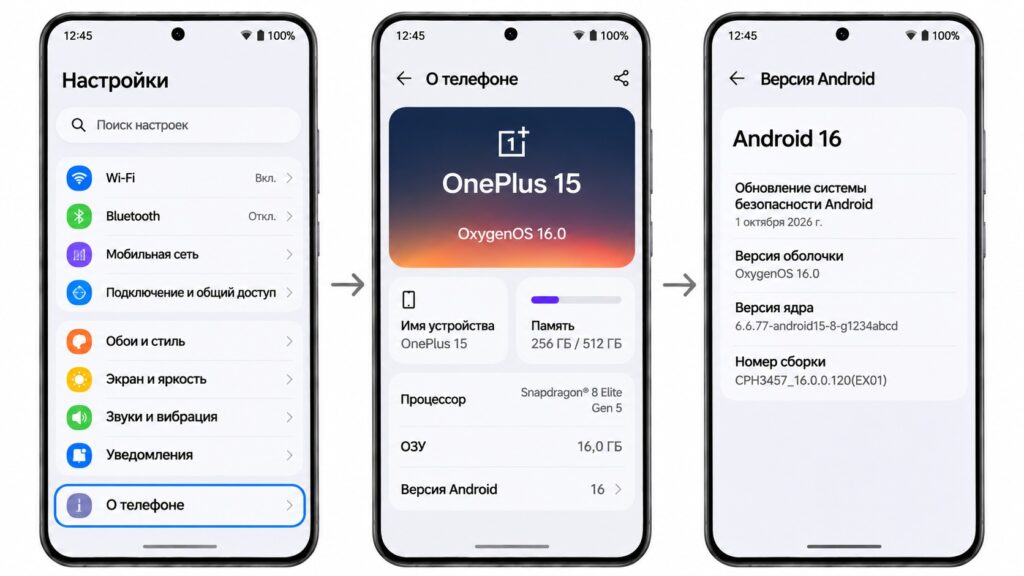
Checking smartphone specifications in Settings

Owners of cheaper phones may be better served by emulators for other game consoles. Those emulators have been available on Android for years and need far less powerful hardware.
Where to get Banana Native
Banana Native is distributed through GitHub as an open, experimental project. It is not available on Google Play. The developer warns that official builds are published only on the project’s own page. Installation works as follows:
- Open the Banana Native releases page on GitHub.
- Choose the latest release and expand the Assets section.
- Download the app’s APK file.
- Open the download on your phone. If Android asks, allow your browser to install apps.
- Confirm the installation and launch Banana Native.
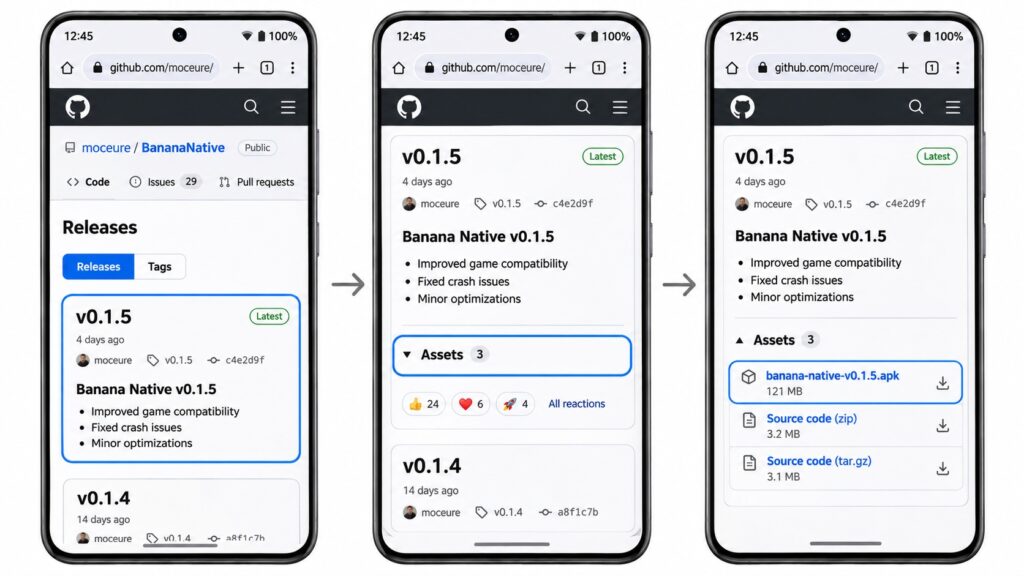
Downloading the Banana Native app on Android
No games, keys or firmware included
Banana Native is free, but it contains no games. It also does not include Nintendo keys or console firmware. Be careful with websites that offer prebuilt packages bundled with dozens of games. The developer does not distribute such bundles, so there is no way to verify that they are safe. Installing APKs from unknown sources carries security risks, and the project’s GitHub page is the only official distribution point.
Installation is only the first step
Banana Native works with the user’s own game copies, prepared as folders containing the program files. Standard NSP and XCI images do not work with the app.
At the time of the original report, the developer had confirmed only two working games:
- Donkey Kong Bananza: launches and lets you play through levels, although graphical errors occur;
- Mario Kart World: loads and lets you drive, but parts of the image render incorrectly.
Only specific builds of these games are supported, as listed in the project documentation, not every version. If you own a compatible copy of Donkey Kong Bananza, you can prepare it directly on the phone:

- Copy the folder with the game files to the phone’s internal storage.
- Launch Banana Native and grant the requested file access.
- Tap Add game and select the game folder.
- Once the game is added, tap Prepare to get it ready to run.
- When processing finishes, select the game and try to launch it.
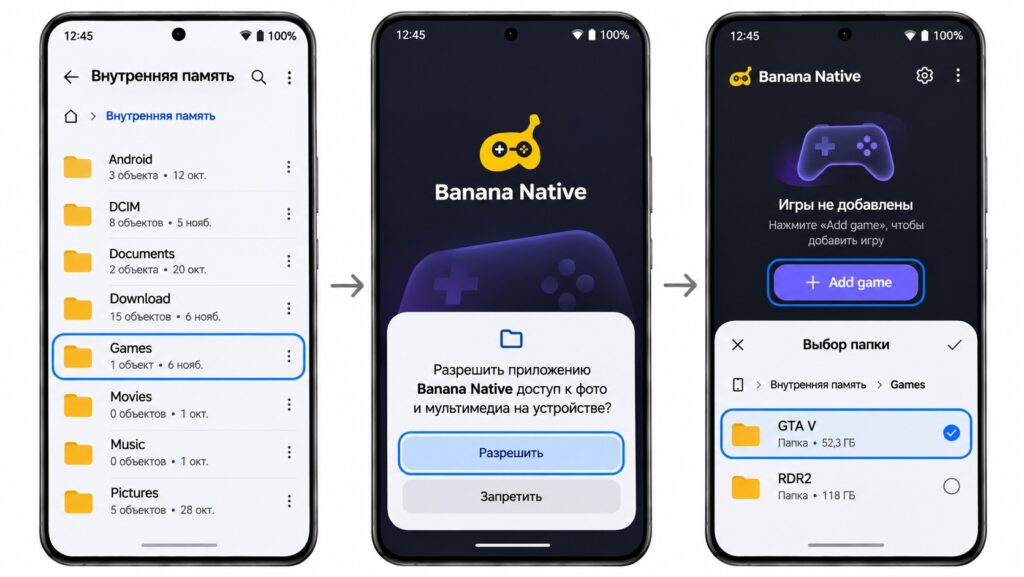
Adding a game in Banana Native
During preparation, the app modifies the executable code and converts the graphics shaders. The developer estimates that processing on the phone takes about an hour and recommends keeping the phone on a charger. This method does not yet work for Mario Kart World, because the app runs out of memory when preparing that game on a phone. The developer uses a separate preparation process on a Mac for it.
Performance and limitations
Donkey Kong Bananza currently shows the best results. On a phone with a Snapdragon 8 Elite Gen 5 and 16 GB of RAM, the game holds around 30 frames per second and sometimes climbs close to 60.
Banana Native also supports frame generation, which can push the output to 60, 90 or 120 FPS. That does not mean the game itself is running at those speeds. The extra frames are generated in software and may increase input latency. Other limitations include:
- the phone gets noticeably hot during long sessions;
- stutters can occur when entering an area for the first time, because shaders are being prepared;
- graphical artifacts appear in some scenes;
- the app can crash;
- the list of compatible games is still extremely short.
For more comfortable control, you can connect a Bluetooth gamepad. The app also provides on-screen buttons with adjustable placement and a frame-rate limiter.
The alternative: Eden SX2A
An alternative project, Eden SX2A, also lets users experiment with Switch 2 games, but it relies on emulation. Its final version, 0.3.2, was released on 2 November, after which the author ended support. In some games, its performance is too low for comfortable play.
The verdict: an experiment for enthusiasts
For now, Banana Native looks like the more interesting option, but it is too early to call a smartphone a real replacement for the Switch 2. If you have a powerful Snapdragon phone, enough RAM and your own files for a supported game, you can already try the project. Buying a new flagship just for this is not advisable. Banana Native is an experiment for enthusiasts, not a complete gaming platform. Still, running Donkey Kong Bananza on Android at an acceptable speed shows how far mobile emulation and console game adaptation have come.