Complaints that the MAX messenger doesn’t work appear with enviable regularity. The app is government-run, young, raw, and problems occur more often than one would like. Sometimes you can’t do without contacting MAX support. That’s why we should go through all available ways to reach the national messenger’s team: from the most convenient to those that work less well.
Trying to reach MAX support
When You Need MAX Support
MAX messenger appeared relatively recently. In just one year, the messenger managed to gift users an entire collection of unpleasant situations. In particular, people massively complain about MAX account hacking (I covered in detail what to do in such cases). But before contacting support, it’s worth understanding: is this really a case where they can help? Sometimes the problem is solved by restarting the app, and there’s no need to waste time chatting with a bot.
Contacting MAX support service is justified in the following situations:
- Your MAX account was blocked without an apparent reason (you can’t log in, and the phone number isn’t the issue);
- Your account was hacked (unfamiliar messages, unknown devices in active sessions);
- A MAX technical failure persists for several hours (messages won’t send, the app crashes, notifications don’t arrive);
- Problems with phone number linking or account switching;
- You accidentally deleted your account and want to recover data;
- Other questions about the messenger’s operation have arisen.
Everything else like slow MAX app performance, broken animations, or missing features won’t be resolved by support. These are product characteristics you’ll have to live with. Or not live with and use Telegram while it’s still somewhat available.
MAX Support Through the App
The most obvious way to contact MAX app support is directly from the app itself. This is convenient because the system automatically pulls your account data and app version, so you don’t need to enter them manually. The request goes to the @support bot, which is the MAX support bot. You can also write to it directly by finding it through the contact search.
To contact support through settings, follow these steps:
- Open the MAX app and go to “Settings.”
- Scroll down and find the “Help” section.
- Tap “Ask your question.”
- A chat with the support bot will open: describe your problem in free form.
- Wait for the operator’s response. Actually wait, because sometimes it takes time.
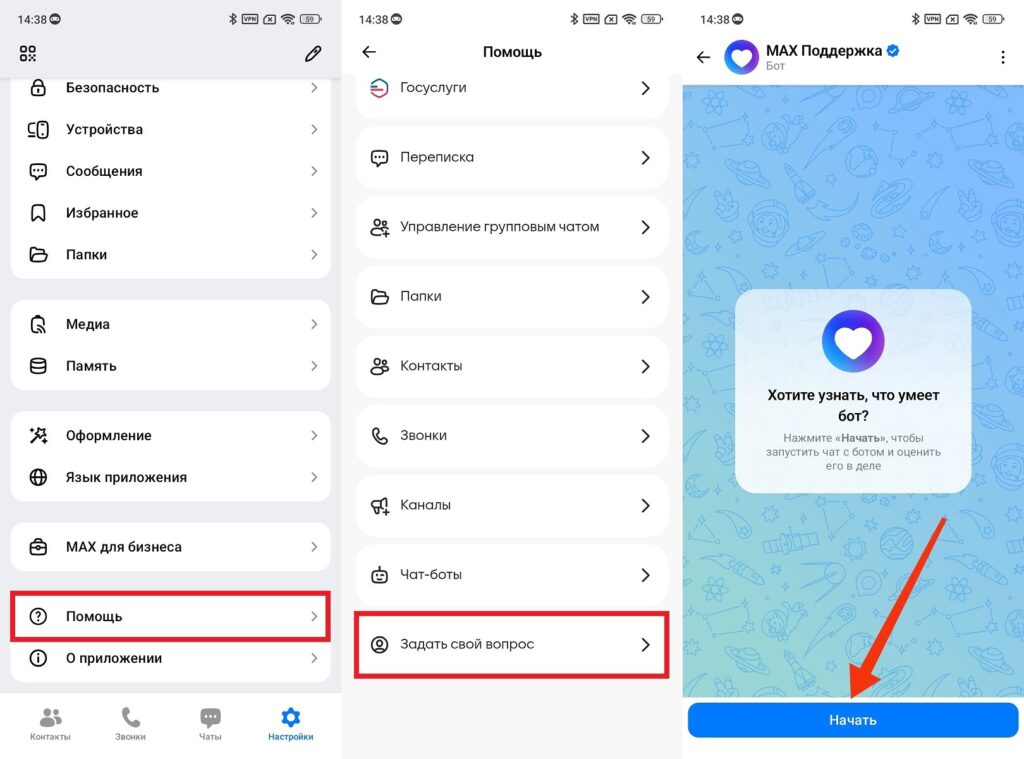
The simplest way to contact tech support
If you want to bypass the menu and contact them directly, search for the MAX Support bot and write to it. The result is the same, just faster. Keep in mind that the first replies are mostly generated by a bot, and you’ll need to look for the “Write to an operator” button or its equivalent in the dialog to reach a live person.
Official MAX Support Website
The official MAX support website is located at help.max.ru. It’s a full-fledged knowledge base with answers to common questions. Before creating a request, it makes sense to search there. Some problems can be resolved without an operator’s involvement, simply by following the instructions.
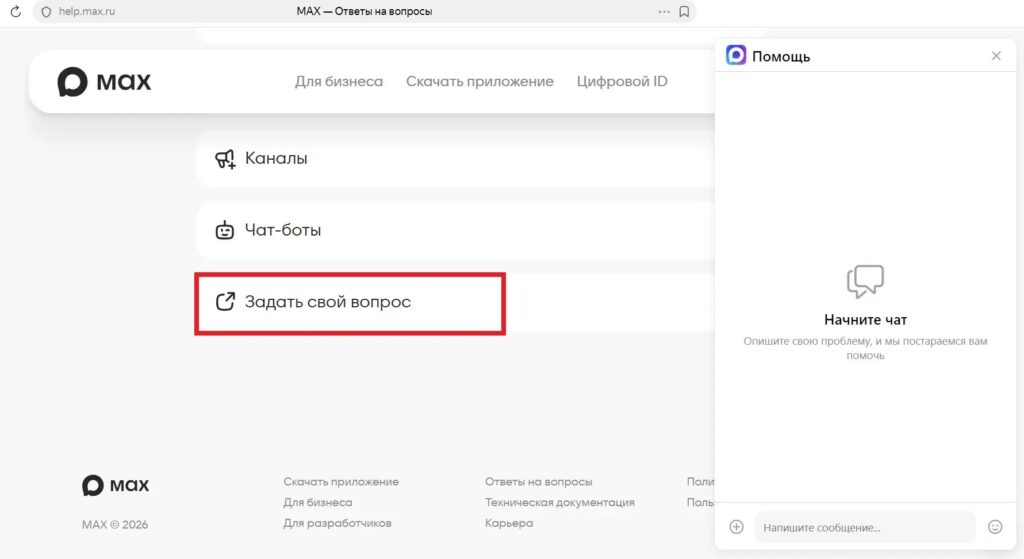
Feedback is also available on the website
If a ready-made answer wasn’t found, the MAX support website has an “Ask your question” button. After clicking it, a support chat will open — the same @support bot as in the app, just in a browser interface. This is convenient if MAX isn’t working on your phone and you can’t access the app. Or if you simply prefer working from a browser (typing a detailed request on a computer keyboard is faster than poking at a phone screen).
MAX Support Email
For those who prefer the classic way of communication, there’s the MAX support email: support@max.ru. This is the official address where you can send a detailed request with attached screenshots and a thorough description of the problem.
You can try solving the problem via email
Email is convenient in situations where you need to convey a lot of information at once: multiple screenshots, error logs, a detailed description of the sequence of actions that led to the problem. It’s inconvenient to do this in a chat, but in an email — it’s just right. Keep in mind that the response time via email is usually slower than in the chat. If the problem is urgent, it’s better to start with the bot in the app or on the website, and use email as an additional channel if they couldn’t help there.
MAX Support Phone Number
If you’re looking for a MAX support phone number or a MAX hotline — I’ll say right away: there isn’t one. All requests are accepted exclusively online: through the app, website, or email.

As such, a MAX call center doesn’t exist, though it would be nice
On one hand, this is understandable — the audience scale is such that a call center would be expensive. On the other hand, the situation is somewhat absurd. A government messenger that tens of millions of people are required to use doesn’t have a MAX support number to call. That means if you have an account problem, no internet, or got blocked specifically in the national messenger, contacting support is simply impossible. Welcome to 2026.
How to Properly Write to MAX Support
The quality of the response from MAX technical support largely depends on how the request is formulated. Vague complaints like “everything is broken” are resolved slowly or not resolved at all. To get help faster, follow a few rules:
- Describe the problem specifically: what exactly isn’t working;