I’ve written in detail about why my acquaintances don’t use MAX. There were many reasons, and most of them are quite rational. But there are also myths. One of the most persistent: the state messenger spies through the camera and microphone, listens to conversations, and records everything around. People refuse the MAX app precisely because of this — not because of real documented problems, but because of fear of something that may not even exist. I’ll break it down honestly: what’s true, what’s a myth, and what to do with permissions.
Let’s figure out what MAX does with the camera and microphone
Why MAX Requests Camera and Microphone Access
Let me start with something that should provide at least some reassurance. MAX on Android requests camera and microphone access not because it’s a state app that wants to spy on you. Every messenger requests these permissions — whether it’s Telegram or WhatsApp. Without them, it’s impossible to implement the basic functions of voice and video calls.
Every messenger requests camera and microphone access.
I’ve already written about how to properly set up MAX on Android in general. Here, I’ll focus specifically on the camera and microphone, as that’s a separate topic. MAX permissions are divided into mandatory and optional. Camera and microphone are technically optional: the messenger will launch and work for text messages without them. But half of the features will be unavailable.
What MAX Does Through the Smartphone Camera
Does MAX use the camera for spying?
Let’s look at the official functions of the camera in the MAX app. Here’s what it’s actually needed for:
- video calls (the main reason any messenger requests camera access);
- video circles (those round video messages sent in chats);
- taking photos and videos to send in a chat directly from the app;
- scanning QR codes (for example, to log into the MAX messenger from another device).
All of this is logical and technically justified. The question is different: when exactly does MAX on the phone access the camera? Only when you press the corresponding button yourself — or in the background too?
Android 12+ shows a green indicator every time the camera is accessed — it's easy to check.
Starting from version 12, Android shows a green indicator in the upper right corner of the screen every time any app accesses the camera. Check it yourself: open MAX and just scroll through chats without pressing anything related to the camera. The indicator should not light up. If it does — that’s a reason to be concerned.
What MAX Does Through the Microphone on Android
Does it eavesdrop through the microphone?
The microphone story is similar. The microphone in the MAX app is used for:
- calls (audio and video);
- recording voice messages;
- transcribing voice and video messages (the microphone isn’t needed in the background for this feature — transcription works with already recorded audio).
This is where the first real tension arises. MAX spies — that’s what many users claim. But what exactly has been documented? Research from March 2026 recorded that the MAX messenger tracks whether a VPN is being used on the device and establishes connections to competitors’ servers. This is a real fact. Does it mean MAX listens to the microphone in the background? There’s no direct connection, but the question remains open. The same Android indicator works for the microphone too: when an app accesses the microphone, an orange indicator lights up. Check it the same way as with the camera.
Does MAX Spy Through the Camera and Microphone
Here’s the main question and an honest answer to it. Does MAX spy on users through the camera and microphone in the background? There is no direct technical evidence of this. Independent researchers who studied the app’s network activity documented VPN tracking and connections to competitors’ servers, but not unauthorized access to the camera or microphone.
So should you be afraid of MAX permissions?
You can learn how to check MAX for eavesdropping and surveillance in a separate guide. This isn’t for paranoid people — it’s for those who want to verify things themselves.
VPN tracking is documented. Camera and microphone surveillance is not.
What has actually been documented:
- the app tracks VPN usage and transmits data to servers;
- the privacy policy allows sharing data with third parties;
- conversations are stored on Russian servers without end-to-end encryption in regular chats.
What has not been confirmed:
- unauthorized camera access in the background;
- recording conversations through the microphone without the user’s knowledge;
- transmitting video or audio to third parties without a request.
MAX is concerning, but specifically documented issues are limited to network activity, VPN tracking, and metadata. Fear of the camera and microphone is still in the myth category for now. Although checking this yourself through Android indicators is worth doing for everyone.
How to Configure MAX Permissions on Android
Regardless of whether you believe in surveillance through the camera or not, properly configuring permissions is basic digital hygiene. The “Only while using the app” mode reduces risks without limiting functionality:
- Open “Settings” on Android.
- Go to “Apps — MAX.”
- Tap “Permissions.”
- Find “Camera” and select “Only while using the app” instead of “Allow all the time.”
- Find “Microphone” and select “Only while using the app.”
- Tap “Location” and select “Deny” if you don’t send your location through MAX.
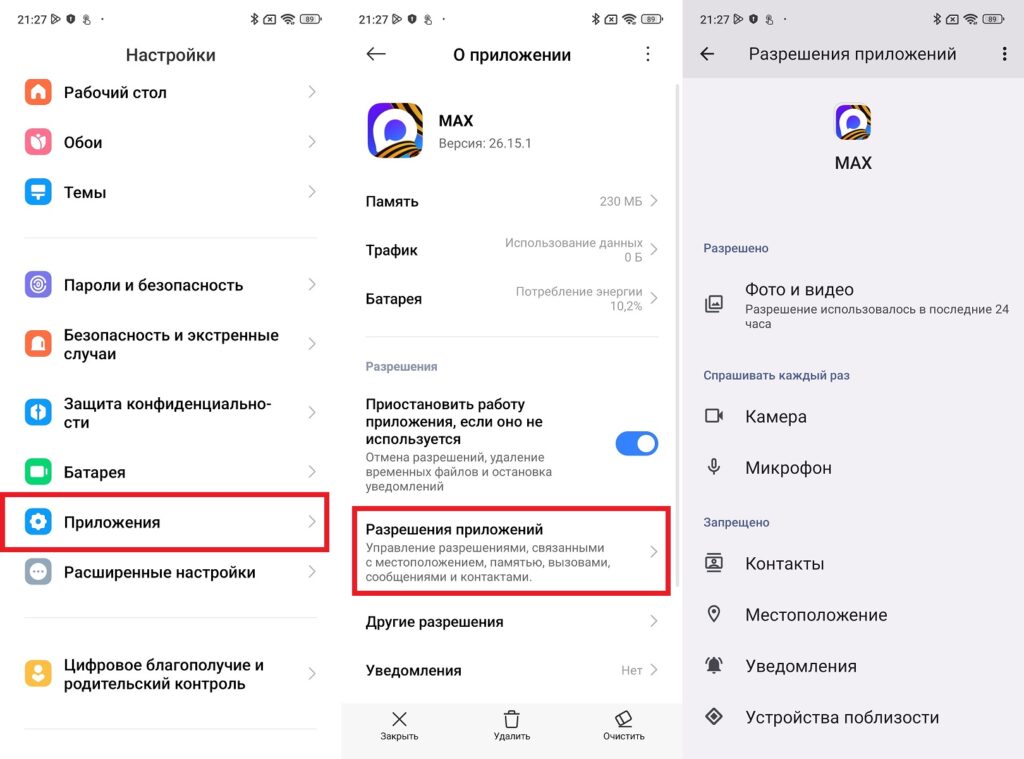
Set up MAX permissions correctly so you don’t regret it later
With the “Only while using the app” mode, MAX requests camera and microphone access at the moment when you press the corresponding button inside the app. In the background — there is no access. This is the optimal balance between security and functionality.


