Recently we enabled MAX notifications on an iPhone, and today we’ll dig deeper: what happens if this messenger lives on your phone side by side with Telegram. The topic has become so overgrown with speculation that separating real risks from retellings of other people’s fantasies has become difficult. So let’s go through the facts and see what actually changes on an iPhone when both messengers are on it at once.

Can these apps coexist on one smartphone
How to Use MAX on iPhone Without the App Store
Let me start with what confuses many people. You won’t have the familiar icon from the app store because the messenger has been removed from the App Store. The disappearance from the catalog itself pleased many iPhone owners, although it added hassle for some. While the app was still in the store, installing it alongside Telegram took just a couple of taps, and both services coexisted peacefully on the screen.
Today the role of the app is taken over by the web version in Safari. You go to the website, log in, and the same chats, channels, and calls are available. To avoid searching for the link every time, add the page to your home screen via the “Share” menu, and it will appear as a separate icon, almost indistinguishable from a regular app. I keep several services this way and barely notice any difference in everyday use.
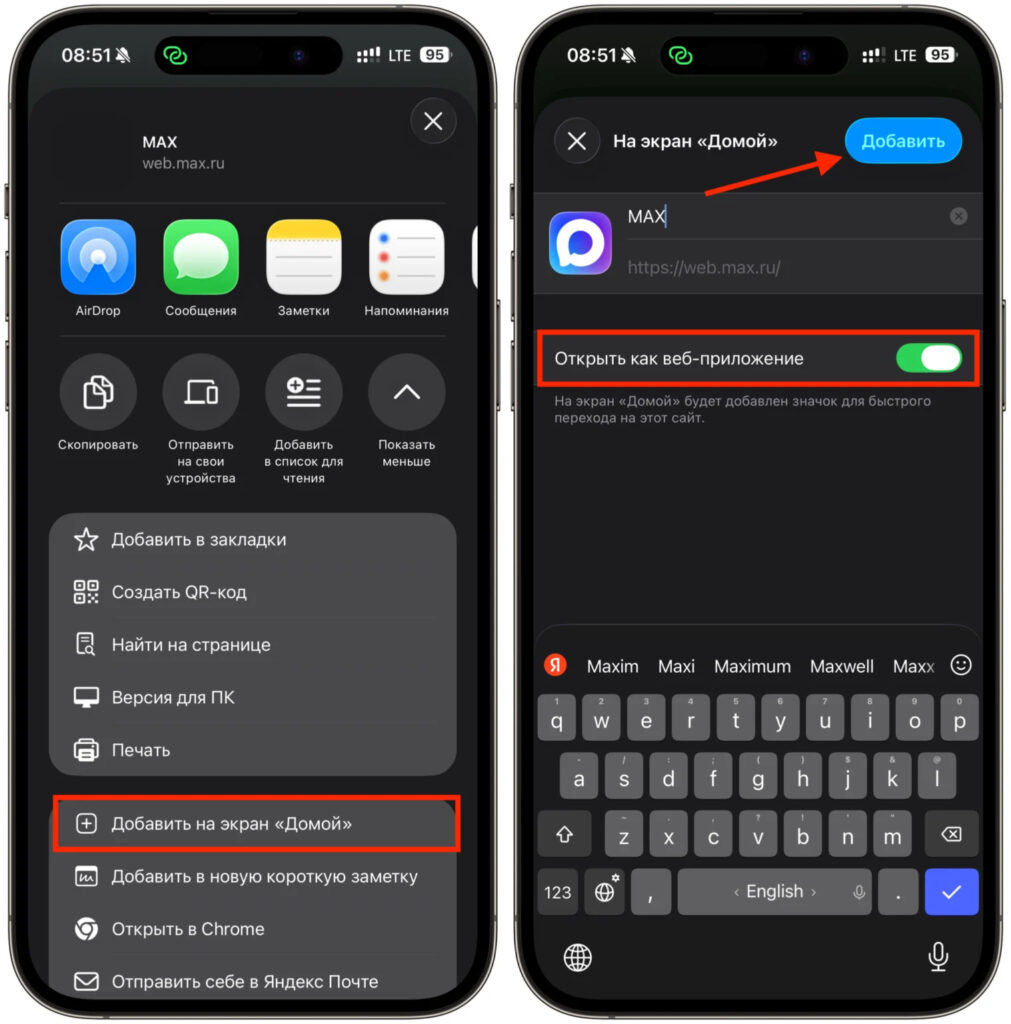
Now only the web version of MAX remains
Telegram meanwhile doesn’t go anywhere and remains a standalone app. Each app on iOS is sandboxed in its own area and can’t just access another app’s data, so there’s no fight for the phone between them. The web version doesn’t take up any storage at all, and the only thing you’ll notice from having two messengers at once is slightly more active notifications and a small battery drain from background checks.
If the stream of alerts starts to annoy you, hide some of them through “Focus” mode or mute specific chats. Putting both icons in a single folder is also convenient — they won’t be scattered across screens and will always be at hand. Essentially, you simply get two independent communication channels on one device, and they work in parallel without interfering with each other.
Does MAX Spy on iPhone Users
The loudest complaint about the messenger grew from a real discovery. When specialists dug into the code, it turned out the app was querying the system and checking whether Telegram and WhatsApp were installed on the device. After this was reported, the developers removed this behavior in update 26.7.1.
An important detail that people usually forget: this was about the Android build. On iPhone, everything works under different rules. Apple doesn’t allow apps to freely scan what you have installed, and the list of apps that can even be checked is strictly limited by the system. And since the app itself stopped working on iPhone and the web version is now in use, a website in a browser certainly can’t peek into your list of programs.
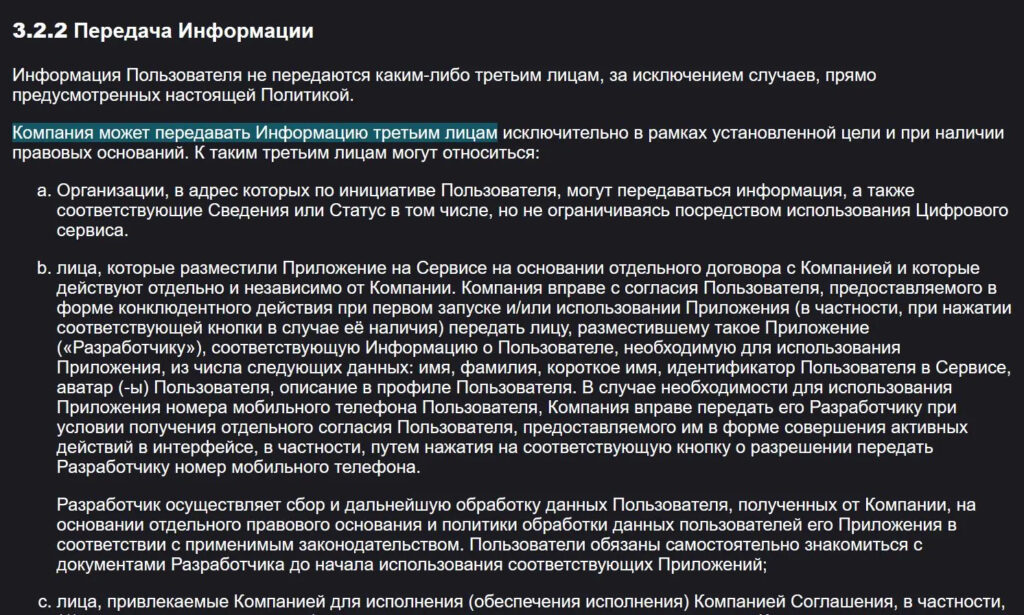
Remember this part of the user agreement
Let me draw a line on this point: MAX cannot read your Telegram conversations — neither through the app nor through a Safari page. If you want extra peace of mind, just update everything on time, and you can put your surveillance worries to rest.
How MAX Differs from Telegram

There are really many differences between the messengers
There’s a persistent belief that MAX requires more permissions than others. The numbers don’t support this: on Android, it has fewer permission requests than both WhatsApp with its eighty-some permissions and Telegram with over seventy. On iPhone, the argument loses meaning entirely because the system grants access not in batches but one at a time, and only when you press “Allow” yourself. The web version needs at most a microphone and camera for calls — it doesn’t ask for anything else.
The real difference lies in another area. MAX lacks end-to-end encryption, where message content is inaccessible even to the server. Telegram has this protection in secret chats, and WhatsApp has it enabled by default. Additionally, the messenger’s user agreement explicitly provides for sharing data with partners and government authorities upon request — this is written in official documents, not invented by critics. From this comes a practical guideline: anything you wouldn’t want to show to outsiders is better discussed where messages are protected by encryption.
At the same time, for casual chatting, work matters, and group chats, the absence of end-to-end encryption barely bothers anyone in practice, since the overwhelming majority of conversations people have are in open chats of any messenger anyway. So the question isn’t which service is “safer in principle” but what specific topics you’re discussing through it.
Which Permissions to Disable for Telegram and MAX on iPhone
Permission management lives not in the messengers themselves but in system settings, and here you’re in charge. To sort things out with Telegram, do the following:
- Go to “Settings” and find Telegram in the list of apps.
- Open it and look at the enabled toggles: “Location,” “Microphone,” “Camera,” “Contacts.”
- Turn off what your messaging can do without, and leave only what you actually need.
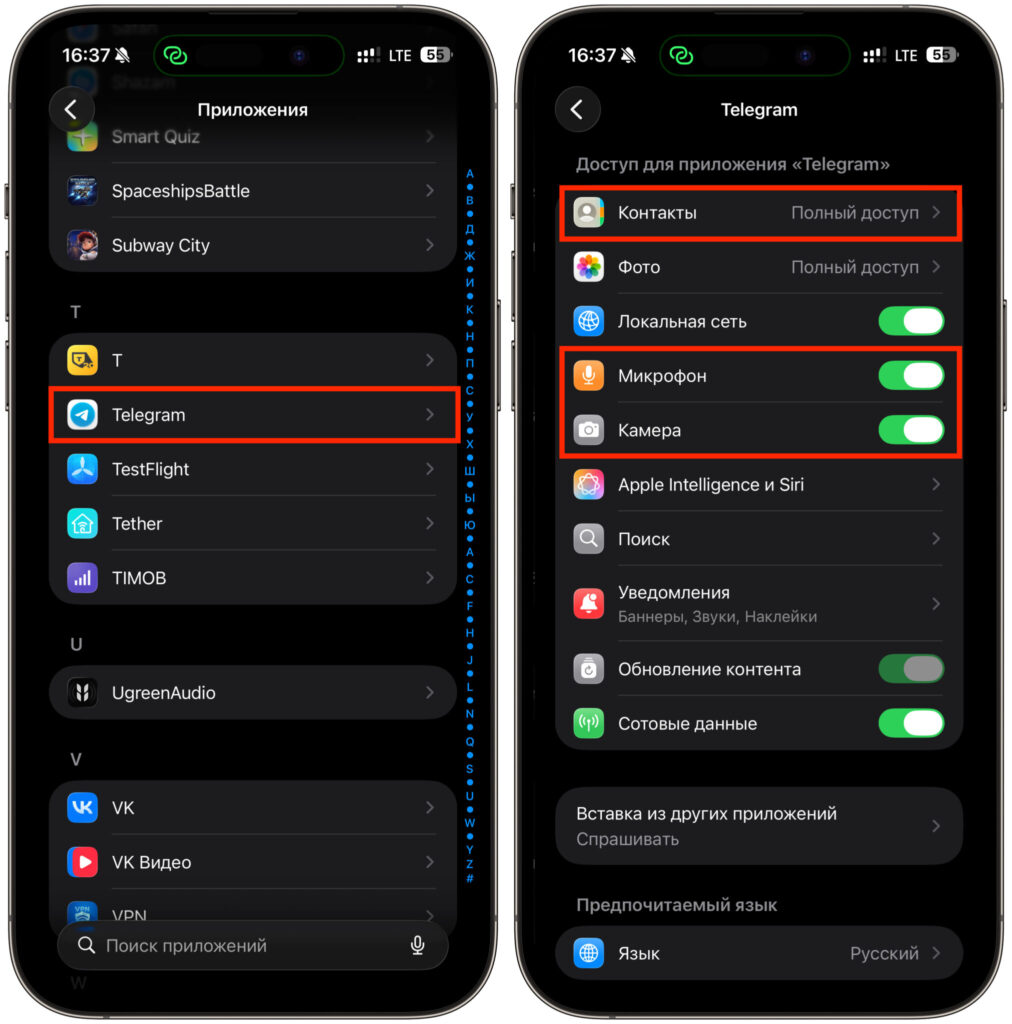
Disable what you’re worried about
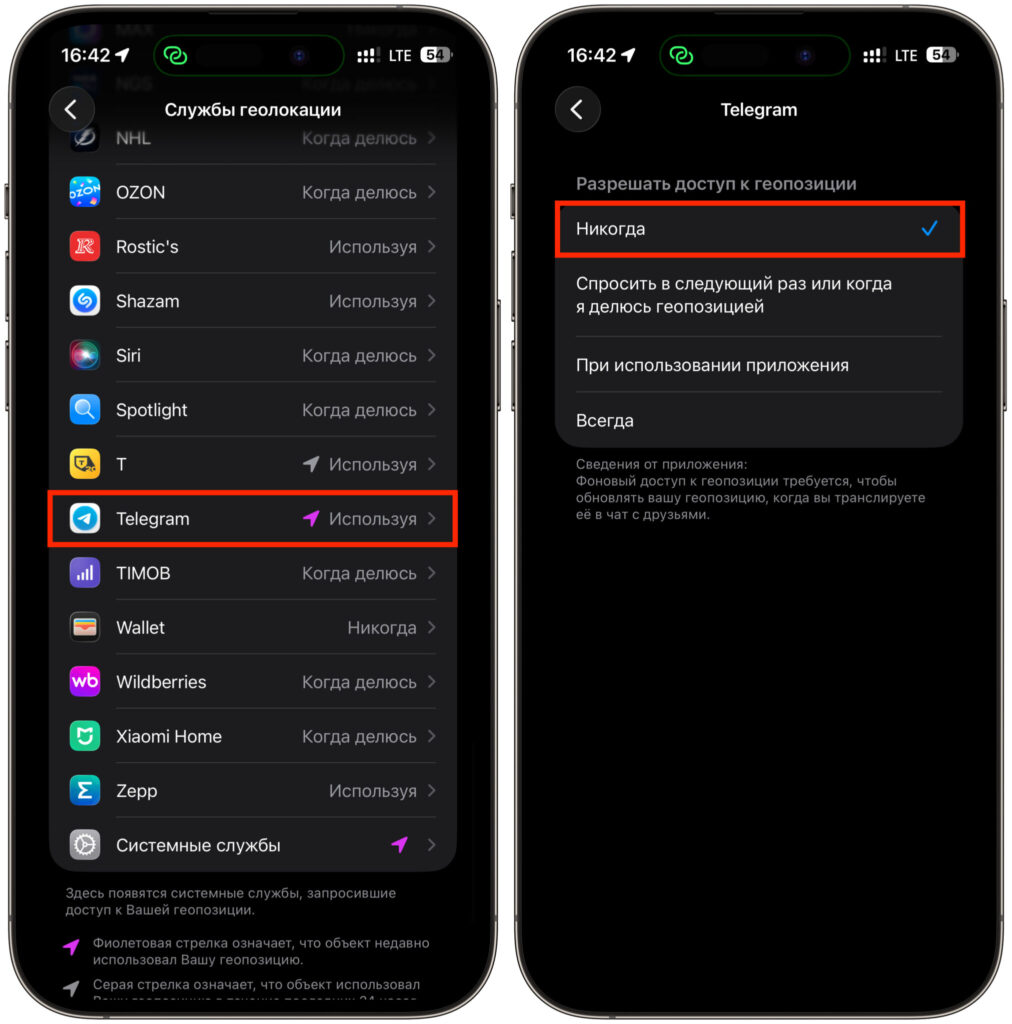
Location access can be configured separately
With the MAX web version, everything works similarly.


