So many rumors have built up around the national messenger that telling facts from scare stories has become a quest in itself. Some of my friends assure me it’s a harmless Telegram replacement, while others tap their temples and talk about wiretapping. Recently we covered how to enable comments in MAKS on iPhone, and now let’s look at the main myths about the national messenger and check each one from an iPhone owner’s perspective.
Breaking down the main myths about MAKS
Let me say right away: I don’t treat this messenger with either enthusiasm or hatred. For me, it’s simply a communication tool and nothing more. The goal of this article is to break down the five most persistent claims about MAKS and see which ones hold up and which were invented in comment sections.
Does MAKS Spy on iPhone Users
The most popular scare story goes like this: the app was created for total surveillance. Let me break it down point by point, because the difference between spying and data collection is fundamental.
What is factually known. Inside there is VK’s analytics toolkit that tracks your behavior in the interface: which screens you open, how much time you spend. Your messages are stored on servers, not on the device, and this is a standard cloud model, exactly like regular Telegram chats. Plus, the privacy policy explicitly states that data can be handed over upon official requests.
The main myth about MAKS is total surveillance
There’s a separate story for us Apple device owners. The iPhone app is not in the App Store, so most people use the web version through Safari. And here’s an important nuance: the browser itself restricts access to hardware. Camera, microphone, and location are requested on a one-time basis through a system dialog, and iOS shows a sensor activity indicator in the status bar. There is no background listening through a tab.
Bottom line: analytics exist, infrastructure for data handover exists, but the mythical “reading everyone in real time” mode does not.
Can MAKS Read Users’ Messages
Here the wording confuses people. It’s more accurate to say not “reads” but is technically capable of accessing the content. The difference is like between a locked door and a door where the concierge has a spare key.
Here’s how it works. When encryption is end-to-end, keys are stored only on the participants’ devices, and the server sees a meaningless set of bytes. When there’s no end-to-end encryption, the server processes messages in plain text, meaning the content is accessible on the platform’s side. MAKS has no public E2EE specification, and pretending it does would be strange.
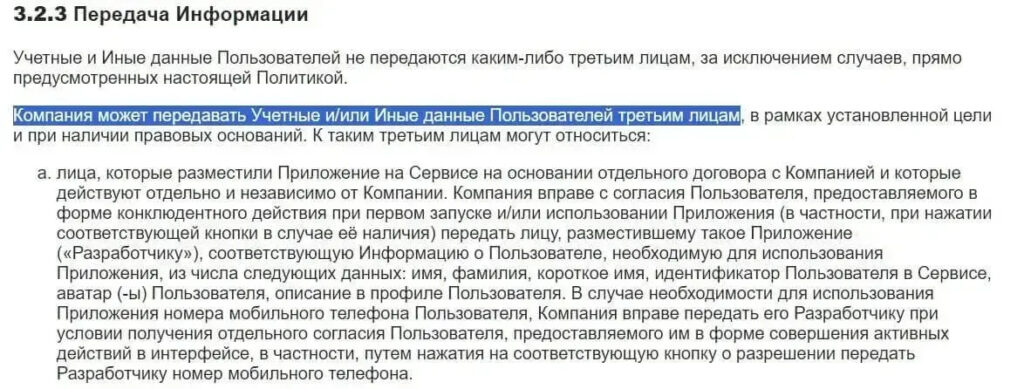
MAKS can hand over information from chats upon official request
Does this mean someone is scrolling through your jokes in the family chat right now? No. Does it mean that upon an official request, data can be sent where needed? Yes, this is stated in the service’s own documents.
My practical advice. It’s better not to send passwords and one-time codes through the messenger, nor passport scans, card details, or work documents under NDA. For everyday “buy some bread” messages, there are no restrictions.
Which Is Better for Communication: MAKS or Telegram

Telegram still remains better than MAKS
Formally, both apps do the same thing: chats, calls, groups, channels. But that’s where the similarities end, and from there the difference is in architecture, not button design. Secret chats with end-to-end encryption are only available in Telegram; MAKS has no publicly described equivalent.
The second point is geography. Telegram works almost everywhere there’s internet, while the national messenger is designed for communication within the country. If you travel frequently or have relatives abroad, switching entirely won’t work — there simply aren’t any contacts there.
Third, chat history doesn’t migrate anywhere. These are two independent platforms with their own contact lists, so transferring chats from Telegram is impossible in principle. At most, you’ll create a second account and live on two fronts. The conclusion is simple. As an additional communication channel within Russia, the messenger works. As a full replacement for Telegram in terms of capabilities — no.
How MAKS Affects iPhone Performance
This is where iPhone users have a fundamentally different situation compared to Android owners, and almost nobody writes about this. There is no full native app in the App Store, which means no installation in the usual sense takes place.
What you actually do: open the website in Safari and most likely add a shortcut to the home screen. Visually it looks like an app — there’s an icon, it launches full-screen — but essentially it’s just a regular browser tab. This leads to some pleasant consequences.
The tab doesn’t stay alive in the background indefinitely. As soon as you minimize Safari or switch to another task, the system unloads the page from memory roughly the same way as any other website. Background services that drain your battery around the clock simply don’t exist physically in the web version. Energy consumption equals the time you actually spend looking at chats.
There’s a flip side too. Push notifications through the web version work slightly worse than native ones. Messages often arrive with a slight delay, and this is visible in the push notifications. If your iPhone has genuinely become sluggish, look for the cause elsewhere: full storage, an old battery with worn capacity, or a fresh iOS beta.
How Secure Is the MAKS Messenger

And don’t forget that MAKS is not 100% secure


