Apple has released macOS Tahoe 26.5 — the fifth major update to the current Mac operating system. The company rolled out updates across several platforms simultaneously, and macOS was not left out this time. There are no headline features here: a couple of targeted improvements in Maps, a new subscription scheme in the App Store, and apparently some background fixes. Let’s break down who should update right away and who can afford to wait.

macOS Tahoe 26.5 is now available for installation to everyone
New Features in macOS Tahoe 26.5
macOS Tahoe 26.5 arrived seven weeks after the release of macOS Tahoe 26.4 and became the fifth major system update. The changelog is short, and that’s normal for an interim update — Apple typically saves the major innovations for the fall release. The key changes affect two apps:
- Apple Maps — a Suggested Places section has appeared in search
- App Store — a new subscription payment format: lower monthly payment but with a commitment to pay for the entire year
The remaining changes are under the hood: bug fixes, performance optimization, and preparing the system for future releases. If you were expecting something fundamentally new, macOS Tahoe 26.5 won’t surprise you — but it shouldn’t disappoint either.

Suggested Places section in Apple Maps search
Maps now has a Suggested Places section in the search interface — a curated selection of places the app recommends based on your queries and context. In practice, it’s simply a slightly more convenient search: less manual typing, more ready-made options.
Much more important is another detail: the update lays the groundwork for advertising in Maps, which will appear this summer. For now, users won’t see any banners, but the system code is already preparing a platform for paid placements. This means that places in Maps search results will soon become advertising inventory — similar to how Google Maps has worked for a long time.
The good news is that nothing changes right now. The bad news is that it changes by summer.
New App Store Subscription Format: Who Benefits
The App Store has received an option for monthly payments at a lower price, but with a commitment to pay for the subscription over 12 months. Essentially, this is the equivalent of an annual contract, like with mobile carriers: you pay monthly, but you can’t cancel without penalties.
Who benefits from this:
- Those who already use a subscription for years — for example, for a music service or office suite
- Those who find it inconvenient to pay the full annual amount upfront
Who doesn’t benefit: anyone who likes to try services for a month or two and then cancel. Before choosing the new plan, it’s worth honestly asking yourself whether you actually use the subscription all year long. Sometimes an app sits unused for months while the charges keep coming. If that sounds familiar — it’s better to stick with the standard monthly plan.
Bugs Fixed in macOS Tahoe 26.5
Apple hasn’t published an official list of fixes, but the update likely includes bug fixes and background performance improvements. During beta testing, no new features were discovered. This is a typical minor update: something was fixed, something was sped up, but don’t expect major changes.

A large number of bugs were fixed in macOS Tahoe
Users who complained about minor stuttering in Finder and occasional freezes when waking from sleep report that the situation has improved slightly in 26.5. There are no objective benchmarks yet, but subjectively the system feels more responsive.
MacBook Battery Life After Installing macOS Tahoe 26.5
One of the main questions with any macOS update is whether it will kill the battery. In the case of macOS Tahoe 26.5, there’s nothing to worry about. After installing the update, MacBook holds its charge as usual: no drops in battery life have been noticed.

Increased battery drain is possible in the first days, but it will stabilize eventually
In the first 24 hours after updating, the system may consume slightly more power — this is normal. macOS re-indexes Spotlight, updates caches, and performs background tasks. Everything usually returns to normal within a day or two. If after this period the battery is still draining faster than usual, try restarting your Mac and checking Activity Monitor for processes that are unnecessarily loading the processor.
Overall, macOS Tahoe 26.5 continues the trend of recent updates: Apple carefully manages power consumption and doesn’t break battery life with interim updates. For MacBook Air and MacBook Pro owners on M-series chips, nothing has changed — the laptop comfortably lasts a full working day.
How to Update to macOS Tahoe 26.5
You can install macOS Tahoe 26.5, just like previous updates, through your Mac’s settings:
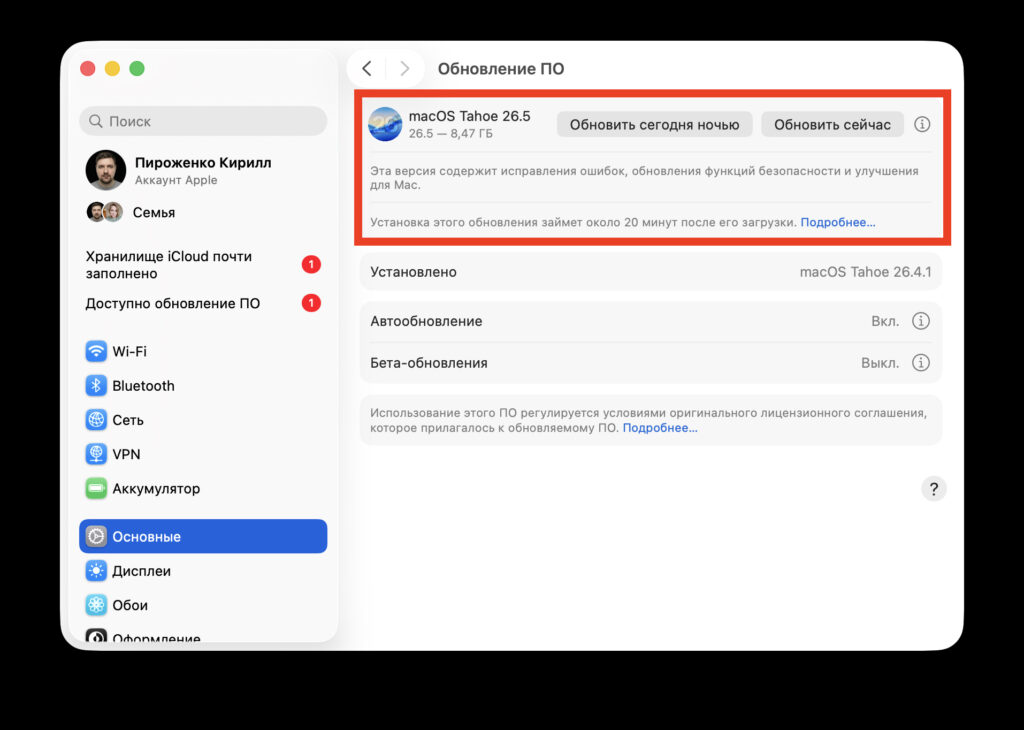
The system installs fairly quickly
- Open System Settings
- Go to the Software Update section
- Wait for macOS Tahoe 26.5 to appear and click “Update Now”
Before installing, it makes sense to create a backup via Time Machine — even for a minor update, this rule remains relevant.
Should You Update to macOS Tahoe 26.5

macOS Tahoe 26.5 is now available
If everything is working stably for you, there’s no rush to update: there are no new features in macOS Tahoe 26.5 worth dropping everything for. But there’s also little reason to delay for too long — security updates and background fixes are useful, and no serious problems have been reported with the update at launch.
The sensible approach: install it within the next few days at a convenient time.


