Apple released iOS 26.6 on July 27 for all compatible iPhones. Described as the final major update to the iOS 26 line before the autumn transition to iOS 27, this release focuses on bug fixes, security patches, and behind-the-scenes optimization rather than flashy new features. The most notable visible change is a new warning when the phone’s block list reaches its 20,000-number limit. Code references to a snatch-protection feature — which would automatically lock the device if grabbed from a user’s hand — have also been spotted, though this function is not yet fully operational.
What you need to know
- iOS 26.6 is available now for all iPhones compatible with iOS 26; no beta profile or developer account is required.
- The update addresses battery drain and overheating issues that plagued the previous iOS 26.5.2, along with Wi-Fi, Bluetooth, and cellular connectivity bugs.
- Apple has pre-optimized the Spotlight index for iOS 27 to reduce the heavy background indexing, heating, and battery drain that occurred during the iOS 27 beta.
- This is expected to be the last public feature release in the iOS 26 line, with iOS 27 anticipated for a September launch.
iOS 26.6 is now available for download.
What’s New in iOS 26.6
There are no design changes in iOS 26.6 — this is purely a maintenance release. Apple’s development resources are reportedly focused on iOS 27. Still, a couple of noteworthy additions were identified:

Code references to a snatch-protection feature have been found.
- Block list limit warning: The iPhone now alerts users when their block list reaches the 20,000-number cap, prompting them to remove older entries.
- Snatch-protection code (not yet active): References in the code suggest a future feature that would automatically lock the device if it detects the phone being grabbed from the user’s hand. This is not yet functional.
- HealthKit reliability improvements.
- Improved HDR screenshot processing.
- Apple Maps security layer: A new protective layer that isolates and validates incoming Maps data.
Bug Fixes in iOS 26.6
Apple’s official release notes are described as brief, mentioning bug fixes, security updates, and search optimization. The previous iOS 26.5.2 was reported to drain the battery and cause iPhones to overheat. Based on beta testing and user complaints, the following issues have been addressed in iOS 26.6:
This build is primarily focused on bug fixes.
- Battery drain and overheating: The most common complaint across the iOS 26 line. iPhone 16 Pro and iPhone 17 Pro owners reportedly experienced overheating during simple tasks and overnight battery drain. Apple has adjusted background processes.
- Wi-Fi and Bluetooth: On iPhone 17, iPhone Air, and iPhone 17 Pro, connections would sometimes drop spontaneously, and AirPods would disconnect mid-playback. Connection stability has been improved.
- Cellular connectivity: Some users were unable to find a network after updating. Network connection behavior has been stabilized.
- Interface stuttering: Scrolling and app-launch jank affected even iPhone 17’s ProMotion display. The source attributes this to the heavy Liquid Glass rendering combined with re-indexing, and notes that some of these issues have been resolved.
- Low Power Mode on older iPhones: On iPhone 11, 12, and 13, Low Power Mode was reportedly causing lag instead of saving energy. This has been smoothed out.
- HealthKit stability: Bugs causing unpredictable behavior in health-related apps have been fixed.
- HDR screenshots and Object Capture: Media processing improvements.
- Apple Maps security: A new isolation layer for validating incoming data.
- Security vulnerabilities: Multiple security holes have been patched. Apple is expected to publish the full list on its security page alongside the release.
Whether battery life has meaningfully improved over iOS 26.5.2 remains to be confirmed through real-world usage over the coming days.
How iOS 26.6 Prepares Your iPhone for iOS 27
Perhaps the most interesting aspect of this update is hidden in the release notes: iOS 26.6 pre-optimizes the Spotlight search index for iOS 27. When the first iOS 27 beta was released, iPhones reportedly spent weeks indexing in the background, causing overheating and excessive battery consumption. To avoid repeating that scenario when iOS 27 launches publicly this autumn, Apple has moved part of that heavy indexing work into iOS 26.6.
The update prepares the iPhone for iOS 27.
iOS 26.6 is almost certainly the last public release in the iOS 26 series; going forward, Apple is expected to issue only security patches for this version. The major leap comes in autumn — iOS 27, featuring an updated Siri, is anticipated for a September release for all users.
How to Install iOS 26.6
The update is available to all iPhones compatible with iOS 26. No beta profile or developer account is needed.
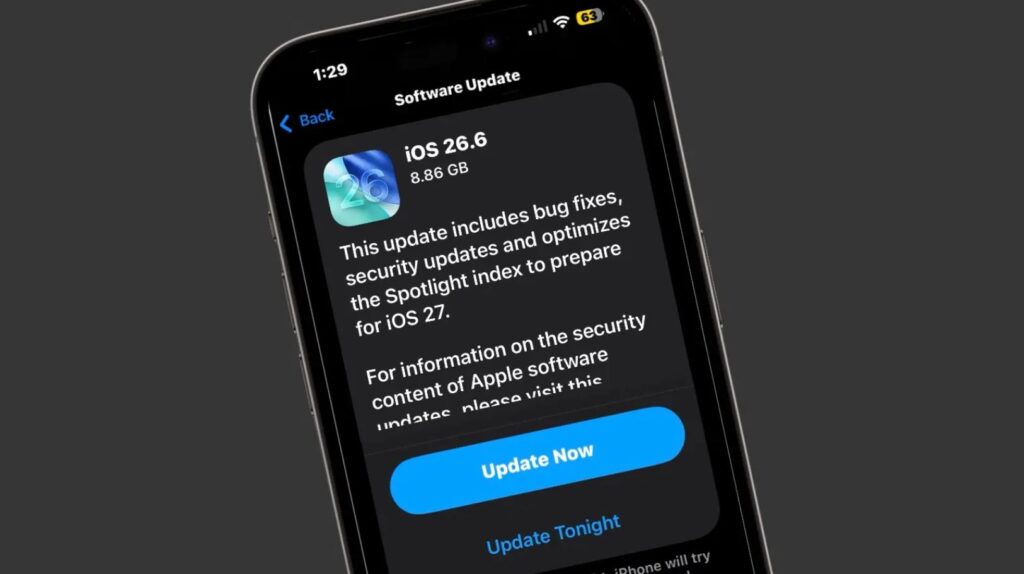
The update is already available in iPhone Settings.
- Open Settings → General → Software Update.
- Wait for the iPhone to find the iOS 26.6 update.
- Tap Download and Install.
Before updating, make sure you have enough free storage, that your battery is above 50% (or the phone is plugged in), and that you have a recent backup via iCloud or Finder. If you were running the iOS 26.6 beta, the final release will arrive as a standard over-the-air update — just remember to disable beta updates in the same Software Update section afterward.
In summary, iOS 26.6 is a stability-and-security release rather than a feature update. It addresses real pain points from the iOS 26 cycle — particularly battery drain and connectivity issues — while quietly laying groundwork for a smoother transition to iOS 27 this autumn.


