After updating to iOS 26.5.2, some iPhone owners have experienced accelerated battery drain and overheating. The update itself is important: it patches more than 25 system vulnerabilities. Now let’s figure out how serious the problem is, who absolutely needs to update, and what to do if your phone gets hot after installation.
Users report overheating issues on the latest iOS 26.5.2
iOS 26.5.2 Update: What Changed
Apple released iOS 26.5.2 on June 29, 2026: this update is about security, not new features. The patch closed more than 25 vulnerabilities, including some in very sensitive areas of the system, such as the kernel and the WebKit browser engine.
The latest update closes many vulnerabilities but adds problems
In short, these are security holes through which someone could theoretically harm the device or access personal data. The kernel is responsible for the foundation of the entire system, and the browser engine handles how websites are opened. That’s why these patches are recommended for everyone.
That said, not every firmware update is equally urgent right now. If you’re unsure, it’s worth understanding in advance which update to download to your iPhone and which you can skip without any risk to the device.
How to Update iPhone to iOS 26.5.2
If you haven’t updated yet, checking for the update is simple. Go to “Settings,” then “General” and “Software Update”: if you see the update card, you can install it right away. The entire process takes a few minutes and doesn’t require any complicated steps.
Here’s a quick sequence of steps so you don’t mix anything up:
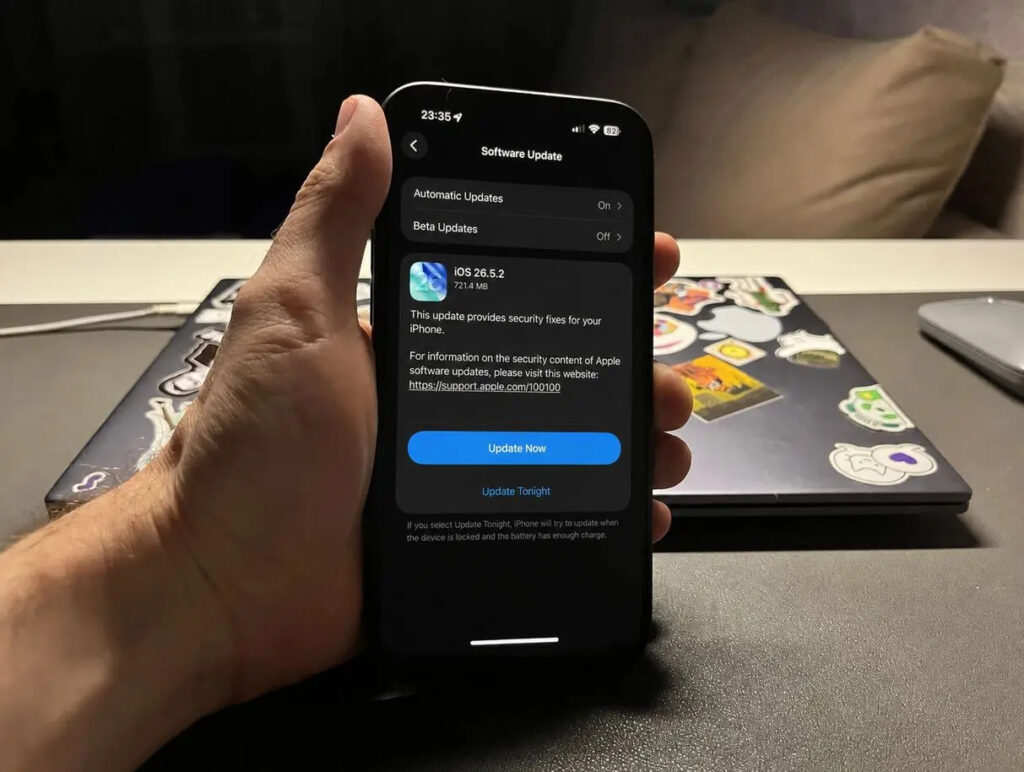
Open settings and the update will appear right away
- Open “Settings” on iPhone
- Go to the “General” section
- Select “Software Update”
- If the update card appears, tap to install
A separate note for those already running the test version of the future system. If your iPhone has the latest iOS 27 developer beta installed, the security patches have already been loaded onto the device. In this case, you don’t need to separately install iOS 26.5.2 — you’ve already received all the necessary fixes.
Why iPhone Drains Quickly After Update
The main reason for the buzz is user reviews themselves after installation. According to iPhone owners who installed the update and complained on social media, iOS 26.5.2 also drains the battery noticeably faster than usual. At the same time, the body heats up so much that the phone becomes difficult to hold.

Users complain that after the update the phone heats up and drains faster
One iPhone 16 Pro Max owner described the situation in detail. Users on Reddit reported that after installing iOS 26.5.2, the phone developed new issues. The excellent battery life they previously enjoyed has now noticeably decreased. Additionally, they noticed that the device heats up very strongly and very quickly, although they were initially ready to blame it on hot weather.
Important point: Apple has not officially confirmed rapid battery drain after this update. For now, these are only complaints from individual users on social media, not a company-acknowledged bug. Similar waves of feedback have occurred before.
How to Determine What’s Draining iPhone Battery
Keep in mind that hot weather and resource-heavy apps also drain the battery and heat up the phone. But here, the combination of two symptoms matters. A quickly draining smartphone and a scorching hot body usually go hand in hand. Most often, these problems are related to each other and signal that the phone is reacting to something that’s not working properly.
To determine whether the update is to blame rather than a third-party app or summer weather, follow these simple steps:
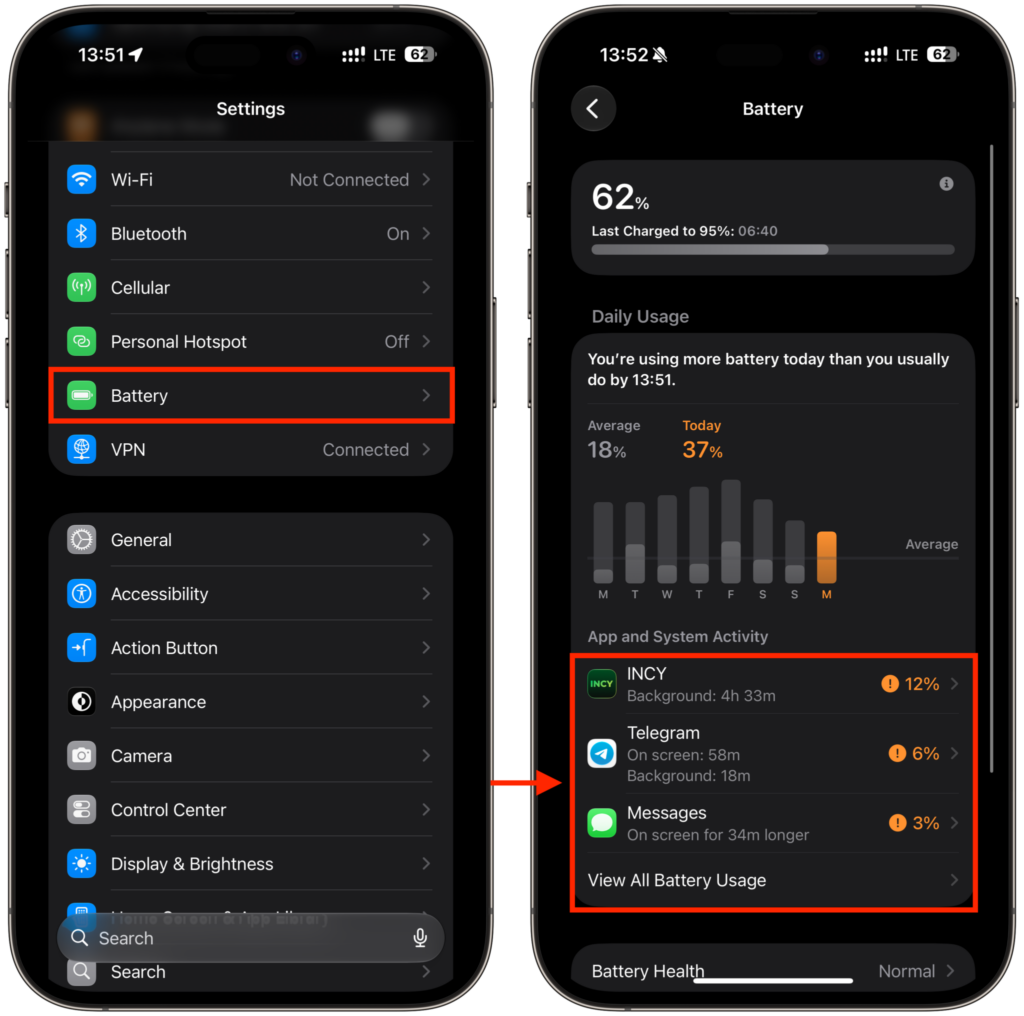
In the Battery section you can see which app is consuming charge
- Check “Settings” — “Battery” to see which app is consuming the most charge
- Give the phone 1-2 days after the update: the system may still be re-indexing data and running background processes, and the drain returns to normal
- Check whether the iPhone is heating up while charging or under direct sunlight — this is a normal reaction to heat
- Restart the device: this often resolves one-time background freezes
If after all checks the drain and heating don’t go away for several days, then the cause may indeed be the update itself. In the past, Apple has fixed such things with subsequent minor updates, so it’s better not to rush to a final verdict.
Should You Install iOS 26.5.2
Short answer: the update is worth installing for security reasons, but do it consciously. The pros and cons look like this:
- For the update: more than 25 vulnerabilities are closed, including critical parts of the system and the browser
- Against the update: some users complain about battery drain and overheating, with no official confirmation of the problem from Apple
If security matters most to you, it’s recommended to install the update.


