A new trend is gaining momentum on social media — users are asking ChatGPT to rate their appearance and receiving detailed reports with scores, strengths, and weaknesses. It sounds like entertainment, but the prompt is crafted so well that the neural network delivers a detailed analysis of facial proportions, symmetry, skin condition, and even provides skincare recommendations. If you still don’t know what prompts are and how to use them, it’s time to figure it out. Here’s how to do it all on your iPhone in just a couple of minutes.
Neural networks can rate your appearance from a photo
ChatGPT Appearance Rating: What’s the Trend About
The idea is simple: you upload your photo to ChatGPT, enter a special prompt — and receive a so-called beauty report. The neural network analyzes your face across several parameters: symmetry, proportions, bone structure, and skin condition. It assigns a score for each criterion and at the end provides an overall score along with personal care recommendations.
The trend went viral on social media — people enjoy receiving honest (well, as honest as AI can be) feedback. Some take the results seriously, others just have fun with it. Either way, it’s a great reason to try ChatGPT in action if you haven’t done so yet.
How to Register for ChatGPT on iPhone
Before entering the prompt, you need to install the app and create an account. Here’s how to do it:
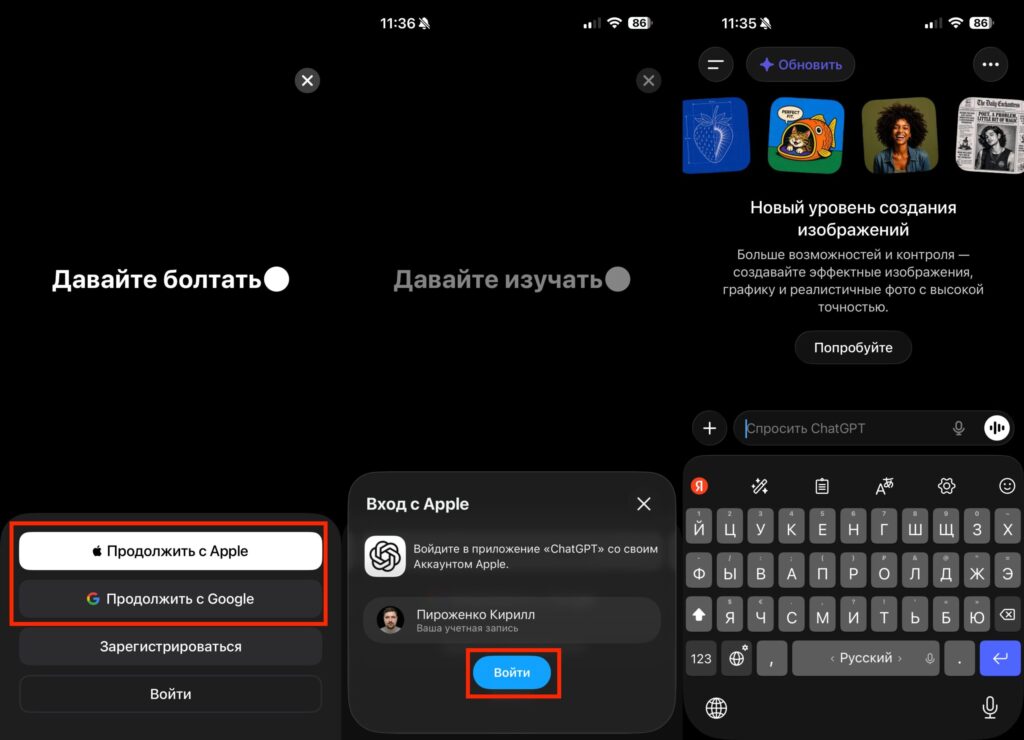
Registering for ChatGPT takes a minute
- Open the App Store on your iPhone and download ChatGPT — it’s free.
- Launch the app and tap Continue with Google or Continue with Apple — this is the quickest way to sign in.
- Accept the terms of use, and that’s it — your account is created. No additional email confirmations are required.
If you already have an account, simply tap Log in and sign in via Google. The entire process takes less than a minute. Now you can move on to the fun part.
Prompt for Appearance Rating in ChatGPT
Now that the app is installed and your account is ready, you can request an analysis of your appearance. Follow this step-by-step guide:
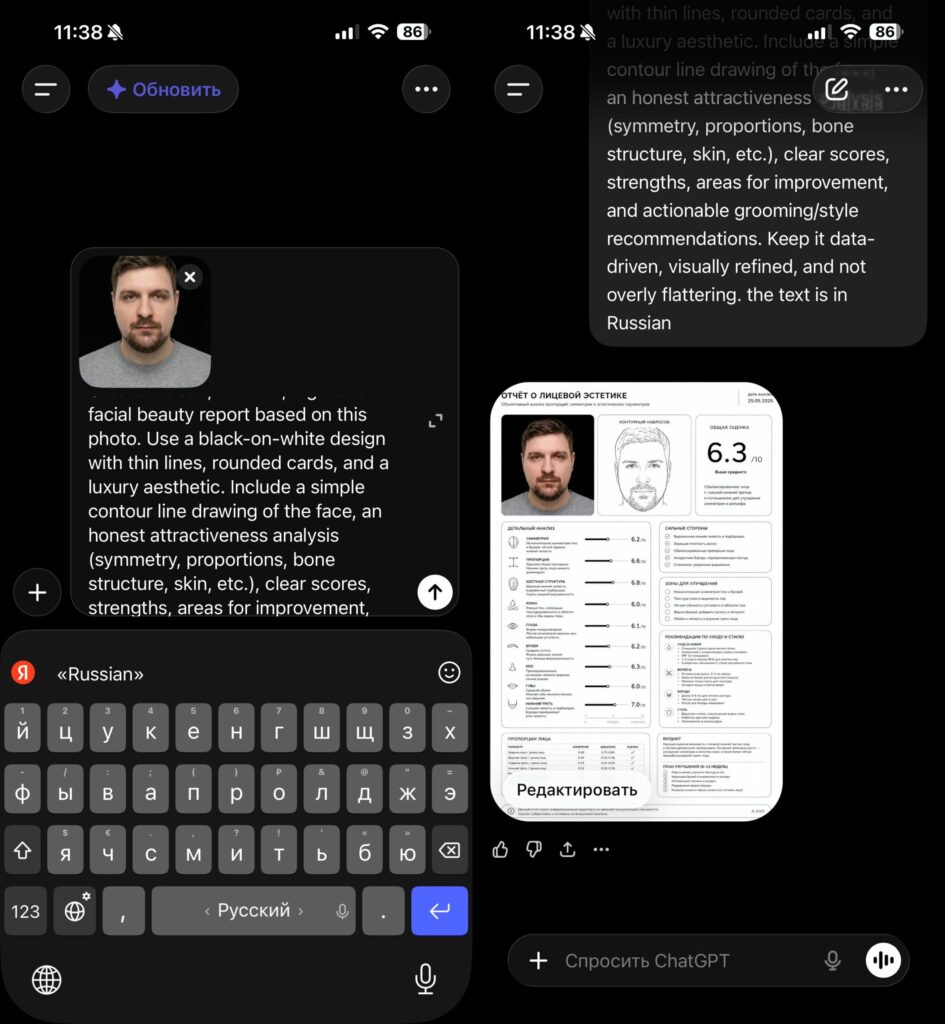
Paste the prompt and add a photo
- Open the ChatGPT app on your iPhone.
- In the text input field, paste the prompt:
Create a clean, minimal, high-end facial beauty report based on this photo. Use a black-on-white design with thin lines, rounded cards, and a luxury aesthetic. Include a simple contour line drawing of the face, an honest attractiveness analysis (symmetry, proportions, bone structure, skin, etc.), clear scores, strengths, areas for improvement, and actionable grooming/style recommendations. Keep it data-driven, visually refined, and not overly flattering. The text is in Russian - Tap the plus icon to the left of the input field and select a photo from your gallery. A clear portrait shot with good lighting, without filters or masks, works best.
- Tap the send button and wait 10–20 seconds. ChatGPT will generate a detailed report with scores for each parameter.
Note: at the end of the prompt it says the text is in Russian. This ensures the neural network delivers the result in Russian. If you want the report in English — simply remove that line.
ChatGPT Appearance Report
After processing, ChatGPT will produce a beautifully formatted report in card form. Here’s what it includes:
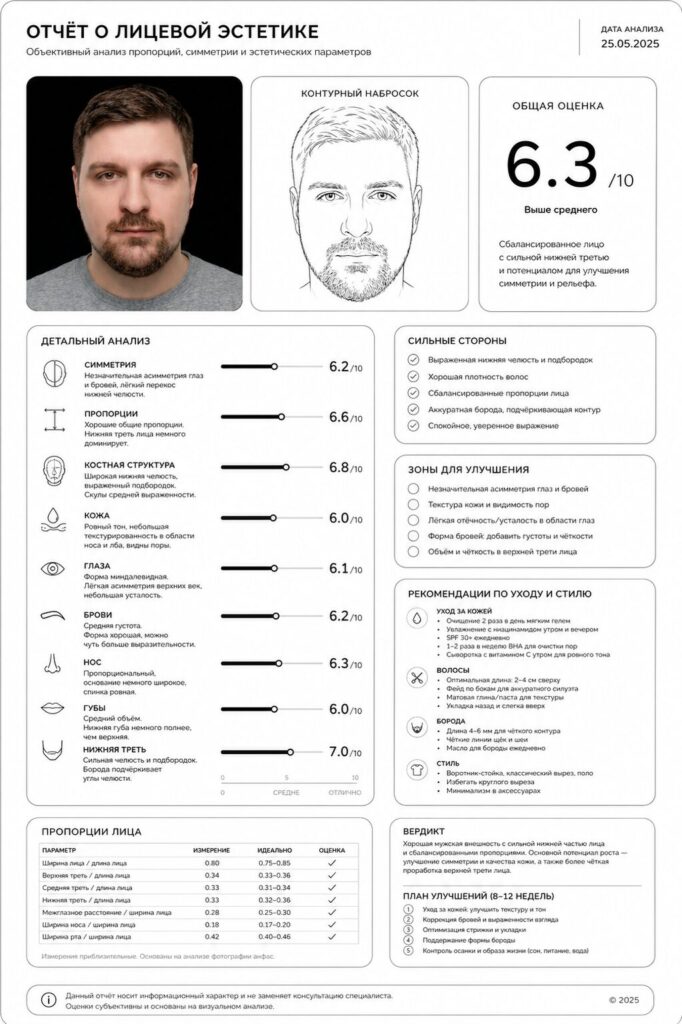
Here’s what the result looks like
- Contour face drawing — a stylized portrait drawn by the neural network based on your photo.
- Category scores — symmetry, proportions, bone structure, skin condition. Each parameter is assigned a score.
- Strengths — what the neural network considers your advantages.
- Areas for improvement — what the AI thinks you could work on.
- Style recommendations — tips on skincare, hairstyle, and accessories.
Of course, you should take the results with a grain of humor. ChatGPT is not a plastic surgeon or a dermatologist. The neural network evaluates photos based on formal criteria and doesn’t account for many factors: lighting, angle, facial expression. Change the photo — and the result can be completely different.
Can You Trust an AI Appearance Rating
In short — no, you shouldn’t trust it blindly. A beauty report from ChatGPT is more of an entertainment piece than an objective assessment of your attractiveness. The neural network works with a specific image, not with you as a person. It doesn’t see facial expressions in motion, doesn’t sense charisma, and doesn’t evaluate style in a real-life context.
Nevertheless, the prompt is great in that it provides structured feedback. If you’ve been wanting to understand what you could improve in your personal care routine — it’s a decent starting point. Just don’t treat the scores as a verdict.
Try uploading several different photos and compare the results — this way you’ll better understand how much angle and lighting influence the outcome. And if you want to go further and learn to work with AI truly effectively, start with the basics — it will open up a world of possibilities.