An AI video model can convincingly swap a dancer in an existing clip for someone from a single photo, but getting there took several missteps and $9.97 in generation fees, according to an AppleInsider.ru author. He tried to recreate a viral clip of Cheba Man dancing Tecktonik to Benny Benassi’s Love Is Gonna Save Us, with Grigori Rasputin as the dancer. The best result came from Alibaba’s Wan 3 reference-to-video model on fal.ai. Most of the money went on mistakes: the wrong mode, a downscaled source clip and a long video generated in pieces. Below is what happened, why each attempt failed or succeeded, and the author’s reusable workflow and prompt.
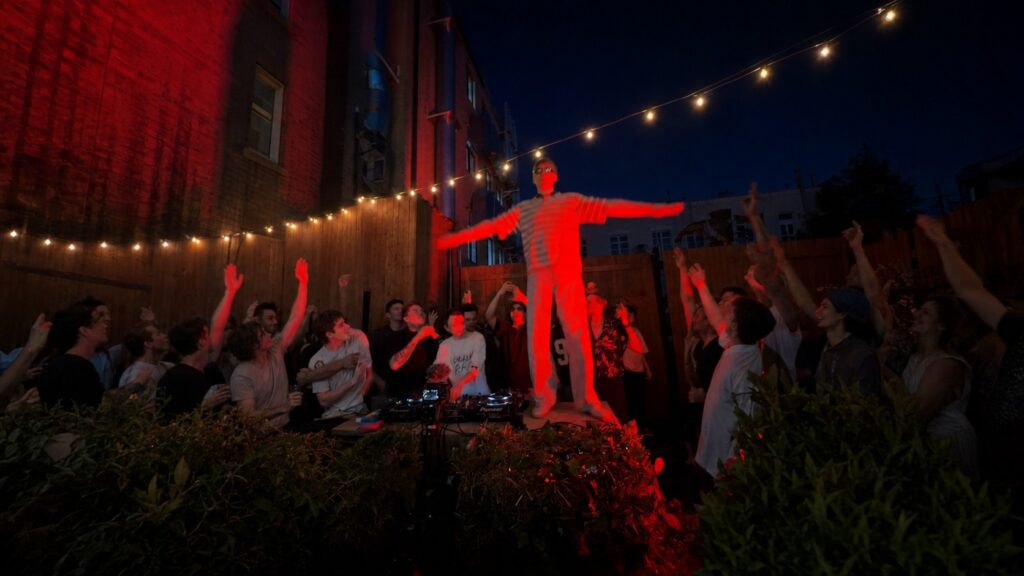
Cheba Man dancing Tecktonik at a courtyard party
What you need to know
- A five-second Wan 2.2 Animate Replace test cost $0.37 but looked pasted in, partly because the source clip had been downscaled from 1080×1920 to 480×854.
- Wan 3 reference-to-video produced a convincing result, but it bills for the uploaded input video as well as the output, so a five-second 1080p test cost $2 rather than $1.
- Wan 3 accepts videos of no more than 15 seconds. Generating a longer clip in separate parts left visible jumps at the joins.
- According to the author, the total spend was $9.97, and the main lesson was “one clip, one generation.”
Why the author built it himself
The author says that after he watched the original Tecktonik video, his feed began showing ads for apps that promised to make any uploaded photo dance the same way. He found those apps underwhelming and paid. Instead, he turned to an AI video model and asked OpenAI’s Codex for help. The author describes Codex as an AI agent that opens websites, downloads files and edits video on its own, then reports back to the user.
The request was deliberately simple. The author attached the dance clip and a photo of Rasputin and wrote, in effect, “I want a video like this, with Rasputin from the photo dancing.” A minute later, he added that the music had to stay exactly as in the original. He did not write an elaborate English prompt.
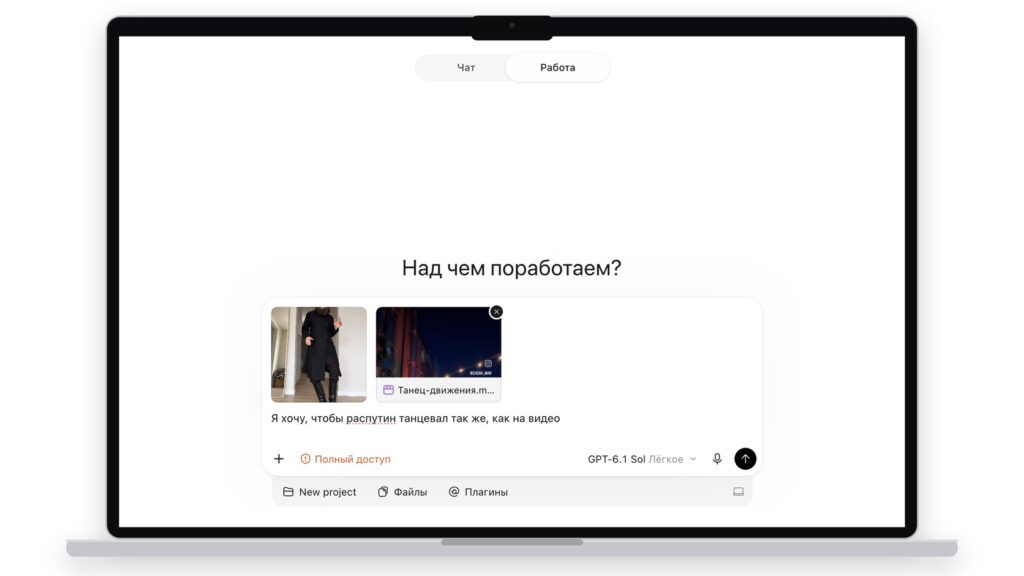
The request in ChatGPT: a photo, a clip and one sentence
Attempt one: a free demo that animated the wrong scene
Codex started with a free option, a Wan Animate demo on Hugging Face. The demo takes a character photo and a video with movements. A two-second test worked. The server rejected a longer request, and the demo then hit its daily limit. The result was two free seconds of dancing, and not the kind the author wanted.
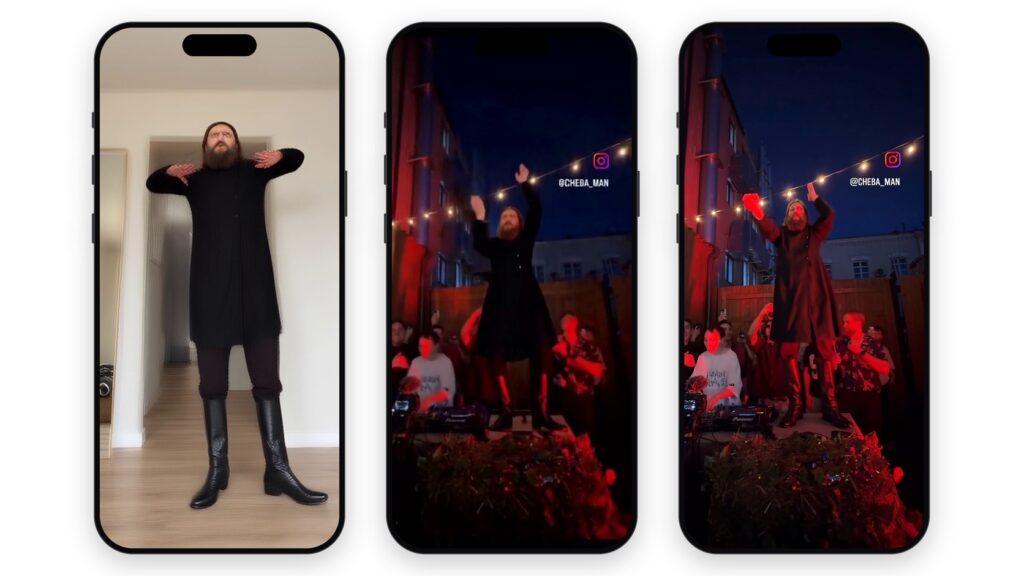
The free demo, Wan Replace and Wan 3
Rasputin did dance, but inside the apartment where his photo had been taken. Codex had chosen a motion-transfer mode, which applies the video’s movements to the photo. The author actually wanted character replacement inside the original video: the same platform, crowd, red lighting and camera, with Rasputin in place of the dancer. After the author clarified this, Codex acknowledged the mistake and suggested replacement options, starting with Wan.
Attempt two: a 37-cent test that looked like a sticker
The replacement mode was available on fal.ai, a platform that hosts various video AI models and charges per generation. According to the author, fal.ai offers no free credits, and a new account starts with a zero balance. He made a one-time $10 top-up, with no subscription or auto-renewal.
Codex then ran Wan 2.2 Animate Replace, a dedicated character-replacement mode, for a five-second test that cost $0.37. This time the platform, crowd and movements were preserved, but Rasputin looked inserted:
- The lighting did not match. The original dancer is bathed in red light, but Rasputin’s face and hands stayed close to natural skin tone.
- He came out shorter and bulkier than the dancer.
- His face and hands lost detail, and his caftan became a solid black blob.
The author asked Codex to diagnose the problem before redoing anything. Codex had lowered the quality itself to make the test cheap: it shrank the source from 1080×1920 to 480×854, which left 5.4 times fewer pixels. The small face, beard and fingers predictably smeared. The lighting problem had a different cause. Rasputin’s photo was taken in soft indoor light, and the model never transferred the red stage lighting onto him. When the author pointed out that Wan 3.0 also existed, Codex admitted it should have checked the newer model before paying for the older one.
Attempt three: Wan 3 got it right, at a higher price
For Wan 3, Codex used the same five-second segment at full resolution and set the output to 1080p. The mode is called reference-to-video. The model receives a character photo and a video, and the prompt explains who is who. Codex also specified the red light, the dancer’s height, the position of the feet, and that no one else in the shot should be changed.
The author reports that the result, delivered after a few minutes, was a clear success. The red light finally fell on Rasputin’s face, hands and caftan, the folds of his clothing were legible, and his height was closer to the original. The hands sometimes blurred, which the author called nitpicking. The fal preview had no sound, so Codex added the original music to the downloaded file afterwards.
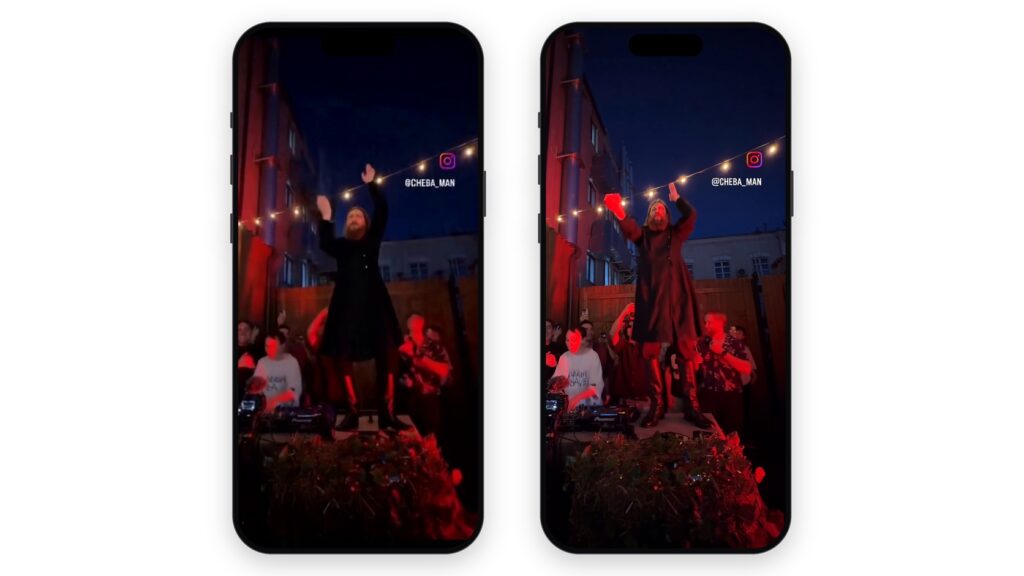
The same frame in Wan Replace and Wan 3
How Wan 3 pricing works
The test cost $2, even though the listed rate for five seconds of 1080p output is $1. Wan 3 also charges for the input video. The author cites these rates as of October 20:
- $0.05 per second of output in 480p
- $0.10 per second of output in 720p
- $0.20 per second of output in 1080p
- The same per-second amount again for each second of uploaded video
These rates reflect that date and may since have changed.
The full clip gave itself away at the joins
The source video runs 23.3 seconds, but Wan 3 accepts videos of no more than 15 seconds. Codex split the rest of the clip into two parts, from second 5 to second 14 and from second 14 to the end, and generated each part separately. Those parts cost $3.60 and $4. The whole project, including the failed test, came to $9.97, which left three cents of the $10 balance.
The joins were obvious. At seconds 5 and 14, Rasputin’s arms jump and the spectators shift position. At the first join, the sky also suddenly brightens. The reason is that the model generated all three pieces independently, each time starting again from the same photo. The end of one piece was never used as a reference for the next.
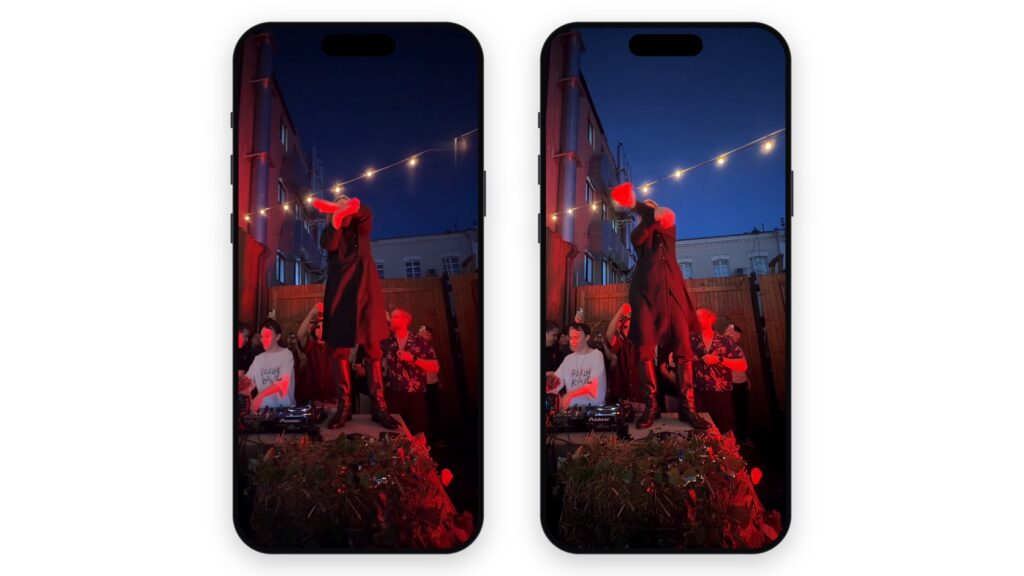
Frames before and after the join between two parts
Hiding the seams with cutaways
Codex acknowledged that such jumps cannot be removed from a continuous wide shot. Colour can be matched, but people’s poses cannot be fixed, and a crossfade between pieces would produce doubled hands and faces. Instead, Codex made the joins part of the edit. At seconds 5 and 14, it inserted short close-ups of the DJ and the audience from the original video, each 0.8 seconds long. The audio runs uninterrupted from the original, so the music does not stutter, and the viewer reads each join as a deliberate shot change, as in an ordinary music video. The author found this an elegant fix that required no new generations. The inserts were somewhat softer, though, because they had to be enlarged.
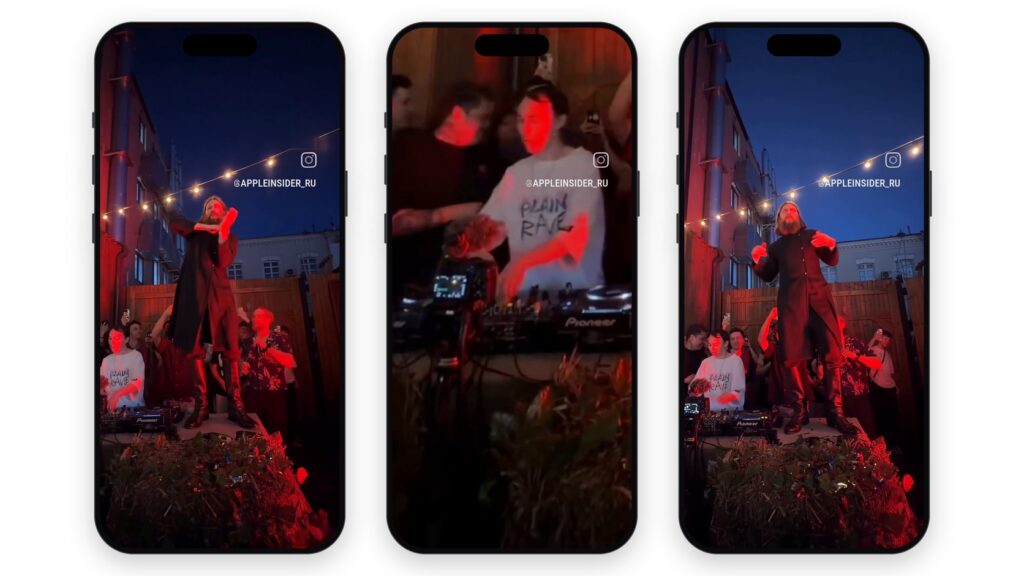
Rasputin, a close-up of the DJ and Rasputin again
The author stresses that this is masking, not repair. His main lesson is one clip, one generation. If you want no seams, use a segment of up to 15 seconds and generate it in a single pass.
How to repeat it on fal.ai
The author says Codex is optional, and the whole process can be done in a browser on fal.ai. He recommends preparing three things in advance:
- A fal.ai account with a funded balance
- A photo of the person who will dance, ideally full-length, so the face and clothing are visible
- A dance clip of up to 15 seconds at no less than 16 frames per second. Trimming is fine, but do not reduce the resolution. That is what cost the detail in the second attempt.
Everything happens on one page, from top to bottom. The field names below match the English labels on the site:
- Sign in to fal.ai, for example with Google. Without signing in, the Run button is replaced by “Sign in to run.”
- Open the alibaba/wan-3.0/reference-to-video model page and go to the Playground tab.
- Paste your prompt into the Prompt field. A template is provided below.
- Set Resolution to 480p for a test.
- Set Duration to the length of your clip in seconds.
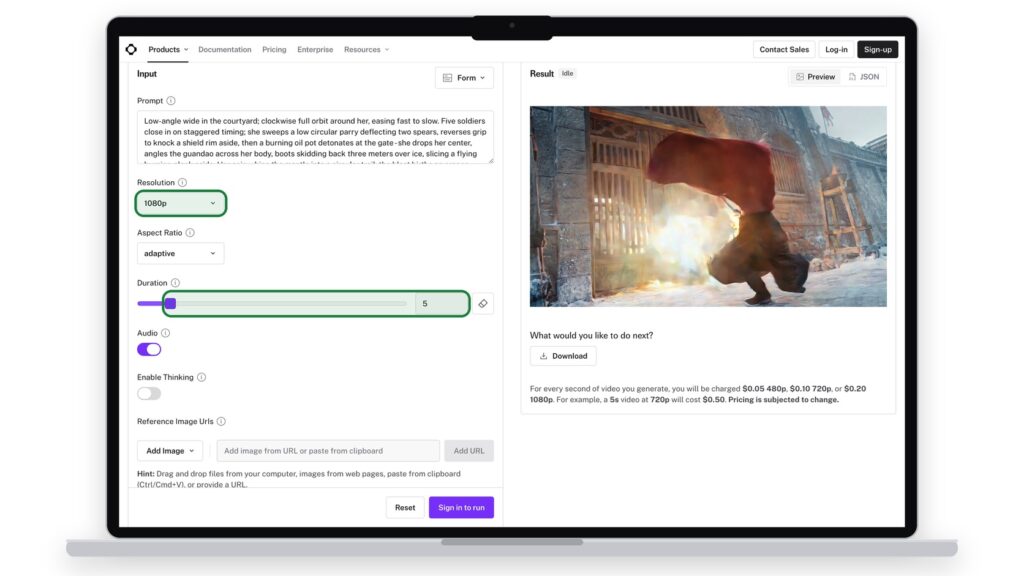
The Resolution and Duration fields in the Wan 3 form
The author advises leaving the fields in between, Aspect Ratio, Audio and Enable Thinking, at their defaults. Then scroll down:
- In the Reference Image Urls block, click Add Image and upload the photo of the person who will dance.
- In the Reference Video Urls block, click Add Video and upload your dance clip.
- Click Run at the bottom of the form and wait a few minutes. The finished clip appears on the right, and you can save it with the Download button.

The Add Image and Add Video buttons on fal.ai
Test cheaply, then render in high quality
A colleague of the author suggested testing at a cheap resolution and repeating a successful version in 1080p. Including the input video charge, 15 seconds costs $1.50 per attempt in 480p, $3 in 720p and $6 in 1080p, based on the October 20 rates cited by the author. He notes that 480p is for checking the idea, not for the final result.
Sound needs separate handling. Wan 3 generates its own audio, and the Audio toggle is on by default. If you want the original music, as the author did, add it to the downloaded clip in any video editor.
Delegating the job to Codex
If you use Codex, you can hand it the entire task by attaching the clip and the photo and describing what you want in your own words. The author had to clarify a lot along the way, so he recommends listing every pitfall up front. His suggested request, translated from Russian:
I want the person in the photo to dance in place of the dancer in this video. Replace the person directly in the original clip rather than transferring the movements onto the photo: the scene, lighting, other people and camera must stay as in the original. Take the music from the original video. Do not reduce the source resolution. Use the Wan 3 reference-to-video model on fal.ai and make the whole clip, up to 15 seconds, in a single generation with no stitched parts. First make a test in 480p and show it to me, then repeat it in 1080p. Before each paid run, tell me the cost.
The author cautions that even this may not produce a perfect result on the first try. If it does not, describe what you dislike, as he did. You still need a funded fal.ai account.
The prompt matters more than resolution
This is the prompt that worked for the author. Paste it into the Prompt field in full. Replace the parts in square brackets, which describe the author’s clip, with your own English descriptions, and delete the brackets. Copy everything else exactly as written.
Replace ONLY [the central red-lit male dancer standing on the raised platform] with [the bearded long-haired man] from Image 1, wearing [his black knee-length caftan and tall black boots]. Image 1 provides identity and clothing only; do not use its [apartment] background or its pose. Preserve the exact original [five-second] choreography, gesture timing, body position, height in frame, foot contact, camera motion, lens perspective, [courtyard, DJ equipment, crowd, buildings, string lights] and all foreground occlusions from Video 1. The replacement must look filmed in the original shot: illuminate [his face, hands, hair, black cloth and boots] with the same [strong saturated red stage light and dim blue ambient night light] as the original dancer. Natural contact shadows, matching motion blur, grain and sharpness. His feet stay on the original platform. Preserve every other person. No new actions, cuts, zooms, slow motion or added objects. Photorealistic seamless character replacement.
What to replace:
- “the central red-lit male dancer standing on the raised platform”: who dances in your clip, for example “the girl in a white dress”
- “the bearded long-haired man”: who is in your photo, for example “the young woman”
- “his black knee-length caftan and tall black boots”: what the person in the photo is wearing, for example “her red dress and white sneakers”
- “apartment”: where your photo was taken, for example “office”
- “five-second”: the length of your clip, for example “ten-second”
- “courtyard, DJ equipment, crowd, buildings, string lights”: what is visible around the dancer in your clip, for example “beach, sea, palm trees”
- “his face, hands, hair, black cloth and boots”: what on your character should catch the light, for example “her face, hands, hair and dress”
- “strong saturated red stage light and dim blue ambient night light”: the lighting in your clip, for example “warm evening sunlight”
Do not change the terms Image 1 and Video 1. Image 1 is your photo and Video 1 is your clip, and the terms tell the model where to take the character from and where to take the scene from. The author says to describe the lighting in your clip with particular care, because mismatched light is what made Rasputin look like a sticker in the first paid attempt. If English is difficult for you, write the descriptions in your own language and run them through a translator.
The verdict: not magic, but better than the advertised apps
For $9.97 and a couple of hours of back-and-forth with Codex, the author ended up with a clip that the advertised apps could not produce. The successful generation was not the expensive part. The mistakes along the way cost more: the wrong mode, a downscaled source and a long video generated in pieces.
In the author’s view, this is now a workable process. The five seconds generated by Wan 3 look as though Rasputin really stepped onto that platform. He warns not to expect perfection, since hands sometimes blur, and recommends testing at a cheap resolution first.