You know that feeling when a package has been “in transit” for three days already, and you can’t figure out whether it’s stuck at a sorting facility or already sitting at the pickup point? Usually, you have to open five different apps and enter the tracking number into each one. T-Bank solved this problem: now all shipments can be tracked right in the banking app on iPhone. Free and without extra services.
T-Bank has a convenient package tracking service
Package Tracking in T-Bank: Where to Find the Service
T-Bank launched its own tracking service that works with more than 1,000 shipping companies. Not just Russian ones, but international as well. The idea is simple: you enter the tracking number once and see the current delivery status on a single screen. No switching between CDEK, Russian Post, and Boxberry apps.
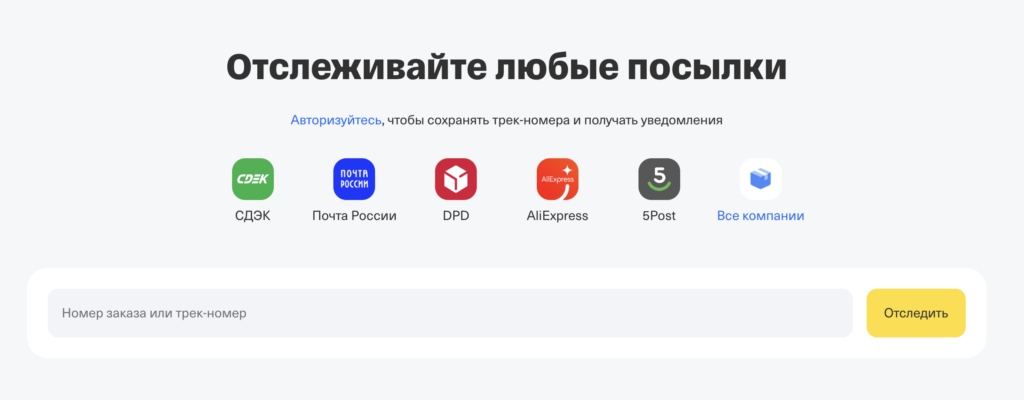
You can even track packages on the website
The service is available in the T-Bank mobile app for iOS and Android, as well as in the personal account on the tbank.ru website. Even those who are not bank customers can use it: just go to the website’s “For Individuals” section, navigate to “City,” and select the service.
Which Delivery Services Does T-Bank Show
All major shipping companies used by Russians are connected to the service. Here are the key ones:
- Russian Post — the federal postal operator with offices across the entire country. Packages are stored for 15 days, with the option to extend up to 30.
- CDEK — one of the largest private delivery services. Storage at the pickup point is 7 days with the option of a free 7-day extension.
- Boxberry — a network of pickup points with coverage across all of Russia.
- 5Post — a delivery service operating through parcel lockers and pickup points in Pyaterochka stores.
- DPD — an international courier service operating in Russia.
- Delovye Linii — a shipping company for oversized cargo and business delivery.
- CourierServiceExpress (CSE) — express delivery across Russia.
- Cainiao — AliExpress logistics platform for international shipments.
- DOSTAVISTA — an urgent same-city courier delivery service.
- Yandex Delivery — a delivery service from Yandex.
In total, more than 1,000 companies are connected. If you order something from abroad, the service will also show the status: no need to visit a foreign carrier’s website and navigate an interface in another language.
Where to Enter a Package Tracking Number in the T-Bank App
The process takes literally a minute. Here’s what you need to do:
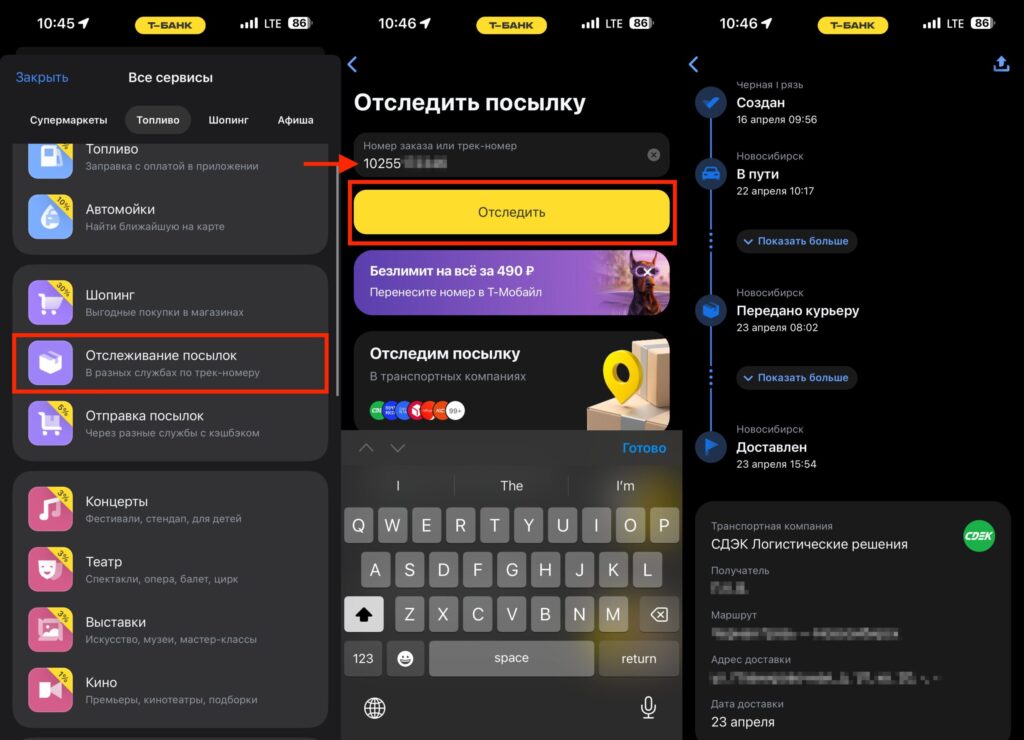
Enter the tracking number, and the package is immediately added to the database
- Open the T-Bank app on your iPhone.
- Go to the “City” section on the bottom panel.
- Tap “All Services.”
- Find and select “Package Tracking.”
- Enter the order number or tracking number in the search bar.
- Tap “Track.”
After that, a widget will appear on screen with the current status of your package and an estimated delivery date. The tracking number is saved automatically: next time you won’t need to enter it again.
Delivery Status Notifications in T-Bank
One of the most convenient features of the service: push notifications when the status changes. When the package arrives at the pickup point, you’ll receive a push or SMS. The app will then keep reminding you about the package until you pick it up.
Another nice touch: each shipment can be given a custom name. Instead of a faceless tracking number like “RR123456789RU,” it will say “Case from Ali” or “Gift for Mom.” When you have a dozen orders in progress, this makes life much easier.
On the main screen of the service, the statuses of all added shipments are visible. Information is updated in real time and matches what the shipping company’s website shows.
Tracking CDEK, Russian Post, and Boxberry in One App
The main advantage: everything in one place. No need to install apps for Russian Post, CDEK, Boxberry, and five other services. One tracking number, one screen, one notification.
It’s convenient to track deliveries from different companies in one place
The second advantage: the service is completely free. No subscriptions, hidden fees, or limits on the number of tracked packages. It works for everyone, even those who don’t have a T-Bank account.
The third point: support for international companies. If you order products from China or other countries, statuses are available right in the app. Previously, you had to use third-party aggregators like “GdePostylka” or track the package on the seller’s website.
According to the T-Data analytics project, over the past two years T-Bank customers made more than 80 million transactions with shipping companies. Leaders: Yandex Delivery (39%), Russian Post (28%), and CDEK (27%). Clearly, the demand for a unified tracking service was enormous.
What to Do If a Tracking Number Isn’t Being Tracked
Sometimes after entering a tracking number, no status appears. There can be several reasons. An international package hasn’t cleared customs yet: some companies, like CDEK, only start displaying the status after the cargo arrives on Russian territory.
If the status hasn’t changed for several days in a row, it’s worth contacting the shipping company’s support. Contact information can be found in the “Frequently Asked Questions” section on the main package tracking page in the T-Bank app.
Another option: check whether you entered the number correctly. The tracking number is usually sent via SMS or email from the seller. If the number is lost, contact the store or sender.
The package tracking service in T-Bank won’t replace full-featured shipping company apps with advanced functions like redirection or changing the delivery date. But for the main task — finding out where your package is right now and when it will arrive — it’s more than enough. Especially if you already use T-Bank on your iPhone every day.


