Topping up your Apple ID in Russia is a tricky task. Russian cards don’t work, payment via mobile phone number hasn’t worked since April 1, but you still need to buy things in the App Store or renew subscriptions somehow. And that’s where T-Bank comes in, quietly and without much fanfare selling Apple gift cards right in its app. Here’s how to use them and how much they cost today.
You can top up Apple ID through T-Bank
An important point right away: Apple gift cards sold by T-Bank work only for accounts with the US region. If your Apple ID is linked to Russia, Kazakhstan, or any other country, the code simply won’t activate. So first, sort out the region, and then go get the card.
Change Your Apple ID Region to the US
Changing the region is a straightforward process, but there are nuances. The main requirement: your Apple ID account must have no money, active subscriptions, or unused gift cards. If any of these are present, the system simply won’t let you change the region.
Here’s what to do next:
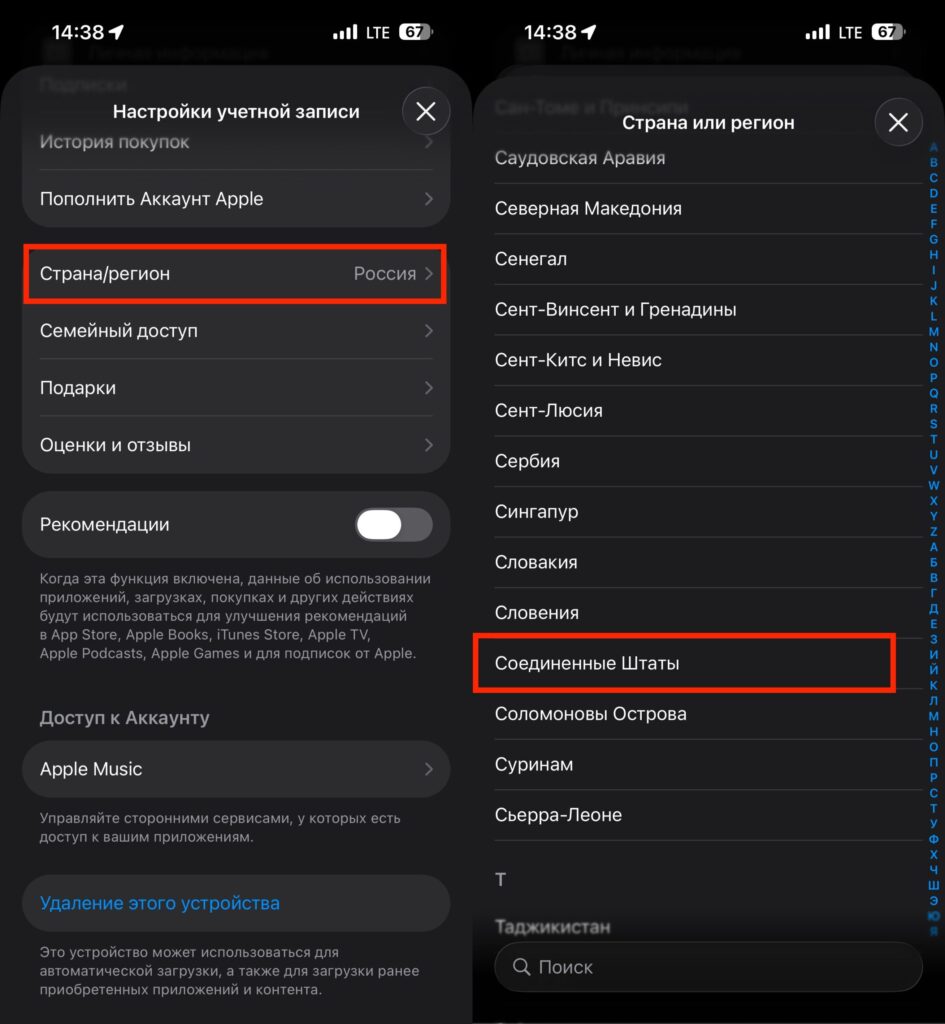
The region changes very quickly
- go to “Settings” on your iPhone and tap your name at the top;
- open the “Media & Purchases” section;
- select “Country or Region”;
- tap “Change Country or Region” and select the United States;
- for the payment method, select “None”;
- fill in the address — any real American address will do, which you can easily find online.
After this, your Apple ID will officially become American, the App Store will switch to an English-language interface with prices in dollars, and you’ll be able to activate gift cards from T-Bank.
Buy an Apple Gift Card in T-Bank
T-Bank doesn’t put this section on the main screen, so if you search randomly, you could spend about ten minutes looking. Follow this clear route:
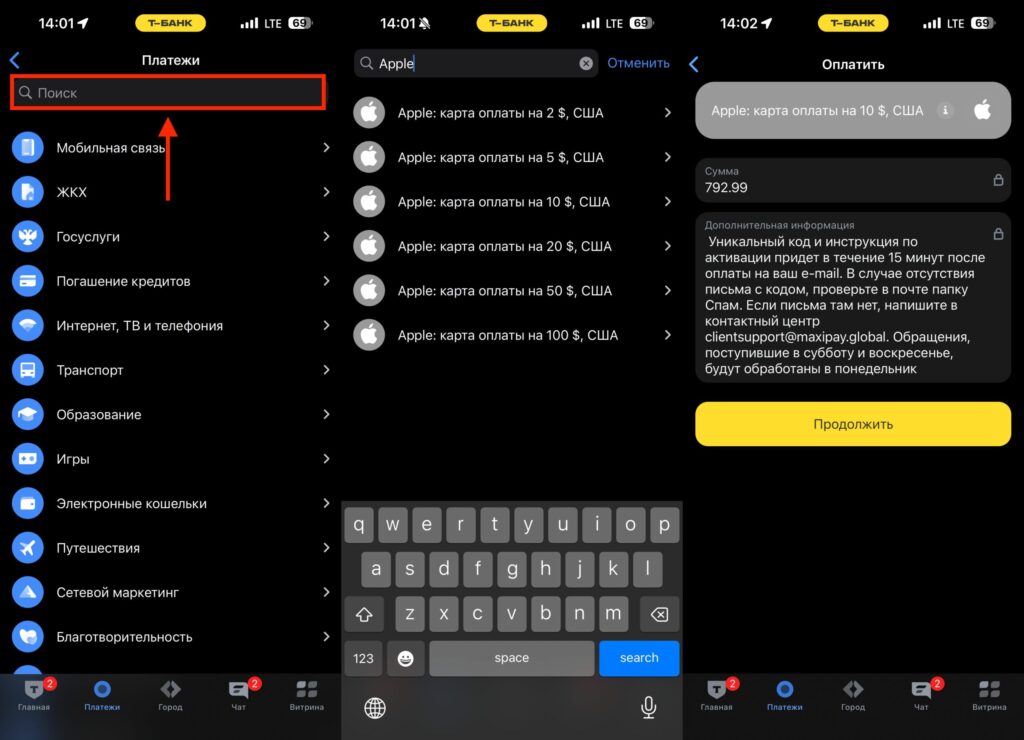
Just choose the denomination and pay
- open the T-Bank app;
- go to the “Payments” section;
- in the “Payments” block, tap the “All” button;
- type Apple in the search bar;
- select the desired gift card denomination.
Available denominations: $2, $5, $10, $20, $50, and $100. This is convenient — you can buy exactly as much as you need for a specific subscription or purchase, without overpaying “just in case.”
Apple Gift Card Prices at T-Bank
The exchange rate at which T-Bank sells cards is slightly above the market rate — this is normal for such services. Here are the current prices for the most popular denominations:
- $2 card — 158.60 rubles;
- $5 card — 396.49 rubles;
- $10 card — 792.99 rubles.
That works out to approximately 79.3 rubles per dollar. Compared to gray-market exchangers and resellers in Telegram, where a $10 denomination can cost a thousand rubles or more, this is a perfectly reasonable price. Plus, you’re buying a card from a legitimate bank, with no risk of running into scammers or receiving a non-working code.
How to Activate an Apple Gift Card on iPhone
You’ve bought the card, received the code — now you just need to redeem it. It takes literally one minute:
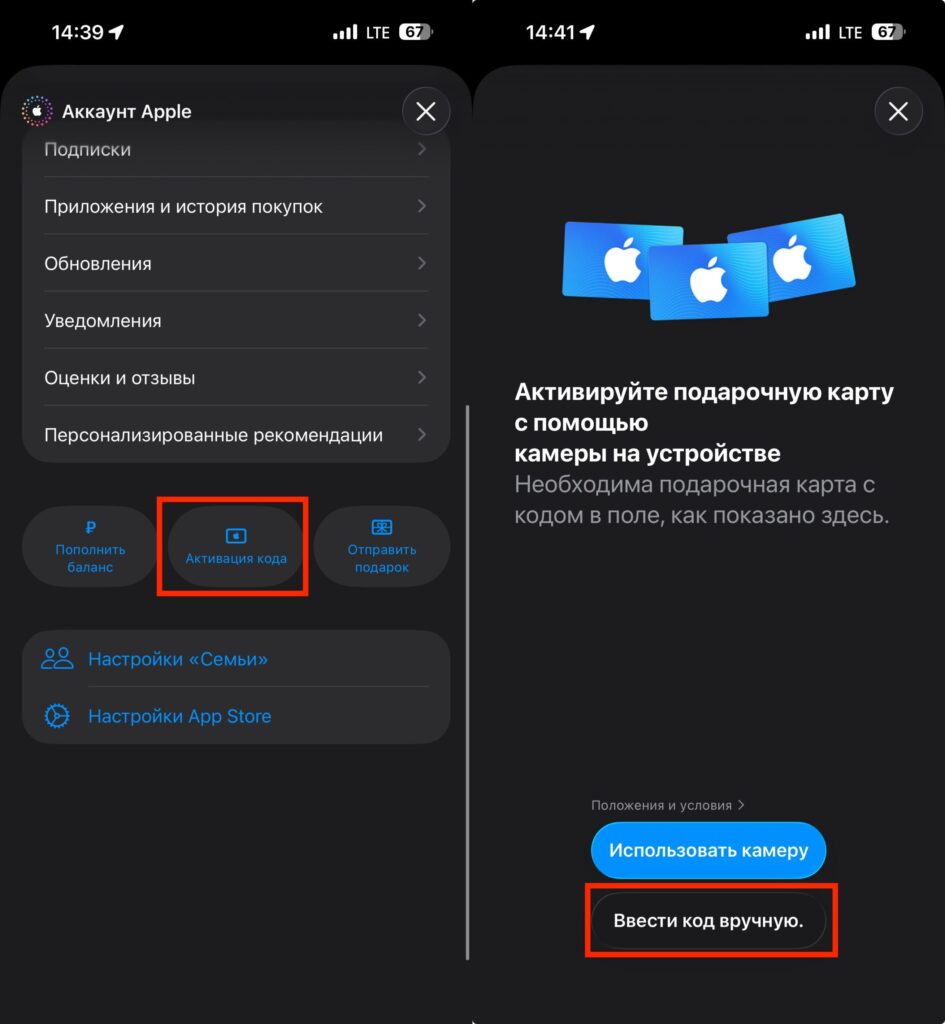
After receiving the code, enter it here and the funds will be credited to your account
- open the App Store on your iPhone or iPad;
- tap the profile icon in the upper right corner;
- select “Redeem Gift Card or Code”;
- tap “Enter Code Manually”;
- confirm the activation.
The amount is immediately credited to your Apple ID balance, and you can spend it on anything: an iCloud+ subscription, Apple Music, Apple Arcade, App Store purchases, games, apps. The money on your balance doesn’t expire and stays there as long as you need.
Benefits of Topping Up Apple ID Through T-Bank
In my opinion — yes, this is currently one of the simplest and safest ways to top up your Apple ID from Russia. You don’t need to search for exchangers, negotiate with strangers in chats, or send money to unknown people. Everything happens within the familiar banking app, the receipt is saved in the transaction history, and the code arrives almost instantly.
The only limitation is the need to have an account with the US region. But if you’ve been using the App Store in Russia for a long time, you probably know that without changing the region, it’s almost impossible to fully purchase anything in it anyway. So this is less of a drawback of the method and more of a general rule of the game in 2026.