If you thought that topping up your Apple ID from Russia was a quest involving buying cards from resellers and risking getting an already-used code, then I have good news for you. Alfa-Bank has built the sale of Apple gift cards right into its app. Let’s take a look at Alfa.
Alfa-Bank also sells Apple gift cards. Image: myseldon.com
Apple Gift Cards at Alfa-Bank
Open the Alfa-Bank app and go to the “Payments” section. Then look for the “Shopping and Leisure” category — that’s where the option we need is hidden. If you don’t want to scroll manually, just type “Apple Card” in the search, and the app will immediately show the result.
After navigating there, you’ll see two card options — for American and Turkish accounts. Keep in mind that a code from a card of one region won’t work for an account registered in another. So before purchasing, be sure to check which country is specified in your Apple ID settings — you can do this in the “Content & Purchases” section in your iPhone settings.
Apple Gift Card Prices at Alfa-Bank
Alfa-Bank offers several fixed denominations. The selection isn’t the widest yet, but for regular balance top-ups — it’s more than enough. Here’s what’s available at the time of writing.
| Region | Denomination | Price in rubles |
|---|---|---|
| USA | 2 dollars | 220 ₽ |
| USA | 5 dollars | 550 ₽ |
| Turkey | 25 lira | 90 ₽ |
| Turkey | 50 lira | 180 ₽ |
The price difference is striking. Turkish cards cost several times less than American ones — 90 rubles versus 220. However, prices in the Turkish App Store are also lower, so a direct comparison of denominations isn’t quite fair. But if your account is linked to Turkey, topping up will cost you next to nothing. American denominations are also quite affordable — especially if you need to pay for a specific app or a monthly subscription.
How to Buy an Apple Gift Card at Alfa-Bank
The purchase process takes a couple of minutes and doesn’t require any additional apps or visits to third-party websites. Everything happens inside the Alfa-Bank app — from selecting the denomination to receiving the code.
- Open the “Payments” section in the Alfa-Bank app
- Go to “Shopping and Leisure” or search for “Apple Card”
- Select the region — USA or Turkey
- Select the desired denomination and confirm payment
- Wait for the code — it arrives instantly
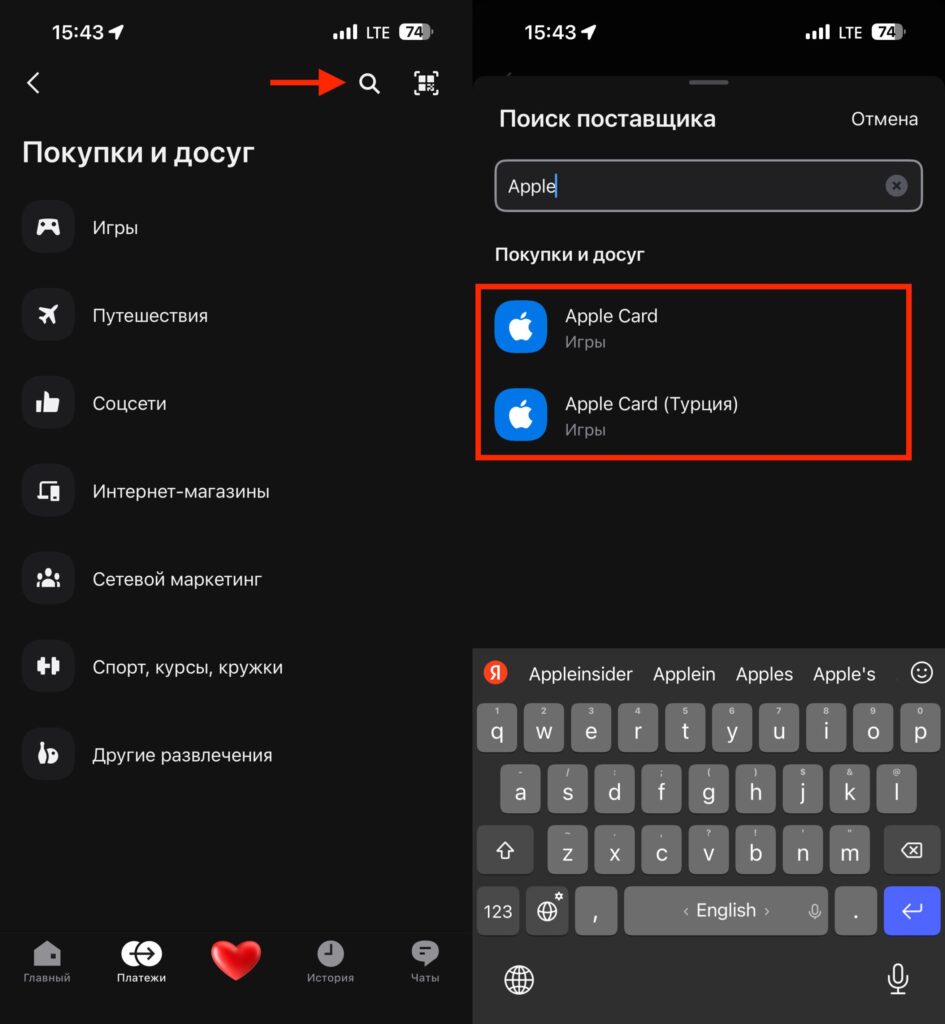
Find Apple cards via search
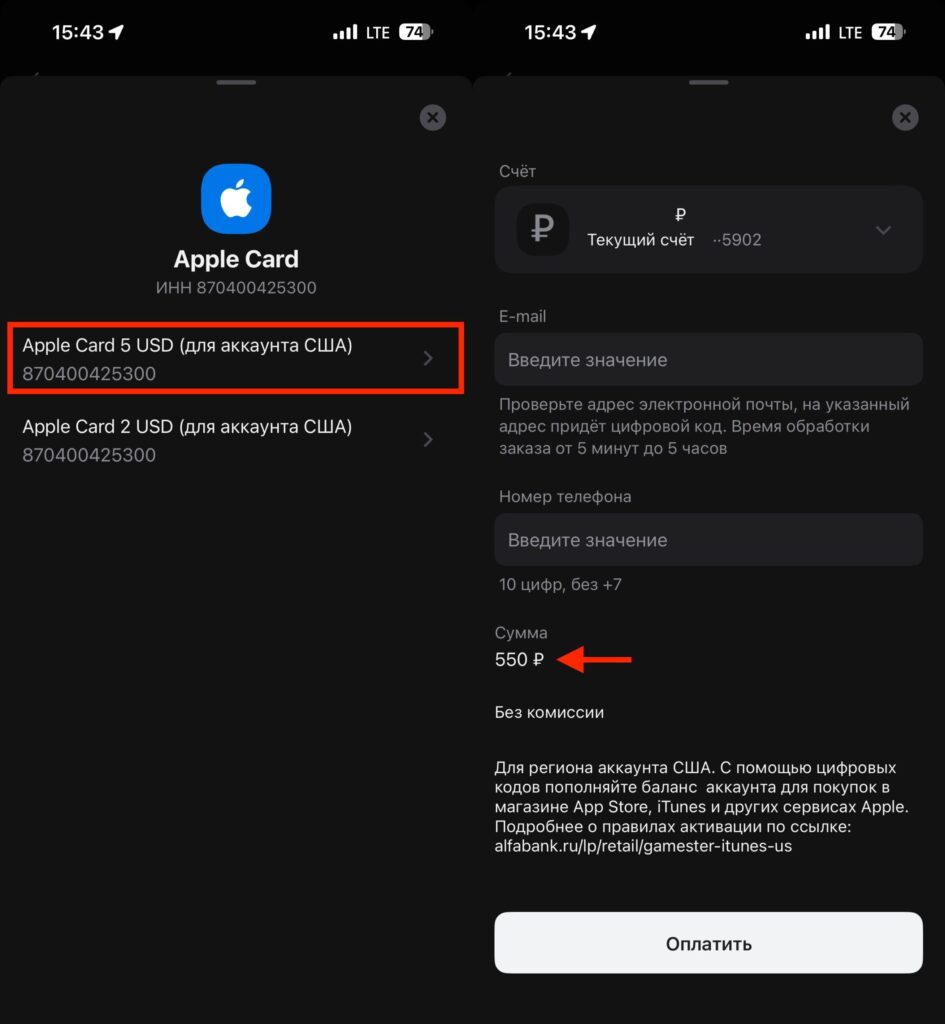
And pay for the denomination you need
The code is sent to the specified email address. Copy it — and you can proceed to activation. No need to wait for SMS from third-party services or correspond with marketplace sellers.
Activating the Gift Card on iPhone
You have the code in hand — now it’s time to activate it. Open the App Store on your iPhone and tap the profile icon in the upper right corner of the screen. In the menu that opens, select “Redeem Gift Card or Code”.
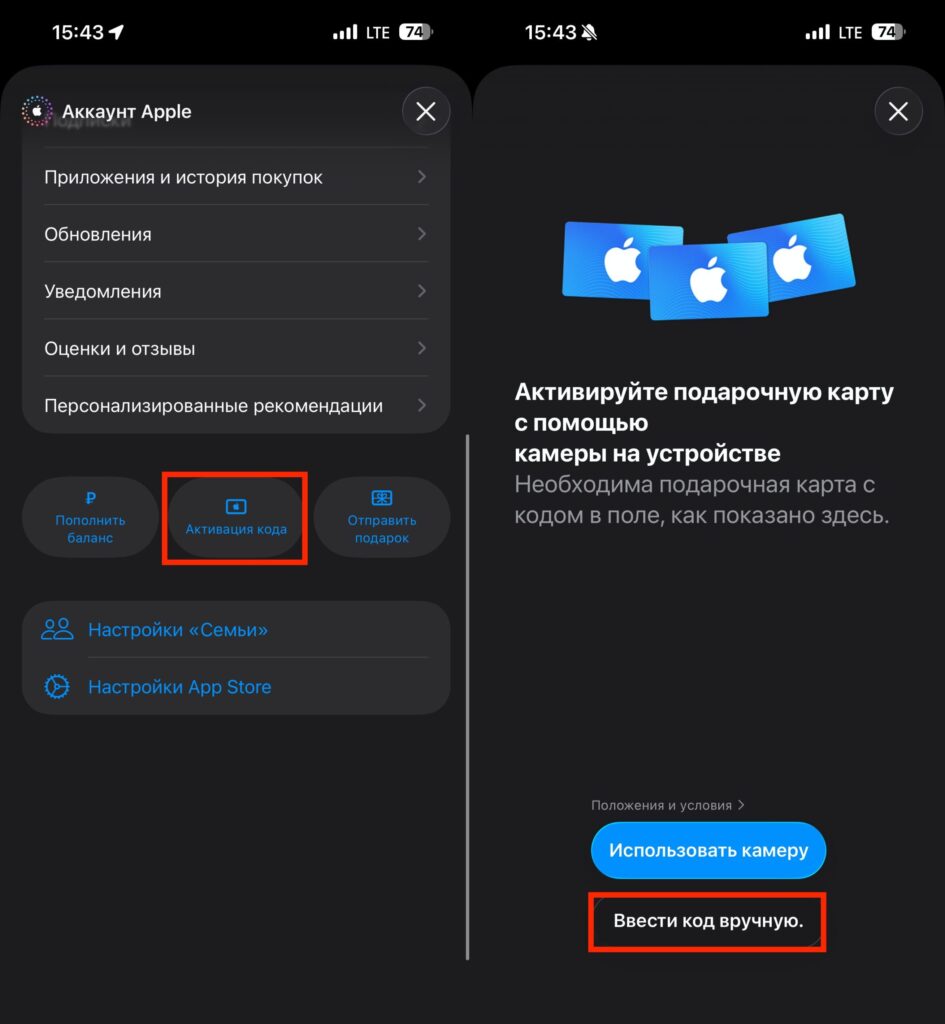
The gift card is activated here
Then there are two options. You can enter the code manually — tap the corresponding button and paste the copied code. Or you can scan it with the camera if you took a screenshot or received the card as an image. After confirmation, the funds will be instantly credited to your Apple ID balance.
You can check your current balance in the same place, in the App Store profile settings. The amount updates immediately after activation — no delays.
What You Need to Know Before Topping Up Apple ID via Alfa-Bank
The main thing to note we already mentioned — the card region must match your Apple ID region. An American code won’t work on a Turkish account, and vice versa. This isn’t a quirk of Alfa-Bank, but a general Apple rule.
Another point — the denominations are still small. To purchase an expensive app or an annual subscription, you’ll need to buy several cards in a row. This isn’t very convenient, but the risks are minimal — even if something goes wrong, you’ll lose at most 550 rubles, not several thousand.
If you compare it with other top-up methods, Alfa-Bank is perhaps the least convenient, quite expensive, and unremarkable option.


