In 2026, paying for Apple Music in Russia has become more difficult because the usual payment methods for Russian Apple accounts no longer work. It is no longer possible to top up the Apple ID balance for the Russian region, and a phone number can no longer be linked as a payment method. Therefore, to subscribe to Apple Music, you now need to change your Apple account region and top up your balance in the currency of the new region.
Figuring out how to subscribe to Apple Music in Russia
Ways to Pay for Apple Music After April 1, 2026
You can pay for Apple Music from Russia, but not with the methods users were accustomed to before. Starting April 1, 2026, payment processing for purchases and subscriptions in the App Store in Russia is no longer available. This also applies to existing subscriptions: if there are no funds on the account balance, renewing Apple Music for the Russian region will not be possible.
Users have two main ways to pay for an Apple Music subscription, but in both cases, you first need to change your Apple account region to another country.
Main ways to pay for Apple Music:
- Buy an Apple gift card;
- A foreign bank card, if you have one.
The most convenient way to pay for Apple Music after changing the region is to use an Apple gift card in the currency of the new country. It’s fast, simple, and suitable for renewing a subscription.
The Apple ID balance can be used to pay for apps, subscriptions, music, iCloud+, and other Apple services. It’s important to note that gift cards only work in the region for which they were issued, so they need to be redeemed on an account with the corresponding country.
If you have a foreign bank card, you can add it to your Apple ID as a payment method and pay for the subscription directly. The card must match the selected account region.
For most users, the most convenient method remains Apple gift cards. This option is easier to set up, does not require permanent access to a foreign bank card, and is suitable for renewing an Apple Music subscription. Additionally, after April 1, this method is most commonly used as the primary tool for topping up Apple ID.
Which Region to Choose for Apple Music Payment
Users from Russia most often choose the US, Turkey, or Kazakhstan when changing regions. Gift cards are available for these countries, and after changing the region, the Apple Music subscription is paid in the currency of the new account. It’s important to note that gift cards only work in the region for which they were issued.
Prices for an individual Apple Music subscription are as follows:
- USA — $10.99 per month (approximately 795 ₽);
- Turkey — 59.99 TL per month (approximately 96 ₽);
- Kazakhstan — 1,490 ₸ per month (approximately 229 ₽).
Prices in rubles are based on the exchange rate at the time of publication and may change.
For new Apple Music subscribers, a free trial period is available, after which regular monthly payments begin. To activate the trial period, the account must have enough funds to cover one month of the subscription.
The American App Store is considered the most convenient in terms of app and service selection. However, this region has an important caveat: in the US, tax may be added to the price, so it’s better to keep an extra $2-3 on your balance.
Turkey is the least stable option. In practice, after changing the region, some users encounter an error where the Music app fails to load and shows a network error. You need to delete the Apple Music app from your iPhone and reinstall it through the App Store, but in some cases, the problem persists.
Kazakhstan appears to be the most familiar option for users from Russia. It differs in subscription price and regional currency.
How to Change Your Apple Account Region
To pay for Apple Music now, you need to change your Apple account region to a country where suitable payment methods are available.
Before changing the region, you need to:
- Zero out your Apple account balance;
- Cancel all subscriptions and wait for them to expire;
- Remove payment methods;
- Leave Family Sharing.
Instructions for changing your Apple account region:
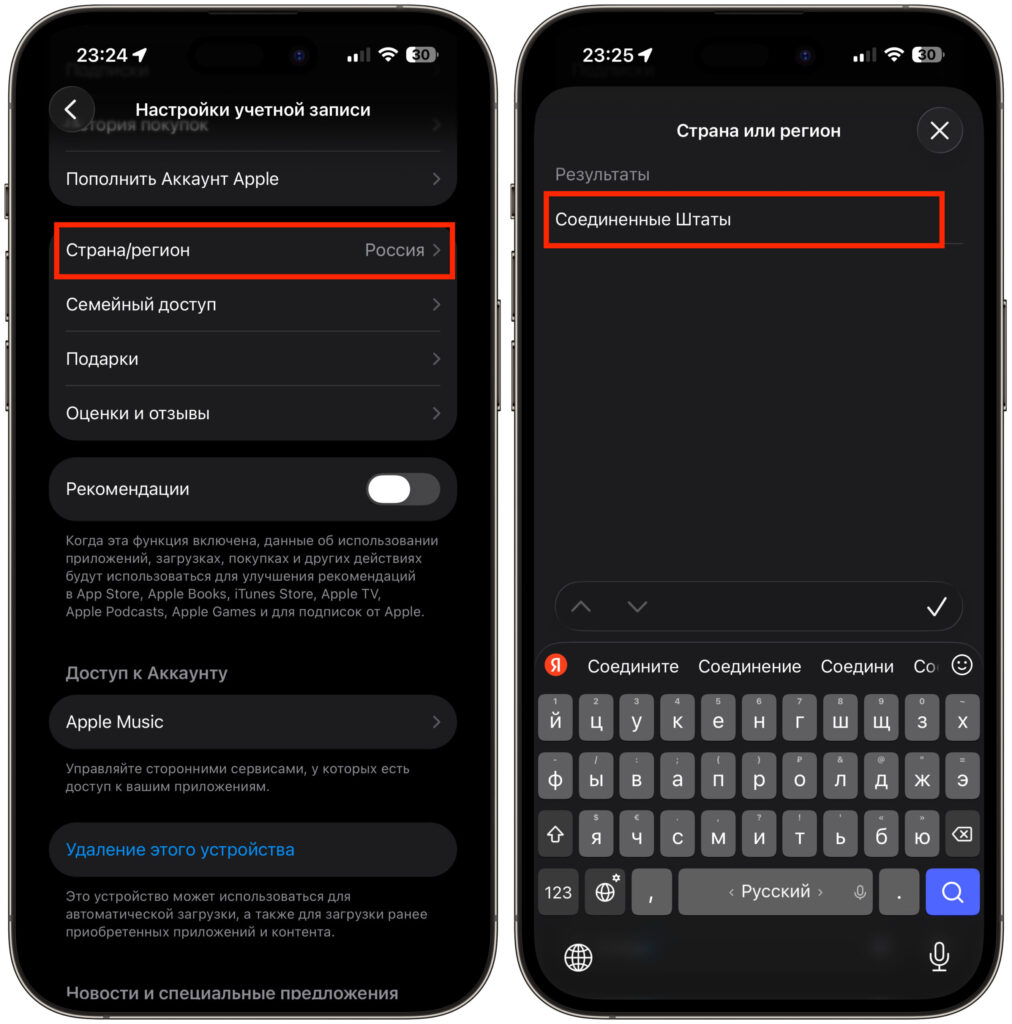
The region can be changed in just a couple of taps
- Open “Settings” on your iPhone;
- Tap on your name;
- Go to “Media & Purchases” — “View Account”;
- Enter your Apple ID password if required;
- Open the “Country/Region” section;
- Select the desired region and confirm the changes.
When changing regions, you need to provide an address and other details for the selected country. For convenience, you can use address generators:
In payment methods, select “None”.
After this, your account will be switched to the new region, and you can use a suitable payment method to subscribe to Apple Music.
How to Pay for Apple Music with an Apple Gift Card
This option is suitable for those who don’t have a foreign bank card but can change their Apple account region and top up their Apple ID balance in the currency of the new country.
Let’s look at buying an App Store gift card using the Paytool service as an example:
- Go to the PayTool website;
- Select the desired gift card denomination;
- Go to your cart;
- Confirm the order;
- Enter your email address and choose a payment method;
- Click “Pay”;
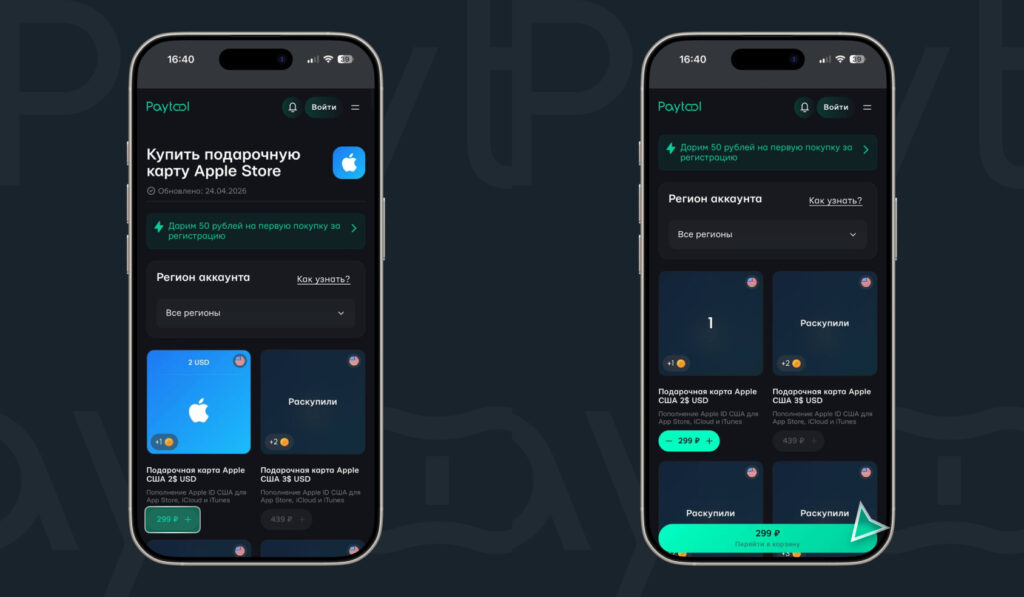
Select the card denomination and add it to your cart
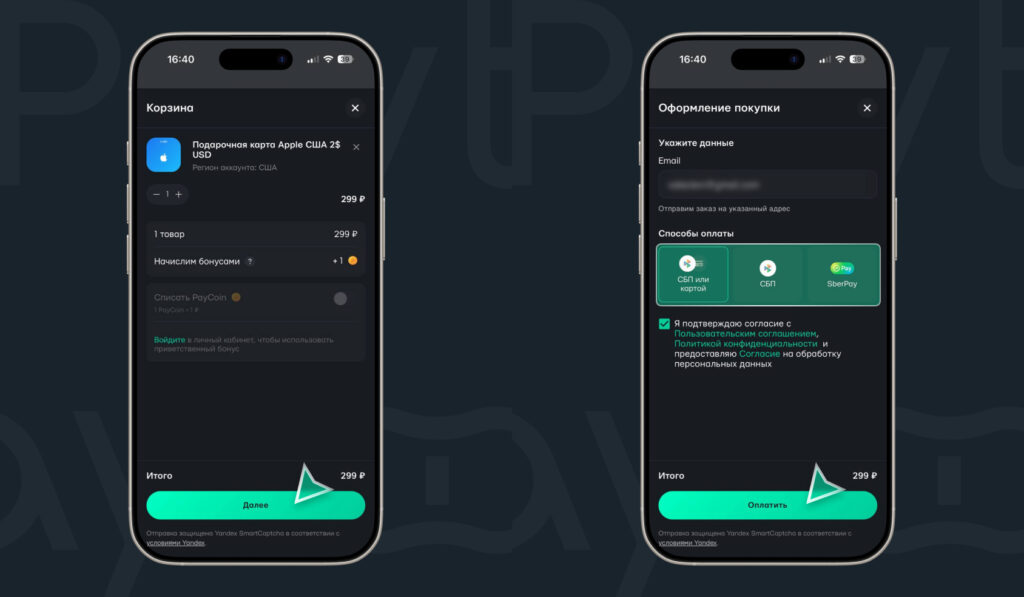
Confirm and pay for the order


