You can make a presentation using AI in just a couple of minutes — without any design skills and without hours of manual work in PowerPoint. Just describe your topic, and the algorithm will assemble slides with text, images, and neat formatting on its own. If you haven’t yet tried using neural networks for everyday tasks, creating presentations is a great way to start. In this article, we review the best services for generating presentations with AI, provide step-by-step instructions, and explain how to get truly great results.

AI has learned to create high-quality presentations much faster than humans
AI for Creating Presentations: How It Works
All presentation generation services work on a similar principle. You enter a topic, description, or paste ready-made text — the neural network analyzes the request and automatically breaks the material into slides. The algorithm structures the content, writes headings and key points, selects appropriate images, and chooses a color palette and fonts. The output is a finished presentation that you can immediately present or download for further editing.
Modern AI tools don’t just fill templates with text. They understand the context of your request. If you ask it to create a presentation about launching an online store, the neural network will build the logic from market analysis to marketing strategy. If the topic is the history of Impressionism, the algorithm will arrange events in chronological order and select relevant illustrations.
After generation, you can edit the presentation: change text, rearrange blocks, replace images, and add new slides. Essentially, the neural network handles the most routine part — the initial assembly of slides — and you just need to refine the result to the desired quality.
How to Make a Presentation Using AI: Step-by-Step Instructions
Let’s walk through the entire process using Gamma as an example — one of the most popular tools for creating presentations with AI. The interface is in English, but Russian is fully supported: you write your prompt in Russian and get slides in Russian.
- Register on the website gamma.app. Click the “Start for free” button and sign in with your Google account — it’s the fastest way. After registration, you’ll receive 400 free credits, which are enough for several full presentations.
- Choose the generation mode. In your dashboard, click the “Generate” button. The service will offer three options: presentation, document, or web page. Choose presentation.
- Describe the topic or paste ready-made text. In the field that appears, write what the presentation should be about. The more specific the request, the better the result. For example: “A 10-slide presentation about the advantages of remote work for a team of 20 people, business style.” If you already have key points or a finished document — paste the entire text, and the neural network will break it into slides on its own.
- Review the structure. Gamma will show a preliminary plan — a list of slides with headings. At this stage, you can adjust the order, remove unnecessary items, or add missing sections.
- Choose the design. The service will offer several themes with different color schemes and fonts. Select the one that fits and click the generate button.
- Wait for the result. In 30–60 seconds, you’ll have finished slides with text, images, and formatting. Even at this stage, the presentation looks impressive.
- Edit the presentation. Click on any element to modify it. You can rewrite text, replace an image from the built-in photo library, or ask the neural network to generate a new image. Unnecessary slides can be deleted with one click, and new ones can be added with the “+” button between existing slides.
- Export or share a link. Click “Share” in the upper right corner. You can copy the link — the presentation will open in a browser without downloading. Or choose to export to PDF or PowerPoint to work with the file in your usual program.
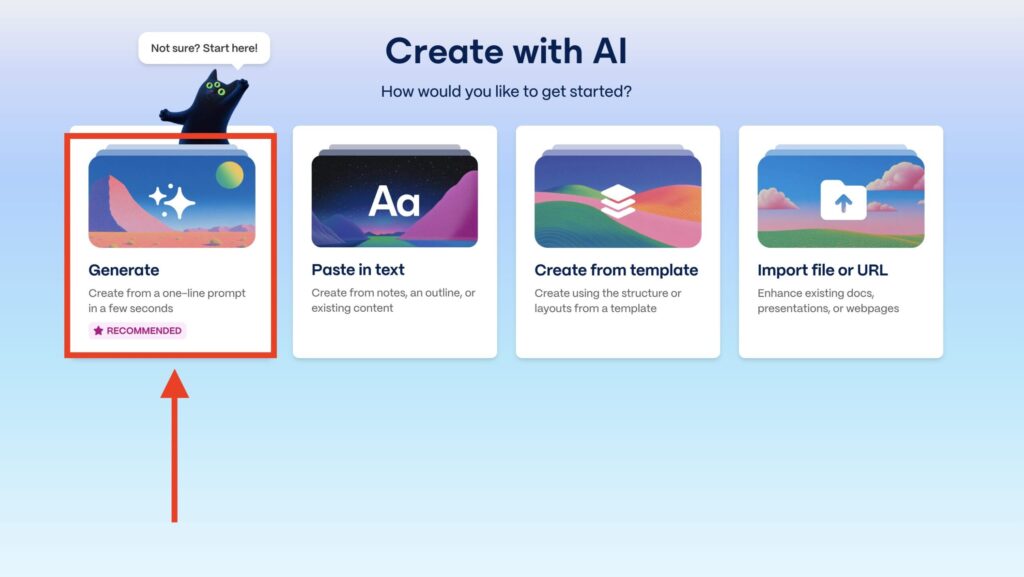
Launch the generation mode

Gamma creates a plan, and you just need to approve it

The output is a beautiful presentation like this
The entire process from registration to a finished presentation takes 3–5 minutes. Another 10–15 minutes for editing — and the result is ready to show to your audience.
Gamma — A Universal Service for Creating Presentations with AI
Gamma is the most well-known tool for generating presentations with AI. The service is suitable for any task: academic reports, work presentations, investor pitches, project overviews. If you’re trying to make a presentation using AI for free for the first time, start with Gamma.

Gamma lets you create cool presentations
The service’s strengths are generation speed and design quality. The slides come out clean, with well-thought-out typography and logical structure. There’s a built-in photo library, support for inserting videos and tables, and the ability to generate images directly within the editor. The free tier with 400 credits is enough for 3–4 full presentations.
Limitations include: the interface is only in English (though slide content is generated in any language), and after exhausting free credits, you need to switch to a paid plan — starting from $10 per month. Exporting to PowerPoint on the free plan adds a Gamma watermark.
SlidesGo — A Presentation Generator with Designer Templates
SlidesGo started as a library of designer templates for Google Slides and PowerPoint, but it’s now a full-fledged AI tool. The service allows you to generate a presentation using AI and immediately get results in a style that looks like professional designer work.