The Lenta supermarket chain app has disappeared from the App Store. You can’t download it even through your purchase history. If you still have it installed, don’t rush to delete it: for now, it will continue to work. But downloading it again is no longer possible. Let’s figure out what happened and show you how to get by without it.
Lenta was removed from the App Store — has Apple gone after grocery stores?
Why Lenta Disappeared from the App Store
The exact reason for the removal of the Lenta app from the App Store has not been announced by either the chain or Apple. The most likely explanation: the developer’s certificate expired, which is required for publishing apps in Apple’s store. Without a valid certificate, Apple automatically removes the app from the storefront and also blocks re-downloading from purchase history.
This is not sanctions or a block by Apple. The issue is most likely technical and on the developer’s side. This has already happened with other Russian apps: the certificate expires, the app is removed, and after some time everything returns to normal. But you shouldn’t count on a quick fix: the restoration process can take anywhere from a few days to several weeks.
Does the Lenta App Still Work on iPhone After Removal?
If Lenta is still installed on your iPhone, it will continue to work. Removal from the App Store does not mean forced deletion from users’ devices. The app will remain on your screen, will open, and will perform its functions: showing promotions, earning bonuses on the “Card No. 1,” and creating shopping lists.
The only problem: updates will stop arriving. If the developer releases a new version and the certificate hasn’t been restored by then, the update simply won’t reach your device. Over time, this could lead to glitches. So the first thing you should do right now is make sure you have automatic offloading of unused apps disabled.
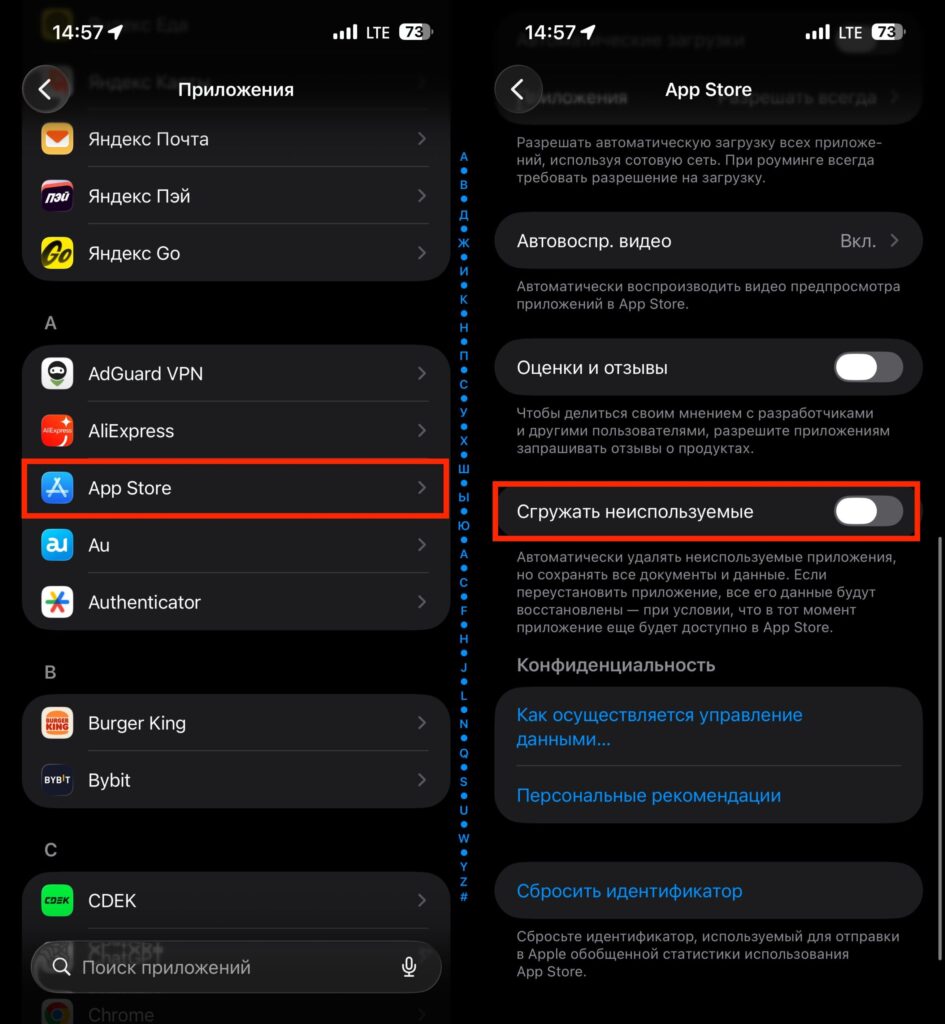
Don’t let the system delete apps from your iPhone on its own
Open “Settings,” go to the “Apps” section, then to “App Store,” and make sure the “Offload Unused Apps” toggle is turned off. If you don’t do this, iOS may decide that you haven’t opened Lenta in a while and offload it on its own. And you won’t be able to reinstall it afterward.
Can You Restore Lenta from App Store Purchases?
Unfortunately, no. Normally, deleted apps can be restored through the “Purchases” section in the App Store. But in the case of Lenta, this method doesn’t work. When you try to download from purchase history, the system returns an error. This confirms the expired certificate theory: Apple completely blocks access to the app if the developer doesn’t have a valid certificate.
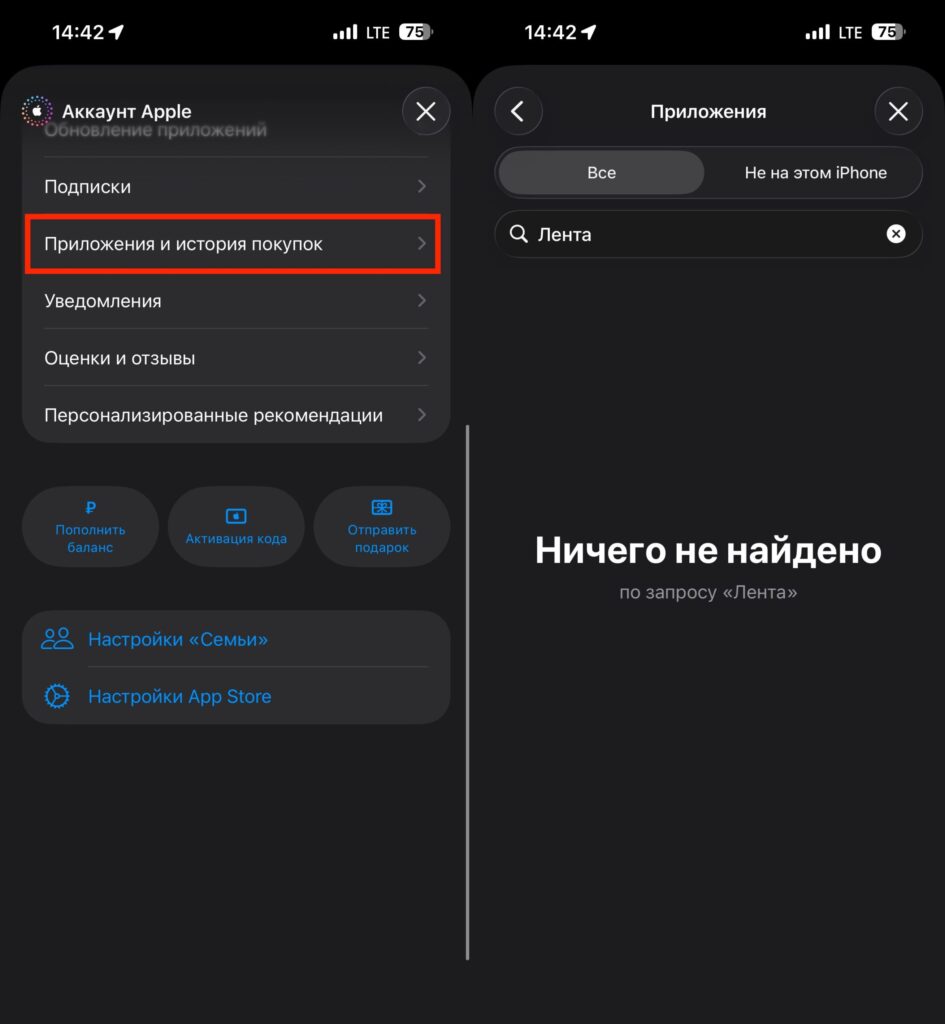
You can’t restore Lenta from purchase history either
Changing your Apple ID region won’t help either. The issue is not related to geo-blocking, as with banking apps, but to the technical status of the app itself in Apple’s catalog. It simply doesn’t exist in any regional segment of the store.
Lenta Online in Safari Instead of the iPhone App
Lenta has a convenient website, lenta.com, that works in Safari on iPhone almost like a full-fledged app. Through it, you can log in with your phone number, browse the product catalog, add items to your cart, and place delivery orders. Personalized discounts with “Card No. 1” are also available in the personal account on the website. They update every week, just like in the app.
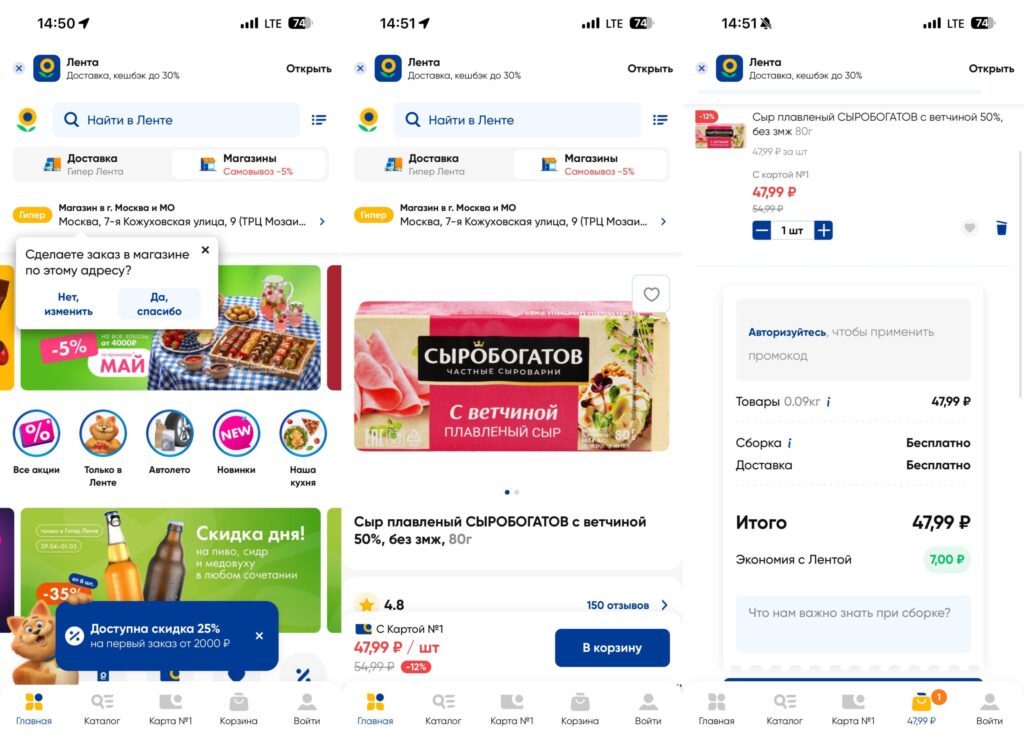
Lenta has an excellent web version that can almost completely replace the app
Essentially, the web version covers all the main needs: catalog, promotions, personalized offers, order placement with delivery, and purchase history. The difference from the app is minimal. The only thing missing is push notifications. However, you can enable them separately if you add the site to your home screen (more on that below).
How to Add Lenta to the Home Screen in iOS
This will take less than a minute, and the result will look very much like a regular app. After adding, the site will open in a separate window, without the Safari address bar, with its own icon on the home screen.
Here’s what you need to do:
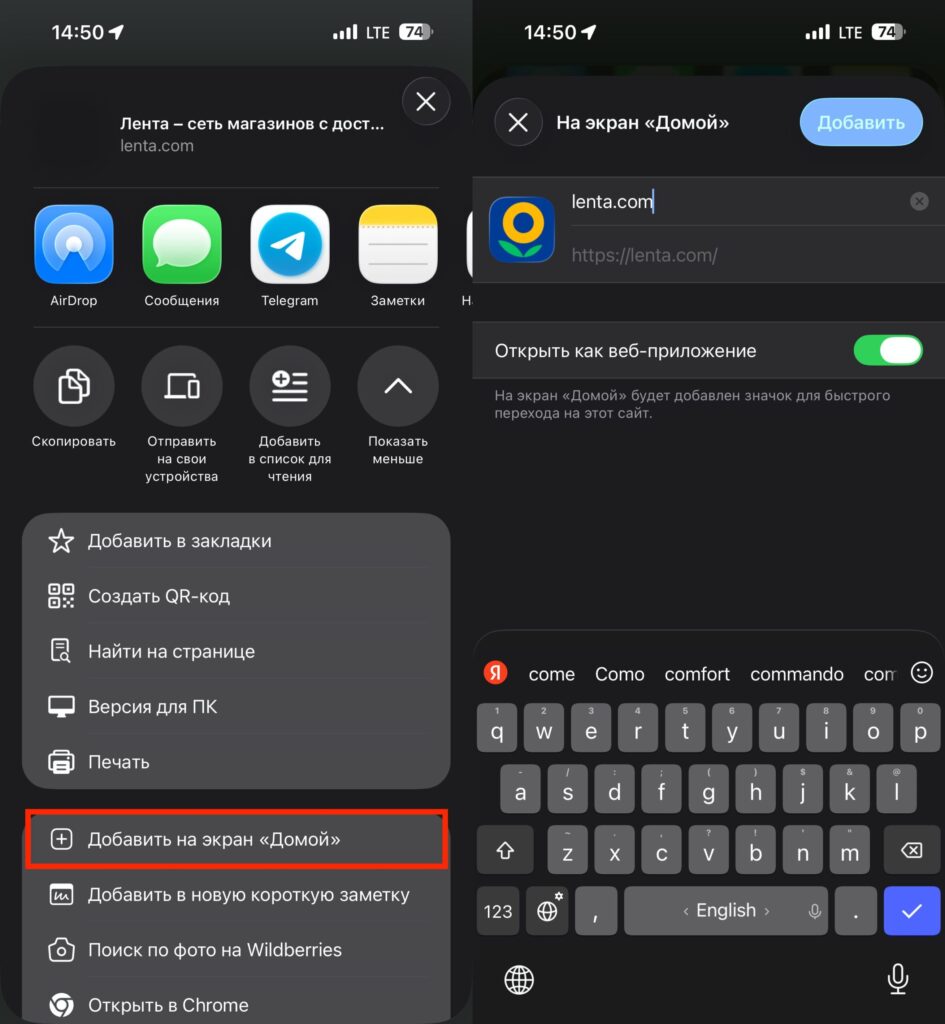
You can add it to the home screen in just a couple of taps
- Open Safari and go to lenta.com.
- Log in with your phone number to immediately link your “Card No. 1” and get access to personalized discounts.
- Tap the “Share” icon in the bottom toolbar (a square with an upward arrow).
- In the menu that appears, select “Add to Home Screen.”
- Set a name (for example, “Lenta”) and tap “Add.”
Done. An icon will appear on your home screen, and tapping it will open the Lenta website in full-screen mode. Visually, it’s practically indistinguishable from a regular app. It works fast, doesn’t require updates from the App Store, and doesn’t depend on certificates.
When Will the Lenta App Return to the App Store?
Online, you can find suggestions to install Lenta via iMazing or download the IPA file from unverified sources. We don’t recommend doing this. First, if the developer’s certificate has expired, an app installed through iMazing may refuse to launch. Second, IPA files from unofficial sources may contain malicious code.
The web version fully covers the functionality of the mobile app and carries no risks. This is the safest and most reliable option while the app is absent from the App Store. The app will most likely return to the store. The situation is not related to sanctions and doesn’t look like a targeted block. An expired certificate is a solvable problem, though not an instant one. The developer needs to renew the certificate, go through Apple’s review again, and publish the app. This usually takes anywhere from a few days to a couple of weeks.


