You open Roblox, tap the chat button, and instead of messaging with friends, you see a dry system notification: you can only view service messages, chat is unavailable in your region. The story is familiar: as soon as Roblox was unblocked in Russia, millions of players rushed back into the game and discovered that communication simply doesn’t work. The platform itself launches normally, worlds load, your character runs around, but the chat is silent. Below I break down step by step how to get chat back in Roblox in 2026 on phone, tablet, and PC, which methods actually work, and which ones just waste your time.
There’s a lifehack for getting chat back in Roblox
How to Enable Roblox Chat in Russia
I’ll start with the honest truth so you don’t get your hopes up. There is no magic button inside the game. Chat for Russian accounts is disabled not because of a glitch or incorrectly set settings, but intentionally. That’s why the working methods are related to the account region, not to checkboxes in the menu.
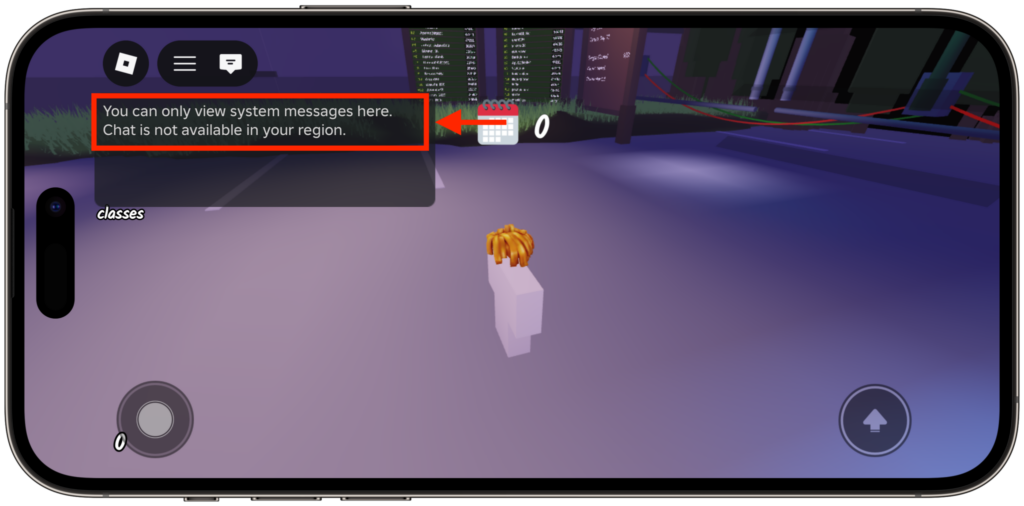
By default, chat looks like this for Russian accounts
In short, there are several working options:
- Change the account region via VPN so that the Account Location becomes non-Russian.
- Create a new account with a different country during registration.
- Request a region change from Roblox support for your existing profile.
- Wait until chat is returned officially for everyone.
Everything else (reboots, reinstalls, server changes) only helps when chat disappeared for a different reason: due to account age or parental controls. These cases are easy to confuse with regional restrictions, so I’ll cover them too.
Why Chat Disappeared in Roblox: Reasons for Disabling in 2026
Roblox was blocked in Russia back in December 2025. Roskomnadzor’s main complaint was specifically about chats: adults were reaching children through them, and the agency called it a direct threat. On June 10, 2026, the platform was unblocked, but with a caveat. To return to the Russian market, the company agreed to disable public chat for accounts with a Russian region.
In other words, this is not a bug or a temporary technical glitch, but part of the agreement. They removed the chat, they removed the main complaint. From the regulator’s perspective, Roblox without open chat is significantly safer for the children’s audience, which on the platform in Russia numbered about two million people daily.
Another measure was added on top of this: Roblox introduced mandatory age verification for all users worldwide. The platform checks two parameters simultaneously: the device’s IP address and the account location. The location in the Account Location field is pulled in part from your connection, and this is what we’ll use going forward.
Getting Chat Back in Roblox on Phone and Tablet
First, check the obvious, because sometimes chat disappears not because of the region. On iPhone and Android, the steps are the same. Open Roblox, go to settings, find the privacy section and the option responsible for communication. Make sure chat access is enabled and the age in your profile is set correctly. For very young accounts, many communication features are closed by default.
On a tablet, everything works the same way: Roblox chat 2026 on tablet lives in the same menu as on a smartphone; there are no separate settings for iPad or Android tablets. The messaging button is usually located at the top of the screen.
| Platform | Current OS Version | Where to Find Chat and Settings |
|---|---|---|
| iPhone | iOS 26.5 | Chat button at the top, settings in the privacy section |
| iPad and Android tablets | iPadOS 26.5, Android 17 | Same menu as on the phone |
| Android | Android 17 | Messages icon at the top of the game window |
| Mac | macOS 26 | Chat panel, settings in the profile menu |
| Windows | Windows 10 and 11 | Chat window via hotkey, settings in Privacy |
If after all checks the chat is still silent and you’re logged in with a Russian account, the issue is specifically the region. Then move on to the section about the VPN method — it actually works.
Getting Chat Back in Roblox on PC: Step-by-Step Guide
On a computer with macOS 26 or Windows, the logic is the same; only the interface differs. Here’s how to get chat back in Roblox on PC step by step:
- Launch the Roblox client and log into your account.
- Open settings via the gear icon in the upper right corner.
- Go to the privacy section and check communication settings.
- Enable text chat access if it’s turned off.
- Restart the client for the changes to take effect.
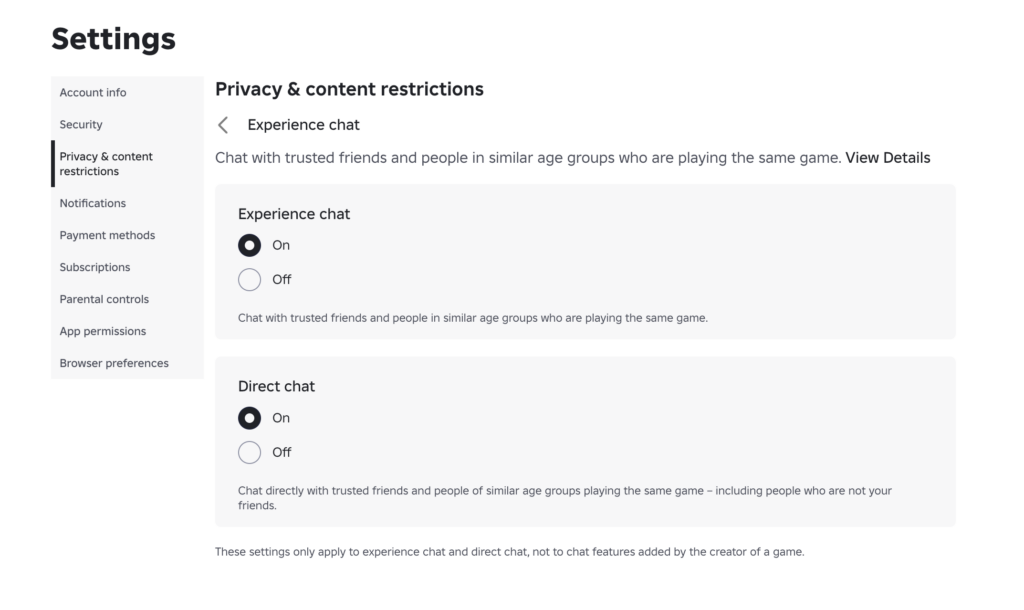
Make sure everything is activated here
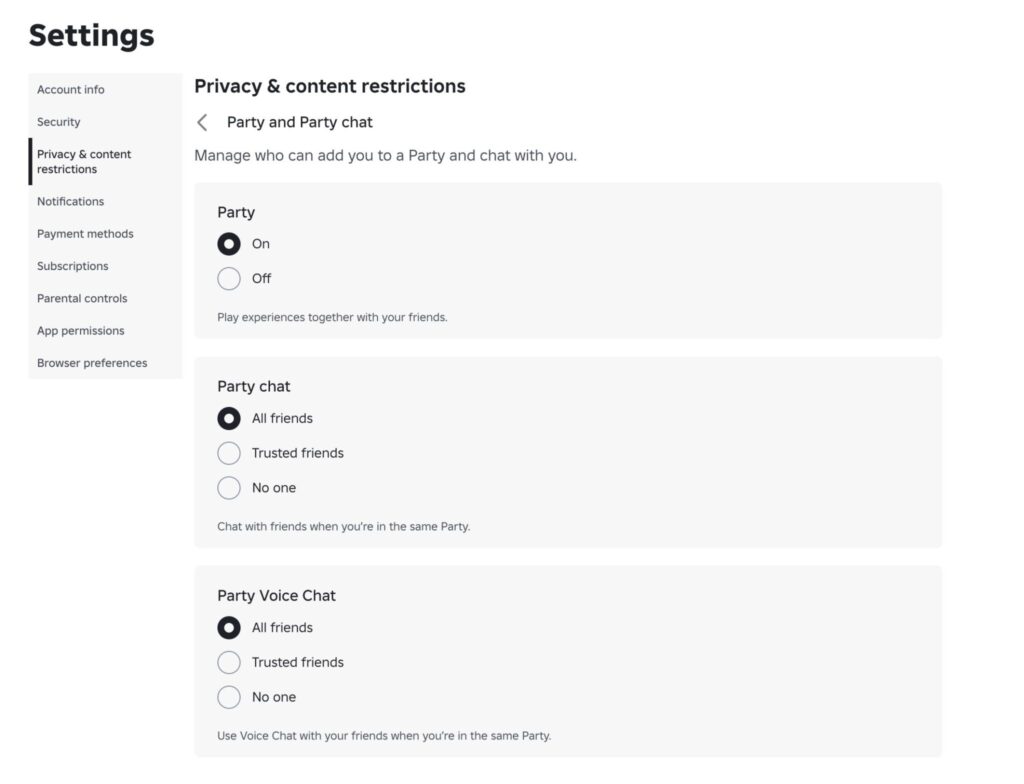
And here
On PC, the messaging panel is usually hidden on the right, and you can collapse and expand it with a hotkey. If the chat button is there but clicking it brings up a message about unavailability in your region, settings won’t help anymore.
Roblox Privacy Settings: Enabling Text Chat
I’ll go over Roblox chat settings in a bit more detail, because some problems are solved right here. In the privacy section, there are toggles for who can message you both in-game and in private messages. Set the appropriate values instead of “Nobody.”
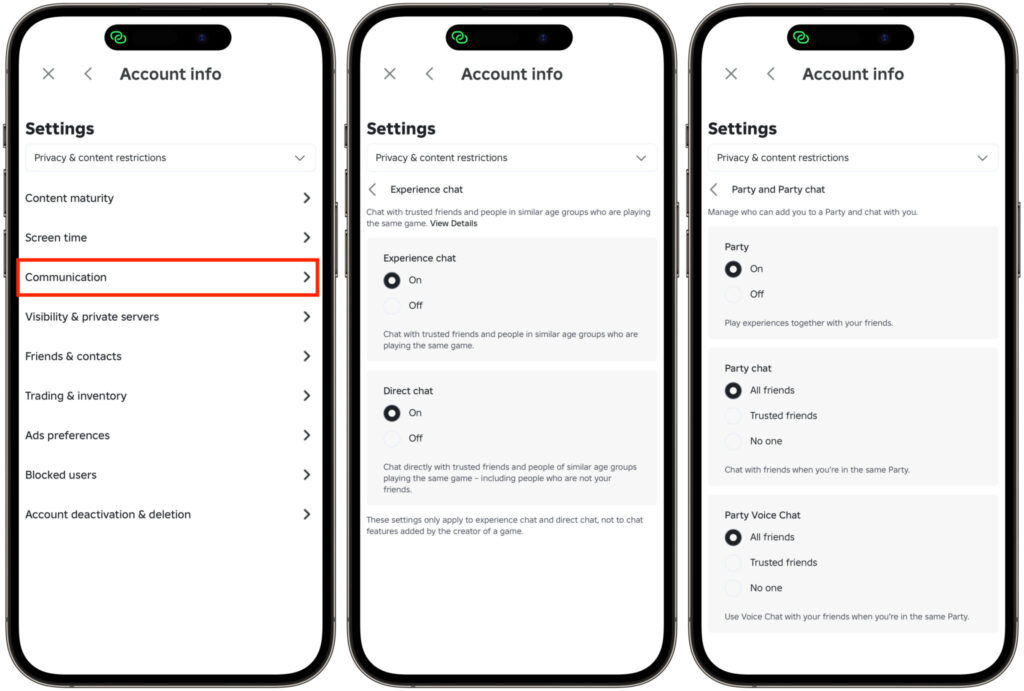
Privacy settings are also available on smartphones
Voice chat is a separate matter. For it to work, you need to confirm your age through verification, and this is a global platform rule, not a Russian invention. Children under a certain age won’t get access to voice chat in any country.
Also check parental controls separately. If there’s a parental account with a PIN code set over the account, it can restrict communication even with enabled settings. Remove the restrictions in the parental profile, and text chat will return.


