Recently we talked about what happens if you don’t use MAX in 2026 — and concluded that for most Russians, it’s no longer a matter of choice. MAX messenger has become part of everyday life, which means typos in messages happen regularly. The good news: you can edit a message in MAX after sending it. Here’s how exactly and how much time you have to do it.

Everything about editing messages in MAX
Can You Edit a Message in MAX
Yes, this feature has been built in from the start. You can edit a message in MAX right in the chat, without deleting and resending the text. It’s convenient: a typo, a forgotten word, or a desire to clarify a thought — everything is resolved with a couple of taps.
Editing in MAX exists, but it's limited by time.
But there’s a nuance that many people only discover when it’s already too late. The feature doesn’t work indefinitely — editing has a strict time limit, and it’s worth knowing about this in advance, not at the moment when the button suddenly disappears.
How to Edit a Sent Message in MAX on Android
Doing this on Android is simple:
- Open the MAX app and go to the desired chat.
- Find the message in MAX that you want to correct in the conversation.
- Long-press it with your finger (a context menu will appear).
- Select the “Edit” option.
- Make your changes to the text and tap the send button.
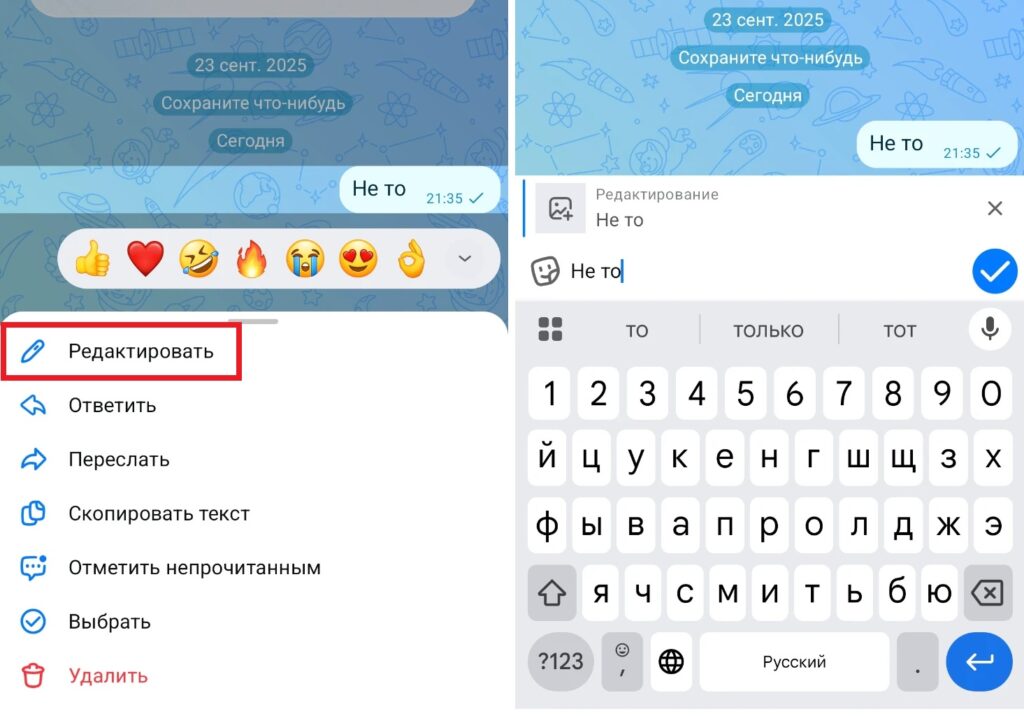
Editing is available by tapping on a message in MAX
After this, the recipient will see the updated text with a note “message in MAX edited” next to it. This is done intentionally — the messenger doesn’t hide the fact of editing so that the conversation remains transparent for both sides.
How Much Time Do You Have to Edit a Message in MAX
Here’s the key number: the time to edit a message in MAX is 7 days from the moment of sending. This is significantly more than many other messengers, where the limit is measured in minutes or hours. During this week, you can make edits as many times as you want — there are no limits on the number of edits, only the time since the first send matters.
After the 7-day period expires, the “Edit” button in the message menu simply disappears, and messages in MAX become permanently unchangeable. In principle, there’s enough time to fix a typo you didn’t notice right away, but not so long that you could completely rewrite conversation history months later.
Why You Can’t Edit a Message in MAX
If the edit button doesn’t appear or a message in MAX won’t edit, the reasons are usually the following:
- more than 7 days have passed since the message was sent (the most common reason);
- the message is in a channel or a special type of group chat where editing is restricted by administrator settings;
- an outdated version of the app is installed (the feature may have been added or changed in one of the updates);
- the message was read by the recipient so long ago that the system automatically closed the editing window.
If the issue is the app version — update MAX through Google Play or RuStore, as this solves most such problems. If you can’t edit a message in MAX because the time limit has expired — there’s only an alternative route left.
What to Do When Editing Is Unavailable in MAX
When the editing window has passed, there’s a working alternative — delete the incorrect text and send a new message instead. This is especially appropriate if the original message contained personal data or an error that needs to be completely removed, not just a typo to fix.

You can delete a message and then write a new one
It’s worth considering that if the recipient has already read the original message — deleting it doesn’t undo the fact that it was read. So for significant corrections, it’s better to explicitly explain the context in a new message rather than relying on the recipient to figure out the changes on their own.


