Yandex Plus has significantly increased in price this year to 4,490 ₽ per year, and we’ve shared ways to save — but there’s another side to the subscription: the loyalty program that lets you earn Yandex points on purchases, spend them across dozens of services, and even convert them into real rubles, which is quite rare. After all, most loyalty programs are just fancy promises that in practice turn into worthless tokens you can only spend on things you don’t need, and only at three in the morning on Tuesdays.
Everything about redeeming Yandex points
How to Earn Plus Points in 2026
Yandex Plus points are cashback in the form of points that only work with an active Yandex Plus subscription. Without it, you can’t earn or spend them. If you don’t have a subscription, sign up first. An annual plan can be purchased at a discount compared to monthly payments.
Points are earned through the “Svoi Plusy” (Your Pluses) loyalty program. Here’s where you can get them:
- Yandex Go: cashback for taxi rides, the amount depends on the selected category in the Yandex Pay app;
- Yandex Market: points for purchasing items marked with the Plus badge;
- Yandex Eats and Lavka: for orders from restaurants and stores with the Plus badge;
- Yandex Travel: a percentage for hotel bookings, up to 2,000 points per order, plus 5% for tour bookings;
- Yandex Afisha: for purchasing event tickets excluding cinema;
- Yandex Fuel: for paying for fuel through the app;
- Yandex Drive: 3% for rides on the Fix tariff for Super-star status;
- Auto.ru: 5% of the cost of reports.
An important nuance: in a single order, you can either earn points or spend them — you can’t do both. If you redeem points during payment, you won’t receive cashback for that order. Also, points only work in Russia, Belarus, and Kazakhstan, and you can only redeem them where they were earned. If you ever get tired of the subscription, we have a separate article on how to cancel Yandex Plus permanently.
How to Spend Yandex Points on Purchases
Paying with Yandex points is available in most ecosystem services. Here’s the full list of where you can spend Plus points:
- Yandex Go: any orders except delivery and the “Fastest” tariff;
- Yandex Market: almost all products, with some exceptions by category and store;
- Yandex Eats: orders from restaurants with the Plus badge, excluding alcohol and delivery;
- Yandex Lavka: groceries on the website and in the app;
- Yandex Travel: hotel booking payments;
- Yandex Afisha: cinema and event tickets;
- Yandex Drive: rides on any tariff;
- Yandex Fuel: fuel payment;
- Auto.ru: reports and listing promotions;
- the Yandex Plus subscription itself: can be paid with points.
You can’t manually choose how many points to redeem. If you have enough points, the system will deduct almost the entire amount, and your card will be charged a symbolic 1 ruble.
I usually redeem points on Yandex Market, which delivers products to even the most remote areas. Here’s how to do it:
- Add the item to your cart and proceed to checkout.
- On the payment screen, you’ll see a “Pay with points” toggle.
- Turn it on, and the system will automatically calculate how many points will be deducted.
- Confirm the order.
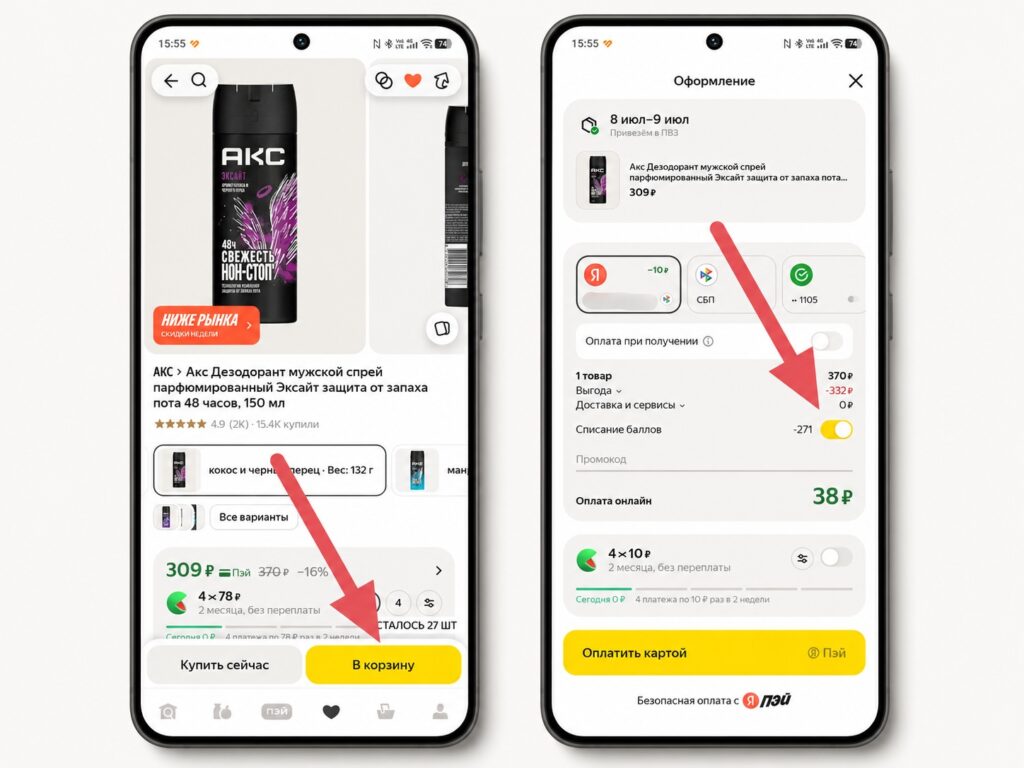
I redeem through Yandex Market
Points in Yandex Taxi are spent the same way: when booking a ride, a point redemption option appears that you need to activate manually.
Can You Withdraw Plus Points
Previously, points couldn’t be converted to money — they could only be spent within the ecosystem. Now you can, but with conditions. Withdrawing Yandex Plus points to rubles is possible through the Yandex Pay app. The exchange rate is 1:1, meaning 100 points = 100 rubles. After conversion, the rubles can be spent in stores and services like regular money.
Limitations you should know about:
- available only to users with “Gold” level in the “Svoi Plusy” program;
- you can only exchange points earned from purchases of 100 rubles or more in the last month;
- the maximum exchange limit is 10,000 points per month;
- you need to verify your personal data in Yandex Pay to make the exchange.
Transferring Plus points is only possible through the Yandex Pay app — this is a mandatory requirement. The app itself is available on Google Play, RuStore, and the App Store. I’ll also note that new users get 5% cashback on all purchases when registering with Yandex Pay — a great reason to install the app right now.
How to Convert Yandex Points to Rubles — Step-by-Step Guide
And now, a step-by-step guide for those who have already achieved Gold status:
- Install the Yandex Pay app from Google Play or RuStore if you haven’t already.
- Log into your Yandex account and verify your personal data (without this, the exchange is unavailable).
- On the main screen, select your Pay card.
- Tap “Purchase Compensation.”
- Confirm the exchange — rubles will be credited to your Yandex Pay account.
- Spend the converted rubles in stores via Yandex Pay or transfer them to a bank card.
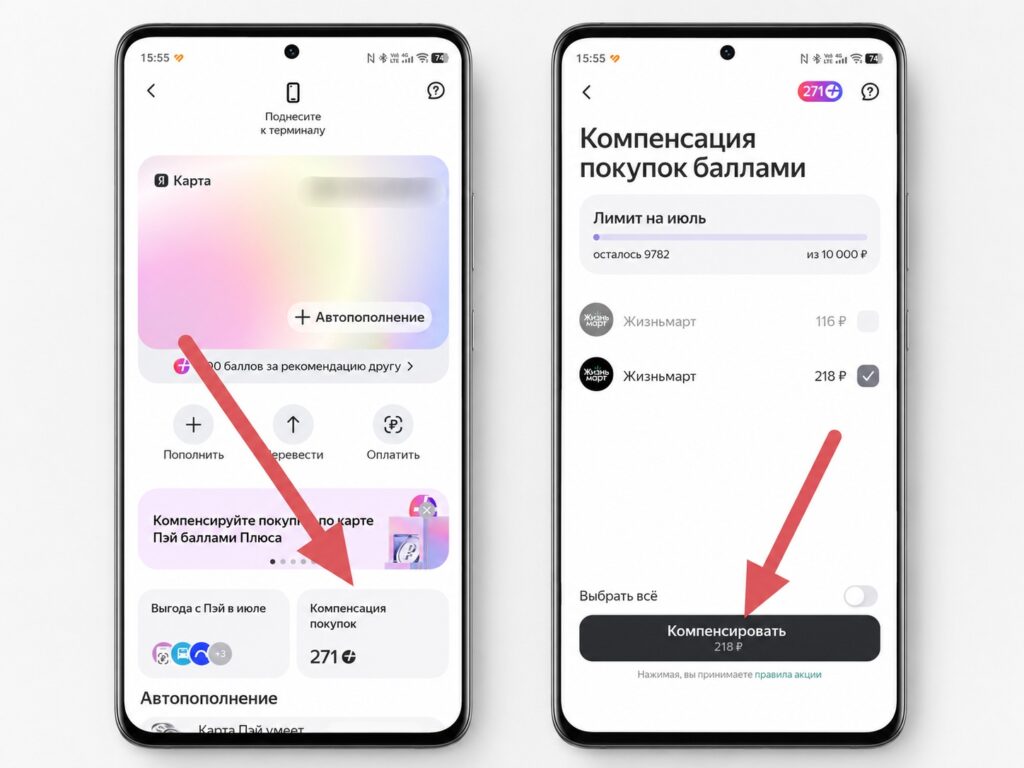
Exchanging for rubles is available in the Yandex Pay app
If the exchange button isn’t there, check your level in the “Svoi Plusy” program. Gold status is granted to active users of the ecosystem who regularly make purchases through Yandex services. Crediting usually takes a couple of minutes but may occasionally be delayed.


