If you recently got an Alfa-Bank card, check the app and review your profile. There’s a good chance you’ll find an Alfa-Smart subscription that you most likely didn’t consciously activate. The bank often enables it right when issuing the card: the first month is free, and then they quietly start charging you 399 rubles. It’s a familiar story. Let’s figure out what this subscription is and how to disable Alfa-Smart on Android so you don’t pay for something you don’t use.
Here’s how to disable the Alfa-Smart subscription
What Is the Alfa-Smart Subscription
Alfa-Smart is a paid Alfa-Bank subscription that adds a set of perks to your card. These include an additional cashback category, increased return limits, fee-free transfers and cash withdrawals, free card notifications, a higher savings account interest rate, and even free mobile service. Sounds tempting, but not everyone actually uses the full set. The cost depends on the plan:
| Plan | What’s Included | Price |
|---|---|---|
| 9 Perks | Basic set for one person | 199 ₽/month |
| Personal (15 Perks) | Full set for one person | 399 ₽/month |
| Alfa Only | Top-tier perks | 2990 ₽/month |
The first month of the Alfa-Smart subscription is free. But after that, auto-renewal kicks in, and money is charged from your card every month — even if you haven’t used a single perk.
Why Alfa-Smart Charges Money Even Though You Didn’t Subscribe
The most frustrating part is that Alfa-Smart is often activated when the card is issued, and the person barely realizes it. The scheme is simple: when the card is issued, they offer a “free month of perks,” the customer agrees without reading the details, and 30 days later paid auto-renewal begins. By that point, the trial period is long forgotten, and the charge comes as a surprise.
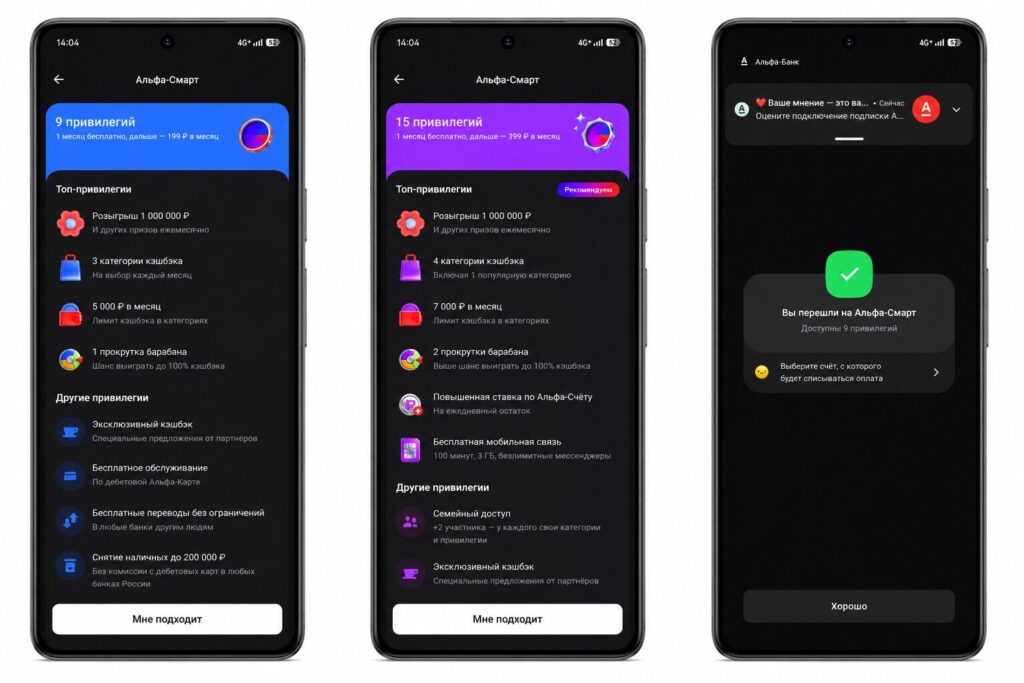
The subscription is often enabled when the card is issued
Money is deducted regardless of whether you spend anything on the card or not. The Alfa-Bank subscription works on a “set it and forget it” principle, and that’s exactly how it sustains itself. Over a year, it adds up to almost 4,800 rubles — essentially for a service you don’t use. Before disabling the subscription, go to your profile and check which plan is currently active. This determines how much money you’ve already spent and how much you’ll save going forward.
How to Disable the Alfa-Smart Subscription on Android
To disable Alfa-Smart, you don’t need to visit a branch or call the hotline — everything is done right in the app in just a couple of minutes:
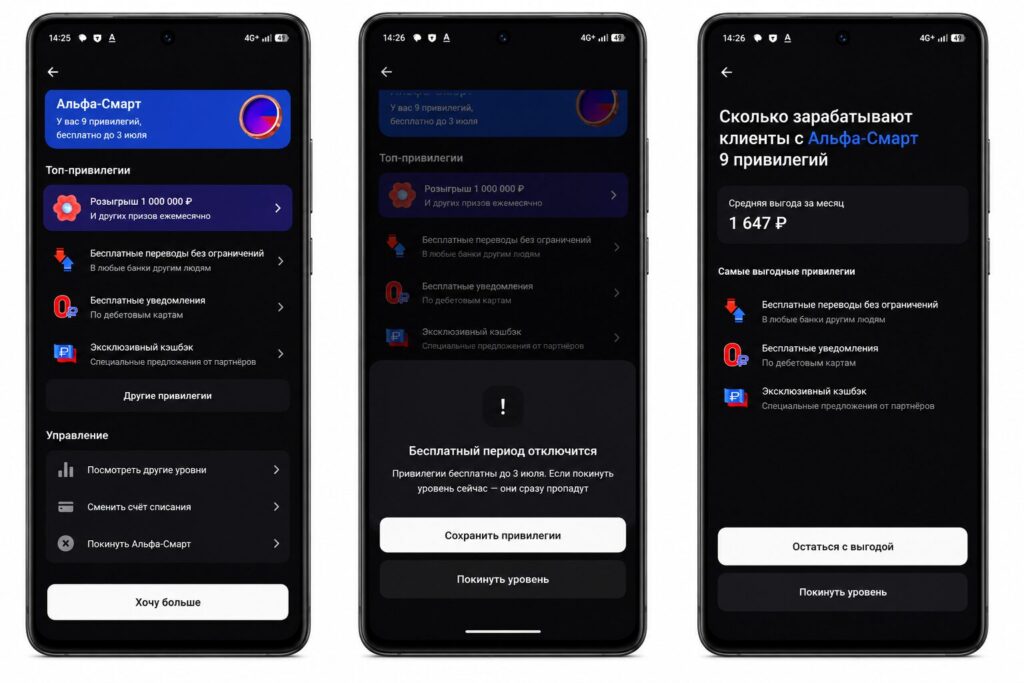
Disabling is done through profile settings
- Open the Alfa-Bank app (Alfa-Online) on Android and log in if necessary.
- Tap the top part of the screen with your name to open your profile. If the subscription is active, its name will be displayed right under your name.
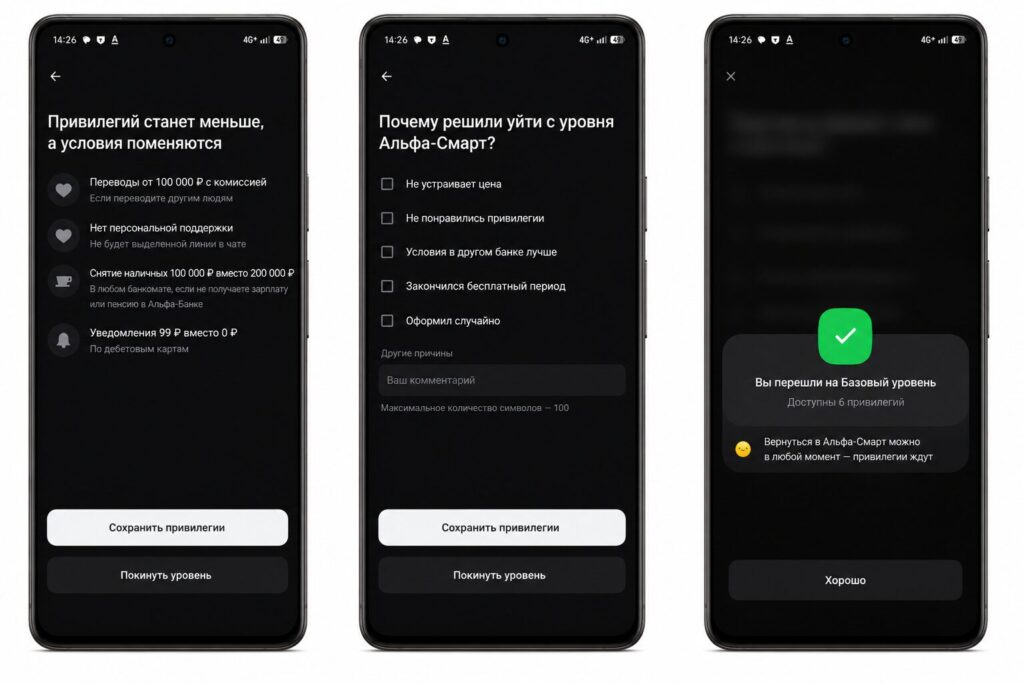
Complete all the steps through to the end to disable it
- Open the Alfa-Smart subscription line.
- Scroll all the way to the bottom of the subscription page.
- Tap “Disable subscription” and confirm the action.
Be prepared for the bank to try to retain you: they may offer to keep your perks, switch to a cheaper plan, or remind you how much cashback you’ll lose. If your decision is made — calmly go through to the last step, otherwise the Alfa-Smart subscription won’t be disabled and will remain active.
What Happens After Disabling Alfa-Smart
Immediately after disabling, Alfa-Smart perks stop working — cashback, free transfers, and the higher savings account rate will revert to standard conditions. But the monthly fee will no longer be charged to your card, and that’s the main goal.
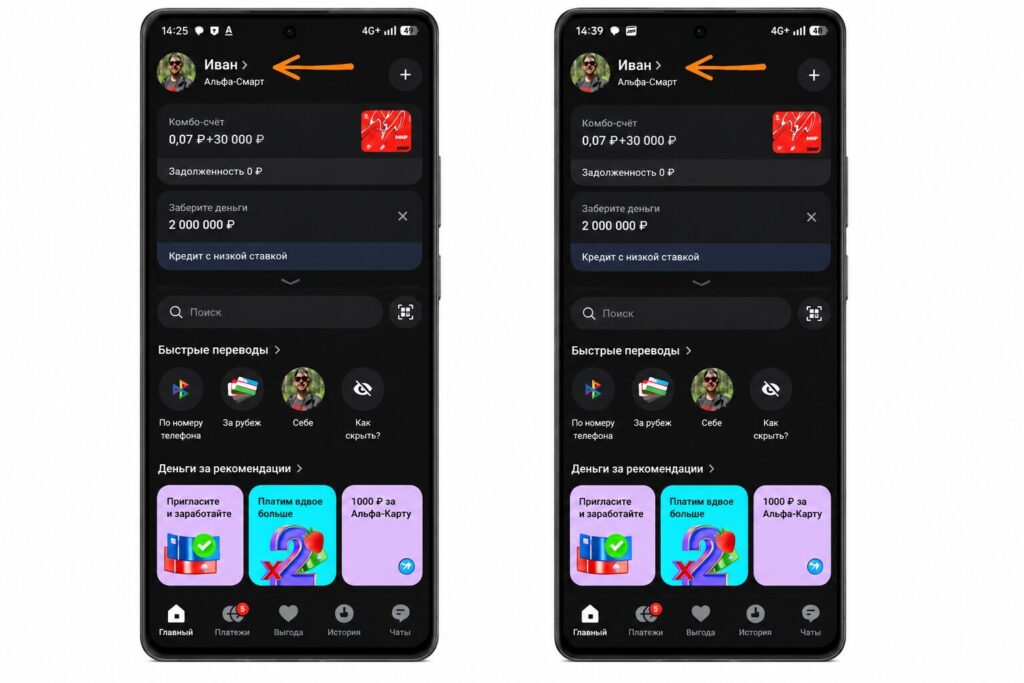
After disabling, “Alfa-Smart” will no longer appear next to your name
Keep one thing in mind: along with the subscription, you also lose free notifications in Alfa-Bank. If you still want to receive push notifications and SMS about transactions, the bank will start charging about 99 rubles per month again. So decide at the same time whether you need paid alerts or can get by with free push notifications within the app itself. If not, here’s how to remove them.
- Go to your profile and select the “Settings” tab.
- Tap “Transaction notifications.”
- Then disable them for each card.
Can You Get a Refund for Alfa-Smart
If money was charged for Alfa-Smart, the paid period is usually non-refundable — the subscription simply runs until the end of the month and then deactivates. A refund is only possible if the payment was made by mistake or due to a technical error. In that case, it’s worth writing to the support chat directly from the app and describing the problem — operators help resolve the issue and process a refund if necessary.
If you simply decided that the perks aren’t for you, then after disabling auto-renewal there’s nothing to worry about: the next payment won’t be charged, and the subscription will stop draining money from your card. In any case, if you or someone you know gets an Alfa-Bank card, don’t forget to immediately check for a subscription so you don’t lose money later.


