In the national messenger MAX, which almost all Russians now use, many interesting channels appeared almost immediately. They often make it into our compilations. But to create your own, a regular user previously had to meet a whole range of requirements — from having an account on other social networks with 10,000 subscribers to passing a Roskomnadzor verification. Now this process has been simplified. After the update, anyone can create a public channel in MAX, even without an audience on other social networks and without needing to contact Roskomnadzor. Here’s how.
Now you don’t need to contact Roskomnadzor to create a channel
Public Channels in MAX — What Are They
MAX previously had an open feed format, but creating a public channel turned into a quest for the chosen few. Now everything is much simpler. Creating public channels is available directly in the MAX app on Android. iPhone owners will be able to do the same through the web version in the coming days, but the full feature hasn’t been added to the iOS app yet.
An important detail: you can also convert an existing private channel to public — the corresponding setting has appeared in the parameters. This means those who ran a closed feed don’t need to recreate everything from scratch.
Why You Need a Digital ID in MAX
The key limitation you should know about in advance: you can’t create a public channel without a Digital ID. This is essentially a verified digital identity within the service, and without setting it up, the button to switch a channel to public mode simply won’t work.
A Digital ID is required to create a channel
For some, this is a plus — fewer anonymous fake channels. For others, it’s a minus — being tied to a verified identity means you can’t run an anonymous open feed. This is worth considering before you start setting up a channel and choosing a nice nickname for the link.
How to Create a Public Channel in MAX on Android
The process is simple but requires a pre-existing Digital ID or activating one during the process:
- Open the “Chats” section and tap the “plus” button at the top of the screen.
- Select “Create Channel.”
- Add a photo, name, and description.
- Confirm the creation of a public channel.
- Connect your Digital ID if you haven’t activated it beforehand.
- Switch the channel to “Public” mode and choose a link with a nickname, if you already had a private channel.
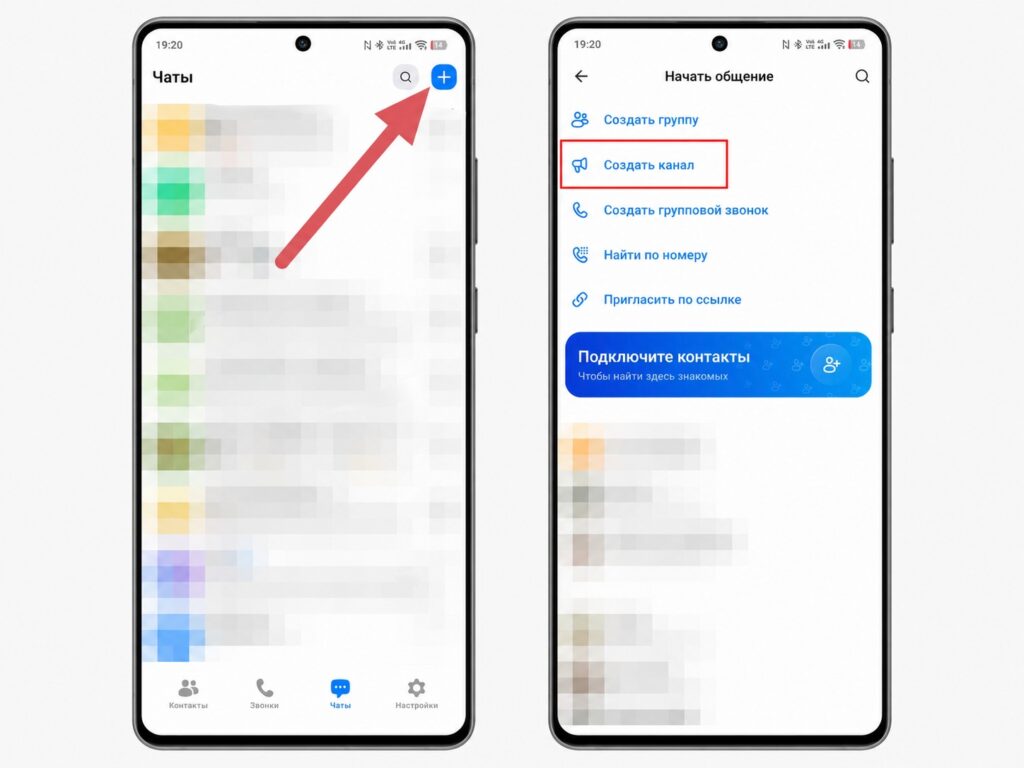
The option is available in the messenger’s main menu
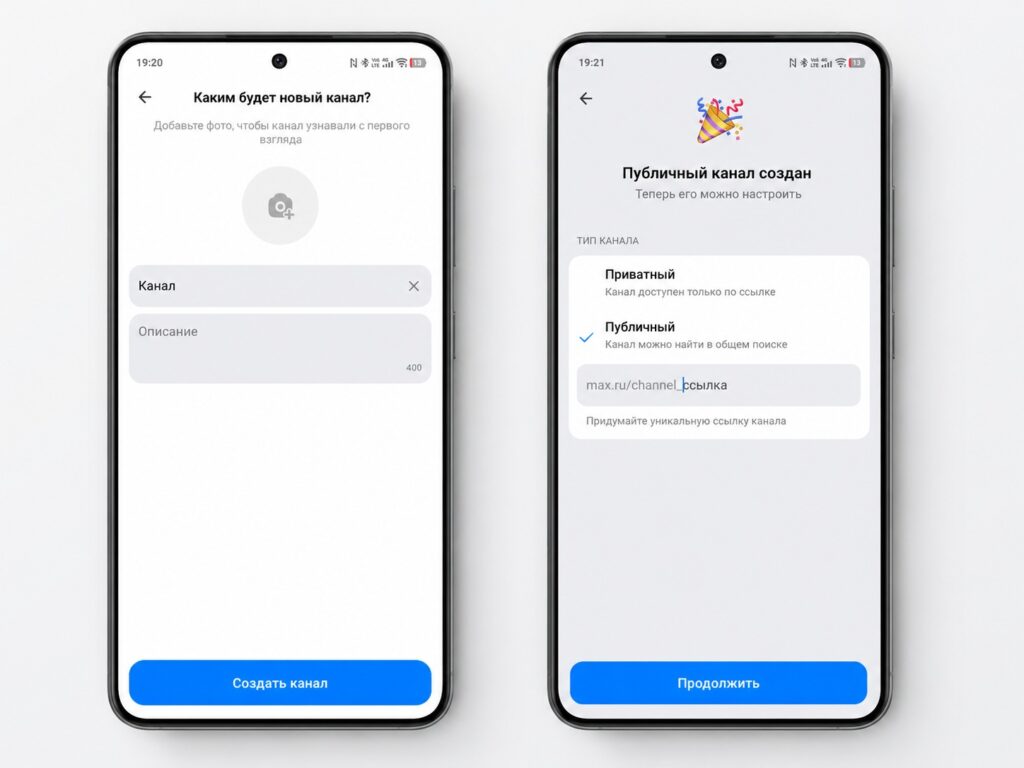
You need to confirm that the channel will be public
After that, the channel will be accessible to everyone via a link, and people will be able to subscribe to it just like in other messengers.
Why Create a Public Channel in MAX
The real benefit of the new format will primarily go to those who create content for an audience: small communities, local projects, stores, and creators. The feature logically joins the ranks of already available tools like mini-apps for partners and live broadcasts in channels — MAX is gradually building what competitors have had for a long time.
If you use the messenger only for personal messaging, there’s no rush: a regular user doesn’t need a public channel for everyday tasks. The introduction of public channels isn’t a revolution but a catch-up feature: something that other messengers have had for a long time. But for those who are adopting MAX for various reasons, this is a noticeable step: now the platform can be used not only for communication but also for publishing content.


