Cashback at Sber is a finicky thing: it’s not enough to simply have a card and a subscription — you need to manually choose the increased cashback categories every month. And this is where Sber behaves differently from everyone else. While other banks calmly let you set up categories for the next month in advance, Sber opens the selection strictly on the 1st of the month and not a day earlier. Want to prepare on the evening of the 30th so that from the morning of the 1st you’re already earning bonuses on the purchases you need? Not going to happen — the button will be inactive.
Do you remember to choose cashback in Sber?
Let’s figure out how it works, how many categories are actually available to you with and without a subscription, and where that selection button in the app is located. And I’ll also tell you about an unpleasant nuance that causes literally everyone who has ever forgotten to activate categories on time to lose bonuses.
When Can You Choose Cashback Categories in Sber
Sber’s logic is simple: the “SberSpasibo” loyalty program updates the list of available categories every calendar month, and until the new month has started, the bank doesn’t show the current selection. That’s why the choice is tied to the first of the month. Other banks have a softer approach — there you can often go into the app around the 20th and mark categories for the next month in advance so you don’t have to think about it later. At Sber, this simply isn’t possible no matter how much you want it.
Just a reminder that it’s already 2026 and Sber still has “Spasibo”
In practice, this means the following: on the first of each month, you go into the app and reassign categories from scratch. Your previous selection does not carry over automatically, even if you want to keep exactly the same categories. If you didn’t log in and confirm, it means you’ll be earning the base card percentage without increased cashback for the entire month.
By the way, Sber has already announced that eventually the selection will become available from the 27th of the previous month under updated rules. But for now this doesn’t work, and reality is exactly as described above: we wait for the first of the month.
Differences in Cashback Categories Without a Subscription and With SberPrime
The number of available categories directly depends on which Sber products you have connected. The current breakdown is as follows:
| Subscription Status | Number of Categories |
|---|---|
| Without subscription | 3 categories |
| SberPrime | 5 categories |
| Premium clients | up to 6 categories |
So basically, without any subscriptions, you get three increased cashback categories. If you sign up for SberPrime or Prime+, the limit goes up to five. Premium bank clients have access to up to six categories simultaneously. The cashback percentage is variable and depends on your user segment — different people may get different cashback rates for the same category.
It’s also worth keeping in mind the monthly bonus caps: for clients without a subscription, it’s 2,000 bonuses per month; for SberPrime holders, up to 10,000; and for Prime+, up to 15,000. So even five generous categories won’t let you accumulate bonuses endlessly.
Choosing SberSpasibo Categories in the Sberbank Online App
The process itself takes a minute — the main thing is not to forget to do it on the first of the month. The steps are straightforward:
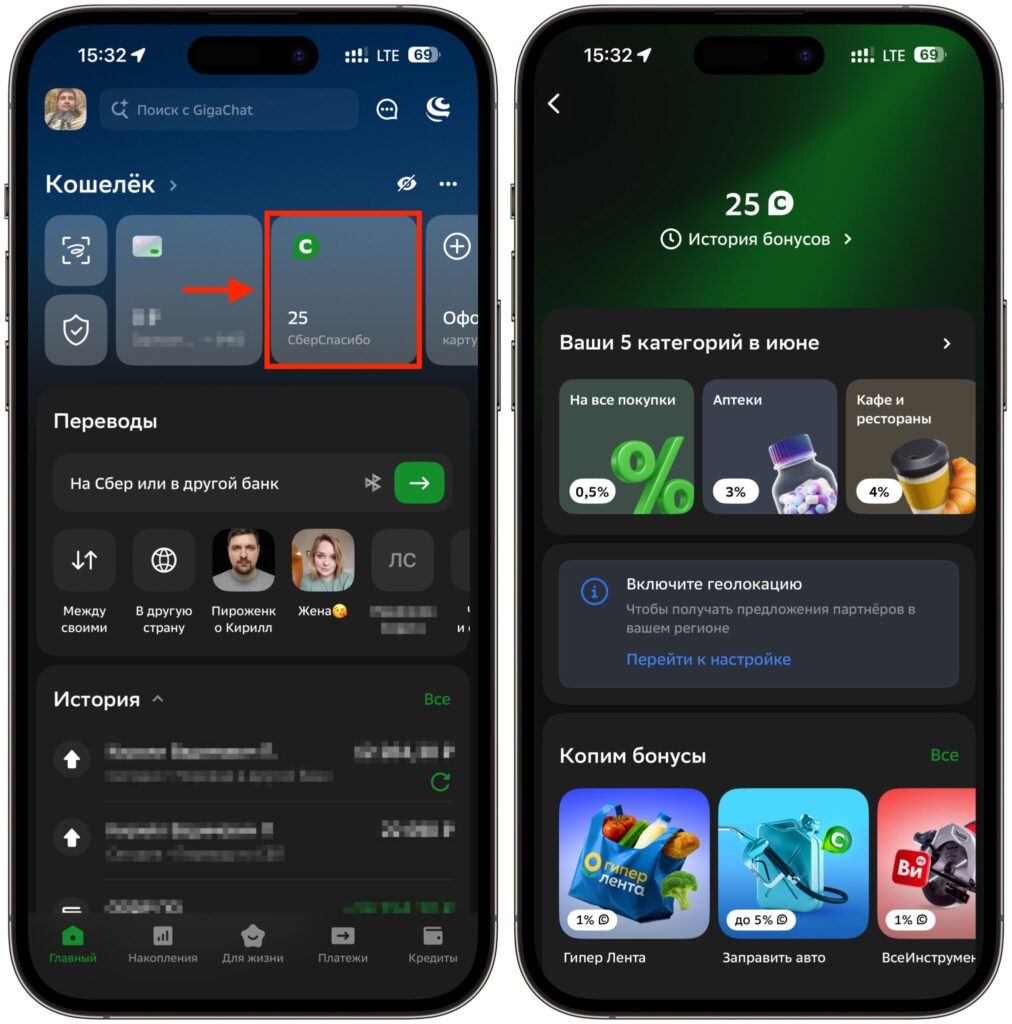
Cashback is selected in this section
- Open the Sberbank Online app and log in.
- On the main screen, find and tap the “SberSpasibo” block.
- Inside, choose the increased cashback categories for the current month and confirm your selection.
After confirmation, the categories are locked in for you until the end of the month, and you won’t be able to change them. So choose wisely, based on your actual spending: there’s no point selecting “Auto Parts” if you don’t have a car — it’s better to pick what you actually spend money on. Sber regularly adds new categories like “Digital Goods,” “Books,” or “Traffic Fines,” so it’s worth scrolling through the entire list before making your choice.
Will Cashback Be Credited If You Choose Categories After a Purchase?
This is the most painful point and the reason bonuses get lost. Cashback is not credited retroactively. If you paid for something with your card on the first and only chose your categories on the second, then those early purchases won’t receive the increased percentage — even if the category was a perfect match for the purchase.
Here’s how it works: bonuses only start accruing from the moment you confirm your category selection in the app. Everything that was paid for before confirmation is calculated at the card’s base rate. If you bought electronics during the day and then remembered in the evening to activate the “Electronics” category, you won’t get increased cashback for that specific purchase.
The conclusion is obvious: make it a habit to open Sberbank Online first thing on the first of the month and activate your categories, and only then make major purchases for the month. This is especially important for those planning expensive purchases like a new iPhone or other tech, where the difference in cashback percentages adds up to significant bonuses.


