Sending a package to another city without overpaying sounds simple, but in practice, you end up opening a dozen courier service websites. If you’ve ever dealt with ordering goods with door-to-door delivery, you know how much rates can vary. T-Bank solved this problem right in its app. A new “Send Packages” service has appeared there. It collects rates from several courier companies on one screen and shows you where it’s cheaper and where it’s faster. Yandex Delivery, CDEK, 5Post, Cargobooking — all options in one place, and you don’t need to switch between apps.
Comparing prices across different delivery services
Sending Packages in the T-Bank App
The service isn’t hidden as deep as you might think, but you won’t see it on the main screen either. You need to look in the “City” section. Open it, go to the “All Services” tab, and find “Send Packages.” This is where delivery cost calculation begins.
In the latest version of T-Bank — Drive Transit — the new feature has already appeared
Important note: the service is available to all T-Bank app users. If you haven’t updated your app in a while, do so. The feature appeared in one of the latest updates.
How to Calculate Delivery Cost Through T-Bank
Calculating the delivery cost takes a couple of minutes. Here’s what you need to do.
- Open the T-Bank app and go to the “City” section.
- Tap the “All Services” tab and select “Send Packages.” A calculation form will appear before you.
- Enter the sender’s address. There’s a nuance here: just the city name isn’t enough. You need to enter the full address with street and building number. Courier service rates depend on the specific pickup point. Similarly, enter the full recipient’s address.
- Select the package size. The app doesn’t ask you to enter numbers manually — you’re taken to a separate page where the size is selected using a slider. Just move it to the desired value.
- Specify the package value. There’s also a dedicated page with a slider for this. The value affects the insurance cost: the more expensive the contents, the higher the delivery price. If you’re sending something inexpensive, don’t inflate the value — you’ll save on the rate.
- Tap the “Calculate” button. The app will display a list of available courier services with prices and delivery times. Results are sorted by categories: “Cheapest,” “Fastest,” and so on.
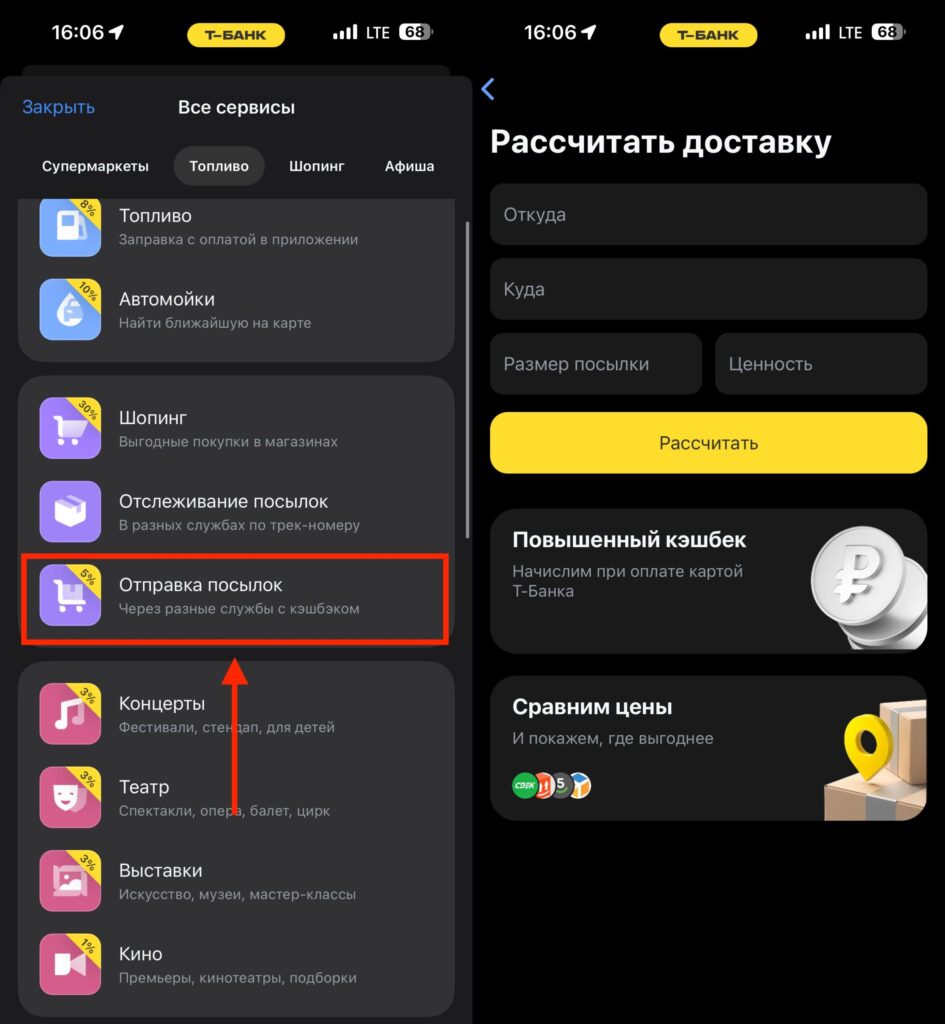
Look for the delivery cost calculator here
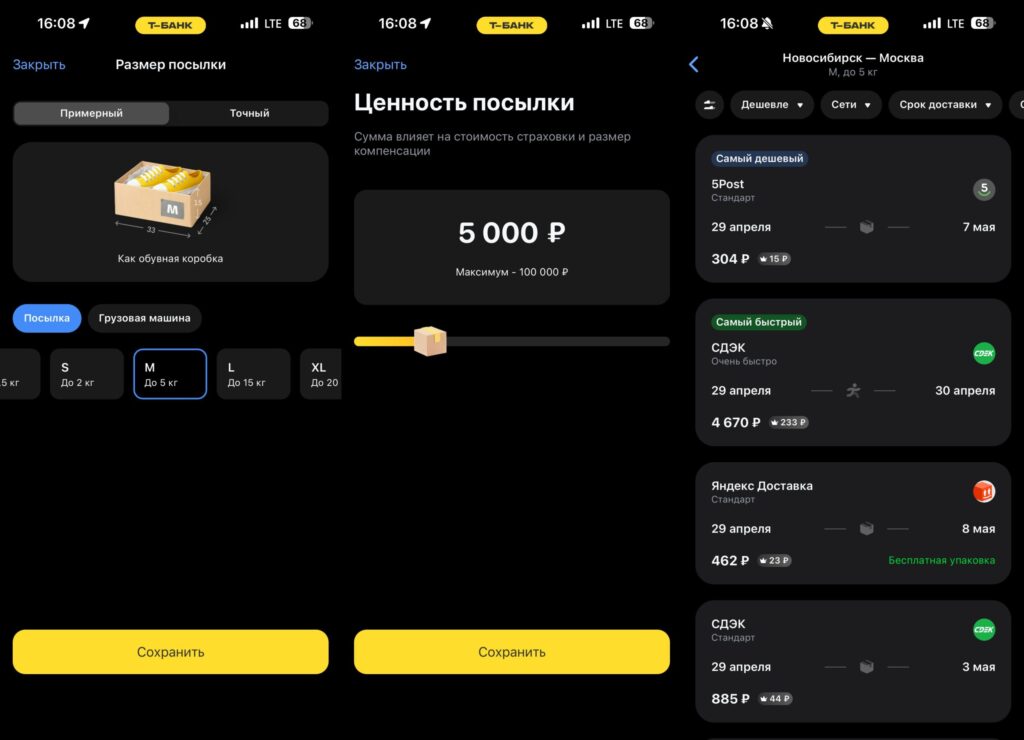
Set the desired parameters and find out the price
How to Place a Package Shipment Through the T-Bank App
After the calculation, you have two options for placing an order. First: continue placing the order in the app. You select the suitable option, and the app guides you through the next steps. All the data you’ve already entered is saved. You won’t need to re-enter addresses and package parameters.
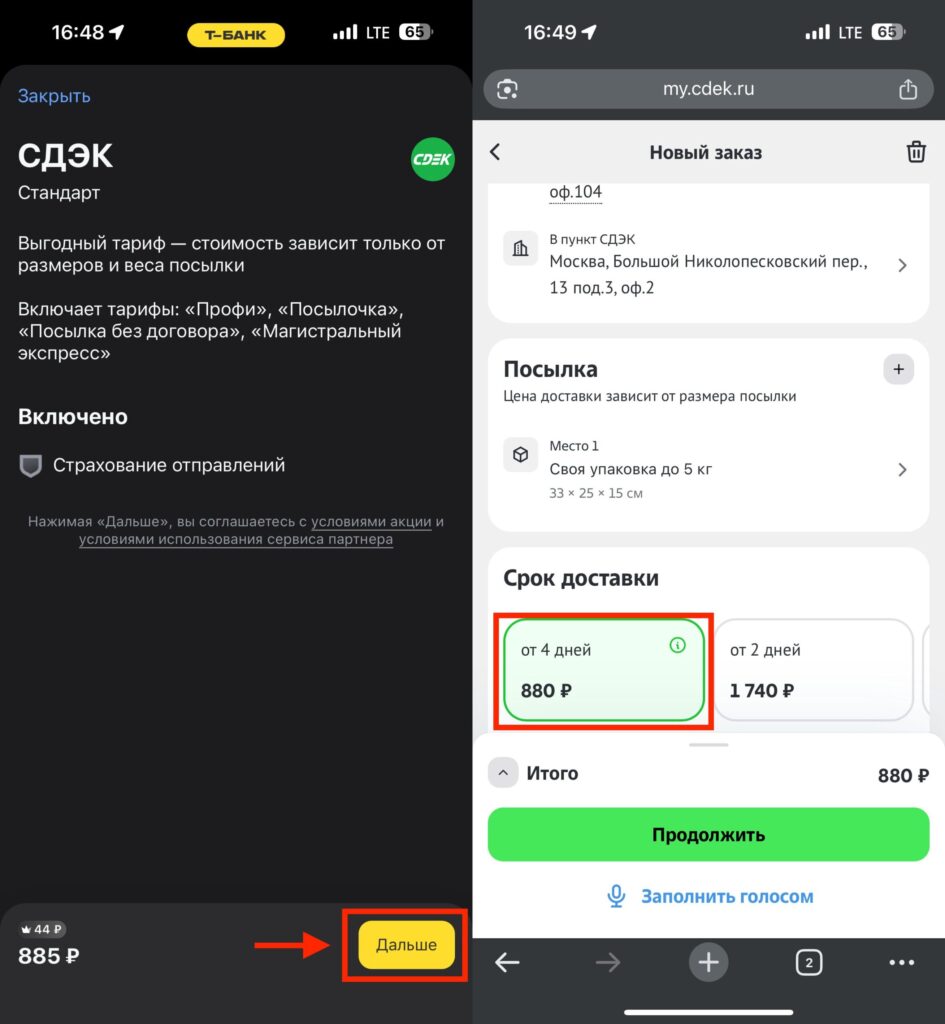
CDEK redirects to its own website and even shows a slightly lower price than in T-Bank
Second option: go to the selected courier service’s website. This may be necessary if a particular carrier doesn’t offer the ability to place deliveries within the T-Bank app. Important: even when redirecting to a third-party site, the price is locked in. You won’t end up in a situation where the app showed 227 rubles, but the delivery service’s website already shows 350. The price will remain what the calculation showed.
Payment in both cases is made with a T-Bank card. And there’s a nice bonus here: when paying with the card, you earn increased cashback. The specific amount depends on personal terms and current promotions, but the very fact that there’s cashback for package delivery makes the service even more attractive.
Which Delivery Services Can Be Compared in T-Bank
Currently, the service works with several major logistics partners. Among them are Yandex Delivery, CDEK, 5Post, Cargobooking, and others. The list may expand: T-Bank clearly plans to add new carriers.
Interestingly, rates from different services can vary dramatically. For the Novosibirsk–Moscow route, the price range for a package up to 5 kg ranges from 304 to 4,670 rubles. Delivery times also differ: from one to nine days. Without such a comparison service, you’d simply choose a familiar service and quite possibly overpay.
How to Choose the Cheapest Package Delivery
If you’re a T-Bank customer and send packages at least occasionally, the service is definitely worth trying. It saves time comparing rates and gives you the ability to choose the optimal option without leaving the banking app. Increased cashback when paying with a T-Bank card is an additional argument in favor of this method.
Of course, this isn’t a revolution in the delivery world. Similar aggregators exist separately. But the integration directly into the banking app you already use every day makes the process as convenient as possible. Enter addresses, move sliders, compare prices, pay — all in just a couple of minutes.


