Subscribing to Ivi takes just a couple of clicks, but canceling it can be much harder: the service keeps offering discounts and tries to retain users until the very end. Let’s break down all the working methods to cancel — from iPhone, through the website and Sberbank Online — and also explain how to unlink your card and try to get a refund for an unused period.
Canceling Ivi is quite a quest too
How to Cancel an Ivi Subscription on iPhone via Apple ID
If you subscribed through the App Store, you can cancel it right in your iPhone settings — this works on all current versions of iOS. Managing subscriptions on iPhone is much simpler than on Android: the whole process takes just a few seconds.
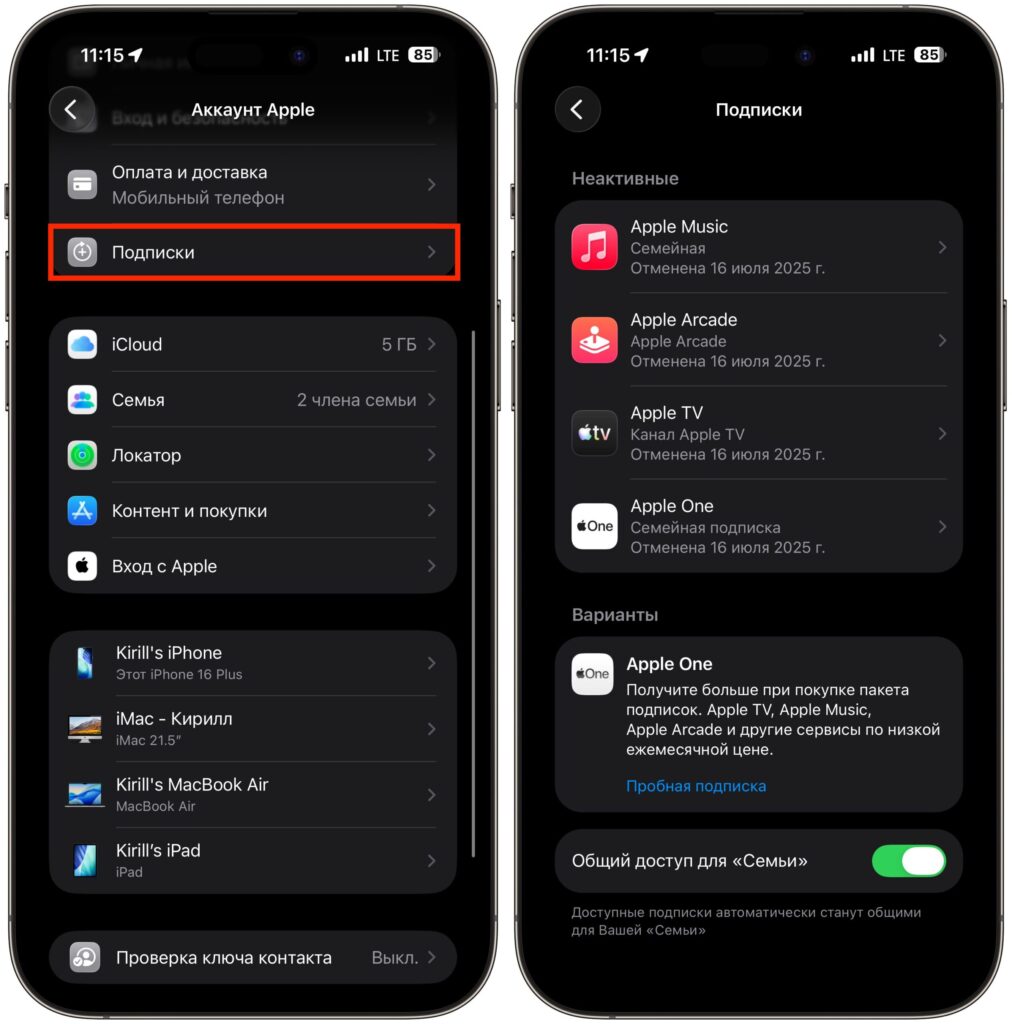
Check for the subscription on this page. If it’s not there, it wasn’t subscribed through Apple
- Open “Settings” and tap the Apple ID profile icon at the top.
- Go to the “Subscriptions” section.
- Find Ivi in the list and tap “Cancel Subscription.”
The subscription will remain active until the end of the paid period — in the case of the App Store, the rule about immediate access termination doesn’t apply because billing is handled by Apple. If you subscribed not through the App Store but directly on the Ivi website, this method won’t work — skip to the section about the personal account.
How to Cancel an Ivi Subscription Through the App
In Russia, you can subscribe on iPhone to Russian services with payment not only through the App Store but also via bank cards and SBP (Faster Payments System). In that case, you’ll need to cancel the Ivi subscription directly in the app:
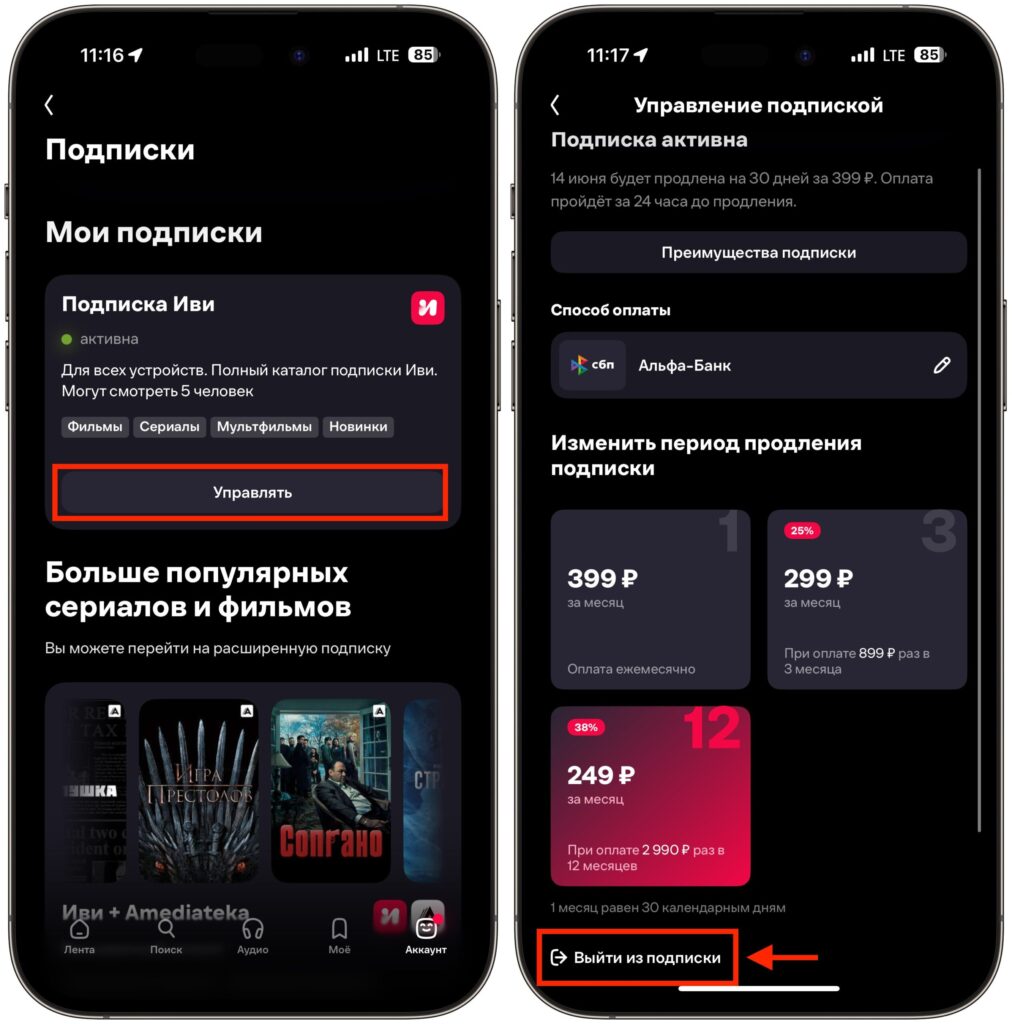
You’ll have to confirm the cancellation several times
- Open Ivi on your iPhone and go to the “Account” section.
- Go to “All Subscriptions” and tap “Manage” next to the active subscription.
- Select “Cancel Subscription.”
- Specify the reason for cancellation and tap “Cancel Subscription” again.
- Go through two more screens with discount offers, each time selecting “Cancel Subscription.”
Yes, you’ll have to press the cancel button four to five times. This is Ivi’s signature approach — retaining users through a series of attractive offers. If you’ve firmly decided to leave, just ignore the discounts and go all the way through.
Cancel Ivi Subscription in Your Personal Account
This is the most universal method — it works regardless of which device you used to subscribe (except for payments through the App Store). It’s more convenient to do this from a computer, but the scenario is the same from a mobile browser.
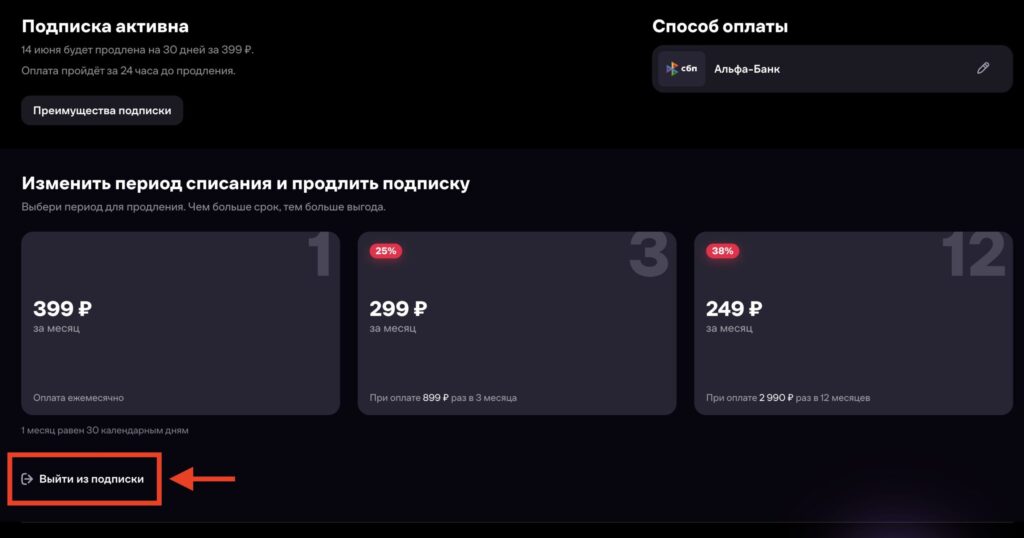
On the website, you’ll also have to go through a confirmation quest
- Go to the ivi.ru website and log in, then click on the profile icon.
- Select the “All Subscriptions” tile.
- Click “Manage” next to the active subscription.
- Select “Cancel Subscription.”
- Specify the reason for cancellation and confirm the exit.
- On the following screens with discount offers, click “Cancel Subscription” again — there will be several such steps.
After completing the procedure, the subscription is considered canceled. Please note: unlike other services, you cannot use paid content after cancellation, even if the period has already been paid for. So if you’ve just made a payment — it makes sense to finish watching what you need first, and only then hit “Cancel.”
Can You Cancel an Ivi Subscription on a TV
Short answer: you cannot cancel the subscription directly from a TV — neither on Smart TV nor on a regular screen with a set-top box. The Ivi app on TV doesn’t have a corresponding section.
To cancel a subscription that you use on a TV, you need to access it from another device:
- from an iPhone — through “Settings” if the subscription was made through the App Store, or through the Ivi app;
- from an Android smartphone — in the Ivi mobile app;
- from a computer or laptop — in the personal account on the ivi.ru website.
If the subscription was originally set up directly on the TV with a linked bank card, you need to cancel it in the personal account on the website.
Ivi Charges in Sberbank Online
This method is often searched for, but it’s important to understand that it doesn’t work as a full subscription cancellation on Ivi’s side — it’s a charge block on the bank’s side. In the Sberbank Online app, there’s a “Subscriptions and Auto-payments” section where you can disable recurring charges to the service.
The nuance is that disabling auto-payment in Sberbank is not equivalent to canceling the subscription on Ivi’s side: from the service’s perspective, the subscription remains active, but the next charge simply won’t go through. This can lead to debt or technical issues with your account. Therefore, it’s more reliable to first cancel the subscription through the standard method — via the website, Ivi app, or iPhone settings — and then, just in case, unlink the card and optionally block the auto-payment in the bank.
Remove Card from Ivi After Canceling the Subscription
Even after canceling the subscription, saved card data remains in your personal account. To eliminate any accidental charges, it’s better to delete the card manually.
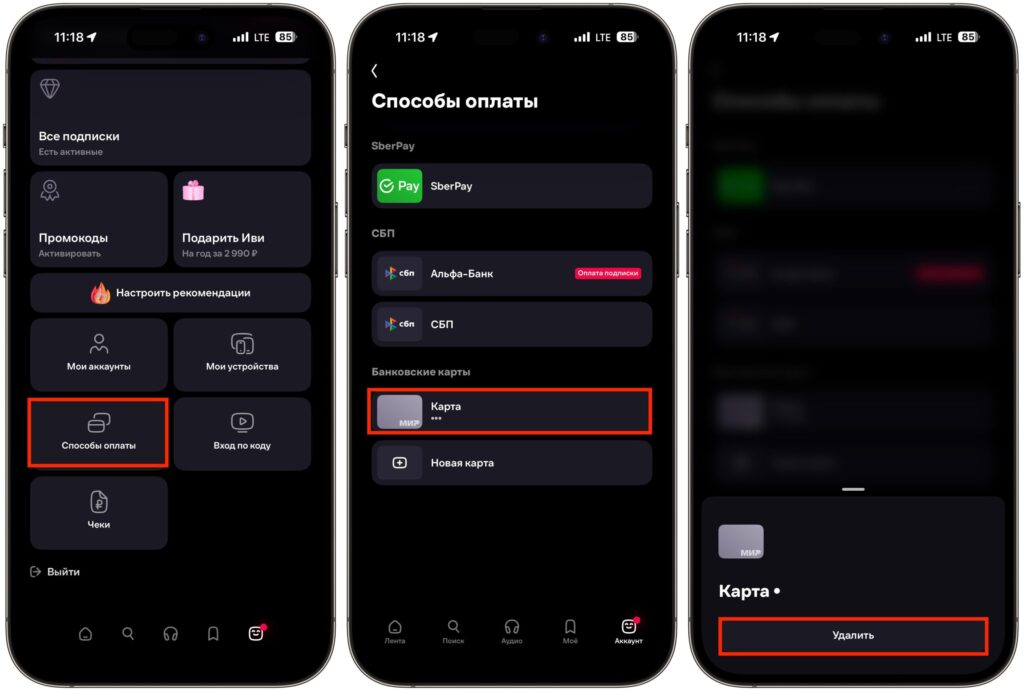
I recommend deleting your card from Ivi after cancellation
- Go to your personal account on the Ivi website and click on the profile icon.
- Open the “Payment Methods” tile.
- Select the desired card from the list.
- Click “Delete.”
After this, automatic subscription charges will stop completely. The procedure is the same for all devices — it’s more convenient to do it through a browser.
How to Get a Refund from Ivi After a Charge
Getting a refund for a paid but unused period is theoretically possible, but it doesn’t happen automatically — you’ll need to contact support. The Ivi website has a full contact form, while the mobile app only offers a chat.


