The Android 17 update, which Google introduced several weeks ago, not only brings interesting features but also causes serious issues for certain smartphones. And the problems don’t end there. Pixel smartphone owners have started reporting a major Wi-Fi bug after installing Android 17. Their devices don’t just lose internet access while showing an active network icon — they constantly disconnect from Wi-Fi and reconnect again. Let’s break down who’s affected, whether Google’s suggested fix actually helps, and whether it’s worth installing the update right now at all.
Explaining how and why Android 17 breaks Wi-Fi
Wi-Fi Not Working on Android 17 — Causes of the Problem
Judging by the growing number of complaints, Wi-Fi on Pixel keeps disconnecting and reconnecting after installing Android 17. According to 9to5Google, some users describe this as connection drops every few minutes.
One Pixel 10 owner reported that the smartphone constantly jumps between Wi-Fi and mobile data. Another complained about losing mobile data entirely. Complaints span models from the Pixel 7 to the Pixel 10 lineup, meaning the problem isn’t tied to one specific generation.
Why Wi-Fi Doesn’t Work After the Update
It’s important not to confuse two different issues. The previous Wi-Fi bug in Android 17, which surfaced in mid-June, worked differently: the network appeared connected, but individual apps silently couldn’t access the internet. The phone showed a full signal, but Gmail or YouTube wouldn’t load, and the user unknowingly ended up on mobile data.
So what should you do about Wi-Fi now
The new wave looks completely different. Here the connection actually drops and restores itself, over and over again, instead of staying connected but blocked. It’s still unclear whether these two issues are related.
What to Do If Wi-Fi Isn’t Working on Your Phone
Google hasn’t officially named the cause. However, Pixel support advises affected users to reset connection settings. Here’s how to do it:
- Open “Settings.”
- Go to the “System” section.
- Select “Reset options.”
- Tap “Reset Wi-Fi, mobile & Bluetooth.”
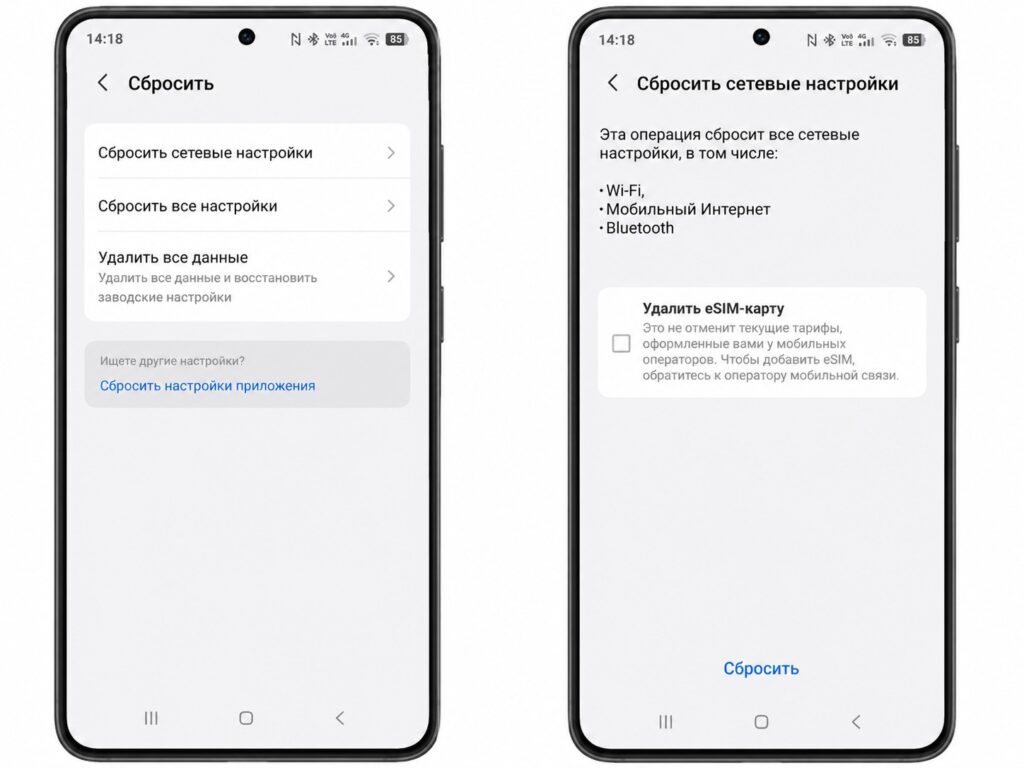
Google says resetting network settings should be enough
According to Android Authority, this helped one Pixel 7a owner. Whether the fix will work for everyone else is a big question, so it should be treated as a temporary workaround rather than a full fix. If the reset didn’t help, all that’s left is to wait for a patch from Google.
Should You Install Android 17 Right Now
This isn’t the first Pixel glitch after an update. A similar wave of complaints followed the January update, and in an Android Authority poll, more than half of the 795 respondents said that update broke something on their device. This is a good reason not to rush into installing fresh versions in the first few days.
On top of that, this month Android 17 has already brought other problems to some Pixels: some experienced unresponsive touchscreens, while others saw game performance drops. So if you value stability and Wi-Fi is critical for you, it’s wiser to wait until Google releases fixes.


