After the release of the Android 17 update last week, Google began rolling out Intrusion Logging — a new feature within Android’s Advanced Protection Mode. It creates an encrypted device activity log that helps detect traces of spyware. This is the first time in history that a smartphone manufacturer has released a tool specifically designed for investigating spyware attacks.
The new protection feature will search for spyware
What Is Intrusion Logging and Why Is It Needed
Until now, Android had a serious problem: standard system logs were not suitable for analyzing breaches. They were quickly overwritten and didn’t preserve the necessary data. Previously, digital forensics relied on logs “that were never designed to detect intrusions.” As a result, traces of attacks often simply disappeared from the device.
Intrusion Logging solves this problem. The feature collects key security events once a day, encrypts them, and saves them in the cloud — in the linked Google account. The logs are protected by end-to-end encryption: only the device owner has access to them; neither Google nor anyone else can read them. Cloud storage is not accidental — if spyware gets onto the phone, it won’t be able to delete the evidence from the server.
How the New Android Protection Feature Works
The log records actions that are typical of attacks on a device. The following actions are recorded in the logs:
- screen unlocking (when and how many times)
- installation and removal of apps
- connections to websites and servers
- connections via Android Debug Bridge (ADB)
- attempts to delete the logs themselves — which may indicate an attempt to cover up traces of a hack
In practice, this means that if a device was forcibly unlocked, forensic equipment was connected to it, or a spyware program was installed, all of this will remain in the encrypted log. The user or an engaged expert will be able to download the logs and figure out what happened. This is especially relevant given the spread of the national messenger MAX.
Who Benefits from Intrusion Logging on Android
Google explicitly states that Android phone protection and Intrusion Logging are designed for people at elevated risk: human rights advocates, journalists, activists, and dissidents. This is not a mass-market feature for everyday use, but rather an analog of Apple’s Lockdown Mode, which is also aimed at those who may be surveilled using state-sponsored spyware.

Encrypted logs are automatically uploaded to the cloud, where spyware cannot delete them
For example, in Serbia, law enforcement used the Cellebrite forensic tool to unlock a journalist’s phone and then installed spyware on it for further surveillance. These are exactly the kinds of scenarios Intrusion Logging is designed to capture. For an ordinary user who is not targeted by intelligence agencies, the feature is unlikely to become a daily necessity. But its very appearance is an important signal: Google acknowledges the problem of user surveillance and is releasing a tool that no Android smartphone manufacturer has offered before.
Limitations of the New Android Protection
The Intrusion Logging feature has several limitations that prevent it from being available to everyone:
- the feature is available only on Google Pixel smartphones with the Android 16 update from December or newer
- Advanced Protection Mode must be enabled
- the device must be linked to a Google account
- the feature must be activated in advance (it does not recover data retroactively)
- logs contain browser history and connections, which may concern those who need to share them with experts
It’s also worth noting that logs are stored for 12 months and cannot be manually deleted — this is a safeguard against situations where an attacker tries to cover their tracks. At the same time, the feature is not yet available on other Android smartphones — Samsung, Xiaomi, and others — although Google promises to expand availability in the future.
How to Enable Intrusion Logging on Pixel
If you have a Pixel with Android 16 (December update or newer), you can enable phone protection as follows:
- Open “Settings”
- Go to “Security and Privacy”
- Select “Advanced Protection”
- Scroll down to Intrusion Logging and enable it
- Restart the device
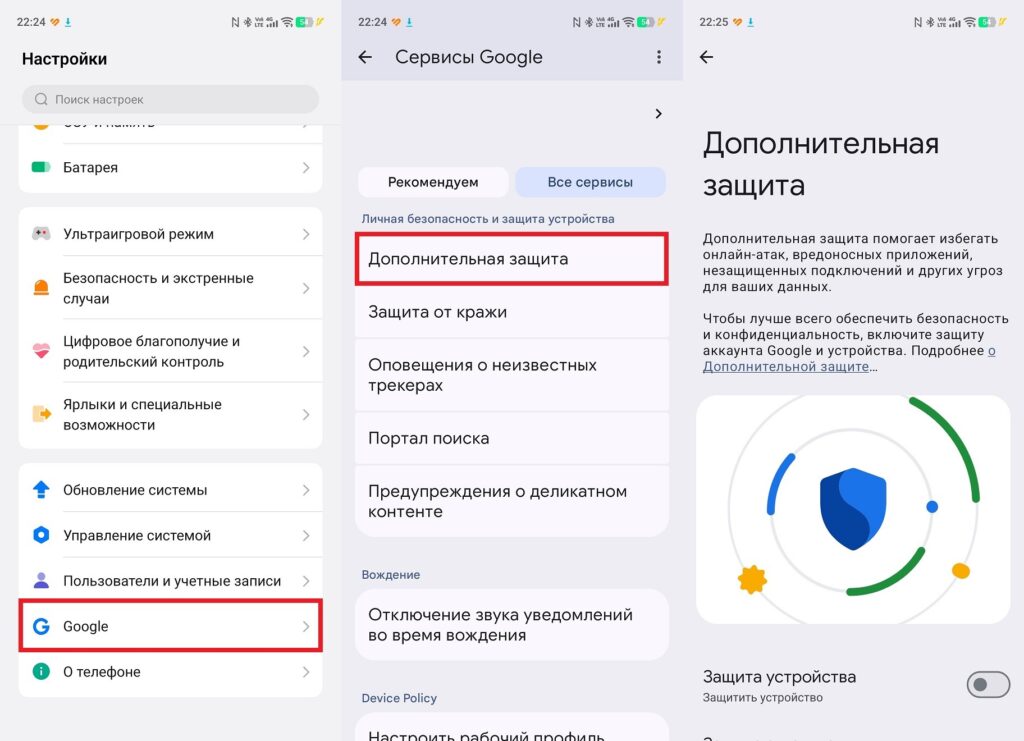
The feature is enabled through Google’s protection settings
After activation, logs will begin collecting automatically. If you suspect that your device has been compromised, you can download the logs in the same settings section by pressing “Access logs.” For data analysis, Amnesty International has released updated tools — AndroidQF and Mobile Verification Toolkit (MVT) — that allow automatic parsing of logs and detection of suspicious events.


