Every registration on an unfamiliar website is a little lottery. You leave your real address, and a couple of days later your inbox starts drowning in newsletters and outright spam. Even if you click “Unsubscribe,” there’s no guarantee that your address hasn’t already spread across dozens of advertising databases. There’s an easier way — disposable email, which is created in a couple of seconds and requires no registration or confirmations. This is especially relevant if your email on your iPhone is already overwhelmed with notifications.
Sometimes disposable email is really needed, and getting one is very easy
Why You Need Disposable Email
The logic is very simple. You visit a website that asks for an email address to register — but you don’t plan to stay there long. Maybe you want to download one file, get a promo code, or just peek behind a “registration wall.” Leaving your main address for this is a questionable idea.
The problem is also that even reputable services sometimes experience user data leaks. Databases with email addresses regularly appear in the public domain — and your inbox can end up in such a database even if you haven’t done anything wrong. A temporary address completely eliminates this risk: even if it ends up in someone’s database, it can no longer harm you.
Of course, you could create a new Gmail or Yandex account each time, but that’s slow and inconvenient. You need to come up with a login, set a password, pass a captcha. Special services for creating disposable email solve this task in literally one action: you open the page — and the address is already ready.
How to Create Disposable Email via Email-Fake
One of the most convenient services of this kind is Email-Fake. It works in a very straightforward way and you can use it even from an iPhone:
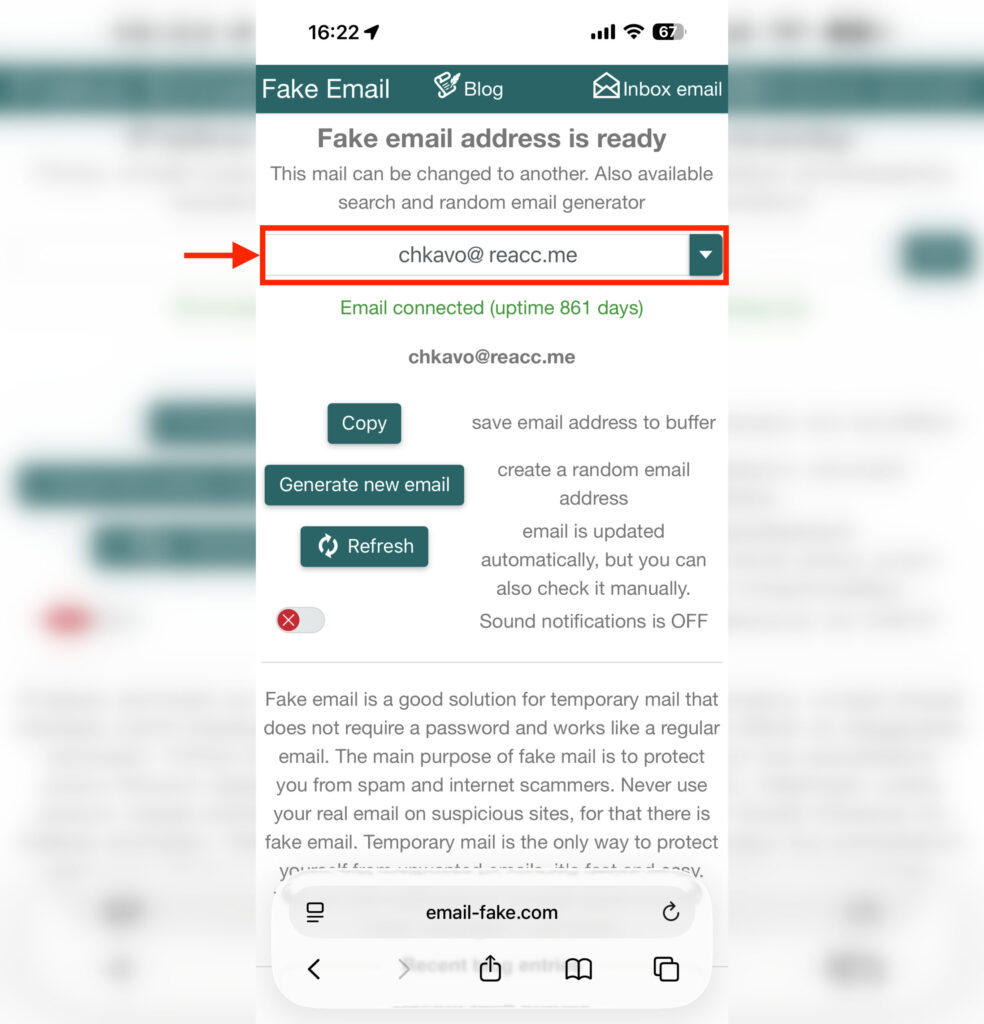
Just go to the website and voilà. If the email doesn’t work, simply regenerate it
- From your iPhone using any browser, go to email-fake.com — you’ll immediately be offered an automatically generated address. Click Copy to copy it to your clipboard.
- Use this address on the website where you don’t want to leave your real email.
- If the website sends a confirmation email for registration — simply return to the Email-Fake page. Incoming messages will appear right there, with all text content. However, images and attachments are not supported.
The domain of the email address or even the mailbox name itself can be changed — just click on the field with the suggested address and enter your own option. This can be useful if a specific domain is already blocked on the website you need — simply choose another one from the list. Depending on the chosen domain, the lifespan of the disposable mailbox may also vary. For some domains it’s a couple of weeks, for others — up to several months. So technically, disposable email can become temporary and be useful for multiple registrations.
Is It Safe to Use Disposable Email
There’s one important nuance you should know about in advance. Access to the created mailbox is tied to your browser’s cookie files. This means that if you clear your cache and cookies — access to the email will be lost permanently. There’s no way to recover it.
The same applies to Incognito mode. If you created a disposable mailbox in a private window and then closed it — that’s it, the email is gone. So it’s better to first receive all the necessary emails and confirm your registration, and only then close the tab.
Another point is the security of incoming emails. Disposable mailboxes are not password-protected, which means theoretically anyone who knows or guesses the address can access them. Therefore, using such email to receive confidential information is a bad idea. A promo code or confirmation code — sure, but no passwords or financial data.
Where You Shouldn’t Use Disposable Email
I don’t recommend using disposable emails for messengers, social networks, and other resources where you might need continued access
Despite all the advantages, disposable email services have limitations. First, many major platforms have learned to recognize domains of disposable mailboxes and block registrations from them. Second, you cannot send emails from such an address — it only works for receiving. And third, for important accounts (banks, government services, main social networks) using such an address is definitely not worth it — you’ll lose access to password recovery.
If you need protection for your main inbox but also want to maintain control over the address, consider the “Hide My Email” feature from Apple. It works on a similar principle — it generates a random address and forwards emails to your real one — but you can disable forwarding at any time. However, this requires an iCloud+ subscription. For one-time registrations, downloading files, receiving promo codes, and testing questionable services — disposable email is a perfect fit. Quick, free, and with no consequences for your main inbox.


