The fuel crisis of summer 2026 got everyone moving: first banks started making gas station maps, then navigation apps stepped in, and quite recently we covered how to check where gas is available through 2GIS. Now it’s the MAX messenger’s turn. In Chita, one gas station launched an electronic fuel queue: you can book a spot in advance right from your smartphone, get a QR code, and arrive at your designated time. No separate app installation needed — everything works inside the messenger through a regular bot.
You can now sign up for refueling through MAX. Though only in one region so far
Electronic Fuel Queue via MAX
The pilot launch was announced by Zabaykalsky Krai Governor Alexander Osipov. The concept is simple: instead of standing in a physical line and burning the very fuel you came for, a driver books a slot in advance. The system monitors limits on its own to ensure there’s enough gas for everyone who signed up and issues a personal QR code for a specific time.
Only one location is operational so far — the DEKS gas station at 3v Lenin Street. This is not a region-wide service, let alone a nationwide one — it’s specifically a test. Physical queues haven’t been eliminated either: if you don’t want to bother with the bot, just show up and wait like before. The electronic sign-up is an additional way to buy gas, not a replacement for the traditional method.
You can sign up and skip the wait
And here’s an important point that many people miss. Signing up is available not just for Chita residents. If you’re passing through the city in transit, planning a route through Zabaykalye, or just happen to be in the area, you can open the bot just the same, add your vehicle, and generate a QR code. Chita residency is not required — the system ties to the license plate number, not your address. For those on a long-distance drive, this is actually the ideal scenario: book a slot in advance, pull up, fill up, drive on.
How to Register Your Car in the MAX Bot
The main mistake newcomers make is jumping straight to booking and not finding the button. It won’t appear until you’ve linked your car. Here’s the procedure:
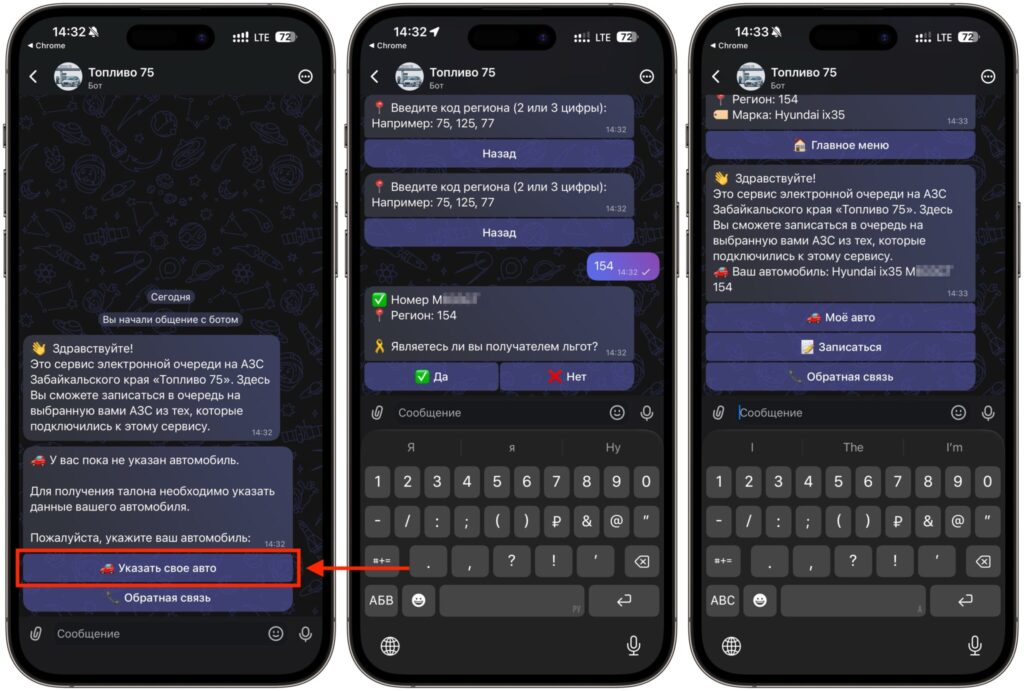
First, link your car to MAX
- Open the “Fuel 75” bot in the MAX messenger and launch it.
- Tap the “Add Vehicle” button.
- Enter your vehicle’s license plate number.
- Indicate whether you have benefits or not.
- Save the data. Only after this will the booking option become available in the bot.
The benefits question is not a formality. Some slots are reserved for eligible benefit categories of citizens, who get priority when booking. If you don’t have benefits, honestly press “no” — the system cross-checks the data anyway, and trying to game it will only result in being denied service at the gas station when your code is scanned. Enter the license plate exactly as it appears on the plate, without spaces or extra characters. One car means one active booking — you can’t register five vehicles under your name and hand out codes to friends.
How to Get a QR Code for Gas
Once your car is linked, everything moves quickly. Booking is open for the following day, meaning today you book for tomorrow, not for an hour from now.
- Return to the bot’s main menu and select the refueling booking option.
- Submit a request for the next day.
- Select an available time slot.
- Specify the type of fuel you need.
- Confirm the request and wait for the QR code to be generated.
- Save the code to your gallery or keep it open in the messenger.
- Arrive at the gas station at the designated time and show the code to the attendant.
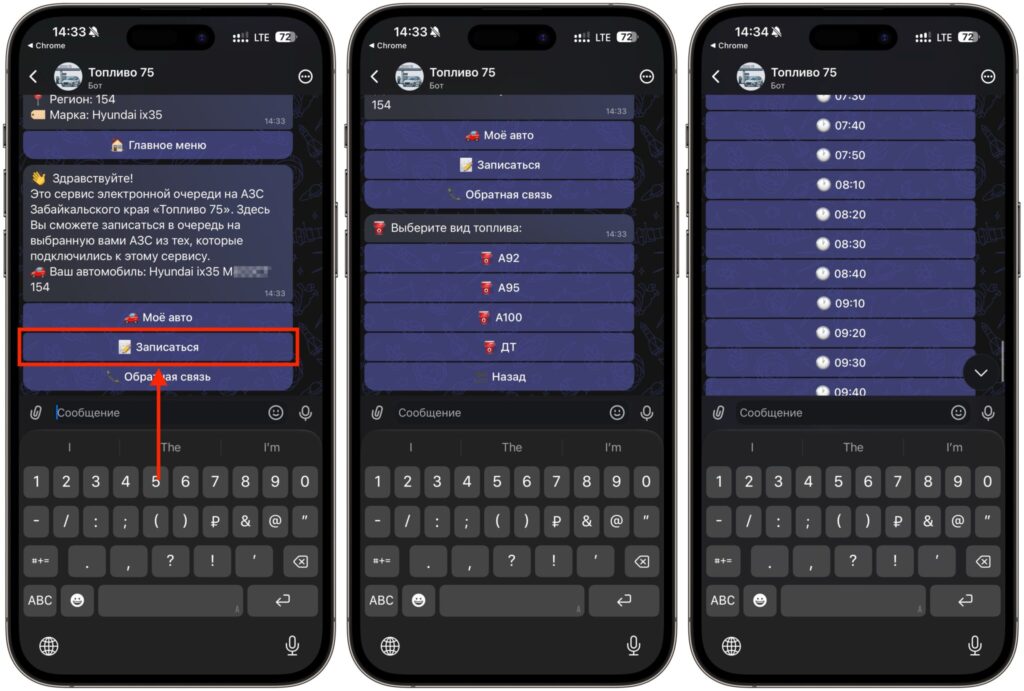
Start the booking and choose a convenient time
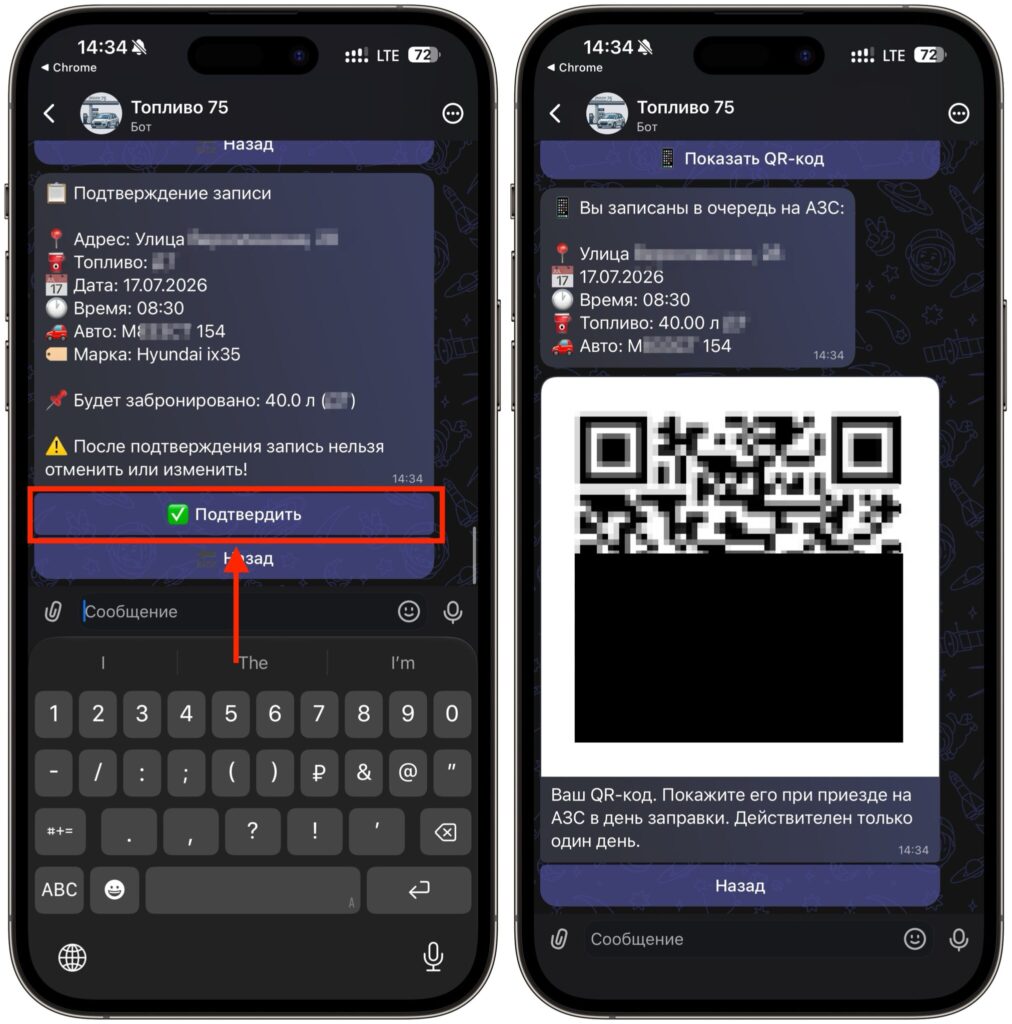
Confirm the request and receive your QR code
The QR code will arrive directly in the chat with the bot — no need to forward it anywhere. At the gas station, it gets scanned, and you’re allowed to proceed to the pump without the general queue. The experience feels like an electronic ticket at a clinic, except instead of a doctor, there’s a pump with 92-octane fuel.
It’s also worth being honest here: booking doesn’t always work out. Slots are limited in the number of spots, and if the limit for your chosen time has already been reached, you won’t get a code. The fuel type you need might also run out — in that case, the bot simply won’t let you select it in the request. There’s nothing terrible about this — try a different slot or a different day. A practical tip: it’s better to check the bot right after booking opens rather than in the evening when all the good hours are taken.
Restrictions on Buying Gas with a QR Code
The system was originally designed so that it can’t be gamed through multiple bookings. The main rule: if you successfully refueled, the next QR code will only be available after six days. This is a direct frequency-of-refueling restriction, and you can’t bypass it by switching accounts — the link is tied to the vehicle’s license plate number.
The second restriction we already mentioned: one car, one active booking. Until the current code has been used, a new one won’t be issued.


