Recently, the Russian IT giant, picking up on the topic of fuel shortages in Russia, introduced a gasoline search feature in the Yandex Fuel service. Now the same thing has appeared in the Yandex Go app. A gas station map has started working there, showing where AI-92 and AI-95 gasoline is currently being sold, how much it costs, and how long ago the last purchase was made at a station. Against the backdrop of fuel disruptions, this looks like a useful tool, but it has notable limitations worth knowing about in advance.

Searching for gasoline through the Yandex Go app
Gasoline Search in Yandex Go — What It Shows
The service displays gas stations on a map and marks where fuel was recently purchased and where there’s no data. For each station, you can see what type of gasoline was last dispensed, as well as prices for AI-92, AI-95, and diesel, if available. Sometimes information about queues is also shown next to a gas station.
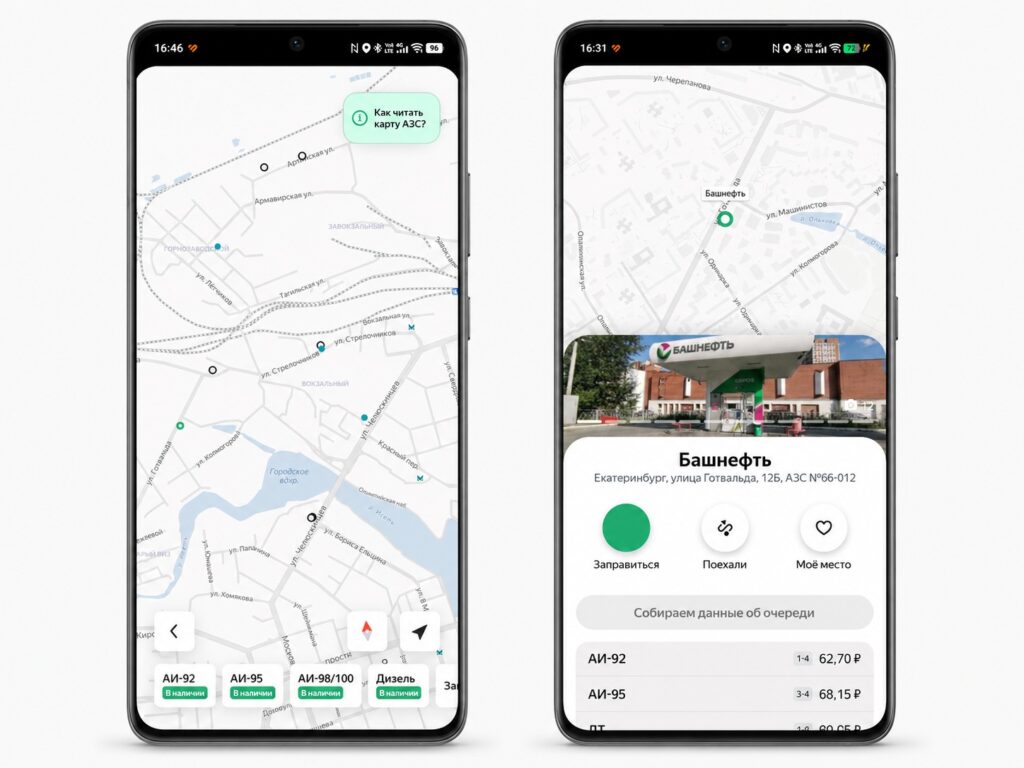
The service shows gas stations with and without fuel
The color coding is simple and immediately clear:
- green dot — fuel was recently purchased at the station;
- white dot — no purchases for a long time;
- gray dot — the station is not connected to the service, no data available.
The logic here is the same as in other navigation services: recent activity at a station indirectly indicates that fuel is actually available there.
How to Find a Gas Station Through Yandex Go
Opening the map is easy — everything is built on straightforward steps within the Yandex Go app, which is also used for ordering taxis and food delivery:
- Launch the Yandex Go app and tap the “Gas Stations” button on the main screen.
- Tap the “Fuel at Gas Stations” button.
- Tap “Find Gas Stations Nearby” to open the map.
- Optionally, complete a short survey (this helps other drivers).
- On the map, tap “How to read the gas station map?” to see an explanation of the markers.

Everything is right inside Yandex Go
Then simply tap on a convenient gas station to see prices and the time of the last purchase.
Is It Worth Searching for Gasoline Through Yandex Go
The service is primarily useful for those who drive through regions with fuel disruptions and don’t want to blindly drive around gas stations. The ability to see in advance where gasoline was recently dispensed and at what price saves time and nerves, especially when the tank is nearly empty.
Gas station search in Yandex Go looks convenient, but it has a significant limitation. Many major gas station chains are not connected to the map, including Lukoil and Gazpromneft. For such stations, the service simply won’t show whether they have fuel, and they will be marked in gray.
Like it or not, you’ll have to use it
The second issue is related to where the data comes from. Part of the information is collected by the service from surveys of drivers themselves, which means it partly relies on trust. Such data may be delayed or not entirely accurate, so you shouldn’t treat the map as a guarantee of fuel availability.


