A couple of years ago, I already talked about Xiaomi sound settings. Today I’ll focus on one of the most important but misunderstood settings: the “Sound Effects” section in HyperOS offers a choice between Dolby Atmos and Xiaomi Sound. Most users either don’t touch it at all or enable Dolby Atmos “because it sounds nice.” Let me break down what it is and what actually sounds better.
Helping you set up sound on Xiaomi correctly
What Is Dolby Atmos on a Xiaomi Smartphone
Dolby Atmos technology was created for cinemas with dozens of speakers placed around the viewer and on the ceiling. There, the algorithm reads special service information from the audio track and precisely positions each sound in space — a plane flies from the upper right, an explosion comes from behind.
A smartphone has two speakers or stereo headphones. There are no ceiling channels. Dolby Atmos on Xiaomi is a software solution that attempts to simulate surround sound using just two channels. It does this in two ways: if the content has Dolby Atmos metadata — it uses it. If not — it works as a stereo scene “expander.”

Dolby Atmos effects are designed for surround sound
The second scenario is the problem. Most music on streaming services doesn’t have Atmos metadata. The algorithm starts “expanding” the sound on its own and in the process often distorts timbres — the performer’s voice and instruments sound different from what the sound engineer intended.
How Xiaomi Sound Differs from Dolby Atmos
Xiaomi Sound is Xiaomi’s proprietary audio processing algorithm. It doesn’t try to create a surround cinema effect. Instead, it optimizes the sound for the specific device: it takes into account the characteristics of the smartphone’s speakers or connected headphones, boosts frequencies in the right ranges, and balances bass and highs.
Its working principle is closer to an adaptive equalizer than spatial audio. Xiaomi Sound doesn’t add effects that aren’t in the original signal — it corrects what’s already there. That’s exactly why in most everyday scenarios it delivers more natural sound.
Dolby Atmos or Xiaomi Sound — What Actually Sounds Better
Here’s a specific answer by scenario — because there’s no universal one:
- Music in headphones. Xiaomi Sound wins here in most cases. At first glance, Dolby Atmos seems more interesting: the sound is wider, more voluminous, more “cinematic.” But if you compare the same song several times in both modes, you’ll notice that Dolby Atmos changes the timbres. The voice sounds different, instruments lose their naturalness.
- Movies and series with Dolby Atmos. Here the situation is reversed. If the content contains Atmos metadata, enable Dolby Atmos on Xiaomi. The algorithm receives the correct data and works as intended.
- Built-in smartphone speakers. Xiaomi Sound wins again for everyday use. Dolby Atmos adds “air,” but often at the expense of accuracy. Plus, having Dolby Atmos constantly enabled noticeably loads the processor and drains the battery faster.
My conclusion: Xiaomi Sound is the default mode for everything. Dolby Atmos should only be enabled when watching content with explicit support for this technology.
Dolby Atmos Presets — What Each Mode Means

Dolby Atmos on Xiaomi offers several presets
When Dolby Atmos is enabled, four modes are available in the Dolby Atmos settings:
- “Auto” — the system automatically detects the content and switches between presets. Convenient if you’re too lazy to switch manually, but the algorithm doesn’t always guess correctly;
- “Movie” — enhances surround sound for movies and series, with emphasis on spatial sound and surrounding effects;
- “Music” — less aggressive processing with emphasis on bass clarity and high frequencies;
- “Voice” — improves speech intelligibility, enhances the clarity of voice frequencies. Useful for podcasts and phone calls.
The “Auto” mode sounds convenient, but in practice it often activates “Movie” where “Music” is needed. If you use Dolby Atmos, switch the mode manually based on the task.
How to Switch the Sound Effect in HyperOS
Sound settings in HyperOS are located in one place for everything:
- Open “Settings” on your Xiaomi, REDMI, or POCO smartphone.
- Go to the “Sound and vibration” section.
- Tap on “Sound effects.”
- Choose “Dolby Atmos” or “Xiaomi Sound” — switching happens instantly.
- If you selected Dolby Atmos, tap on it again to choose a preset.
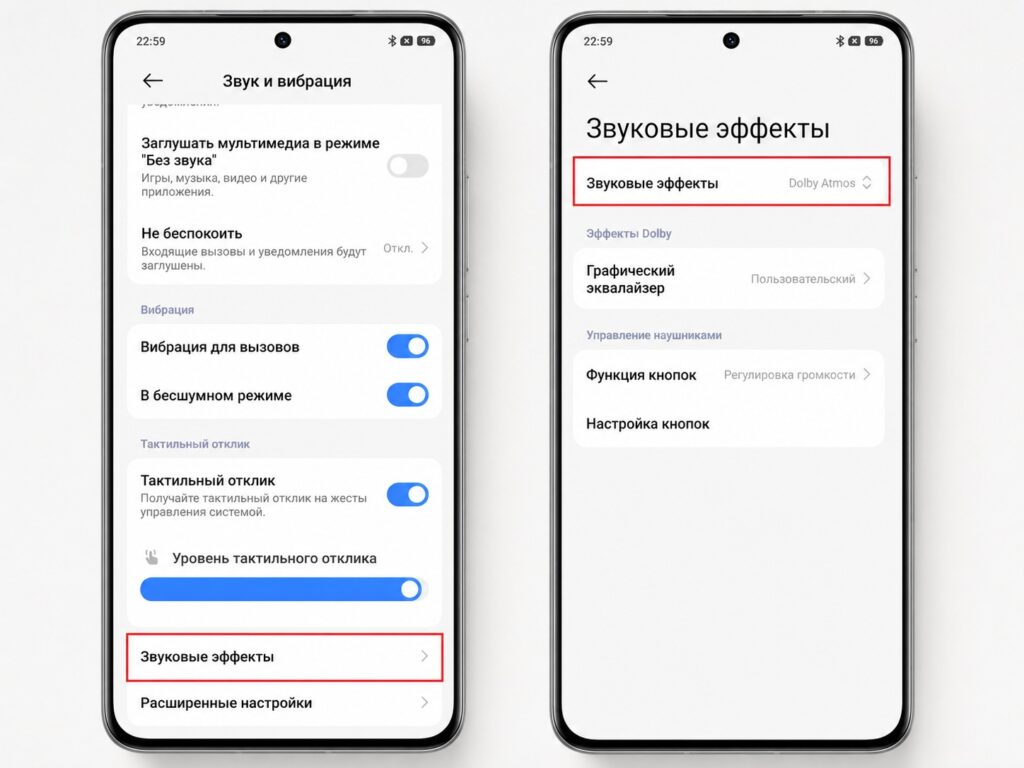
Make sure to check the sound effects settings
An important nuance: when wired headphones are connected and Dolby Atmos is disabled, an additional option appears (“Adjust sound for headphones”). There are several dozen presets for specific Xiaomi headphone models. If your headphones are on the list — it’s worth trying.
How to Set Up Headphone Sound on Xiaomi
Headphone sound settings on Xiaomi become fully functional only when Dolby Atmos is disabled. This is fundamental: while Dolby Atmos is active, most additional options are locked.
After disabling Dolby Atmos with headphones connected, the following appear:
- “Adjust sound for headphones” — equalizer presets for specific Xiaomi models;
- “Virtual immersive sound” — creates a wide soundstage effect without Dolby’s aggressive processing;
- manual equalizer — for fine-tuning to your taste.
Virtual immersive sound is a compromise for those who like Dolby Atmos’s spaciousness but are bothered by the distortions. It gives a sense of space with fewer sacrifices in sound accuracy.


