Since April 21, 2026, the MAX messenger has started showing a banner requiring users to disable VPN. Try to send a message — and instead of the usual chat, you see a notification: “Disable VPN to use MAX.” Sounds strict, but in practice this limitation is easy to bypass. You don’t even need to install anything — one trick that takes just a couple of seconds is enough.
Some users can’t send a message in MAX with VPN enabled
Why MAX Blocks VPN
It’s quite simple. In mid-April 2026, the Ministry of Digital Development held a closed meeting with the heads of major internet companies. The result — by April 15, all of them were required to introduce restrictions for users with VPN enabled. MAX didn’t comply immediately, but starting April 21, the banner appeared there too.
It’s important to understand: MAX doesn’t block VPN at the system level. It simply detects that VPN is active and prevents you from sending a message. At the same time, you can still read channels and conversations, and notifications still come through. The restriction only applies to sending.
By the way, such banners appeared not only in MAX. VPN warnings were encountered by users of MTS, MegaFon, Beeline, Yandex, Gosuslugi, Ozon, and Wildberries. Some apps may even fail to load because of VPN. So MAX isn’t a pioneer here — it’s simply following the general trend.
Sending a Message in MAX After the VPN Notification
This is where it gets interesting. The restriction in MAX is implemented, to put it mildly, not very thoroughly. The VPN check triggers at the moment of sending a text message. But if you open the sticker menu, the message will go through without any issues.
Here’s what you need to do:
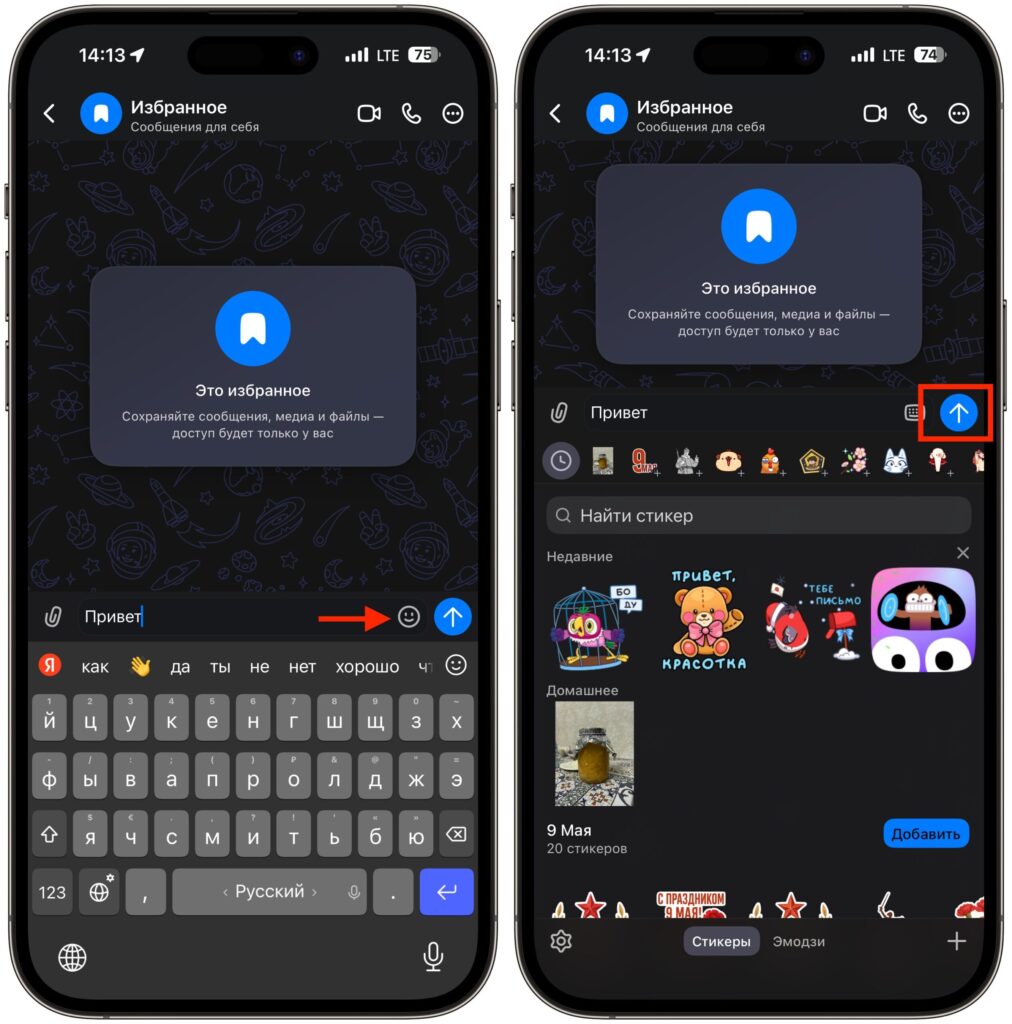
Switching to the sticker panel allows you to send a message
- Open a chat in MAX with VPN enabled.
- Try to send a text message — a banner will appear asking you to disable VPN.
- Don’t close the chat. Tap the sticker icon next to the input field.
- Open any sticker pack — you don’t actually have to send a sticker.
- Return to the text input field and send the message as usual.
That’s it. The banner will disappear, and the message will be sent. Apparently, opening the sticker menu resets the VPN check, and the messenger no longer blocks sending until you re-enter the chat. This method has been tested — it works on both iOS and Android. It’s possible that future MAX updates will close this loophole, but for now it’s still there.
How MAX Detects VPN
Back in March 2026, researchers discovered that MAX contacts third-party IP address detection services. This allows the app to find out your real IP, network parameters, and determine whether you’re using a VPN. The messenger also tries to establish connections to domains of Telegram, WhatsApp, Amazon Web Services, and Google, and sends the results back to its servers.
MAX’s press service explained this as checking push notification delivery and proper call functionality. But technical experts have a different theory: the messenger collects data on the effectiveness of blocks in the Russian internet. You can believe whoever you want, but the fact remains — the app actively analyzes your connection.
It’s precisely based on this data that the banner works. MAX sees that your IP belongs to a VPN server and blocks sending. But the implementation of the check, as we’ve found out, is far from ideal.
Automatically Disabling VPN on iPhone When Launching MAX
If you keep VPN enabled all the time — for YouTube, Instagram, or other blocked services — manually disabling it every time for MAX is inconvenient. On iPhone, this can be automated through the Shortcuts app. Set it up once — and VPN turns off automatically when you open the messenger.
Keep in mind: not all VPN apps support integration with Shortcuts. AdGuard VPN works best — it’s free and properly integrates with iOS automation. If your VPN client doesn’t appear in the action list, try installing AdGuard as an additional option.
Here’s how to set up automatic VPN disconnection:
- Open the Shortcuts app on iPhone.
- Go to the “Automation” tab at the bottom of the screen.
- Tap “+” in the upper right corner.
- Select “App” from the list of triggers.
- Tap “Choose” and select MAX.
- Check “Is Opened” — this means the automation will trigger when the app launches.
- Enable “Run Immediately” so iPhone doesn’t ask for confirmation every time.
- Tap “Next” and select the action “Set VPN Connection.”
- Make sure “Disconnect” is selected, not “Connect.”
- Tap “Done.”
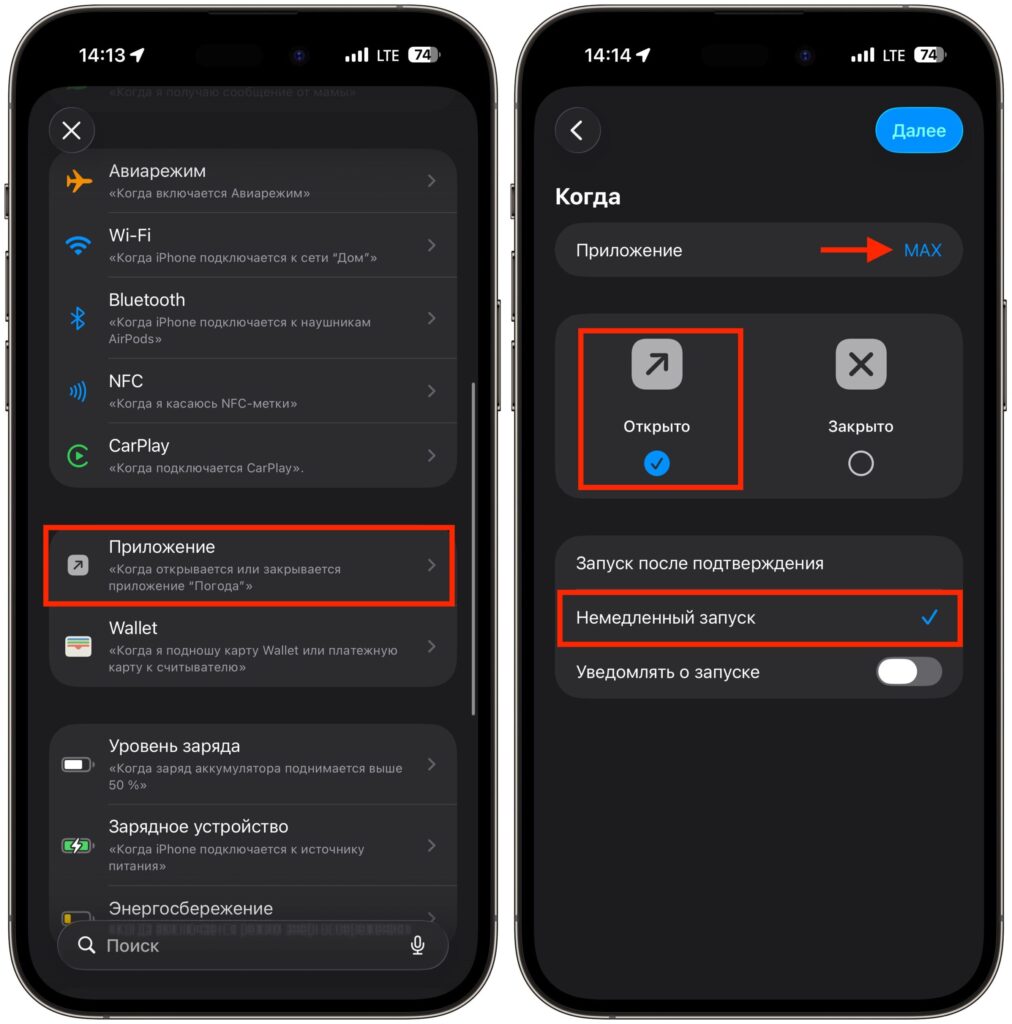
Start creating an automation
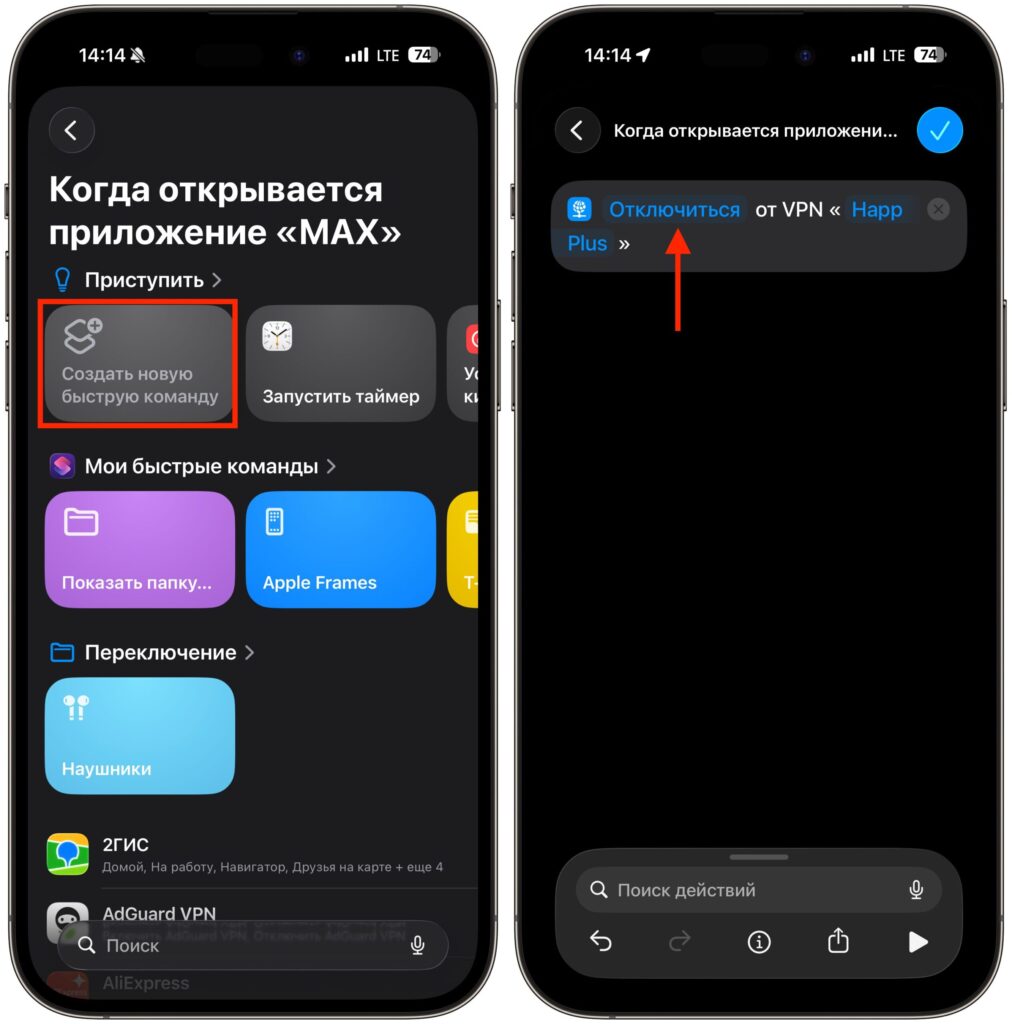
Create an automation with a single action
Now every time you open MAX, VPN will automatically disconnect. No banners, no manual toggling — open the messenger and start typing right away.
What Works in MAX With VPN Enabled
It’s not as bad as it might seem. Even with an active VPN, many features continue to work in MAX. The restriction only affects sending messages, while everything else remains accessible.
With VPN enabled, you can:
- Read channels — the feed updates, posts load, reactions are displayed.
- View conversations — all incoming messages are visible.
- Receive notifications — push notifications come through as usual.
- Browse stickers and media files — photos, videos, and documents load without issues.
Essentially, MAX with VPN enabled turns into a kind of read-only mode. You can see everything but can’t reply — until you use the sticker trick or disable VPN.
Should You Worry About VPN in MAX
The situation is, frankly, absurd. On one hand — a requirement from the Ministry of Digital Development that the messenger formally complied with. On the other hand — the implementation is so superficial that anyone can bypass it. Open the stickers — and type as much as you want.