The possibility of tracking a person through their smartphone has always raised many questions. On one hand, manufacturers talk a lot about privacy. On the other hand, any Android phone can broadcast its location even after it has been turned off or its battery has died completely. Yes, at first glance this feature sounds like a convenient anti-theft protection, but it also adds plenty of reasons for concern.
Some smartphones can be tracked even when turned off
How to Find a Smartphone When Its Battery Has Died
Rejoice, those who don’t like reading walls of text. Tracking a smartphone after its battery has died is possible. We’re talking about the long-familiar Android feature “Find My Device,” which helps locate a lost or stolen smartphone on a map. However, there are two caveats.
First, the feature only works on Pixel 8, Pixel 8 Pro, and newer smartphones: the device remains visible in the service for some time after being turned off.
Second, according to Google’s official documentation, detection works only for a few hours after the phone is turned off — regardless of whether you turned it off yourself or it ran out of battery. So it’s not a permanent marker on the map, but a short window during which you can still find the device.
What Continues to Work in Android After the Phone Is Turned Off
The main question that worries many people: how can a turned-off phone transmit anything to anyone? The answer is that with the offline search option enabled, the device temporarily maintains network activity even without power — meaning it behaves not as a completely de-energized device, but as a gadget in a special sleep mode.
For this to work, Bluetooth and GPS must be active at the time of shutdown. It’s through nearby Android devices with Bluetooth that the phone “checks in” on the map — roughly the same way wireless tracking tags work. Without active Bluetooth and geolocation at the time of shutdown, this mode simply won’t activate.
An important detail about Pixel: location settings cannot be turned off without unlocking the smartphone, whereas Bluetooth can be turned off at any time. This means a thief won’t be able to quickly disable the geo-position without knowing your access code.
Is It Really Possible to Track the Location of a Turned-Off Smartphone?
In short — yes, but again, only Google can do this. And Google is the one sharing this information with you. So tracking a person when their smartphone is turned off won’t work for outsiders.
The scenarios where this really helps are simple:
- The phone was stolen and the thief immediately turned it off — you have a few hours to see where it went
- The smartphone’s battery died and it got lost — while there’s residual network activity, it can still be found
- The device was left somewhere turned off — the chance of finding it is higher than with a regular phone
The main limitation is acting in time while the device maintains its connection. After a day, a turned-off and dead phone won’t transmit anything.
The main advantage of the feature is the chance to find a stolen phone even if the thief immediately turned it off.
Does an Android Phone With a Removed SIM Card Still Transmit Anything?
It’s important not to confuse two different communication channels here. The described search mode does not depend on the SIM card or the cellular network — it relies on Bluetooth and the help of other nearby Android devices. Therefore, removing the SIM card alone does not make the phone “invisible” to the Find My Device service.
At the same time, it’s worth being realistic about the boundaries: the source only discusses Google’s function on Pixel, not some hidden total surveillance of a turned-off device. Everything described requires a pre-enabled option, active Bluetooth, and works only for a few hours. There is no data suggesting that a phone without this setting endlessly transmits its location after being turned off.
How Dangerous Is the “Find My Device” Service in the Wrong Hands?
However, even though the Find My Device service has never been hacked, if someone has access to your Google account, they can theoretically see the location of your devices. Therefore, account protection is more important than the feature itself. A strong password and two-step verification matter more here than any location settings.
Skeptics and privacy advocates rightfully note that constantly active Bluetooth and GPS that don’t turn off immediately after the phone is shut down cause concern for some people. This is an understandable reaction. But in its current form, the feature is not forced on anyone: on the few owners of the latest Pixels, it is enabled manually and completely voluntarily, so there’s little reason to worry about privacy here.
How to Truly and Completely Turn Off Android
If you don’t want your phone to remain visible in the service after being turned off, the logic is simple and based on the feature’s operating conditions:
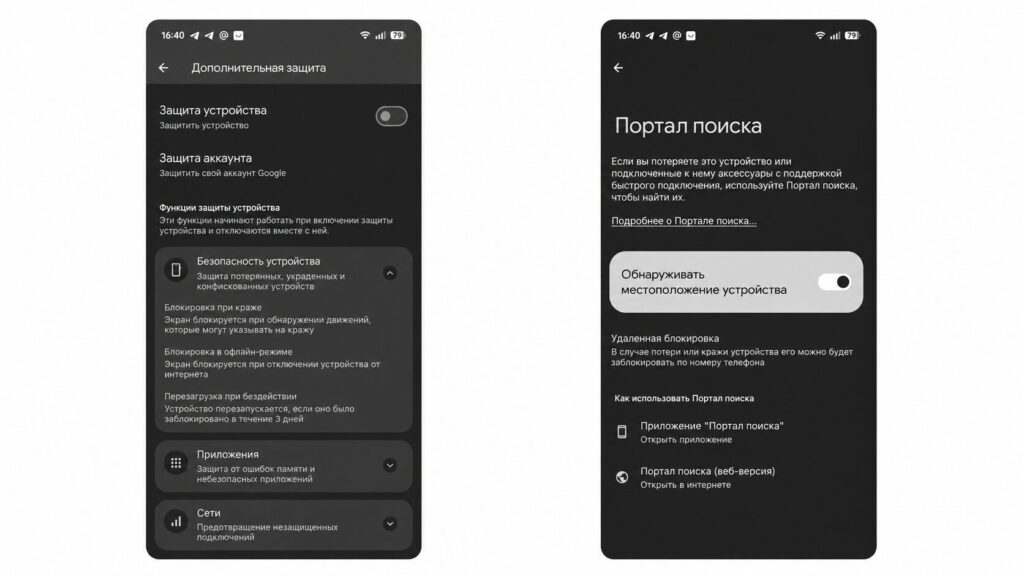
There’s no point in fearing Google, so I wouldn’t disable the protective features
- Go to Android settings, the Google section, then “All services” and “Find My Device,” and check whether the search-after-shutdown option is enabled.
- If you don’t need it, leave it turned off — by default, it’s not active anyway.
- Before turning off the phone, disable Bluetooth: without it, the search mode won’t activate.
This is enough for the phone to behave like a regular turned-off device without residual visibility on the map.
Who Needs Protection From Tracking Through a Turned-Off Android, and Who Doesn’t Need to Worry
The feature is genuinely useful for those who are afraid of losing their phone: a few extra hours to search for a stolen Pixel is a serious advantage. Those who worry about privacy also have no reason to panic: the option is voluntary and easily disabled, and it only works on recent Pixels with pre-enabled Bluetooth and GPS.
The main practical takeaway: this is not surveillance against you, but a tool in your favor that you decide whether to enable or not. If you have a Pixel 8 or Pixel 8 Pro and value the chance to find a stolen device — go ahead and enable it. If privacy is more important than the convenience of search — simply leave the option disabled and turn off Bluetooth before shutting down your phone.


